
SHARP YC-PS204AE-S
SHARP YC-PS204AE-S Mikrobølgeovn Brugermanual
Model: YC-PS204AE-S
1. Vigtige sikkerhedsinstruktioner
Læs alle instruktioner omhyggeligt, inden apparatet tages i brug. Gem denne manual til senere brug.
Generel sikkerhed
- Forsøg ikke at betjene denne ovn med døren åben, da dette kan resultere i skadelig eksponering for mikrobølgeenergi.
- Anbring ikke genstande mellem ovnens forside og lågen, og lad ikke snavs eller rengøringsrester samle sig på tætningsflader.
- Brug ikke ovnen, hvis den er beskadiget. Det er især vigtigt, at ovndøren lukker korrekt, og at der ikke er nogen skader på: (1) Døren (bøjet), (2) Hængsler og låse (brudte eller løse), (3) Dørtætninger og tætningsflader.
- Ovnen bør ikke justeres eller repareres af andre end kvalificeret servicepersonale.
- Dette apparat er kun beregnet til husholdningsbrug.
- Brug ikke ætsende kemikalier eller dampe i dette apparat.
- Opbevar ikke dette apparat udendørs. Brug ikke dette produkt i nærheden af vand.
- Nedsænk ikke ledningen eller stikket i vand.
- Hold ledningen væk fra opvarmede overflader.
- Lad ikke ledningen hænge ud over kanten af bord eller bord.
- For at reducere risikoen for brand i ovnrummet:
- Lad være med at overkoge mad.
- Fjern trådbånd fra papir- eller plastikposer, før posen sættes i ovnen.
- Hvis materialer inde i ovnen skulle antændes, skal du holde ovndøren lukket, sluk for ovnen, og tag netledningen ud, eller sluk for strømmen på sikrings- eller afbryderpanelet.
Elektrisk sikkerhed
- Sørg for, at strømforsyningen matcher voltagsom angivet på apparatets typeskilt.
- Tilslut altid apparatet til en stikkontakt med jord.
- Brug ikke forlængerledninger, medmindre det er absolut nødvendigt, og sørg for, at de er klassificeret til apparatets strømforbrug.
- Træk stikket ud af stikkontakten, når det ikke er i brug og inden rengøring.
2. Produktet er slutview
Gør dig bekendt med komponenterne og kontrolpanelet på din SHARP YC-PS204AE-S mikrobølgeovn.
Komponenter
- Ovnrum: Det indre rum, hvor maden tilberedes.
- Pladespiller: En glasbakke, der kan drejes for at sikre jævn tilberedning.
- Pladespillerring: Understøtter pladespilleren.
- Dør: Udstyret med et sikkerhedslåsesystem.
- Kontrolpanel: Indeholder display, knapper og drejeknap til betjening.
- LED indvendig belysning: Lyser ovnrummet op under drift.
Kontrolpanel og skærm
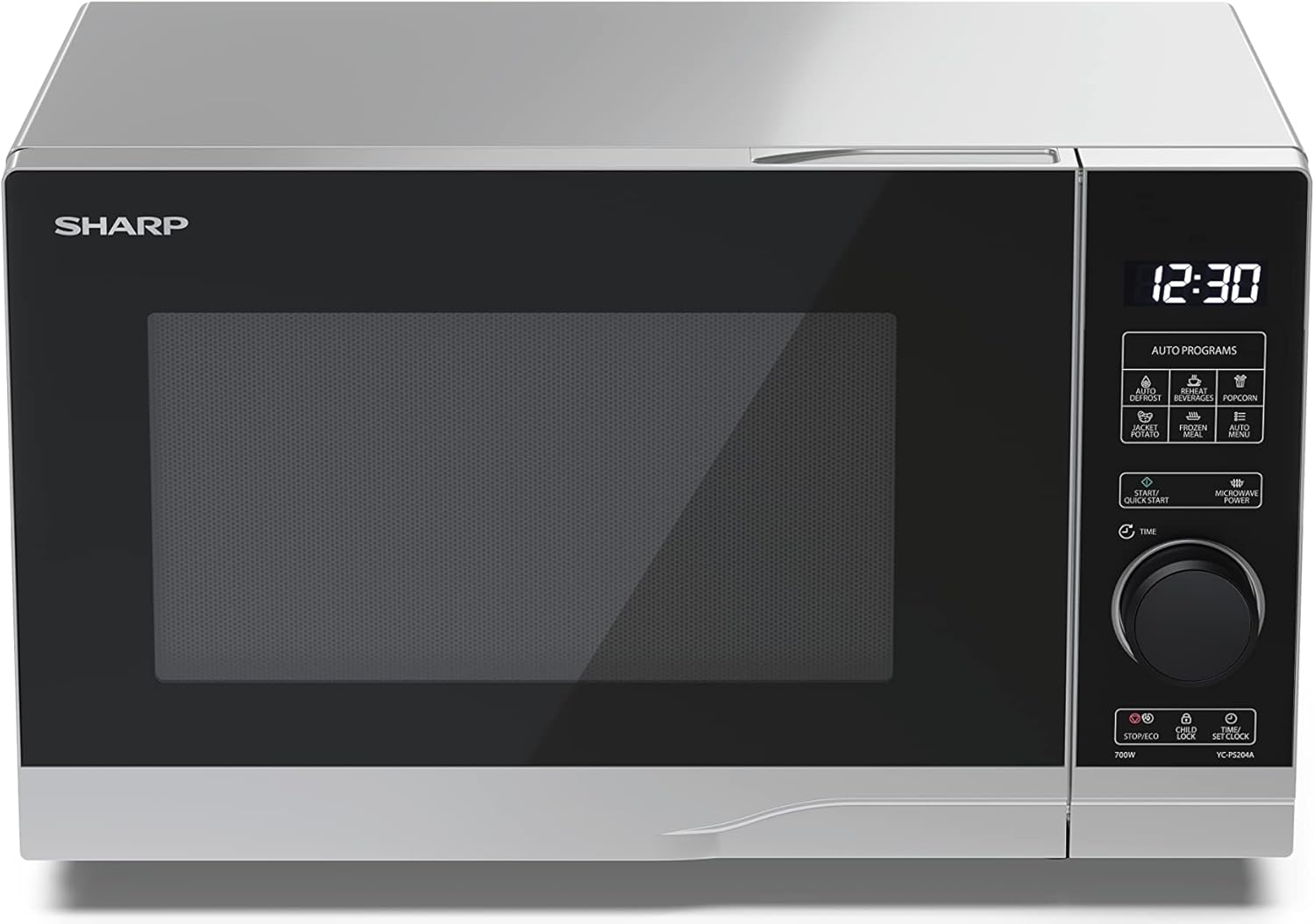
Billede: Front view af Sharp YC-PS204AE-S mikrobølgeovnen, hvor det semi-digitale kontrolpanel i højre side fremhæves. Displayet viser "88:88", og forskellige ikoner for automatiske programmer er synlige over hoveddrejeknappen.
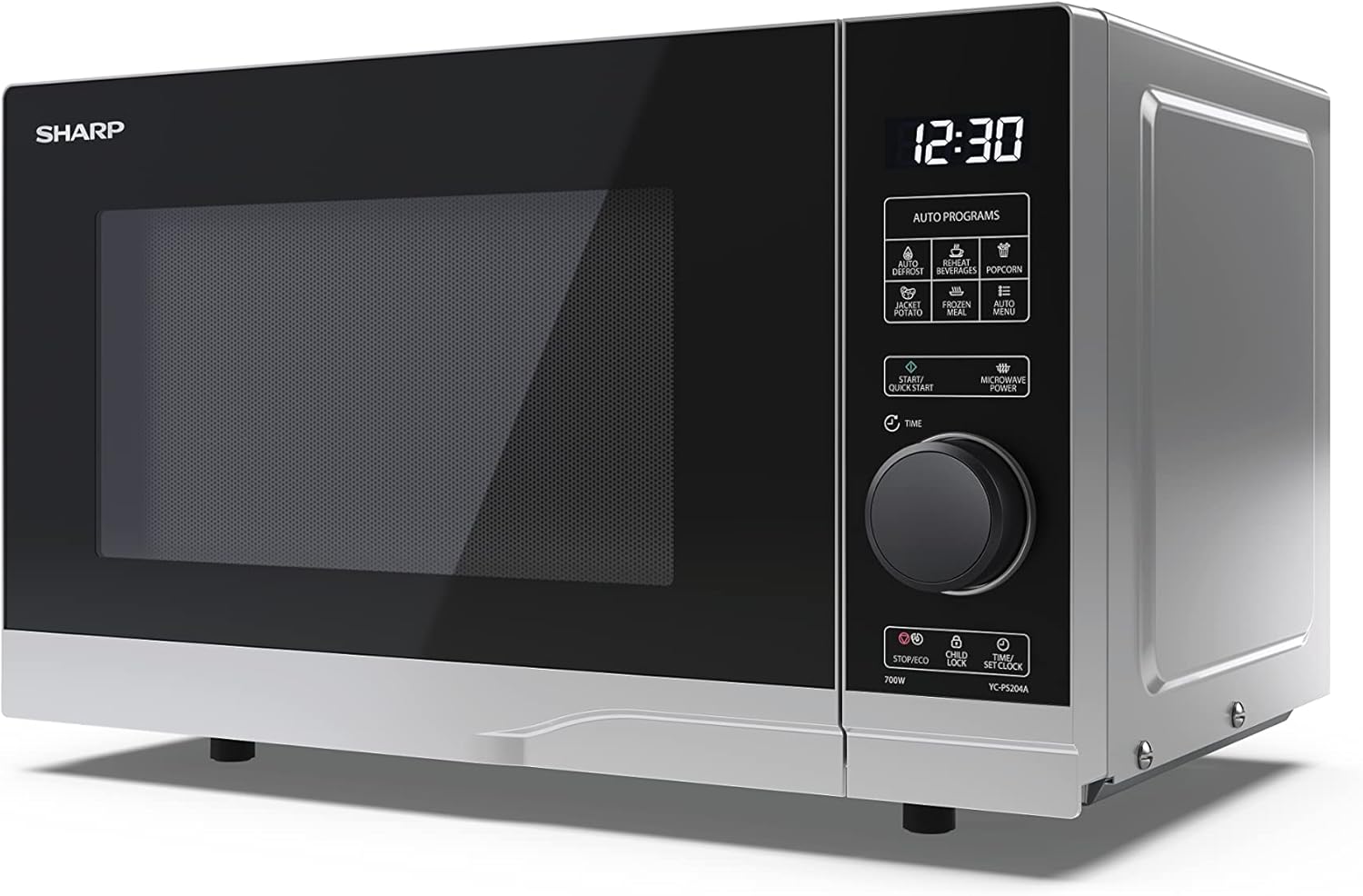
Billede: Vinklet front view af Sharp YC-PS204AE-S mikrobølgeovnen, der viser det elegante sølv- og sorte design. Betjeningspanelet er tydeligt synligt med det digitale display og drejeknap.
Betjeningspanelet har et digitalt display, en drejeknap til indstilling af tid og effekt samt adskillige berøringsknapper til forskellige funktioner og automatiske programmer.
- Vise: Viser tid, tilberedningsindstillinger og programindikatorer.
- Drejeskive: Bruges til at indstille tilberedningstid, vægt og justere ur.
- Automatiske programmer: Ikoner for optøning, genopvarmning, popcorn, bagt kartoffel, frossen mad, drikkevarer og automatisk menu.
- Start/Hurtigstart-knap: Starter tilberedning eller starter hurtig tilberedning.
- Mikrobølgeovns tænd/sluk-knap: Vælger effektniveauer.
- Stop/Eco-knap: Stopper tilberedningen eller aktiverer ECO-tilstand.
- Børnelås knap: Aktiverer/deaktiverer børnesikring.
- Tid/indstil ur-knap: Indstiller uret eller justerer tiden.
3. Opsætning
Udpakning
- Tag forsigtigt mikrobølgeovnen og alt emballagemateriale ud af kartonen.
- Kontrollér ovnen for skader, såsom buler eller en forkert justeret dør. Brug ikke ovnen, hvis den er beskadiget.
- Fjern eventuel beskyttelsesfilm fra kabinettets overflade.
- Sørg for, at alt tilbehør er til stede: glaspladespiller, drejepladering og instruktionsmanual.

Billede: Interiøret i Sharp YC-PS204AE-S mikrobølgeovnen med døren åben, der viser glasdrejetallerkenen og det rustfri stålinteriør. Dette view er nyttigt til at forstå, hvordan man placerer madvarer og rengør hulrummet.
Placering
- Placer ovnen på en plan, stabil overflade, der kan bære dens vægt og den tungeste madvare, der sandsynligvis vil blive tilberedt i den.
- Sørg for tilstrækkelig ventilation: Der skal være mindst 20 cm (8 tommer) plads over ovnen, 10 cm (4 tommer) bagtil og 5 cm (2 tommer) på hver side.
- Bloker ikke nogen ventilationsåbninger.
- Placer ikke ovnen i nærheden af varmekilder såsom radiatorer eller komfurer.
- Hold ovnen væk fra radio- og tv-apparater for at undgå interferens.

Billede: Et diagram, der viser dimensionerne af Sharp YC-PS204AE-S mikrobølgeovnen med mål for højde (273 mm), bredde (455 mm) og dybde (334 mm). Dette hjælper brugerne med at sikre korrekt placering og ventilationsplads.
Indledende opsætning
- Sæt netledningen i en almindelig jordet stikkontakt (230V, 50Hz).
- Displayet vil vise "0:00" eller "12:00".
- Indstilling af uret:
- Tryk én gang på knappen "Tid/Indstil ur". Timecifrene blinker.
- Drej på drejeknappen for at indstille timen (0-23 for 24-timers format).
- Tryk på "Tid/Indstil ur" igen. Minuttiffrene vil blinke.
- Drej på drejeknappen for at indstille minutterne (0-59).
- Tryk på "Tid/Indstil ur" en tredje gang for at bekræfte. Uret er nu indstillet.
4. Betjeningsvejledning
Grundlæggende mikrobølgeovnstilberedning
- Placer maden i en mikrobølgeovnssikker beholder på drejetallerkenen.
- Luk ovndøren forsvarligt.
- Tryk gentagne gange på knappen "Mikrobølgeovnseffekt" for at vælge det ønskede effektniveau (f.eks. P100 for 100% effekt, P80 for 80% osv. Der er 10 niveauer).
- Drej på drejeknappen for at indstille tilberedningstiden (op til 95 minutter).
- Tryk på knappen "Start/Hurtigstart" for at starte tilberedningen.
Hurtig start funktion
- Tryk gentagne gange på knappen "Start/Quick Start" for at tilberede ved 100 % effekt i intervaller af 30 sekunder. Hvert tryk tilføjer 30 sekunder.
- Den maksimale hurtigstarttid er 10 minutter.
Afrimningsfunktion
Denne funktion giver dig mulighed for at optø mad efter vægt.
- Placer de frosne fødevarer på drejetallerkenen.
- Tryk på knappen "Optøning" (normalt angivet med et snefnugikon). Displayet viser "dEF1" eller "dEF2" afhængigt af optøningstilstanden.
- Drej på drejeknappen for at vælge madens vægt (f.eks. 100 g til 2000 g).
- Tryk på "Start/Hurtigstart" for at starte optøningen.
Automatiske programmer (Auto-menu)
Mikrobølgeovnen har 8 forudindstillede automatiske programmer til almindelige fødevarer.
- Tryk på knappen "Auto Menu" (ofte mærket med "Autoprogrammer" eller specifikke ikoner).
- Drej drejeknappen for at vælge det ønskede program (f.eks. popcorn, kartoffel, pizza, drikkevare osv.). Displayet viser programnummeret (f.eks. A-1, A-2).
- Tryk på "Auto Menu" igen for at bekræfte programmet.
- Drej på drejeknappen for at vælge vægt eller mængde (hvis det er relevant for programmet).
- Tryk på "Start/Hurtigstart" for at starte.
Børnelås funktion
For at forhindre utilsigtet betjening, især af børn.
- For at aktivere: Tryk og hold knappen "Børnesikring" (ofte kombineret med "Stop/Øko") nede i 3 sekunder. Et låseikon vises på displayet.
- Sådan deaktiveres: Tryk og hold "Børnesikring"-knappen nede i 3 sekunder igen. Låseikonet forsvinder.
ECO-tilstand
For at spare energi kan displayet slukkes, når ovnen ikke er i brug.
- For at aktivere: I standbytilstand skal du trykke én gang på knappen "Stop/Eco". Displayet slukker.
- Sådan deaktiveres: Tryk på en vilkårlig knap eller åbn døren for at genaktivere displayet.
5. Vedligeholdelse og rengøring
Regelmæssig rengøring og vedligeholdelse vil sikre din mikrobølgeovns levetid og optimale ydeevne.
Rengøring af ovnens indre
- Tag altid stikket ud af ovnen før rengøring.
- Tør det indvendige hulrum af efter hver brug med enamp klud og mildt rengøringsmiddel.
- Til genstridige pletter, sæt en skål med vand med citronsaft i og varm den op i 2-3 minutter. Dampen vil løsne resterne.
- Brug ikke slibende rengøringsmidler eller metalbørster, da de kan beskadige den indvendige overflade.
Rengøring af drejeskiven og ringen
- Glasdrejetallerkenen og drejetallerkenringen kan fjernes for rengøring.
- Vask dem i varmt sæbevand eller i opvaskemaskinen.
- Sørg for, at de er helt tørre, inden du sætter dem tilbage i ovnen.
Rengøring af ydersiden
- Tør de udvendige overflader af med en blød, damp klæde.
- Undgå at vand kommer ind i ventilationsåbningerne.
- Rengør døren og dørtætningerne regelmæssigt for at sikre korrekt lukning og forhindre lækage fra mikrobølgeovnen.
6. Fejlfinding
Hvis du støder på problemer med din mikrobølgeovn, kan du se følgende almindelige problemer og løsninger.
| Problem | Mulig årsag | Løsning |
|---|---|---|
| Ovnen starter ikke. | Netledningen er ikke sat i; Sikringen er sprunget, eller afbryderen er udløst; Døren er ikke lukket ordentligt. | Sæt stikket i en stikkontakt; Udskift sikring eller nulstil afbryderen; Luk døren forsvarligt. |
| Maden tilberedes ikke jævnt. | Maden bliver ikke rørt eller vendt; Drejetallerkenen roterer ikke. | Rør eller vend maden halvvejs gennem tilberedningen; Sørg for, at drejetallerkenen og ringen er korrekt placeret og rene. |
| Gnister inde i ovnen. | Metal eller folie i ovnen; Tallerkenen er ikke mikrobølgeovnssikker; Madrester. | Fjern alt metal; Brug mikrobølgeovnsegnet service; Rengør ovnrummet grundigt. |
| Displayet viser fejlkode. | Intern funktionsfejl. | Tag stikket ud af ovnen i et par minutter, og sæt den derefter i igen. Hvis fejlen fortsætter, skal du kontakte kundeservice. |
| Ovnlyset virker ikke. | Pæren skal udskiftes. | Kontakt kvalificeret servicepersonale for udskiftning af pære. |
Hvis problemet fortsætter efter at have prøvet disse løsninger, bedes du kontakte SHARPs kundesupport.
7. Specifikationer
Tekniske specifikationer for SHARP YC-PS204AE-S mikrobølgeovnen.
| Feature | Detalje |
|---|---|
| Modelnummer | YC-PS204AE-S |
| Kapacitet | 20 liter |
| Mikrobølgeeffekt | 700 watt |
| Effektniveauer | 10 |
| Kontroltype | Semi-digital |
| Produktmål (B x H x D) | 45.5 cm x 27.4 cm x 33.4 cm |
| Vægt | 10.5 kilo |
| Farve | Sølv |
| Indvendigt materiale | Rustfrit stål |
| Diameter af drejeskive | 245 mm |
| Særlige funktioner | Børnesikring, ECO-funktion, Optøningssystem, LED-kabinebelysning, 8 automatiske programmer |
| Strømforsyning | 230 volt |
| Inkluderede komponenter | 1x Mikrobølgeovn SHARP YC-PS204AE-S, Glasdrejetallerken, Flersproget betjeningsvejledning, Garantikort |
8. Garanti og support
SHARP yder garanti på dette produkt. Se venligst garantikortet, der er inkluderet i emballagen, for specifikke vilkår og betingelser.
Kundesupport
For teknisk assistance, fejlfinding ud over denne manual eller garantikrav, kontakt venligst SHARPs kundeservice.
- Besøg den officielle SHARP webwebsted for supportkontaktoplysninger i din region.
- Hav dit modelnummer (YC-PS204AE-S) og købsdatoen klar, når du kontakter support.
Ask a question about this manual
Ask about setup, troubleshooting, compatibility, parts, safety, or missing instructions. Manuals+ will review the question and use this page’s manual context to help answer it.