
Indledning
Thank you for choosing the Hoco J41 Pro 10000mAh Fast Charging Power Bank. This manual provides essential information for the safe and efficient use of your device. Please read it thoroughly before operation and retain it for future reference.
Pakkens indhold
- Hoco J41 Pro 10000mAh Power Bank
- USB-opladerkabel (Type-C)
- Brugermanual
Note: The specific type of USB cable included may vary.
Produkt overview
The Hoco J41 Pro is a portable power bank designed for fast charging of various electronic devices. It features multiple output ports and an LED digital display for battery status.

Billede 1: Front view of the Hoco J41 Pro Power Bank, showcasing its sleek black design and the LED digital display indicating a 100% charge level. A wrist strap is visible on the left side.

Billede 2: Vinklet view of the Hoco J41 Pro Power Bank, highlighting the USB-A output port (22.5W) and the USB-C input/output port (PD 20W). The LED display shows the current battery percentage.
Nøglefunktioner:
- Høj kapacitet: 10000mAh (37Wh) for extended use.
- Protokoller for hurtig opladning: Supports PD20W, QC, FCP/SCP, AFC, VOOC, DASH for wide compatibility.
- Flere porte: USB-A output (22.5W) and Type-C input/output (PD 20W).
- Digital skærm: LED screen shows real-time battery percentage and fast charge indicator.
- Kompakt design: Bærbar og nem at bære.
Opsætning
Første opladning af powerbanken:
- Connect the provided USB charging cable (Type-C) to the Type-C input port on the Hoco J41 Pro power bank.
- Connect the other end of the cable to a compatible USB wall adapter (not included) or a computer's USB port. For fastest charging, use a PD-compatible wall adapter.
- The LED digital display will show the charging progress. When the display shows "100%", the power bank is fully charged.
- Frakobl kablet, når opladningen er fuldført.
Det anbefales at oplade powerbanken helt inden den tages i brug første gang.
Betjeningsvejledning
Opladning af dine enheder:
- Ensure your Hoco J41 Pro power bank has sufficient charge. Check the LED display for the current battery percentage.
- Connect your device's charging cable to the appropriate output port on the power bank (USB-A or Type-C).
- Connect the other end of the cable to your electronic device (e.g., smartphone, tablet).
- The power bank will automatically begin charging your device. The LED display may show a fast charge indicator if a compatible device and cable are used.
- Når din enhed er fuldt opladet, skal du koble den fra powerbanken.
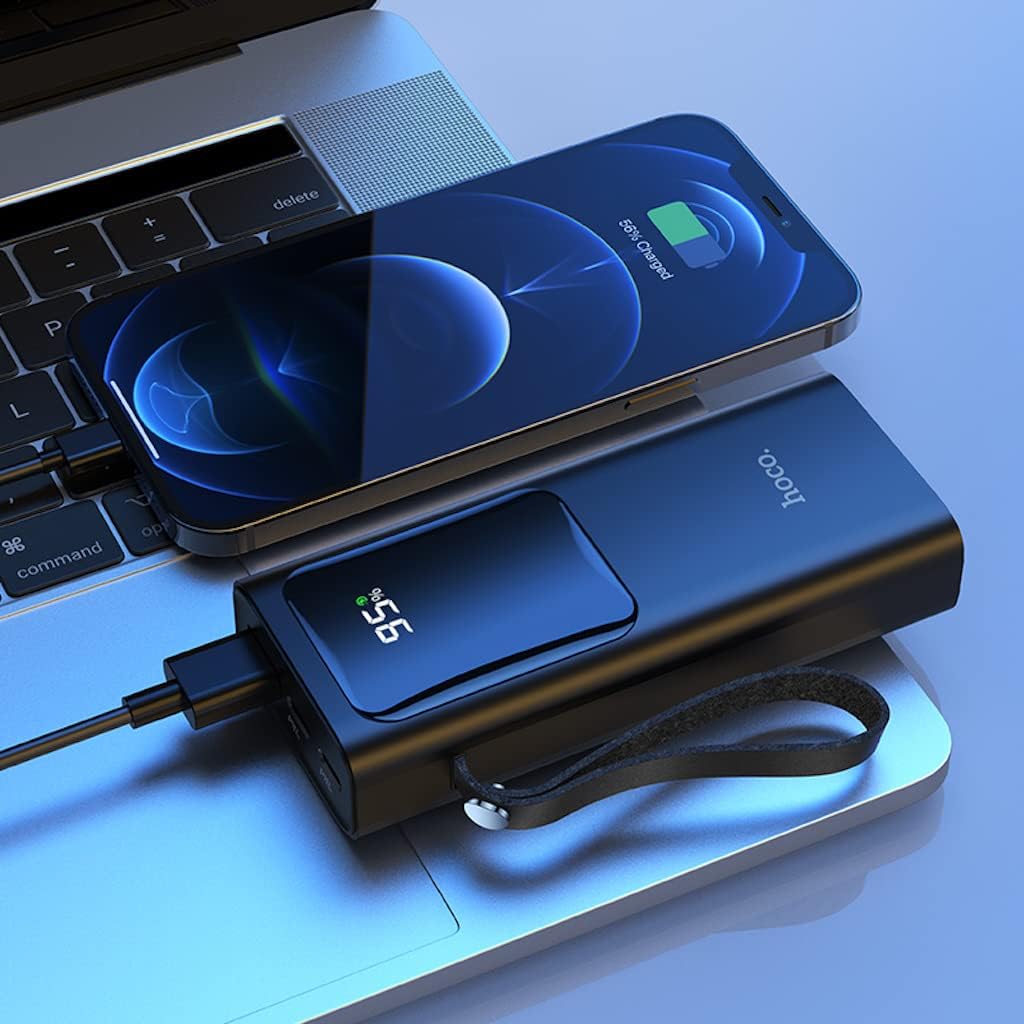
Billede 3: The Hoco J41 Pro Power Bank actively charging an iPhone, positioned next to a laptop. The power bank's LED display shows a 95% charge, indicating its readiness for use.

Billede 4: The Hoco J41 Pro Power Bank simultaneously charging two smartphones, demonstrating its multi-device charging capability. The power bank's display shows 100% charge.
Understanding the LED Digital Display:
- Displayet viser den resterende batteriprocenttage af powerbanken.
- Under opladning er pcttage vil stige.
- When a device is being fast-charged, a specific indicator (e.g., a lightning bolt icon or "PD" / "QC" text) may appear on the display.
Opretholdelse
- Rensning: Brug en blød, tør klud til at rengøre powerbanken. Brug ikke flydende rengøringsmidler eller aerosoler.
- Opbevaring: Opbevar powerbanken et køligt, tørt sted væk fra direkte sollys, ekstreme temperaturer og fugtighed.
- Batteripleje: For at forlænge batteriets levetid, bør du oplade powerbanken helt mindst én gang hver tredje måned, hvis den ikke er i brug regelmæssigt.
- Undgå dråber: Tab ikke powerbanken og udsæt den ikke for kraftige stød.
Fejlfinding
| Problem | Mulig årsag | Løsning |
|---|---|---|
| Powerbanken oplader ikke. |
|
|
| Enheden oplades ikke fra powerbanken. |
|
|
| Langsom opladning. |
|
|
Specifikationer
| Feature | Detalje |
|---|---|
| Modelnavn | J41 Pro |
| Mærke | HOCO |
| Batterikapacitet | 10000mAh (37Wh) |
| Nominel kapacitet | 5900mAh |
| Battericellesammensætning | Lithium polymer |
| Input (Lightning/Type-C) | 18W (PD) |
| Output (Type-C) | PD 20W |
| Udgang (USB-A) | 22.5W (full compatible) |
| Samlet output | 5V/3A |
| Understøttede protokoller | PD 20W, QC, FCP/SCP, AFC, VOOC, DASH |
| Vise | LED Digital Display (Power, Fast Charge Indicator) |
| Connector Type | Lightning, USB Type C |
| Voltage | 5 volt |
| Dimensioner | 21.8 x 14.5 x 4.4 cm |
| Vægt | 206 g |
| Farve | Sort |
Sikkerhedsoplysninger
Please read and follow these safety guidelines to prevent damage to your device or personal injury:
- Udsæt ikke powerbanken for vand, fugt eller ekstreme temperaturer.
- Du må ikke skille powerbanken ad, ændre den eller forsøge at reparere den.
- Holdes væk fra børn.
- Må ikke anvendes, hvis powerbanken er beskadiget, hævet eller utæt.
- Avoid dropping or subjecting the power bank to heavy impacts.
- Brug kun certificerede opladningskabler og adaptere.
- Do not place heavy objects on the power bank.
- Bortskaf powerbanken ansvarligt i henhold til lokale regler.
Garanti og support
Hoco products are manufactured to high-quality standards. For warranty information or technical support, please refer to the warranty card included in your package or contact your local retailer or Hoco customer service. Please have your product model number (J41 Pro) and purchase details ready when seeking support.