
TZT NanoVNA-F V3.1
NanoVNA-F V3.1 Vector Network Analyzer User Manual
Model: NanoVNA-F V3.1 | Brand: TZT
1. Introduktion
The TZT NanoVNA-F V3.1 is a compact and versatile Vector Network Analyzer (VNA) designed for measuring RF circuits and antenna performance. It operates within a wide frequency range of 10KHz to 1.5GHz, making it suitable for various applications including amateur radio, antenna tuning, and general RF circuit analysis. This manual provides essential information for the proper setup, operation, and maintenance of your NanoVNA-F V3.1.

Figure 1: The NanoVNA-F V3.1 Vector Network Analyzer with its 4.3-inch IPS display showing S-parameter measurements.
2. Nøglefunktioner
- Bredt måleområde: Covers 10KHz to 1.5GHz, with excellent dynamic range: >70dB for 10K-300MHz, >60dB for 300M-900MHz, and >40dB for 900M-1.5GHz.
- Batteri med høj kapacitet: Equipped with a 5000mAh battery for extended operation. Can also function as a mobile power source via its extended USB interface.
- Ryd skærm: Features a 4.3-inch IPS TFT LCD with a resistive touch screen for clear data and curve visualization.
- Kraftige funktioner: Capable of measuring S-parameters, Voltage Standing Wave Ratio (SWR), phase map, group delay, Smith chart, DELAY, POLAR, and LINEAR. Supports firmware upgrades via virtual U disk.
- PC and Android Phone Connectivity: Compatible with PC software (e.g., NanoVNA Saver) for data display and Touchstone (.snp) file export. Supports Android mobile phones for control.
3. Pakkens indhold
Når du åbner pakken, skal du kontrollere, at alle følgende varer er inkluderet:
- NanoVNA-F V3.1 Vector Network Analyzer Unit
- USB Type-C-kabel
- 2 x SMA Male to Male RG316 RF Cables
- Calibration Kit (OPEN, SHORT, LOAD)
- SMA Male to Female Adapters (various types)
- Stylus pen
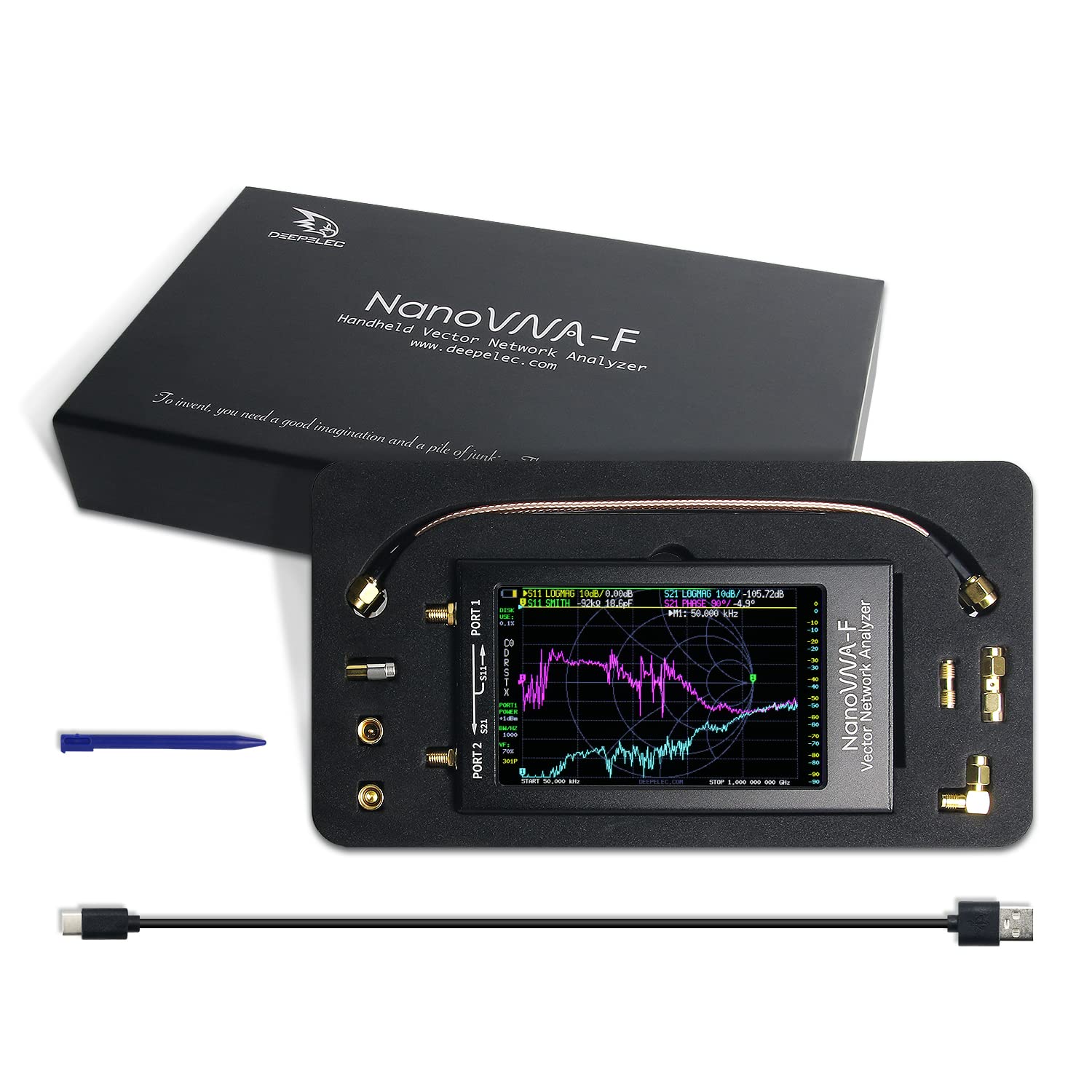
Figure 2: All components included in the NanoVNA-F V3.1 package.
4. Opsætningsvejledning
4.1 Indledende opladning
Before first use, fully charge the NanoVNA-F V3.1. Connect the provided USB Type-C cable to the device's USB-C port and the other end to a standard USB power adapter (5V, 1A recommended) or a computer's USB port. The charging indicator will show the charging status.
4.2 Tænd/sluk
Locate the power switch on the side of the device. Slide the switch to the "ON" position to power on the unit. To power off, slide the switch to the "OFF" position.
4.3 Connecting to a Device Under Test (DUT)
The NanoVNA-F V3.1 has two SMA ports: PORT 1 (S11) and PORT 2 (S21). Use the provided SMA cables and adapters to connect your DUT. For reflection measurements (S11), connect the DUT to PORT 1. For transmission measurements (S21), connect the input of the DUT to PORT 1 and the output to PORT 2.

Figure 3: Schematic representation of S-parameter measurement connections on the NanoVNA-F V3.1.
5. Betjening
5.1 Brugergrænsefladenavigation
The NanoVNA-F V3.1 features a resistive touch screen and a wheel button for navigation. Use the stylus or your finger to interact with the touch screen menus. The wheel button can be used for fine adjustments or menu selection in some modes.
5.2 Kalibrering
Calibration is crucial for accurate measurements. Perform a full two-port calibration (OPEN, SHORT, LOAD, THRU) for the desired frequency range before taking measurements. Access the calibration menu from the main screen.
- Connect the OPEN standard to PORT 1 and perform the OPEN calibration.
- Connect the SHORT standard to PORT 1 and perform the SHORT calibration.
- Connect the LOAD standard to PORT 1 and perform the LOAD calibration.
- Connect PORT 1 and PORT 2 directly using a THRU cable and perform the THRU calibration.
- Gem kalibreringsdataene.
5.3 Måletilstande
The device supports various measurement modes, including:
- S11 (Reflection Coefficient): Measures the reflection characteristics of a device connected to PORT 1. Useful for SWR, Return Loss, and Smith Chart analysis.
- S21 (Transmission Coefficient): Measures the transmission characteristics between PORT 1 and PORT 2. Useful for gain/loss and phase measurements of filters, amplivførere osv.
- SWR (Standing Wave Ratio): Indicates the impedance match of an antenna or transmission line.
- Smith-diagram: Graphical representation of complex impedance.
- Fase: Displays the phase response of the DUT.
- Group Delay: Measures the time delay of signals through the DUT.
5.4 PC Software Connectivity
For advanced analysis and data logging, connect the NanoVNA-F V3.1 to a PC using the USB Type-C cable. Download and install compatible software like NanoVNA Saver. This software allows for larger display, detailed analysis, and export of Touchstone (.snp) files for use in other RF simulation tools.
6. Vedligeholdelse
6.1 Rengøring
Brug en blød, tør klud til at rengøre enheden. Ved genstridigt snavs, rens letamp cloth can be used. Avoid using harsh chemicals or abrasive materials, as they may damage the screen or casing.
6.2 Opbevaring
When not in use, store the NanoVNA-F V3.1 in a cool, dry place, away from direct sunlight and extreme temperatures. Keep it in its original packaging or a protective case to prevent physical damage.
6.3 Pleje af batterier
For at forlænge batteriets levetid bør du undgå at aflade batteriet helt ofte. Hvis det opbevares i længere tid, skal du oplade batteriet til cirka 50 % og genoplade det et par gange om måneden.
7. Fejlfinding
| Problem | Mulig årsag | Løsning |
|---|---|---|
| Enheden tænder ikke. | Low battery or power switch in OFF position. | Charge the device. Ensure the power switch is in the ON position. |
| Upræcise målinger. | Improper calibration or faulty cables/adapters. | Perform a full calibration for the current frequency range. Check cables and connectors for damage. |
| Skærmen reagerer ikke. | Softwarefejl eller fysisk skade. | Genstart enheden. Kontakt support, hvis problemet fortsætter. |
| Kan ikke oprette forbindelse til pc'en. | Incorrect USB cable, driver issues, or software settings. | Ensure you are using the correct USB Type-C cable. Install necessary drivers. Check PC software settings. |
8. Specifikationer
| Feature | Detalje |
|---|---|
| Frekvensområde | 10KHz - 1.5GHz |
| Vise | 4.3-inch IPS TFT LCD, Resistive Touch Screen |
| Dynamisk rækkevidde | >70dB (10K-300MHz), >60dB (300M-900MHz), >40dB (900M-1.5GHz) |
| Batterikapacitet | 5000mAh |
| Havne | 2 x SMA (PORT 1, PORT 2), 1 x USB Type-C |
| Dimensioner | Cirka 127 mm x 74 mm x 21 mm (5 tommer x 2.9 tommer x 0.8 tommer) |
| Vægt | Cirka 1 pund |
| Fabrikant | NU |
| Oprindelsesland | Kina |

Figure 4: Physical dimensions of the NanoVNA-F V3.1.
9. Garanti og support
For garantioplysninger og teknisk support henvises til den dokumentation, der fulgte med dit køb, eller kontakt producenten direkte. Gem din købsbevis til garantikrav.
Der blev ikke fundet nogen officielle produktvideoer fra sælgeren for denne model.