
1. Introduktion
This manual provides detailed instructions for the safe and effective operation of your Andoer 4K 48MP 60FPS WiFi Camcorder. Please read this manual thoroughly before using the device and retain it for future reference. This camcorder is designed for high-quality video recording and photography, featuring 4K Ultra HD resolution, 48-megapixel photos, a 3-inch IPS touchscreen, and infrared night vision capabilities. It is equipped with WiFi connectivity for easy file transfer and remote control, and comes with essential accessories such as an external microphone and a wide-angle macro lens.

Image 1.1: Andoer 4K Camcorder with included accessories.
2. Pakkens indhold
Bekræft, at alle nedenstående varer er inkluderet i din pakke. Hvis der mangler eller er beskadigede varer, bedes du kontakte din forhandler.

Billede 2.1: Alle komponenter er inkluderet i pakken.
- Videokamera
- Mikrofon
- Forrude til mikrofon
- 3.5 mm TRS til TRS lydkabel
- USB kabel
- Håndgreb
- Camera Lens (Wide-angle macro lens)
- Linseadapterring
- 2 x Lithium-polymer Batteries (2000mAh)
- Fjernbetjening
- Camcorder Storage Bag
- Opbevaringspose til objektiv
- Camcorder User Manual
- Brugervejledning til mikrofon
3. Produktet er slutview
Gør dig bekendt med de forskellige dele og betjeningselementer på dit videokamera.
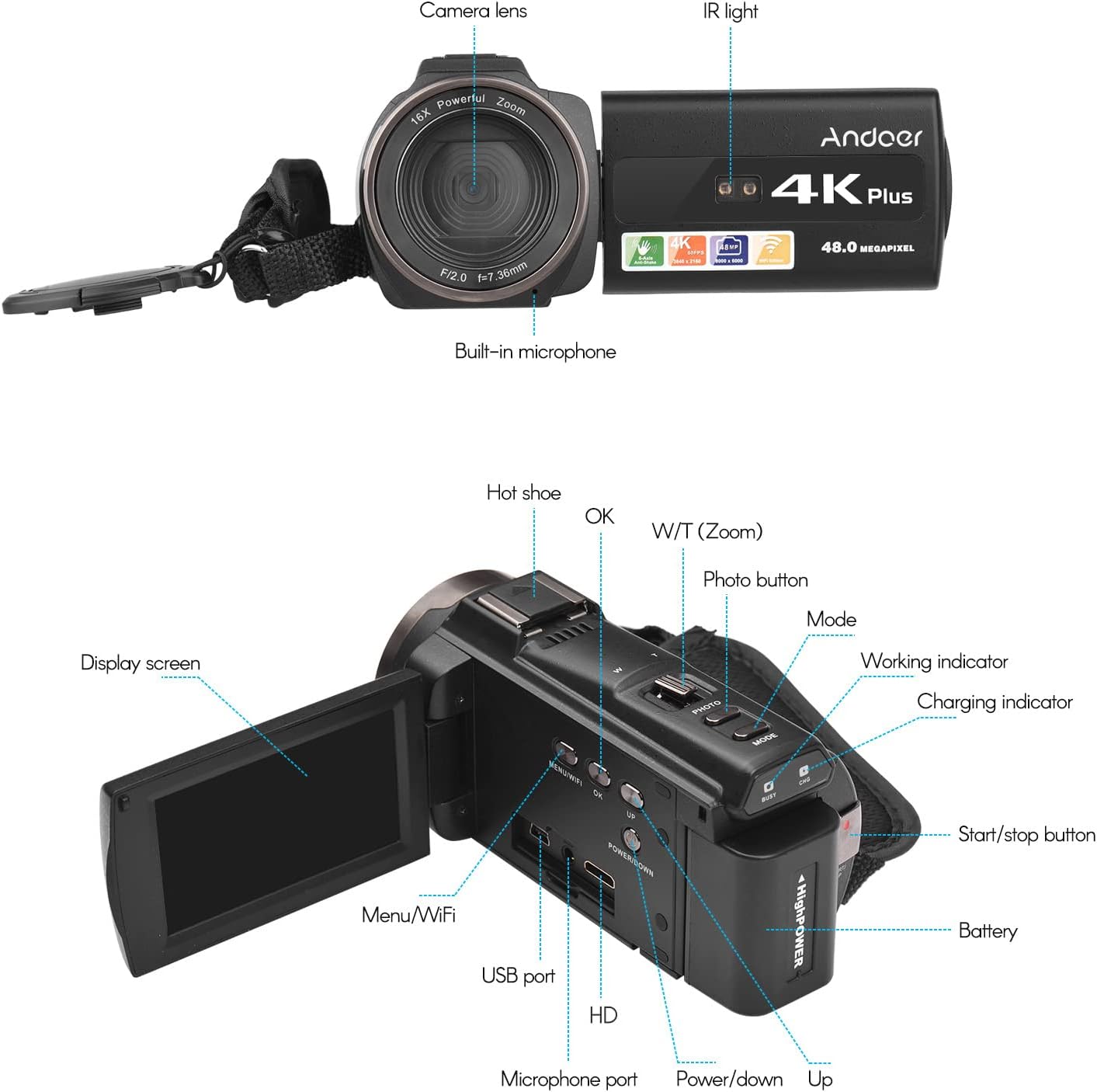
Billede 3.1: Foran og bagpå View of the Camcorder with labeled components.
Nøglekomponenter:
- Kameraobjektiv: Primær optisk komponent til optagelse af billeder og videoer.
- IR lys: Emits infrared light for night vision recording.
- Indbygget mikrofon: Captures audio. An external microphone can be connected for enhanced sound quality.
- Hot Shoe: Mount for external accessories like the included microphone or an LED video light.
- Display Screen (3" IPS Touch Screen): For viewi live footage, playback, and navigating menus.
- Kontrolknapper: Including Power, Mode, Photo, Zoom (W/T), OK, Menu/WiFi, Up/Down.
- Porte: USB, HD (HDMI), Microphone port.
- Batterirum: Indeholder det genopladelige batteri.
4. Opsætning
4.1 Opladning af batteriet
Before first use, fully charge the included lithium-polymer batteries. Insert one battery into the camcorder's battery compartment. Connect the camcorder to a power source using the provided USB cable. The charging indicator will illuminate during charging and turn off when fully charged. A full charge typically takes several hours.

Image 4.1: Battery installation and charging indication.
4.2 Indsættelse af et hukommelseskort
The camcorder supports TF (MicroSD) cards up to 128GB. Ensure the card is formatted before first use in the camcorder's settings. Insert the memory card into the designated slot until it clicks into place.
- Use a Class 10 or higher speed rating for optimal performance, especially for 4K video recording.
- The camcorder supports V60 video speed class.
4.3 Attaching the External Microphone
For improved audio quality, attach the external stereo microphone to the hot shoe mount on top of the camcorder. Connect the microphone's 3.5mm audio cable to the microphone input port on the camcorder.
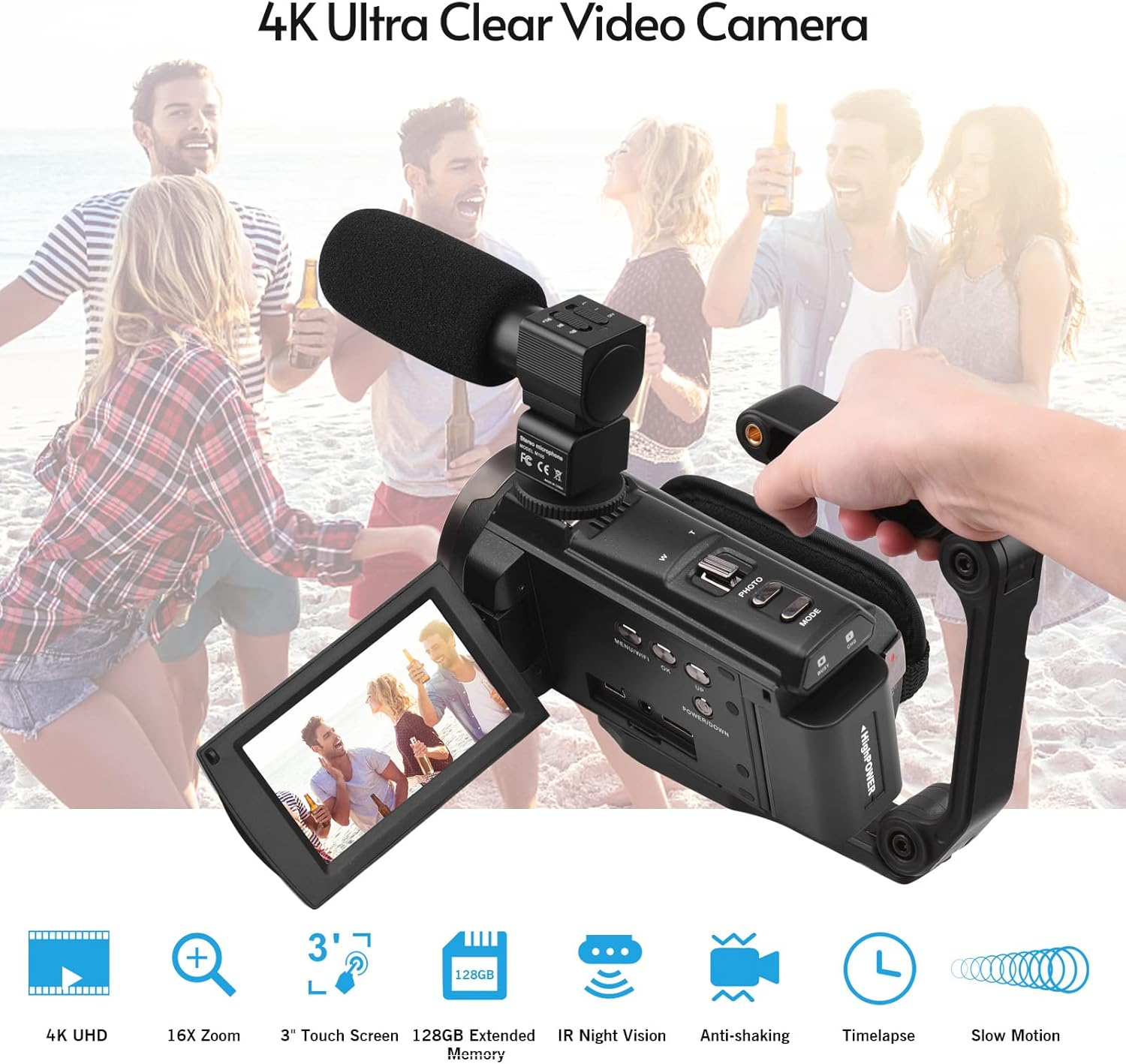
Image 4.2: External microphone attached to the camcorder.
4.4 Attaching the Wide-Angle Macro Lens
To use the wide-angle macro lens, first attach the lens adapter ring to the camcorder's main lens. Then, screw the wide-angle macro lens onto the adapter ring. This lens provides a broader perspective for your shots.

Image 4.3: Wide-angle macro lens for expanded field of view.
4.5 Attaching the Handgrip
The included handgrip can be attached to the bottom of the camcorder via the 1/4" screw hole for more stable handheld recording.
5. Betjeningsvejledning
5.1 Tænd/sluk
To power on the camcorder, open the display screen and press the Power button. To power off, press and hold the Power button, or close the display screen.
5.2 Optagelse af video
- Tænd videokameraet.
- Tryk på Mode -knappen for at vælge videooptagelsestilstand.
- Tryk på Start/Stop button to begin recording. The recording indicator will flash.
- Tryk på Start/Stop knappen igen for at stoppe optagelsen.
The camcorder supports 4K/60FPS video resolution for clear and smooth footage.
5.3 Optagelse af billeder
- Tænd videokameraet.
- Tryk på Mode button to select photo mode.
- Komponer dit billede ved hjælp af skærmen.
- Tryk på Foto button to capture a 48-megapixel image.
5.4 Using the 3" IPS Touch Screen
The capacitive touchscreen allows for intuitive navigation of menus and settings. Tap to select options, swipe to scroll, and pinch to zoom (if supported in specific modes).
5.5 WiFi-funktion
The built-in WiFi allows for wireless transmission of files to a compatible smartphone or tablet via a dedicated app. It also enables remote control of the camcorder from your mobile device.
- Activate WiFi on the camcorder via the menu.
- Download and install the specified app on your mobile device.
- Connect your mobile device to the camcorder's WiFi network.
- Use the app to control recording, view live footage, og overførsel files.
5.6 IR-nattesyn
For recording in low-light or dark conditions, activate the IR Night Vision feature. This utilizes infrared light to capture clear black and white footage.

Image 5.1: IR Night Vision in operation.
5.7 Digital zoom
Use the W/T (Wide/Telephoto) button to adjust the 16x digital zoom. Note that digital zoom can reduce image quality compared to optical zoom.
5.8 Billedstabilisering
The camcorder features 6-axis image stabilization to reduce blur and shakiness in your recordings, especially during handheld use.
5.9 Særlige funktioner
- Bevægelsesdetektion: The camcorder can be set to automatically start recording when motion is detected.
- Face Detection/Recognition: Optimizes focus and exposure for faces in the frame.
- Fjernbetjening: Use the included remote control to operate the camcorder from a distance, useful for self-recording or group shots.
- Selvudløser: Set a delay before capturing a photo or starting a video recording.

Image 5.2: Tripod mounting for self-timer and stable shots.
5.10 Tilslutning til eksterne enheder
- USB: Tilslut til en computer for file overførsel.
- HD (HDMI): Connect to a TV or monitor to view dine optagelser på en større skærm.
6. Vedligeholdelse
- Rensning: Use a soft, dry cloth to clean the camcorder body. For the lens, use a specialized lens cleaning cloth and solution. Avoid harsh chemicals.
- Opbevaring: Opbevar videokameraet et køligt og tørt sted, væk fra direkte sollys og ekstreme temperaturer. Fjern batteriet, hvis det opbevares i længere perioder.
- Batteripleje: Do not expose batteries to high temperatures. Recharge regularly even if not in use to maintain battery health.
- Firmwareopdateringer: Tjek producentens webbesøg webstedet regelmæssigt for at se om der er tilgængelige firmwareopdateringer for at sikre optimal ydeevne og nye funktioner.
7. Fejlfinding
| Problem | Mulig årsag | Løsning |
|---|---|---|
| Videokameraet tænder ikke. | Batteriet er afladet eller ikke isat korrekt. | Ensure battery is fully charged and correctly inserted. Try the second battery. |
| Kan ikke optage video/tage billeder. | Memory card is full, not inserted, or corrupted. Incorrect mode selected. | Check memory card status, ensure it's inserted and has free space. Format if necessary (backup data first). Select the correct mode. |
| Dårlig billed-/videokvalitet. | Lens is dirty. Low light conditions without IR. Digital zoom used excessively. | Clean the lens. Activate IR Night Vision in dark environments. Avoid excessive digital zoom. Ensure sufficient lighting. |
| Problemer med WiFi-forbindelse. | Incorrect WiFi settings. App not installed or updated. | Ensure WiFi is enabled on camcorder and mobile device. Re-establish connection. Update or reinstall the mobile app. |
| Mikrofonen optager ikke lyd. | Microphone not connected properly or settings incorrect. | Check microphone cable connection. Verify audio input settings in the camcorder menu. |
8. Specifikationer
| Feature | Detalje |
|---|---|
| Modelnummer | ZOH0150584179474NZ |
| Video opløsning | 4K (3840x2160) ved 60FPS |
| Foto opløsning | 48 megapixel (8000x6000) |
| Billedstabilisering | 6-akse |
| Skærm | 3-tommer IPS kapacitiv berøringsskærm |
| Digital Zoom | 16x |
| Forbindelse | USB, Wi-Fi, HDMI |
| Understøttelse af hukommelseskort | TF (MicroSD) up to 128GB (Class 10, V60 recommended) |
| Særlige funktioner | IR Night Vision, Motion Detection, Face Detection, Remote Control |
| Batteri | 2 x 2000mAh Lithium-polymer |
| Lensåbning | f/2.0 |
| Minimum brændvidde | 39 mm |
| Kompatible enheder | Tripod, Microphone, TV, Computer, Smartphone |
| Operativsystemkompatibilitet | Windows |
| Dimensioner (pakke) | 18 x 15 x 11 cm |
| Vægt (pakke) | 1.01 kg |
9. Garanti og support
Andoer products are designed for reliability and performance. For any technical assistance, troubleshooting beyond this manual, or warranty inquiries, please contact Andoer customer support through their official webwebsted eller din forhandler.
Gem venligst dit købsbevis for garantikrav.