
1. Introduktion
This manual provides essential information for the safe and efficient use of your Getac V110 Rugged Convertible Laptop/Tablet PC. Please read this manual thoroughly before operating the device and retain it for future reference. The Getac V110 is designed for durability and performance in challenging environments, offering versatility as both a laptop and a tablet.
2. Sikkerhedsoplysninger
Overhold følgende sikkerhedsforanstaltninger for at forhindre skader på enheden eller personskade:
- Udsæt ikke enheden for ekstreme temperaturer, direkte sollys eller overdreven fugtighed.
- Use only Getac-approved power adapters and accessories.
- Avoid dropping or subjecting the device to severe impacts, despite its rugged design.
- Forsøg ikke selv at skille enheden ad eller reparere den. Kontakt kvalificeret servicepersonale.
- Hold ventilationsåbningerne fri for at forhindre overophedning.
3. Fysisk overview
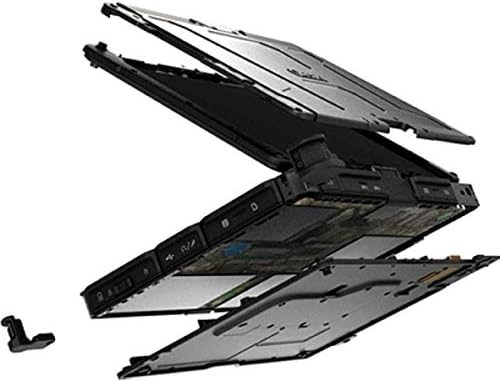
The Getac V110 is a versatile device designed for rugged use. It features a convertible design, allowing it to function as both a traditional laptop and a tablet. Key components include a durable chassis, an 11.6-inch touchscreen display, a full-sized keyboard, and various ports for connectivity.

Figur 3.1: Eksploderet view illustrating the internal structure and ruggedized layers of the Getac V110.
3.1. Tastatur og touchpad
The device includes a backlit keyboard for typing in various lighting conditions and a precision touchpad for navigation.
Figur 3.2: Top-down view of the Getac V110 keyboard and integrated touchpad.
3.2. Convertible Design
The V110 can be easily converted between laptop and tablet modes by rotating the screen. This flexibility allows for optimal use in different scenarios.

Figure 3.3: The Getac V110 configured in laptop mode, displaying the screen and keyboard.

Figure 3.4: The Getac V110 in tablet mode, showcasing the touchscreen interface.
4. Opsætning
4.1. Første opstart
- Tilslut strømadapteren til enheden og en stikkontakt.
- Press the power button located on the side or front of the device.
- Follow the on-screen prompts to complete the initial Windows 8.1 setup, including language, region, and user account creation.
4.2. Netværksforbindelse
The Getac V110 supports both Wi-Fi and Ethernet for internet access.
- Wi-Fi: Access the network settings in Windows 8.1, select your desired Wi-Fi network, and enter the password if required.
- Ethernet: Connect an Ethernet cable from your network router or switch to the Ethernet port on the device.
4.3. Bluetooth-parring
Sådan tilslutter du Bluetooth-enheder:
- Sørg for, at Bluetooth-enheden er i parringstilstand.
- On the Getac V110, navigate to PC Settings > PC and devices > Bluetooth.
- Turn Bluetooth on and select the device from the list to pair.
5. Betjening af enheden
5.1. Switching Between Laptop and Tablet Modes
To convert the device:
- Gently rotate the screen 180 degrees clockwise or counter-clockwise.
- Fold the screen back over the keyboard to enter tablet mode.
- Unfold the screen and rotate it back to the original position for laptop mode.
5.2. Brug af berøringsskærm
The 11.6-inch LED touchscreen supports multi-touch gestures. Use your fingers or a compatible stylus for navigation, selection, and input.
5.3. Strømstyring
To conserve battery life, adjust power settings in Windows 8.1. You can configure sleep mode, display brightness, and other power-saving options.
- Sove mode: Tryk kort på tænd/sluk-knappen for at sætte enheden i dvaletilstand.
- Luk ned: Go to the Charms bar (swipe from right edge or move mouse to top-right corner), select Settings > Power > Shut down.
- Genstart: Go to the Charms bar, select Settings > Power > Restart.
6. Vedligeholdelse
6.1. Rengøring af enheden
Regular cleaning helps maintain performance and appearance.
- Brug en blød, fnugfri klud lidt dampened with water or a mild, non-abrasive cleaner for the screen and exterior.
- Undgå at sprøjte væsker direkte på enheden.
- Brug ikke skrappe kemikalier, opløsningsmidler eller slibende materialer.
6.2. Batteripleje
For at maksimere batteriets levetid:
- Undgå at aflade batteriet helt ofte.
- Opbevar enheden et køligt og tørt sted, hvis den ikke bruges i længere perioder.
- If the device has removable batteries, ensure they are properly seated.
6.3. Softwareopdateringer
Regularly check for and install operating system and driver updates to ensure optimal performance and security. Access Windows Update through PC Settings.
7. Fejlfinding
This section addresses common issues you might encounter with your Getac V110.
7.1. Enheden tænder ikke
- Sørg for, at strømadapteren er korrekt tilsluttet, og at stikkontakten fungerer.
- Check if the battery is charged. If not, allow it to charge for at least 30 minutes before attempting to power on again.
- If the battery is removable, ensure it is correctly installed.
7.2. Problemer med Wi-Fi-forbindelse
- Bekræft, at Wi-Fi er aktiveret i Windows-indstillingerne.
- Restart your router and the Getac V110.
- Ensure you are within range of the Wi-Fi network and have the correct password.
- Check for updated Wi-Fi drivers.
7.3. Berøringsskærmen reagerer ikke
- Genstart enheden.
- Sørg for, at skærmen er ren og fri for snavs.
- Check for any recent software updates or driver issues.
7.4. Langsom ydeevne
- Luk unødvendige programmer, der kører i baggrunden.
- Tjek tilgængelig lagerplads.
- Kør en virusscanning.
- Sørg for, at Windows og drivere er opdaterede.
8. Specifikationer
| Feature | Detalje |
|---|---|
| Mærke | Getac |
| Modelnummer | V110 |
| Processor | Intel Core i5-6300U (2.6 GHz) |
| RAM-hukommelse | 8 GB DDR4 SDRAM |
| Lagerkapacitet | 128 GB |
| Skærmstørrelse | 11.6 tommer |
| Skærmopløsning | 1366 x 768 pixels |
| Display Type | LED |
| Human-Interface Input | Touchskærm |
| Operativsystem | Windows 8.1 |
| Grafik coprocessor | Intel HD Graphics 520 |
| Forbindelsesteknologi | Bluetooth, Ethernet, HDMI, USB, Wi-Fi |
| Varens vægt | 4.4 pund |
| Item Dimensions (L x W x Th) | 11.99 cm x 18.9 cm x 3.9 cm |
| Battericelletype | Lithium Ion (23 Watt Hours) |
9. Garantioplysninger
The Getac V110 Rugged Convertible Laptop/Tablet PC comes with a 90 dages begrænset garanti. This warranty covers manufacturing defects and malfunctions under normal use. It does not cover damage caused by misuse, accidents, unauthorized repairs, or modifications. Please retain your proof of purchase for warranty claims.
For detailed terms and conditions, refer to the warranty documentation provided with your device or contact Getac customer support.
10. Support
If you require further assistance or encounter issues not covered in this manual, please contact Getac customer support. You can typically find support contact information on the manufacturer's official website or within the device's pre-installed documentation.
When contacting support, please have your device's model number (V110) and serial number ready.