
1. Introduktion
This manual provides instructions for the NETVIP Bluetooth Car Speaker, a wireless hands-free device designed for in-car communication and media playback. It supports Bluetooth connectivity, voice assistants, and TF card playback, offering a convenient and safe way to manage calls and audio while driving.
2. Pakkens indhold
Bekræft, at alle nedenstående varer er inkluderet i din pakke:
- Bluetooth In-Car Speakerphone x 1
- USB-kabel x 1
- Magnetic Basement (Clip) x 1
- Nøglesnor x 1
- Brugervejledning x 1
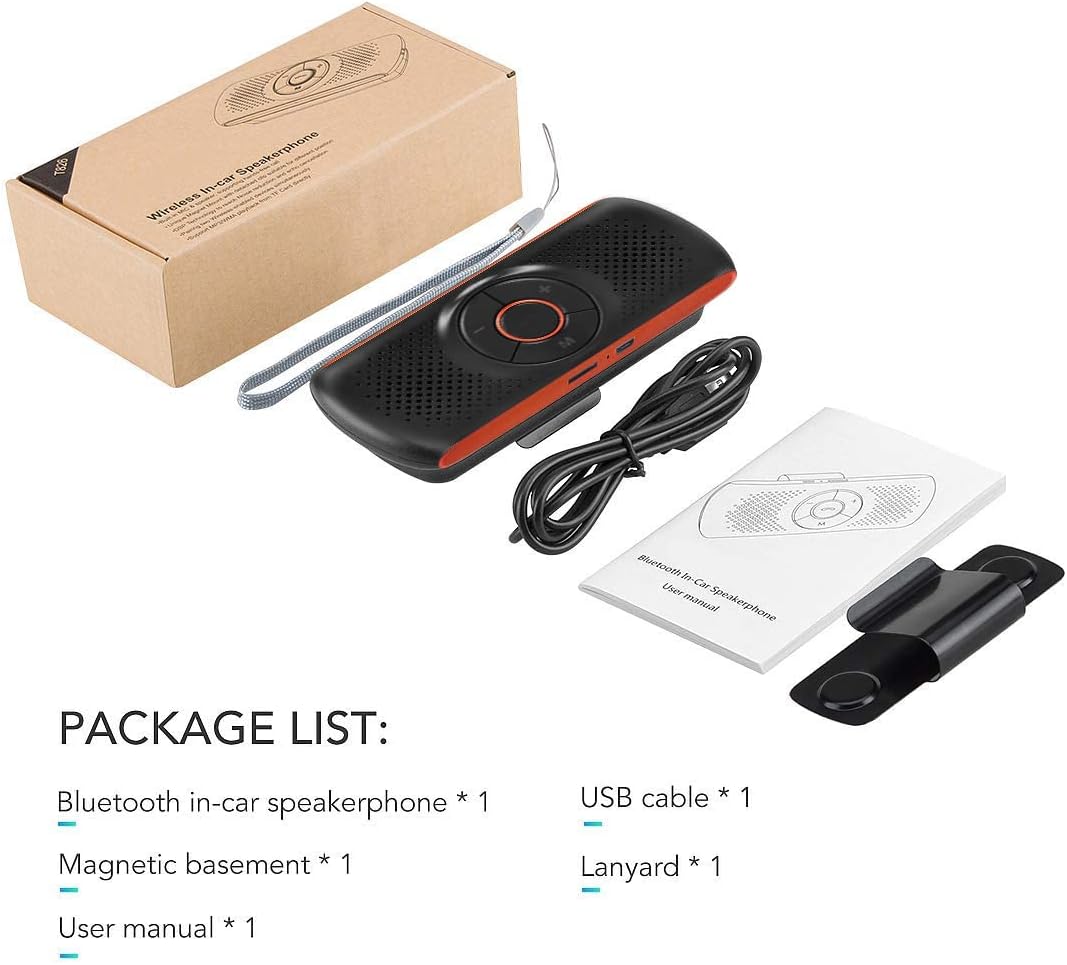
Image: Contents of the NETVIP Bluetooth Car Speaker package.
3. Produktfunktioner
- Håndfri opkald: Designed for safe communication while driving, allowing one-click call answering.
- Enhanced Bluetooth Connectivity: Features Bluetooth V4.2+EDR with echo noise reduction technology for clear audio.
- Understøttelse af stemmestyring: Compatible with Siri and Google Assistant for voice commands.
- Automatisk genforbindelse: Automatically reconnects to your paired phone upon power-on.
- Nem installation: Back-clip design with a durable magnetic base for sun visor mounting.
- Multiple Media Options: Supports music playback via Bluetooth, TF card, or USB cable.
- Dobbelt telefonforbindelse: Capable of connecting to two phones simultaneously.
4. Opsætning
4.1 Opladning af enheden
Before initial use, fully charge the speakerphone using the provided USB cable. Connect the USB cable to the device's charging port and a standard USB power source (e.g., car charger, computer USB port). The charging indicator light will show the charging status.
4.2 Mounting the Speakerphone
The speakerphone features a magnetic clip for easy attachment to your car's sun visor.
- Attach the magnetic basement clip to the back of the speakerphone.
- Slide the clip onto your car's sun visor. The magnetic connection allows for easy removal and reattachment.
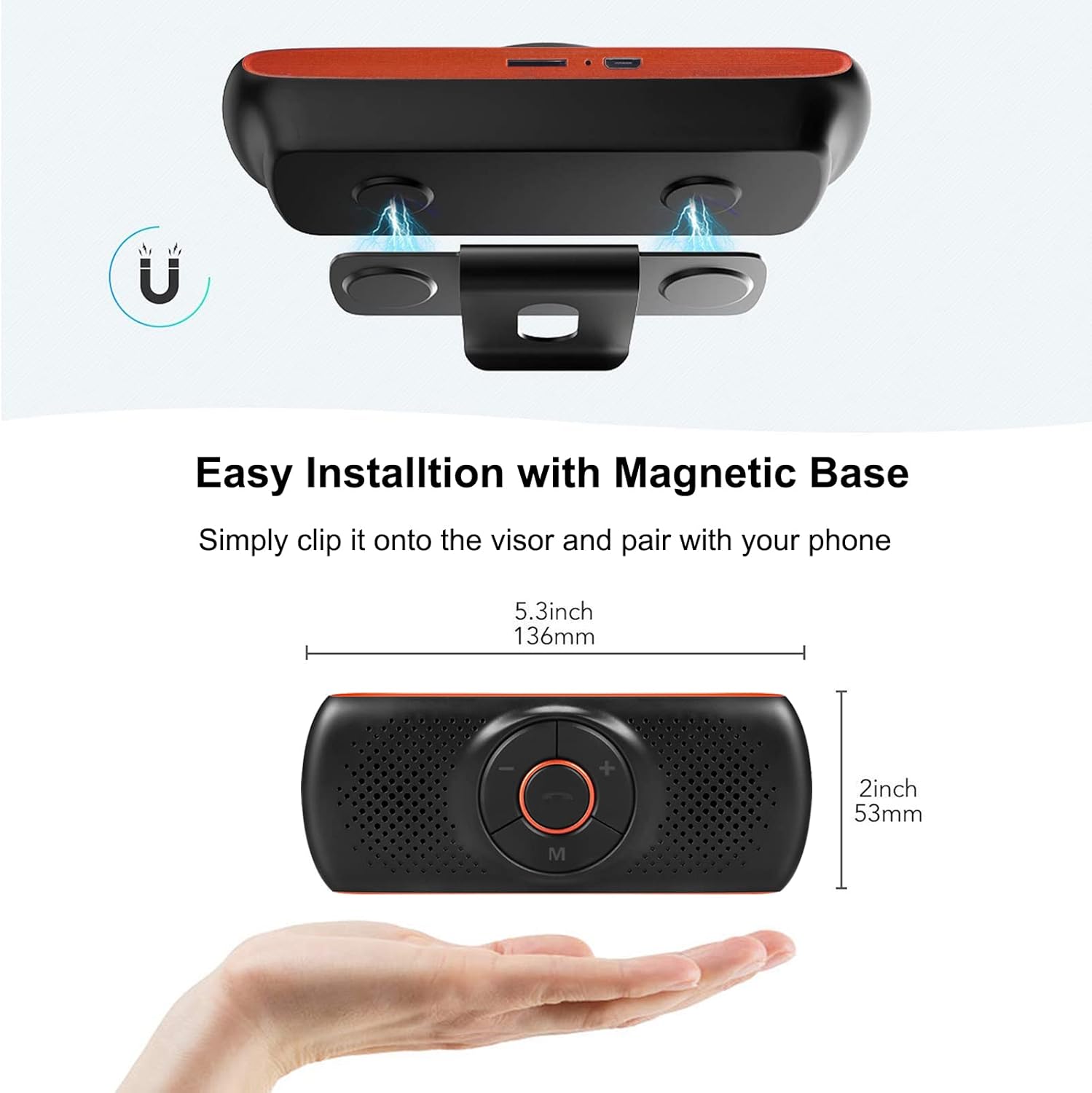
Image: Magnetic installation of the speakerphone on a car sun visor.
4.3 Bluetooth -parring
To connect the speakerphone to your mobile phone:
- Ensure the speakerphone is charged and powered on.
- Aktiver Bluetooth på din mobiltelefon.
- Søg efter available Bluetooth devices. The speakerphone will appear as "NETVIP" or a similar name.
- Select the speakerphone from the list to pair. A confirmation tone or voice prompt will indicate successful pairing.
- The device will automatically reconnect to the last paired phone when powered on and within range.
5. Betjeningsvejledning
5.1 Tænd/sluk
- For at tænde skal du trykke på tænd/sluk-knappen og holde den nede, indtil indikatorlampen lyser.
- For at slukke skal du trykke på tænd/sluk-knappen og holde den nede, indtil indikatorlampen slukker.
5.2 Håndfri opkald
When a call comes in, the speakerphone will announce the incoming call.
- Besvar opkald: Press the phone button once.
- Afslut opkald: Press the phone button once during a call.
- Afvis opkald: Tryk og hold telefonknappen nede i 2 sekunder.
- Genopkald sidste nummer: Double-press the phone button.

Image: Driver using the NETVIP Bluetooth Car Speaker for hands-free communication.
5.3 Stemmeassistent (Siri/Google Assistent)
The speakerphone supports voice commands through Siri or Google Assistant.
- Aktiver stemmeassistent: Double-click the 'M' button to activate Siri or Google Assistant on your connected phone.
- Once activated, you can issue voice commands for tasks like making calls, sending messages, or getting directions.

Image: Illustrates using voice commands with Google Assistant and Siri via the speakerphone.
5.4 Musikafspilning
The speakerphone can play music from your phone via Bluetooth or directly from a TF card.
- Bluetooth musik: Once paired, play music from your phone, and it will stream through the speakerphone.
- TF-kortafspilning: Indsæt et TF-kort med lyd files into the designated slot. The speakerphone will automatically switch to TF card mode and begin playback.
- Lydstyrkekontrol: Use the '+' and '-' buttons on the speakerphone to adjust the volume.

Image: Detail of the TF card slot on the speakerphone for direct music playback.
5.5 Connecting Two Phones Simultaneously
The speakerphone can maintain a connection with two mobile phones at the same time.
- Pair the first phone as described in Section 4.3.
- After the first phone is paired, disable Bluetooth on the first phone.
- Pair the second phone to the speakerphone.
- Re-enable Bluetooth on the first phone. Both phones should now be connected.
- The speakerphone will prioritize incoming calls from either connected device.

Image: Demonstrates the speakerphone's ability to connect to two mobile phones concurrently.
6. Vedligeholdelse
To ensure the longevity and optimal performance of your NETVIP Bluetooth Car Speaker, follow these maintenance guidelines:
- Rensning: Brug en blød, tør klud til at rengøre enheden. Undgå at bruge slibende rengøringsmidler, opløsningsmidler eller stærke kemikalier.
- Opbevaring: Opbevar enheden et køligt, tørt sted væk fra direkte sollys og ekstreme temperaturer.
- Batteripleje: Do not expose the battery to extreme heat or cold. Charge the device regularly, even if not in frequent use, to maintain battery health.
- Undgå vand: This device is not waterproof. Keep it away from liquids and moisture.
7. Fejlfinding
If you encounter issues with your speakerphone, refer to the following common problems and solutions:
| Problem | Mulig årsag | Løsning |
|---|---|---|
| Enheden tænder ikke | Lavt batteri | Oplad enheden helt. |
| Kan ikke parres med telefonen | Bluetooth not enabled on phone; device not in pairing mode; too far from phone | Ensure phone Bluetooth is on. Power cycle the speakerphone. Move phone closer to device. |
| No audio during calls/music | Volume too low; device not connected; incorrect audio output selected on phone | Increase volume on both speakerphone and phone. Re-pair the device. Check phone's audio output settings. |
| Stemmeassistenten svarer ikke | Not activated correctly; phone's voice assistant not enabled | Double-click 'M' button. Ensure Siri/Google Assistant is enabled on your phone. |
| TF-kortmusik afspiller ikke | TF-kort ikke isat korrekt; ikke understøttet file format | Reinsert TF card. Ensure audio fileer i et understøttet format. |
8. Specifikationer
| Feature | Specifikation |
|---|---|
| Mærke | NETVIP |
| Forbindelsesteknologi | Bluetooth, USB |
| Bluetooth version | 4.2 + EDR |
| Strømkilde | Batteridrevet |
| Højttaler output | 3W |
| Batterikapacitet | 500 mAh Lithium-ion |
| Batteriopladningstid | Cirka 3 timer |
| Understøttet medietype | TF kort |
| Monteringstype | Spoke Clip (Magnetic) |
| Kontroltype | Stemmestyring, knapper |
| Kompatible enheder | Smartphones, Car Stereo Systems |
| Input bindtage | 5 volt (DC) |
9. Sikkerhedsoplysninger
Læs og overhold følgende sikkerhedsretningslinjer:
- Avoid using the device near other wireless devices to prevent potential interference.
- Keep the battery away from extreme temperatures and high humidity.
- Dispose of the battery and product responsibly according to local regulations.
- Forsøg ikke selv at skille ad, reparere eller ændre enheden. Kontakt kvalificeret servicepersonale for at få hjælp.
- Ensure the device is securely mounted to avoid obstruction of vision or interference with vehicle controls.
10. Produktvideo
Watch this video for an introduction to the NETVIP Wireless In-Car Speakerphone:
Video: En introduktionview of the NETVIP Wireless In-Car Speakerphone, demonstrating its features and usage.
11. Garanti og support
For warranty information or technical support, please contact NETVIP customer service through the retailer's platform or the official NETVIP webwebsted. Gem din købskvittering for garantikrav.