
1. Introduktion
This manual provides essential information for the safe and effective use of your Synergy Digital Li-Pol 3.7V 6700mAh tablet battery. This battery is designed as a high-capacity replacement for the Toshiba PA3995U-1BRS battery and is compatible with the Toshiba Excite AT205-T32I Tablet, among other models.
Please read this manual thoroughly before installation and use to ensure proper handling and to maximize the battery's lifespan and performance.
2. Sikkerhedsinstruktioner
Lithium-Polymer batteries require careful handling. Failure to follow these safety instructions can result in fire, burns, or other hazards.
- FORSØG IKKE AT ADSKILLE, ÅBNE ELLER SERVICERE BATTERIPAKKEN. This will void the warranty and can be dangerous.
- MÅ IKKE KNUSES, HULLES UD, KORTSLUTTES EKSTERNE KONTAKTER ELLER BORTSKAFFES I ILD ELLER VAND.
- OPBEVAR IKKE VED TEMPERATURER OVER 60 °C (140 °F). Høje temperaturer kan beskadige batteriet og udgøre en brandfare.
- Udskift kun med den batteripakke, der er beregnet til dette produkt.
- New battery packs must be fully charged before use.
- Read instructions in the operating guide before using the battery.
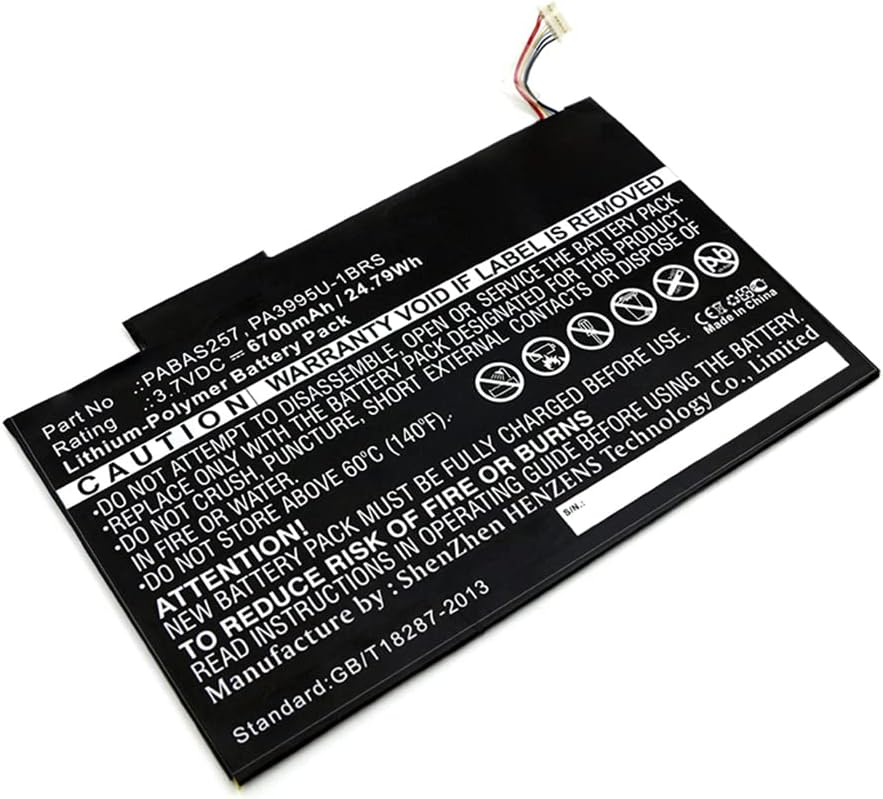
Billede: Top view of the Synergy Digital tablet battery, showing part number PABAS257 PA3995U-1BRS, rating 3.7VDC 6700mAh / 24.79Wh, and critical safety warnings printed on the label.

Billede: Bund view of the Synergy Digital tablet battery, displaying similar safety warnings and manufacturing information, including 'Made in China' and 'Manufacture by: ShenZhen Henzens Technology Co., Limited'.
3. Pakkens indhold
Din pakke skal indeholde følgende vare:
- 1 x Synergy Digital Tablet Battery (Li-Pol, 3.7V, 6700mAh)
4. Installationsvejledning
Replacing a tablet battery typically requires opening the device. It is recommended that battery replacement be performed by a qualified technician. If you choose to proceed yourself, exercise extreme caution.
- Sluk for enhed: Ensure your Toshiba Excite AT205-T32I tablet is completely powered off and disconnected from any power source.
- Disassemble Tablet: Åbn forsigtigt tabletten casing. This may require specialized tools and knowledge of the tablet's internal structure. Refer to your tablet's original service manual or a reputable online guide for specific disassembly instructions for the Toshiba Excite AT205-T32I.
- Find og frakobl det gamle batteri: Identify the existing battery. Carefully disconnect its connector from the tablet's motherboard. Avoid pulling on the wires; always grasp the connector itself.
- Fjern det gamle batteri: Gently remove the old battery. It may be secured with adhesive or screws. Do not bend or puncture the old battery during removal.
- Installer nyt batteri: Position the new Synergy Digital battery in the battery compartment. Ensure it fits correctly.
- Tilslut nyt batteri: Carefully connect the new battery's connector to the motherboard. Ensure it is seated firmly and correctly.
- Reassemble Tablet: Carefully reassemble the tablet casing, ensuring all components are properly aligned and secured.

Billede: Et nærbillede view of the battery's multi-pin connector, showing several colored wires (red, black, white, yellow, blue, grey) leading into a white plastic housing, which connects the battery to the tablet's mainboard.
Vigtig: Always handle the battery and tablet components with care. Improper installation can damage the device or the battery.
5. Charging and Usage
5.1 Indledende opladning
After installing the new battery, it is recommended to fully charge the tablet before its first use. Connect the tablet to its original charger or a compatible charger and allow it to charge until the battery indicator shows 100%.
5.2 Normal brug
This Li-Pol battery does not suffer from a 'memory effect,' meaning you do not need to fully discharge it before recharging. For optimal battery health, avoid frequently draining the battery to 0% or keeping it at 100% charge for extended periods when not in use.
The 6700mAh capacity provides ultra-high capacity for extended usage times, depending on your tablet's power consumption and usage patterns.
6. Pleje og vedligeholdelse
6.1 Opbevaring
If storing the battery for an extended period (more than one month), ensure it is charged to approximately 50-60% capacity. Store it in a cool, dry place, away from direct sunlight and extreme temperatures (below 0°C or above 30°C). Do not store the battery fully charged or fully discharged for long periods.
6.2 Rengøring
Keep the battery and its contacts clean and dry. Use a soft, dry cloth to wipe away any dust or debris. Do not use liquid cleaners or solvents.
6.3 Bortskaffelse
Do not dispose of the battery in household waste. Lithium-Polymer batteries contain materials that require special handling. Please recycle the battery at an authorized recycling center or return it to the point of purchase for proper disposal, in accordance with local regulations.
7. Fejlfinding
- Batteri oplades ikke:
- Ensure the charger and charging cable are functioning correctly.
- Verify the battery connector is securely attached to the tablet's motherboard.
- Check for any visible damage to the battery or tablet's charging port.
- Tablet Not Powering On After Battery Replacement:
- Confirm the battery is correctly installed and its connector is fully seated.
- Attempt to charge the tablet for at least 30 minutes before trying to power it on.
- Ensure all internal tablet connections are secure.
- Kort batterilevetid:
- Ensure background applications are closed.
- Juster skærmens lysstyrke til en lavere indstilling.
- Check for excessive power-consuming apps or settings.
- Perform a full charge cycle (charge to 100%, then use until low, then recharge).
If issues persist after following these steps, professional assistance may be required.
8. Tekniske specifikationer
| Specifikation | Værdi |
|---|---|
| Batterikemi | Lithium-Polymer (Li-Pol) |
| Voltage | 3.7V |
| Kapacitet | 6700mAh |
| Produktdimensioner | 7.56 x 4.89 x 0.11 tommer |
| Varens vægt | 4.9 ounce |
| Kompatibel med | Toshiba Excite AT205-T32I Tablet |
| Replaces Battery Model | Toshiba PA3995U-1BRS |
9. Garanti og kundesupport
This Synergy Digital battery comes with a 3 års garanti, ensuring its quality and performance. For warranty claims, technical assistance, or any questions regarding your product, please contact Synergy Digital customer support through their official channels or the retailer where the product was purchased.
When contacting support, please have your purchase information and the battery's model number (PA3995U-1BRS) available.