
1. Introduktion
Thank you for choosing the FOREVER Setty WebDenne manual indeholder vigtige oplysninger om opsætning, betjening og vedligeholdelse af dit kamera. webcam. Designed for remote work, conferences, online teaching, and video calls, this webcam offers clear image quality, an integrated microphone, and versatile 360-degree rotation.
2. Hvad er der i æsken
- FOREVER Setty Webcam
- USB kabel
- Audio kabel

Image 2.1: FOREVER Setty Webcam and its retail packaging, showing the webcam, USB cable, and audio cable.
3. Opsætningsvejledning
3.1 Tilslutning af Webcam
- Placering: The Setty webcam features an adjustable clip. You can securely attach it to any type of screen (PC monitor, laptop, TV) or place it stably on a desk, monitor stand, TV cabinet, or a circular lamp with a tripod.
- USB-forbindelse: Tilslut webcam directly to your computer using the provided USB cable. The computer will automatically detect the webcam without requiring additional drivers. The 140 cm cable length allows for flexible placement.
- Lydforbindelse: If your computer does not automatically detect the microphone or you prefer a separate audio input, connect the audio cable from the webcam to your computer's microphone input.

Image 3.1: The FOREVER Setty Webcam showing its integrated clip and the attached USB and audio cables, ready for connection to a computer.

Image 3.2: The FOREVER Setty Webcam securely mounted on top of a laptop screen, demonstrating its adjustable clip mechanism.
4. Betjening af Webcam
4.1 Billed- og videokvalitet
The Setty webcam features a CMOS sensor that delivers a clear image with a constant high resolution of 16 MPX. The dynamic resolution is 640 x 480 pixels. This ensures good visual quality for various applications.
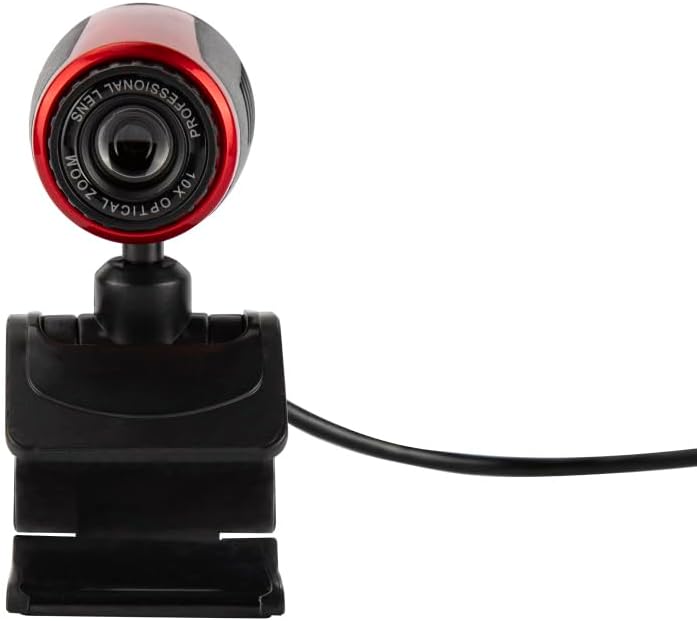
Image 4.1: A close-up front view of the FOREVER Setty Webcam, highlighting the lens and its compact design.
4.2 Integrated Microphone
De webcam includes an integrated microphone for clear and fluid video communications. This allows for natural audio recording, making it suitable for online classes, business meetings, and connecting with family and friends. You can also use the camera with wireless headsets, gaming headsets, or computer speakers.
4.3 360-graders rotation
De webcam's design allows for 360-degree rotation, enabling you to adjust the angle as needed. The stable clip ensures the camera remains in your desired position without damaging your screen.

Billede 4.2: En side view of the FOREVER Setty Webcam, illustrating its adjustable stand and the ability to change the camera's angle.
4.4 Bredt anvendelsesområde
The Setty Webcam is compatible with various operating systems, including Windows (Win10/Vista/Win7), Mac, and Android TV. It provides excellent video quality for popular communication platforms such as Skype, WhatsApp, Facetime, Zoom, Teams, Facebook, YouTube, and Twitch.
5. Vedligeholdelse
For at sikre optimal ydeevne og lang levetid for din webkamera, følg disse vedligeholdelsesretningslinjer:
- Rensning: Gently wipe the lens and body of the webcam with a soft, dry, lint-free cloth. Avoid using harsh chemicals or abrasive materials that could scratch the lens or damage the surface.
- Opbevaring: Når den ikke er i brug, skal du opbevare den webcam på et køligt, tørt sted væk fra direkte sollys og ekstreme temperaturer.
- Kabelpleje: Avoid bending or twisting the USB and audio cables excessively to prevent internal damage.
6. Fejlfinding
If you encounter issues with your FOREVER Setty Webkamera, prøv følgende løsninger:
- WebKamera ikke fundet:
- Sørg for, at USB-kablet er korrekt tilsluttet til begge webkameraet og din computer.
- Prøv at forbinde webkameraet til en anden USB-port på din computer.
- Genstart din computer.
- Check your computer's device manager (Windows) or System Information (Mac) to see if the webkameraet er angivet.
- Intet billede/dårlig billedkvalitet:
- Sørg for, at linsen er ren og fri for støv eller pletter.
- Check the lighting conditions in your environment. Adequate lighting is crucial for good image quality.
- Bekræft, at det er korrekt webcam is selected in your video conferencing application's settings.
- Microphone Not Working/Poor Audio Quality:
- Sørg for, at lydkablet (hvis det bruges) er korrekt tilsluttet.
- Kontrollér din computers lydindstillinger for at sikre, at webcam's microphone is selected as the input device and its volume is not muted.
- Verify the microphone settings within your video conferencing application.
7. Specifikationer
| Feature | Detalje |
|---|---|
| Mærke | FOR ALTID |
| Modelnummer | 5900495902092 |
| Farve | Sort |
| Produktmål (L x B x H) | 3.2 x 3.1 x 3.2 cm |
| Varens vægt | 90 gram |
| Forbindelsesteknologi | USB |
| Effektiv stillopløsning | 16 megapixel |
| Video opløsning | 480p |
| Billedsensorteknologi | CMOS |
| Maksimal brændvidde | 3.5 millimeter |
| Max blænde | 2.8 f |
| Digital Zoom | 3.6 x |
| Fokus Type | Manuel fokus |
| Særlige funktioner | Adjustable, Wireless (Note: 'Wireless' might be a mistranslation or refer to compatibility with wireless headsets, as the primary connection is USB) |
| Kompatible enheder | Laptop, personlig computer, tablet |
8. Garanti og support
For warranty information and technical support, please refer to the documentation provided with your purchase or contact FOREVER customer service. Keep your proof of purchase for any warranty claims.