
Indledning
Thank you for choosing the AFMAT Electric Pencil Sharpener. This manual provides detailed instructions for the safe and efficient operation, maintenance, and troubleshooting of your new sharpener. Please read this manual thoroughly before use and retain it for future reference.

Image: The AFMAT Electric Pencil Sharpener, blue model, designed for various pencil sizes.
Produktegenskaber
- Wide Pencil Compatibility: This electric pencil sharpener is designed to sharpen standard and large size pencils, accommodating diameters from 6mm to 12mm. It is suitable for No.2 pencils, colored pencils, and hard charcoal pencils.
- Fully Automatic Hands-Free Operation: The sharpener features a fully automatic, hands-free operation. Simply insert the pencil, and the device will automatically push it down, sharpen it, and lift it up once the desired point is achieved. This eliminates the need for continuous manual pressure during sharpening.
- Justerbar skarphed: Features a selector to choose between a blunt or sharp pencil point.

Image: A diagram illustrating the hands-free sharpening mechanism, showing the pencil automatically lowering for sharpening and lifting when complete.
Opsætning
Strømindstillinger
The AFMAT Electric Pencil Sharpener offers dual power options:
- Batteristrøm: Insert 4 AA batteries (not included) into the battery compartment located at the bottom of the sharpener. Ensure correct polarity (+/-) as indicated.
- AC-adapter strøm: Connect the provided AC adapter to the sharpener's power port and plug it into a standard electrical outlet.
Do not use both power sources simultaneously. Remove batteries when using the AC adapter for extended periods.

Image: Illustration of the sharpener's dual power options, showing battery insertion and AC adapter connection.
Betjeningsvejledning
Slibning af en blyant
- Select Point Sharpness: Locate the sharpness selector dial on the front of the sharpener. Rotate the dial to choose between a blunt or sharp pencil point according to your preference.
- Indsæt blyant: Gently insert the pencil into the sharpening hole. The sharpener will automatically grip the pencil and begin the sharpening process.
- Automatisk stop: The sharpener will automatically stop and release the pencil once it has reached the selected sharpness. Remove the sharpened pencil.
Note: This sharpener is suitable for pencils with diameters between 6mm and 12mm. Avoid using very soft charcoal pencils, as they may clog the mechanism.

Image: A visual guide demonstrating the two adjustable pencil point options (blunt and sharp) and the selector dial on the sharpener.
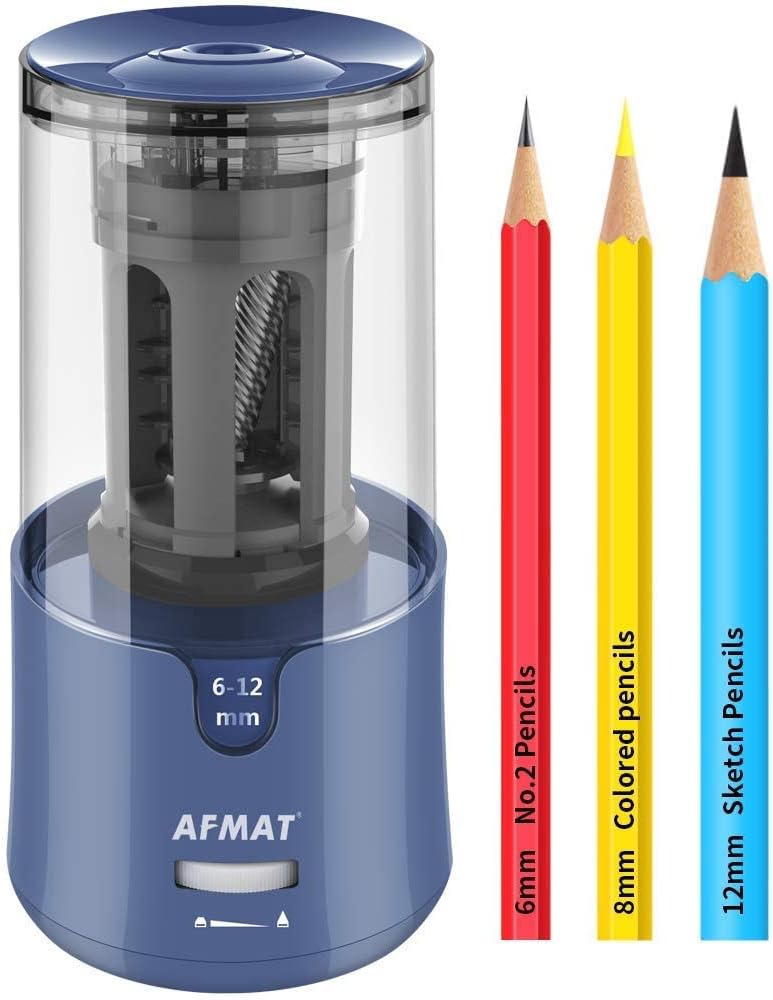
Image: An illustration displaying various pencil types and their diameters (6mm No.2, 8mm Colored, 12mm Sketch) compatible with the AFMAT sharpener.
Opretholdelse
Tømning af spåner
- Ensure the sharpener is powered off and unplugged (if using AC adapter).
- Carefully remove the shaving receptacle by twisting or pulling it off, as indicated by the product design.
- Empty the pencil shavings into a waste bin.
- Clean any residual dust from the receptacle and the sharpener's interior with a soft brush or cloth.
- Reattach the shaving receptacle securely before further use.
Rengøring af bladet
If sharpening performance decreases, the blade may need cleaning. With the power off and receptacle removed, gently use a small brush (e.g., an old toothbrush) to clear any pencil lead or wood debris from the helical blade. Do not use water or harsh chemicals.
Fejlfinding
| Problem | Mulig årsag | Løsning |
|---|---|---|
| Slibemaskinen tænder ikke. | No power, batteries depleted, or AC adapter not connected. | Check battery installation and replace if necessary. Ensure AC adapter is securely plugged in. |
| Pencil not sharpening properly. | Blade clogged with debris, pencil too soft, or pencil diameter outside range. | Clean the blade. Ensure pencil is within 6-12mm diameter. Avoid very soft charcoal pencils. |
| Pencil gets stuck. | Excessive pressure applied, or debris in the sharpening mechanism. | Allow the sharpener to operate automatically without applying force. Clean the sharpening mechanism. |
Specifikationer
- Mærke: AFMAT
- Model: PS93+PSA8
- Materiale: Metal, Plast
- Strømkilde: Electric (4x AA Batteries or AC Adapter)
- Compatible Pencil Diameters: 6 mm - 12 mm
- Specifikke anvendelser: No.2 Pencils, Colored Pencils, Sketch Pencils
Garanti og support
AFMAT products are manufactured with quality and performance in mind. For specific warranty details, please refer to the warranty card included with your purchase or visit the official AFMAT website. For technical support or inquiries, please contact AFMAT customer service through the contact information provided on the product packaging or webwebsted.