
1. Introduktion
The DORHEA Buck Boost Converter is a versatile adjustable voltage regulator designed to convert an input DC voltage (6V-36V) to a stable output DC voltage (0.6V-36V). It features both step-up and step-down capabilities, constant current functionality, and various protection mechanisms, making it suitable for a wide range of applications including power supply, battery charging, and LED driving.
2. Sikkerhedsoplysninger
- Sørg altid for at inputvolumentage is within the specified range (DC 6V-36V). Exceeding this range can damage the device.
- Observe correct polarity when connecting input and output terminals. Reverse polarity protection is included, but incorrect wiring can still lead to issues.
- Do not exceed the maximum output current of 5A or output power of 80W to prevent overheating and damage.
- Ensure proper ventilation, especially when operating at higher power levels, as the device may generate heat.
- Hold enheden væk fra fugt, støv og ekstreme temperaturer.
- Afbryd strømmen, før du foretager ændringer eller justeringer af ledninger.
3. Produktfunktioner
- Wide Input Voltage Område: DC 6V-36V.
- Justerbar udgang Voltage: DC 0.6V-36V, with 0.01V resolution.
- Adjustable Output Current: 0-5A, with 0.001A resolution.
- Maksimal udgangseffekt: 80W.
- Constant Current (CC) Function: Ideal for charging rechargeable batteries (0.6V-36V).
- Multifunktionelt display: Viser input/output lydstyrketage (V), current (A), temperature (T), power (W), electric capacity (AH), electric quantity (WH), and running time.
- Graphical Display: Voltage and current curves interface.
- Skærmen kan tilpasses: Flip/rotate display, change background/parameter colors, switch day/night display mode.
- Hukommelsesfunktion: Saves voltage and current settings after power down.
- Omfattende beskyttelse: Over-voltage protection (OVP), over-current protection (OCP), over-power protection (OPP), low-voltage protection (LVP), over-temperature protection (OTP), reverse protection, and short circuit protection.
4. Specifikationer
| Parameter | Værdi |
|---|---|
| Input bindtagRækkevidde | DC 6.0V-36V |
| Udgang VoltagRækkevidde | DC 0.6V-36V |
| Udgangsstrøm | 0-5.0A |
| Udgangseffekt | 80W (maks.) |
| Indgangsstrømgrænse | 6A (Max) |
| Voltage Opløsning | 0.01V |
| Nuværende opløsning | 0.001A |
| Voltage Præcision | ±0.3% + 1 byte |
| Current Precision | ±0.4% + 3 bytes |
| Kapacitetsmåling | 0-999999AH |
| Energimåling | 0-999999WH |
| Tidsmåling | 0-1000 timer |
| Monteringstype | Portable (Panel Mount Design) |
| Dimensioner (ca.) | 79mm x 43mm x 53mm (L x B x H) |
5. Pakkens indhold
- 2 x DORHEA DC 6.0V-36V to DC 0.6-36V 5A Buck Boost Converter Modules
6. Opsætning
6.1 Fysisk overview

Billede 1: Front view of the DORHEA Buck Boost Converter. This image shows the main display screen, the rotary encoder knob for adjustments, and the ON/OFF button. The display is active, showing output voltage (05.00V), current (0.121A), and power (00.60W).

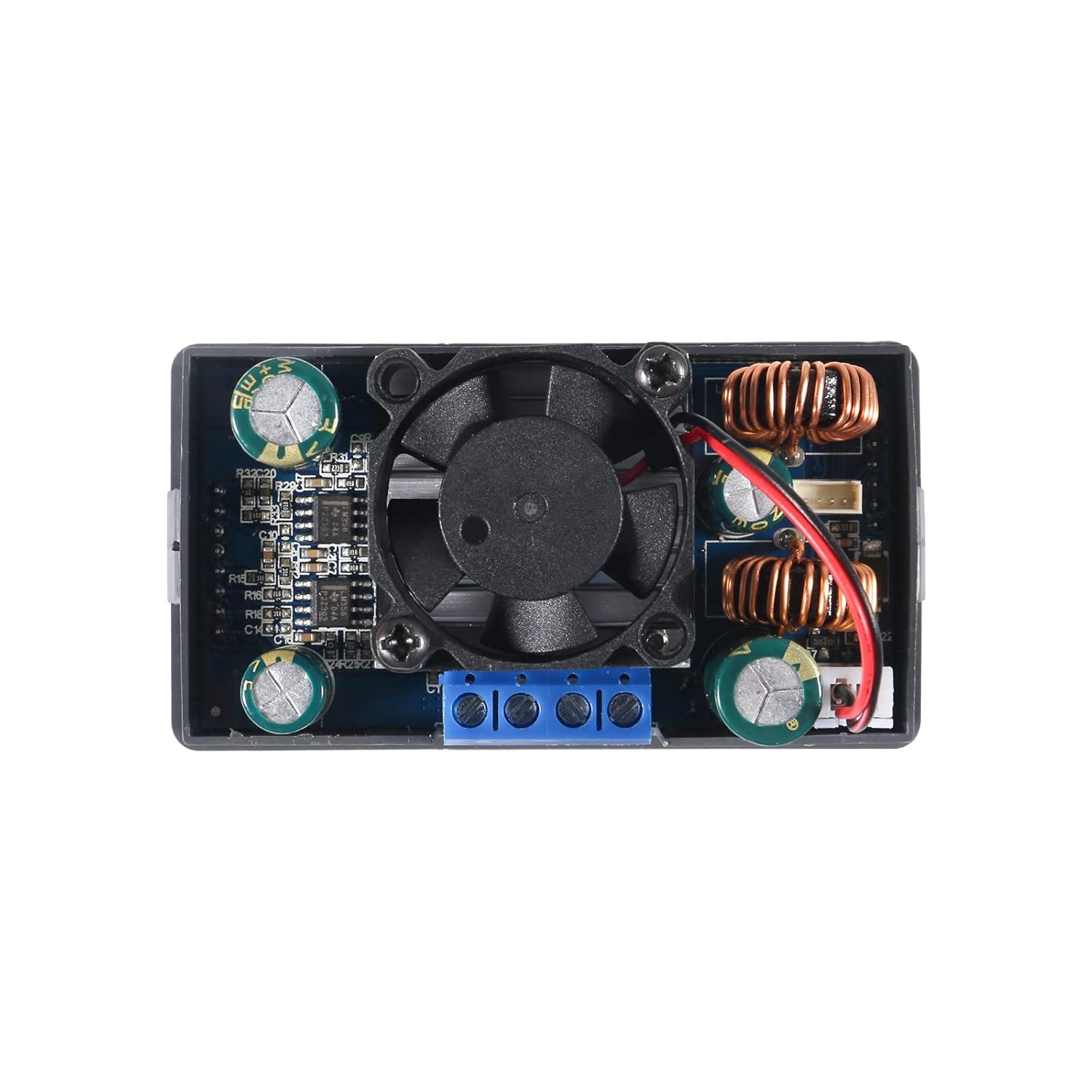
Billede 2: Top-down view of the converter's internal components. This image highlights the cooling fan, inductors, capacitors, and the screw terminals for input and output connections. The fan is centrally located for heat dissipation.
6.2 Dimensioner og montering
Billede 3: Dimensional drawing of the converter. This image provides key measurements for the device, including a length of 79mm (3.11in), width of 43mm (1.69in), and height of 53mm (2.09in). These dimensions are crucial for enclosure design and mounting.
The converter is designed for panel mounting. The cutout dimensions required for installation are approximately 72 mm x 40 mm, med en 12mm x 2.5mm notch centered on each narrow side for securing the unit.
6.3 Ledningsforbindelser
Identify the input and output terminals on the back of the module. These are typically labeled:
- VIN+Positiv indgangsvolumentage
- VIN-Negativ indgangsvolumentage (Ground)
- UD+Positiv udgangsvolumentage
- UD-Negativ udgangsvolumentage (Ground)
Use appropriate gauge wires for your input power source and load. Ensure all connections are secure within the screw terminals. For stranded wires, it is recommended to twist and tin the ends with solder for a more reliable connection.

Billede 4: Bag view of the converter, highlighting the screw terminals. The labels VIN+, VIN-, OUT+, and OUT- are visible, indicating where to connect the input power source and the load.
7. Betjeningsvejledning
7.1 Tænd/sluk
Once wired, apply input power. The unit will typically power on automatically. Use the dedicated ON/OFF button on the front panel to toggle the output power.
7.2 Justering af lydstyrketage og Nuværende
The rotary encoder knob is used to adjust parameters. Press the knob to select a parameter (e.g., voltage or current). Rotate the knob to change the value. You may need to cycle through digit positions to set precise values. Press the knob again to confirm or move to the next digit/parameter.
7.3 Display Pages and Settings
The converter features multiple display pages that can be cycled through to view various operational parameters:
- Input/Output Voltage (V)
- Nuværende (A)
- Temperatur (T)
- Effekt (W)
- Electric Capacity (AH)
- Electric Quantity (WH)
- Køretid
- Voltage and Current Graphs
- Systemparameterindstillinger
Refer to the on-screen menu for navigation and customization options, which may include flipping or rotating the display, changing background and parameter colors, and switching between day and night display modes.
7.4 Constant Current (CC) Function
The constant current function allows the module to maintain a set output current regardless of load changes (within its operational limits). This is particularly useful for charging batteries or driving LEDs that require a stable current. To use this function, set the desired current limit. The module will then regulate the output current to this value.
7.5 Beskyttelsesfunktioner
The module includes several built-in protection features:
- Over-bindtage-beskyttelse (OVP): Slukker for output, hvis lydstyrkentage overstiger en fastsat grænse.
- Overstrømsbeskyttelse (OCP): Begrænser eller lukker ned for udgangen, hvis strømmen overstiger en indstillet grænse.
- Overspændingsbeskyttelse (OPP): Begrænser eller lukker ned for udgangen, hvis strømmen overstiger en indstillet grænse.
- Lav-voltage-beskyttelse (LVP): Slukker for output, hvis inputvolumentage falder under en fastsat tærskel.
- Overtemperaturbeskyttelse (OTP): Shuts down output if the module's temperature becomes too high.
- Omvendt beskyttelse: Protects against damage from incorrect input polarity.
- Kortslutningsbeskyttelse: Protects against damage from output short circuits.
These protections are designed to safeguard both the converter and the connected load. If a protection is triggered, the display will typically indicate the fault.
8. Vedligeholdelse
- Rensning: Keep the module clean and free from dust. Use a soft, dry cloth for cleaning. Avoid using liquids or solvents.
- Heat Sink/Fan: Periodically check the cooling fan for obstructions and ensure it operates freely. Ensure the heat sink is securely attached to the components for effective heat dissipation. If the heat sink or fan circuit board appears loose, it can be secured with a small amount of non-conductive adhesive.
- Terminalforbindelser: Regularly inspect screw terminal connections to ensure they remain tight and secure. Loose connections can lead to intermittent operation or overheating.
9. Fejlfinding
- No Output Voltage:
- Check input power supply and connections.
- Ensure the ON/OFF button has been pressed to enable output.
- Verify that no protection functions (e.g., OVP, OCP, LVP) have been triggered.
- Inaccurate Output Voltage/aktuel:
- Use a calibrated external multimeter to verify the output.
- Ensure the load is not drawing more current than the set limit or the module's maximum capacity.
- If significant discrepancies persist, the unit may require calibration or be faulty.
- Overophedning af modul:
- Reduce the load or ensure it is within the 80W power limit.
- Check for proper ventilation around the module.
- Ensure the cooling fan is operating correctly and not obstructed.
- Intermittent Operation or Display Issues:
- Kontroller alle ledningsforbindelser for løse forbindelser.
- Inspect the internal circuit board, especially the heat sink/fan board, for any loose connections or components. Gently re-seat or secure if necessary (e.g., with a small dab of hot glue on non-critical areas).
10. Garanti og support
For warranty information or technical support, please refer to the product listing on the retailer's website or contact DORHEA directly through their official channels. You can often find support contact information on the brand's store page, such as the DORHEA Store on Amazon.