
X7 Pro
X7 Pro Smart Watch User Manual
Model: X7 Pro | Brand: Generic
Indledning
Thank you for choosing the X7 Pro Smart Watch. This manual provides essential information for setting up, operating, and maintaining your device. The X7 Pro Smart Watch is designed to enhance your daily life with features such as Bluetooth calling, health monitoring, fitness tracking, and smart notifications. It supports both Android and iPhone devices and features a 1.78-inch IPS full touch screen.
Pakkens indhold
Markér venligst feltet for følgende elementer:
- X7 Pro Smart Watch (Black)
- Silicone Band (44mm)
- Trådløst ladekabel
- Brugermanual

Image: The X7 Pro Smart Watch in black, featuring a sleek design and a clear digital display showing the date and time.
Produkt overview
Familiarize yourself with the main components of your X7 Pro Smart Watch:
- 1.78-inch IPS Full Touch Screen: Til interaktiv navigation og visning.
- Roterende krone: Used for navigating menus, zooming, and scrolling.
- Side knap: Typically for power on/off or returning to the home screen.
- Pulsmåler: Located on the back for health tracking.
- Trådløs opladningsplade: On the back for convenient charging.
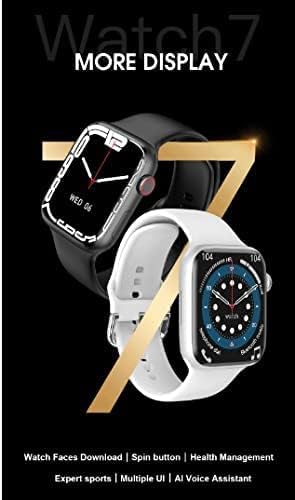
Image: A close-up of the X7 Pro Smart Watch, highlighting the rotating crown on the side, which is used for navigation.
Opsætning
1. Opladning af enheden
Before first use, fully charge your X7 Pro Smart Watch. Place the watch on the wireless charging pad. A built-in magnetic module ensures correct alignment. A full charge takes approximately 2 hours.
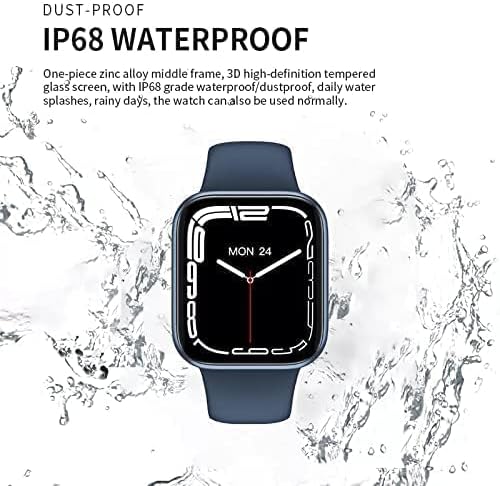
Image: The X7 Pro Smart Watch positioned on its wireless charging base, illustrating the charging process. The image also notes the 200mAh battery and 2-hour charging time.
2. Tænd/sluk
- Tænd: Tryk og hold sideknappen nede, indtil skærmen lyser op.
- Sluk: Tryk og hold sideknappen nede, og vælg derefter "Sluk" på skærmen.
3. Parring med smartphone
- Download Wearfit Pro application from your smartphone's app store (compatible with Android and iPhone).
- Sørg for, at Bluetooth er aktiveret på din smartphone.
- Open the Wearfit Pro app and follow the on-screen instructions to search for and connect to your X7 Pro Smart Watch. The watch uses Bluetooth 5.2 for stable connectivity.
- Bekræft parringsanmodningen på både dit ur og din smartphone.
Betjeningsvejledning
Grundlæggende navigation
- Berøringsskærm: Stryg op, ned, til venstre eller højre for at navigere gennem menuer og notifikationer. Tryk for at vælge elementer.
- Roterende krone: Rotate to scroll through lists, zoom in/out, or change watch faces. Press to return to the home screen or confirm selections.
Bluetooth-opkaldsfunktion
Once paired with your smartphone, you can make and answer calls directly from your X7 Pro Smart Watch. Ensure the Bluetooth call feature is enabled in the Wearfit Pro app.
Meddelelser
Receive notifications for SMS, Facebook, Twitter, Line, WhatsApp, and other applications directly on your watch. Configure notification settings within the Wearfit Pro app.
Health Monitoring & Fitness Tracking
- Pulsmåler: Uret overvåger løbende din puls. View your data in real-time on the watch or in the Wearfit Pro app.
- Fitness Tracker: Track your steps, distance, calories burned, and various sports activities.
Tilpasning af urskiver
The X7 Pro Smart Watch offers a variety of built-in watch faces and allows for custom watch faces. Access the "Dial Market" within the Wearfit Pro app to download more options and personalize your watch's appearance.

Image: A display showcasing various dynamic watch faces available for the X7 Pro Smart Watch, emphasizing personalization options.
PIN Lock Feature
For enhanced security, you can set a PIN lock on your watch. This feature helps keep your data safe and provides peace of mind.
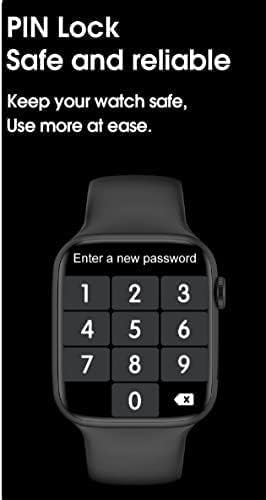
Image: The X7 Pro Smart Watch screen showing the PIN lock interface, prompting the user to enter a new password for security.
Andre funktioner
- Del placering: Utilize location sharing features through the connected app.
- QR Code Support: For quick access to certain functions or information.
- PayPal & Alipay: Support for mobile payment functionalities.
- Wake Up Gesture: Løft dit håndled for at vække skærmen.
- Alarm: Indstil alarmer direkte fra dit ur.
- Stopur: A built-in stopwatch for timing activities.
Opretholdelse
Rengøring af dit ur
Tør uret og remmen regelmæssigt af med en blød kludamp klæde. Undgå at bruge skrappe kemikalier eller slibende materialer.
Vandtæthed (IP68)
The X7 Pro Smart Watch is IP68 waterproof and dustproof. This means it can withstand daily water splashes, rain, and can be used normally in such conditions. Avoid prolonged submersion or hot water exposure.

Image: The X7 Pro Smart Watch shown with water droplets, illustrating its IP68 dustproof and waterproof capabilities, suitable for daily use and splashes.
Batteripleje
To prolong battery life, avoid extreme temperatures and fully discharging the battery frequently. The 200mAh lithium polymer battery provides more than 4 days of typical use.
Fejlfinding
If you encounter issues with your X7 Pro Smart Watch, try the following common solutions:
- Uret tænder ikke: Sørg for, at uret er fuldt opladet.
- Kan ikke parres med telefon: Make sure Bluetooth is enabled on both devices and the Wearfit Pro app is open. Try restarting both the watch and phone.
- Notifikationer vises ikke: Check notification permissions in the Wearfit Pro app and your phone's settings.
- Unøjagtige sundhedsdata: Ensure the watch is worn snugly on your wrist and the sensors are clean.
For persistent issues, refer to the Wearfit Pro app's help section or contact customer support.
Specifikationer
| Feature | Specifikation |
|---|---|
| Modelnummer | X7 Pro |
| Skærmstørrelse | 1.78 inches IPS Full Touch Screen |
| Bluetooth version | 5.2 |
| Batterikapacitet | 200mAh Lithium Polymer |
| Opladningsmetode | Trådløs opladning |
| Remmateriale | Silicone (44MM) |
| Vandmodstand | IP68 støvtæt og vandtæt |
| Operativsystemkompatibilitet | Android, iOS |
| Hukommelseslagringskapacitet | 128 MB |
| Produktdimensioner | 0.43 x 0.38 x 0.13 cm; 190 g |
| Fabrikant | HW |
| Første ledige dato | 1 januar 2022 |
Garanti og support
For warranty information and customer support, please refer to the documentation included with your purchase or contact the retailer. Keep your purchase receipt as proof of purchase.