
Indledning
The MIFA WildBox is a portable Bluetooth speaker designed for robust outdoor and indoor use. It features powerful audio output, dynamic LED lighting, and a durable waterproof and dustproof design. This manual provides essential information for setting up, operating, maintaining, and troubleshooting your MIFA WildBox speaker to ensure optimal performance and longevity.

Figure 1: MIFA WildBox Bluetooth Speaker showcasing its waterproof design and power bank feature.
Hvad er der i æsken
Upon unboxing your MIFA WildBox, please ensure all the following items are present:
- 1 x MIFA WildBox Bluetooth Speaker
- 1 x USB-C opladningskabel
- 1 x User Guide Manual
Funktioner
- Kraftfuld lydudgang: 60W total output with 2x20W RMS woofers and 2x10W RMS tweeters for loud sound and deep bass.
- IP67 vandtæt og støvtæt: Designed to withstand immersion in water up to 1 meter for 30 minutes and fully protected against dust ingress. The speaker is also floatable.
- Dynamiske LED-lys: Features 16 million dynamic LED lights with multiple modes to enhance your listening experience.
- TWS & Partyadd Function: Allows pairing of two MIFA WildBox speakers for true stereo sound, or connecting over 100 MIFA WildBox speakers for a synchronized party experience.
- Alsidig tilslutning: Supports Bluetooth 5.3 for stable wireless connection up to 197ft, Aux input, and Micro SD card slot for various audio sources.
- Indbygget Power Bank: Equipped with a 10000mAh battery that can charge external devices via its USB-A output port.
- Lang spilletid: Op til 24 timers kontinuerlig musikafspilning på en enkelt opladning.
- Bærbart design: Integrated carrying handle for easy transport.

Figur 2: Overview of MIFA WildBox key features.
Opsætning
1. Første opladning
Before first use, fully charge your MIFA WildBox speaker. Connect the provided USB-C cable to the speaker's USB-C input port (labeled 'IN') and the other end to a compatible USB power adapter (not included). The charging indicator will show the charging status. A full charge takes approximately 4 hours.
2. Tænd/sluk
- For at tænde: Tryk og hold på Power-knap (
 ) for 2-3 seconds until you hear an audible prompt and the LED lights activate.
 - For at slukke: Tryk og hold på Power-knap igen i 2-3 sekunder.
3. Bluetooth-parring
- Power on the MIFA WildBox speaker. It will automatically enter Bluetooth pairing mode, indicated by a flashing blue LED.
- Aktiver Bluetooth på din mobilenhed (smartphone, tablet osv.) og søg efter tilgængelige enheder.
- Select "MIFA WildBox" from the list of devices.
- Once successfully paired, the blue LED will remain solid, and you will hear a confirmation tone.
4. TWS (ægte trådløs stereo) parring
To pair two MIFA WildBox speakers for a stereo experience:
- Ensure both MIFA WildBox speakers are powered on and not connected to any Bluetooth device.
- På den ene højttaler skal du trykke på TWS knap (
 Den vil søge efter den anden højttaler.
 - The speakers will automatically connect to each other. Once connected, the main speaker's LED will flash blue (ready to pair with a device), and the secondary speaker's LED will be solid blue.
- Connect your mobile device to the main speaker via Bluetooth as described in step 3. Audio will now play in stereo through both speakers.

Figure 3: Multiple speakers connected via Partyadd for an immersive audio experience.
5. Aux Input & Micro SD Card Usage
The MIFA WildBox supports audio playback via a 3.5mm AUX cable and a Micro SD card.
- Aux input: Connect a 3.5mm audio cable (not included) from your audio source to the AUX-in port on the speaker. The speaker will automatically switch to AUX mode.
- Micro SD-kort: Insert a Micro SD card (up to 32GB, not included) with your music files into the Micro SD card slot. The speaker will automatically switch to Micro SD mode and begin playback.

Figure 4: Connectivity options including Bluetooth, Micro SD, and AUX.
Betjeningsvejledning
1. Knapfunktioner
The control panel on top of the speaker provides easy access to various functions:
- Tænd/sluk-knap (): Tryk og hold for at tænde/slukke.
- Mode-knap (M): Short press to switch between Bluetooth, AUX, and Micro SD card modes.
- Skrue ned for lyden (-): Kort tryk for at reducere lydstyrken.
- Afspil/pause knap (
 ): Short press to play or pause music. Long press for next track.
 - Lydstyrke op (+): Kort tryk for at øge lydstyrken.
- Lysknap (
 ): Short press to cycle through different LED light modes. Long press to turn lights off/on.
 - Bas knap: Press to activate or deactivate the extra bass effect.
- TWS-knap (): Press to initiate TWS or Partyadd pairing.
2. LED-lystilstande
The MIFA WildBox features 6 distinct RGB light modes. Use the Light button to switch between them or turn the lights off completely.
3. Powerbank-funktion
To use the speaker as a power bank:
- Open the rubber flap on the back of the speaker to access the ports.
- Connect your device's charging cable to the USB-A output port (labeled 'OUT') on the MIFA WildBox.
- Opladningen begynder automatisk.

Figure 5: The MIFA WildBox functioning as a power bank.
Opretholdelse
- Waterproof & Dustproof Care: Ensure the rubber flap covering the ports is securely closed before exposing the speaker to water or dust. While IP67 rated, avoid prolonged submersion or exposure to high-pressure water jets.
- Rensning: Brug en blød, damp klud til at rengøre højttalerens yderside. Brug ikke skrappe kemikalier eller slibende rengøringsmidler.
- Opbevaring: Opbevar højttaleren et køligt, tørt sted væk fra direkte sollys og ekstreme temperaturer, når den ikke er i brug i længere perioder.
- Batteripleje: For at forlænge batteriets levetid bør du undgå at aflade højttaleren helt ofte. Oplad den regelmæssigt, selvom den ikke er i konstant brug.

Figure 6: The MIFA WildBox is designed to be waterproof and floatable.
Fejlfinding
| Problem | Mulig årsag | Løsning |
|---|---|---|
| Højttaleren tænder ikke. | Lavt batteri. | Charge the speaker fully (approx. 4 hours). |
| Kan ikke parres via Bluetooth. | Speaker is already connected to another device or out of range. | Ensure the speaker is in pairing mode (flashing blue LED). Disconnect from other devices. Move speaker closer to your device. |
| Ingen lyd fra højttaleren. | Volume too low, incorrect mode, or audio source issue. | Increase speaker and device volume. Check if the correct input mode (Bluetooth, AUX, SD card) is selected. Ensure audio source is playing. |
| TWS-parring mislykkes. | Højttalerne er for langt fra hinanden eller allerede tilsluttet andre enheder. | Ensure both speakers are disconnected from other devices. Place them close to each other during TWS pairing. |
| LED-lys virker ikke. | Lysene er slukket eller i statisk tilstand. | Short press the Light button to cycle modes. Long press to turn lights on/off. |
Specifikationer
| Feature | Detalje |
|---|---|
| Modelnavn | MIFA WildBox |
| Højttaler type | Outdoor / Portable Bluetooth Speaker |
| Højttaler Maksimal udgangseffekt | 60 watt |
| Bashøjttaler diameter | 2.75 Inches (70mm) x 2 |
| Diskant-diameter | 0.79 Inches (20mm) x 2 |
| Passive radiatorer | 85mm x 2 |
| Forbindelsesteknologi | Bluetooth 5.3, Auxiliary (3.5mm), USB (for power bank) |
| Wireless Range | Op til 197 fod (60 meter) |
| Vandmodstandsniveau | IP67 (Vandtæt og støvtæt) |
| Batterikapacitet | 10000 mAh |
| Spilletid | Op til 24 timer |
| Opladningstid | Ca. 4 timer |
| Produktmål (L x B x H) | 12 cm x 7 cm x 5 cm |
| Varens vægt | 4 pund |
| Materiale | Plast |
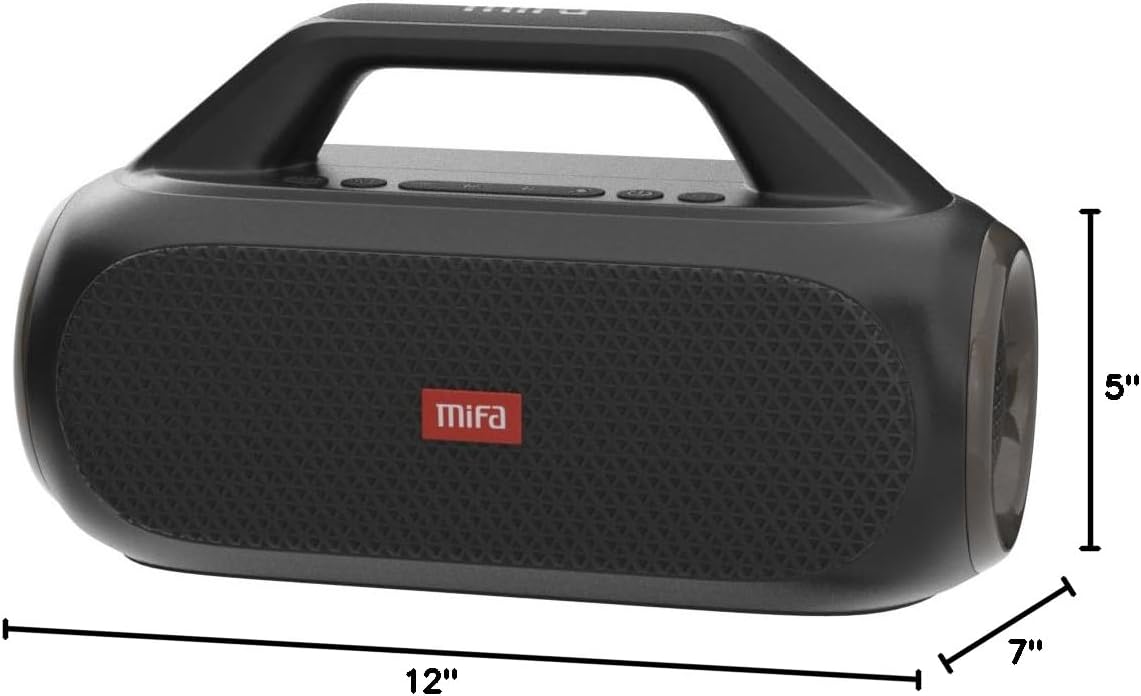
Figure 7: MIFA WildBox dimensions.
Garanti og support
The MIFA WildBox Bluetooth Speaker comes with a limited warranty. For specific details regarding warranty coverage, duration, and terms, please refer to the warranty information provided in the packaging or contact MIFA customer support directly.
For technical assistance, troubleshooting beyond this manual, or warranty claims, please visit the official MIFA website or contact their customer service team. Contact information can typically be found on the product packaging or the MIFA brand store on Amazon.