
1. Produktet er slutview
The OONO D-1437 is a 2-channel power distribution module featuring rocker switch thermal circuit breaker overload protectors. Designed for DIN rail mounting, this module provides protection against overcurrent conditions for electrical circuits. Each channel includes a 10A thermal circuit breaker, allowing manual control of the output state (RESET or OFF) and indicating normal operation with a built-in red light.
2. Nøglefunktioner
- Input bindtage: AC 125V to 250V, 50-60Hz.
- Maximum Total Input Current: 20A (per position terminal block).
- Maksimal udgangsstrøm: 10A per channel.
- Maximum Total Output Current: 20A.
- Afbrydere: Two 10A rocker switch thermal circuit breaker overload protectors.
- Switch funktionalitet: Manual RESET or OFF states with integrated red indicator light for normal output.
- Terminalblokke: Pitch 7.62mm (0.3 inch), suitable for 26AWG to 10AWG (4.0mm square) wires.
- DIN-skinnemontering: High-quality fireproof nylon material carrier, compatible with 35mm, 32mm, and 15mm DIN rails.
- Konstruktion: FR-4 fiberglass dual copper layers PCB.
3. Tekniske specifikationer
| Specifikation | Værdi |
|---|---|
| Mærke | OONO |
| Model | D-1437 |
| Input bindtage | AC 125-250V, 50/60Hz |
| Max total indgangsstrøm | 20A |
| Max Output Current (per channel) | 10A |
| Max Total Output Current | 20A |
| Afbryder type | Thermal, Rocker Switch |
| Antal poler | 2 |
| Monteringstype | DIN-skinneophæng |
| Terminal Block Pitch | 7.62 mm (0.3 tommer) |
| Wire Range | 26AWG to 10AWG (4.0mm²) |
| Striplængde | 8 mm |
| Skruemateriale | M3, Steel, Cr3+ Zn plated |
| Pin Header and Cage Material | Messing |
| PCB-materiale | FR-4 fiberglass dual copper layers |
4. Sikkerhedsoplysninger
ADVARSEL: Electrical shock hazard. Installation and servicing should only be performed by qualified personnel. Always disconnect power at the main circuit breaker or fuse box before installing or servicing this device.
- Sørg for, at al ledningsføring overholder lokale og nationale elektriske forskrifter.
- Overskrid ikke den angivne voltage og aktuelle klassificeringer af enheden.
- Verify proper wire gauge for the current load to prevent overheating.
- Ensure secure connections at all terminal blocks to prevent loose contacts and potential hazards.
- Denne enhed er designet til indendørs brug i tørre omgivelser. Undgå udsættelse for fugt eller ekstreme temperaturer.
5. Opsætning og installation
5.1 DIN-skinnemontering
The OONO D-1437 module is designed for easy installation on standard DIN rails (35mm, 32mm, or 15mm width). To mount, align the module's clips with the DIN rail and press firmly until it snaps into place. To remove, gently pull the release mechanism (if present) or pry the module off the rail.
5.2 Ledningsforbindelser
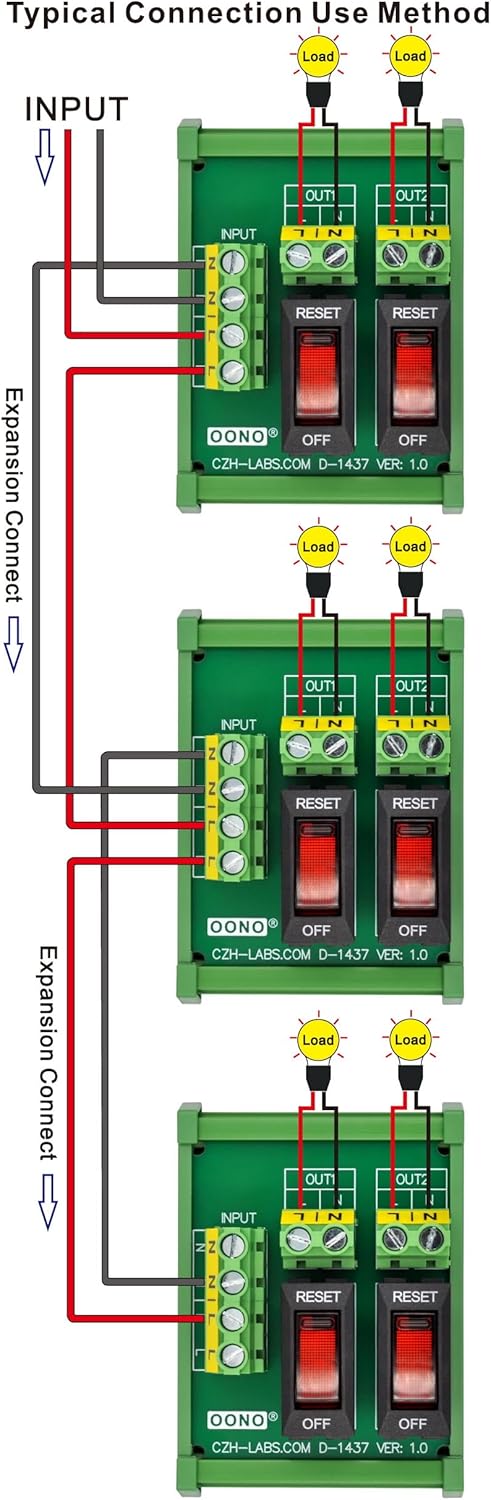
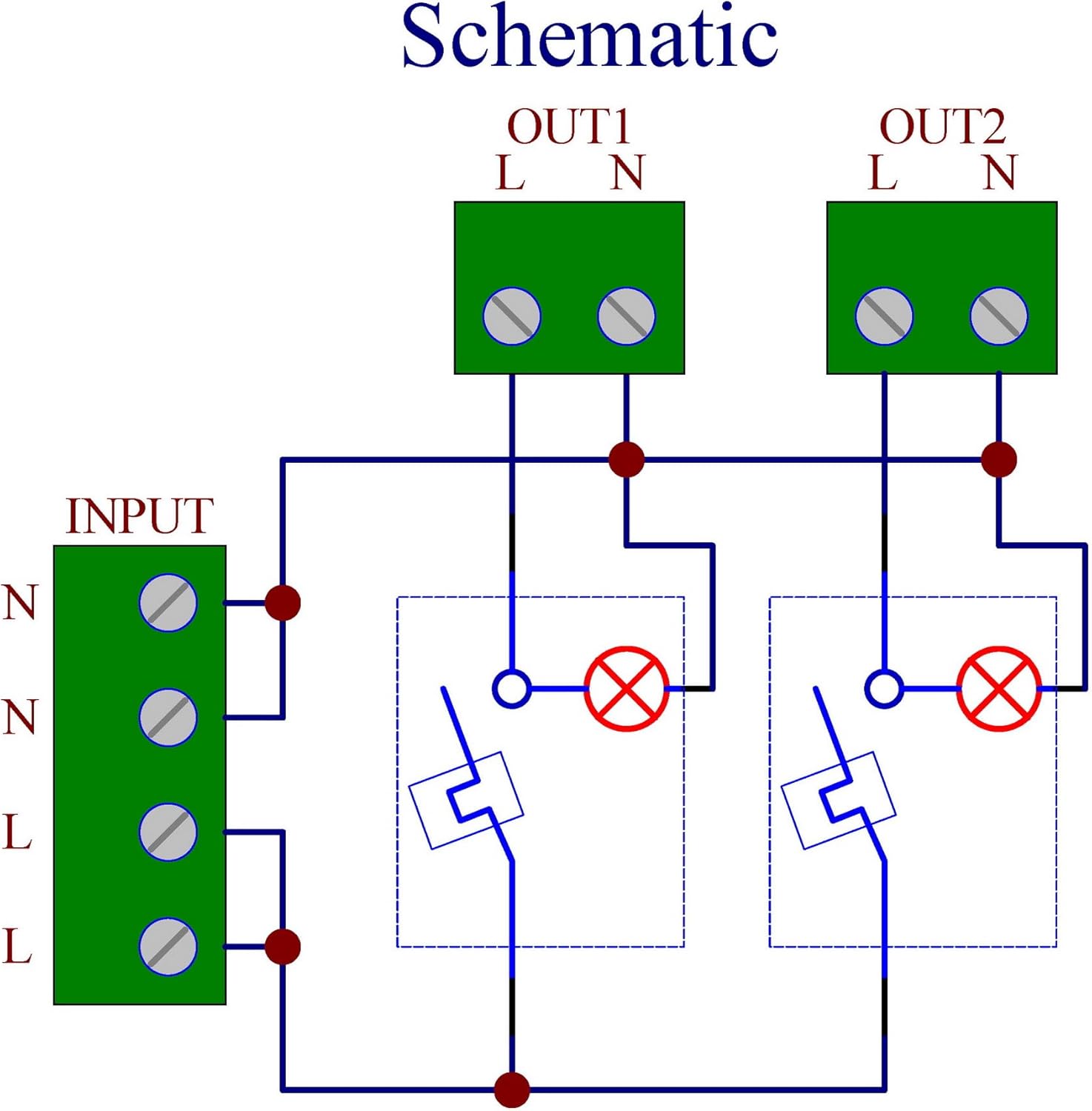
Refer to the schematic and connection diagrams for proper wiring. Ensure power is disconnected before making any connections.
- Indgangsterminaler: Connect the AC 125-250V power supply to the input terminals labeled 'N' (Neutral) and 'L' (Line). The module supports a maximum total input current of 20A.
- Udgangsterminaler: Each channel has 'L' and 'N' output terminals. Connect your load to the corresponding output channel. Each channel supports a maximum output current of 10A. The maximum total output current for the module is 20A.
- Trådspecifikationer: Use wires within the range of 26AWG to 10AWG (4.0mm²). Strip wire insulation approximately 8mm before inserting into the terminal blocks. Tighten M3 screws securely.



5.3 Dimensioner
For precise integration into your electrical panel, refer to the detailed dimensional drawing below.

5.4 Installation overview Video
Watch this video for a visual guide on the product's features and installation process.
6. Betjeningsvejledning
The OONO D-1437 features two independent rocker switches, each controlling one output channel.
- ON/RESET Position: When the rocker switch is pressed to the 'RESET' side, the circuit breaker is closed, allowing power to flow to the connected load. A built-in red indicator light will illuminate when the output is normal.
- OFF position: When the rocker switch is pressed to the 'OFF' side, the circuit breaker is open, disconnecting power to the connected load. The red indicator light will be off.
- Overbelastningsbeskyttelse: In the event of an overcurrent, the thermal circuit breaker will automatically trip, moving the rocker switch to the 'OFF' position and disconnecting the load to prevent damage. To reset after an overload, allow a brief cooling period, then manually press the switch to the 'RESET' position. If the breaker trips repeatedly, investigate the cause of the overload.
7. Vedligeholdelse
The OONO D-1437 is designed for minimal maintenance. However, periodic inspection is recommended to ensure optimal performance and safety.
- Rensning: Ensure the module is free from dust and debris. Use a dry, soft cloth for cleaning. Do not use liquid cleaners or solvents.
- Tilslutningskontrol: Periodically inspect all wire connections to ensure they remain tight and secure. Loose connections can lead to overheating or intermittent operation.
- Visuel inspektion: Check for any signs of physical damage, discoloration, or burning on the module or wiring. Replace the unit immediately if any damage is observed.
8. Fejlfinding
- Ingen strøm til at indlæse:
- Check if the rocker switch is in the 'RESET' position.
- Verify that the input power supply is active.
- Undersøg alle ledningsforbindelser for løse eller beskadigede dele.
- Circuit Breaker Trips Repeatedly:
- This indicates an overcurrent condition. Disconnect the load and check for short circuits or excessive current draw.
- Ensure the connected load does not exceed the 10A rating of the individual channel or the 20A total rating of the module.
- Allow the breaker to cool down before attempting to reset.
- Indikatorlampe ikke tændt:
- The indicator light illuminates when the output is normal and the switch is in the 'RESET' position. If it's off, check the switch position, input power, and load connection.
- If the breaker has tripped, the light will be off.
9. Garanti og support
For warranty information and technical support, please refer to the documentation provided at the time of purchase or contact the manufacturer directly. Keep your purchase receipt as proof of purchase.