
Indledning
Tak for købetasing the Northpoint NP-TL LED Desk Lamp. This modern and versatile desk lamp is designed to provide optimal lighting for your workspace while offering convenient features such as QI wireless charging and an integrated display for time and temperature. Please read this manual carefully before use to ensure proper operation and to maximize the lifespan of your product.
Sikkerhedsinstruktioner
- Ensure the power adapter is compatible with your local power supply before connecting.
- Du må ikke skille, reparere eller ændre l'en.amp dig selv. Kontakt kvalificeret servicepersonale for at få hjælp.
- Undgå at placere lamp i miljøer med høj temperatur, fugtighed eller støv.
- Behold lamp væk fra vand og andre væsker.
- Do not look directly into the LED light source for extended periods to prevent eye strain.
- Tag stikket ud af lamp from the power outlet before cleaning or when not in use for a long time.
- Dette produkt er kun designet til indendørs brug.
Pakkens indhold
Tjek venligst pakken for følgende varer:
- Northpoint NP-TL LED Desk Lamp
- 12V strømadapter
- Brugermanual
Produkt overview
Familiarize yourself with the components of your Northpoint NP-TL LED Desk Lamp.

Billede 1: Forside view of the Northpoint NP-TL LED Desk Lamp, showing the adjustable light head, flexible arm, integrated display, and QI wireless charging base with mood lighting.

Billede 2: Side view of the Northpoint NP-TL LED Desk Lamp, highlighting the flexible arm design and the integrated display on the lamps krop.

Image 3: The Northpoint NP-TL LED Desk Lamp in a typical desk environment, demonstrating its compact size and ambient lighting capabilities.
- Adjustable LED Head: Provides directional lighting.
- Fleksibel arm: Allows for easy positioning of the light.
- Integreret skærm: Shows time, date, and ambient temperature.
- Tryk på Kontrolpanel: For adjusting light settings and display functions.
- QI Wireless Charging Pad: Located on the base for compatible devices.
- Mood Light Base: Provides ambient RGB lighting.
Opsætning
- Pakker ud: Fjern forsigtigt alle komponenter fra emballagen.
- Position: Placer lamp på en stabil, flad overflade.
- Tilslut strøm: Insert the DC plug of the 12V power adapter into the power input port on the back of the lamp base. Plug the adapter into a standard wall outlet.
- Indledende skærmopsætning: Upon first power-on, the display will illuminate. You may need to set the time and date using the touch controls (refer to "Operating Instructions - Display Settings").
Betjeningsvejledning
Lys funktioner
- Tænd/sluk: Tryk på Power-knap (
 ) on the touch control panel to turn the lamp til eller fra.
 - Brightness Adjustment (Dimmable): Mens lamp is on, press and hold the Lysstyrke knap (often represented by a sun icon or +/-) to smoothly adjust the light intensity. Release when the desired brightness is reached.
- Farvetemperaturjustering: Tryk på Mode/Color Temperature button (often represented by a 'M' or color spectrum icon) to cycle through different color temperatures: Warm White, Neutral White, and Cool White.
QI trådløs opladning
- Place your QI-compatible smartphone or device directly onto the wireless charging pad located on the lamp's base.
- Ensure the device is centered on the charging pad for optimal charging.
- A charging indicator (if available on your device) will confirm that charging has begun.
- Remove any metallic objects or thick cases from your device that may interfere with wireless charging.
Integrated Display Settings (Time, Date, Temperature)
The integrated LCD displays time, date, and ambient temperature. Specific buttons for setting these functions are usually located near the display or on the touch panel.
- Indstilling af tid/dato: Look for buttons labeled "SET", "MODE", or similar. Typically, you press "SET" to enter setting mode, then use arrow buttons or +/- to adjust values, and "SET" again to confirm and move to the next setting (e.g., hour, minute, year, month, day).
- Temperaturvisning: Lamp automatically detects and displays the ambient temperature. No manual setting is required for this function.
Stemningsbelysning
- Lamp features an integrated mood light base. Look for a dedicated Mood Light knap (often a color wheel or RGB icon).
- Tap the button to cycle through different static colors or activate a color-changing mode.
- Press and hold the button to turn the mood light off.
Opretholdelse
- Rensning: Afbryd strømmen før rengøring. Brug en blød, tør klud til at tørre l'en af.ampBrug ikke slibende rengøringsmidler, opløsningsmidler eller stærke kemikalier.
- Opbevaring: Hvis du opbevarer lamp i længere tid, skal du tage stikket ud og opbevare den et køligt og tørt sted.
- LED lyskilde: LED-lyskilden er integreret og kan ikke udskiftes af brugeren.
Fejlfinding
| Problem | Mulig årsag | Løsning |
|---|---|---|
| Lamp tændes ikke. | Ingen strømtilslutning. Defekt strømadapter. | Sørg for, at strømadapteren er sat ordentligt i både lamp og stikkontakten. Try a different outlet. If the issue persists, contact customer support. |
| Trådløs opladning virker ikke. | Device not QI-compatible. Enheden er ikke korrekt justeret. Obstruction (e.g., thick case, metallic object). | Verify your device supports QI wireless charging. Reposition your device on the charging pad. Remove any cases or metallic objects. |
| Display shows incorrect time/date. | Time/date not set or reset after power interruption. | Refer to "Operating Instructions - Display Settings" to manually set the time and date. |
| Lyset flimrer eller er ustabilt. | Ustabil strømforsyning. Problem med intern komponent. | Prøv at tilslutte lamp into a different power outlet. If the problem continues, discontinue use and contact customer support. |
Specifikationer
| Mærke | Nordpunkt |
| Modelnummer | NP-TL |
| Produktmål (L x B x H) | 16.6 x 6 x 33.5 cm |
| Materiale | Kunstlæder |
| Finish Type | Leather look |
| Lyskildetype | LED |
| Magt | 18 watt |
| Lysstrøm | 480 lm |
| Color Rendering Index (CRI) | 80.00 |
| Særlige funktioner | Dimmable, QI Wireless Charging, Temperature Display, Mood Lighting |
| Skift stil | Røre |
| IP-vurdering | IP20 |
| Voltage | 12 volt |
| Inkluderede komponenter | QI Charging Station, 12V Power Adapter |

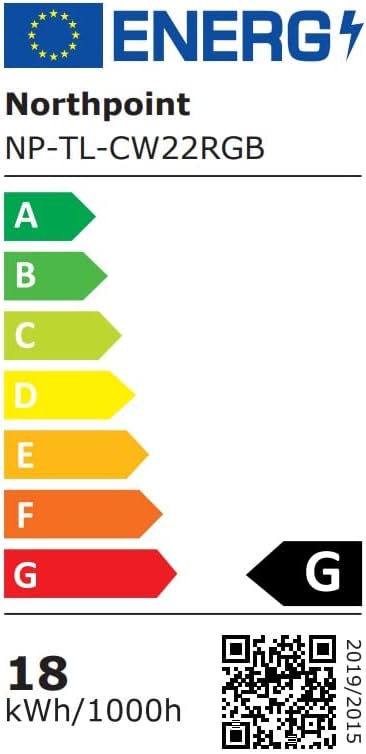
Image 4: Energy efficiency label for the Northpoint NP-TL LED Desk Lamp, indicating energy class G and 18 kWh/1000h consumption.
Garanti og support
Northpoint products are manufactured to high-quality standards. For warranty information or technical support, please refer to the contact details provided with your purchase documentation or visit the official Northpoint webwebsted. Gem venligst din købsbevis i tilfælde af garantikrav.
Note: Information regarding spare parts availability and software updates is not available at the time of printing.