
1. Introduktion
This manual provides detailed instructions for the BoxWave SlimKeys Bluetooth Keyboard with Trackpad, designed for use with the Apple iPhone 13 mini. Please read this manual thoroughly before using the product to ensure proper operation and to maximize its lifespan.
The SlimKeys Bluetooth Keyboard integrates responsive chiclet-style keys and a full-functioning trackpad, transforming your iPhone 13 mini into a portable workstation. Its ultra-thin and lightweight design makes it an ideal travel companion.
2. Pakkens indhold
- BoxWave SlimKeys Bluetooth Keyboard with Trackpad
- USB opladningskabel
- Brugermanual
3. Produktfunktioner
- Integrated Keyboard and Trackpad: Combines a full QWERTY keyboard with a responsive trackpad for enhanced navigation.
- Slankt og let design: At approximately 3/16 inch thick, it is highly portable without compromising key size for comfortable typing.
- Bluetooth-version 3.0: Ensures fast pairing and seamless wireless communication with your device.
- Batteribesparelse: Features an on/off switch to extend battery life when not in use.
- Transportabel: Designed for easy transport in bags or luggage.

Figur 3.1: Top-down view of the SlimKeys Bluetooth Keyboard, showing the full keyboard layout and integrated trackpad.
4. Opsætning
4.1 Opladning af tastaturet
- Find opladningsporten på siden af tastaturet.
- Tilslut den lille ende af det medfølgende USB-opladerkabel til tastaturets opladningsport.
- Tilslut den større ende af USB-kablet til en USB-strømkilde (f.eks. en computers USB-port eller en USB-vægadapter).
- Opladningsindikatorlampen lyser. Når den er fuldt opladet, skifter lampen typisk farve eller slukker.
4.2 Tænd/sluk
- To power on the keyboard, slide the 'ON/OFF' switch, usually located on the side or back, to the 'ON' position. A power indicator light will briefly illuminate.
- To power off the keyboard, slide the 'ON/OFF' switch to the 'OFF' position. This conserves battery life when the keyboard is not in use.
4.3 Bluetooth -parring
Follow these steps to pair your BoxWave SlimKeys Bluetooth Keyboard with your Apple iPhone 13 mini:
- Sørg for, at tastaturet er fuldt opladet og tændt.
- On your iPhone 13 mini, go to Indstillinger > Bluetooth.
- Turn on Bluetooth. Your iPhone will begin searching for nearby Bluetooth devices.
- On the keyboard, press the Bluetooth pairing button (often labeled 'Connect' or with a Bluetooth symbol). The Bluetooth indicator light on the keyboard will start blinking, indicating it is in pairing mode.
- On your iPhone, locate 'BoxWave Keyboard' or a similar name in the list of 'Other Devices' and tap on it.
- If prompted, enter the pairing code displayed on your iPhone screen using the keyboard, then press Enter.
- Once paired, the Bluetooth indicator light on the keyboard will stop blinking and remain solid or turn off, and your iPhone will show the keyboard as 'Connected'.

Figure 4.1: Keyboard with highlighted power switch and Bluetooth pairing button locations.
5. Betjeningsvejledning
5.1 Brug af tastatur
Once paired, the keyboard functions like a standard computer keyboard. Simply open any application on your iPhone that requires text input (e.g., Messages, Notes, Safari) and begin typing. The on-screen keyboard will automatically disappear, allowing you to use the physical keyboard.
5.2 Brug af pegefeltet
The integrated trackpad allows for precise cursor control and navigation on your iPhone 13 mini. Basic gestures include:
- Tryk med en enkelt finger: Functions as a left-click to select items or activate buttons.
- To-finger rulning: Drag two fingers up or down on the trackpad to scroll through content.
- Markørbevægelse: Move a single finger across the trackpad to move the cursor on your iPhone screen.
5.3 Specielle funktionstaster
The keyboard may include function keys (F1-F12) or dedicated media control keys. These keys often require pressing the 'Fn' key simultaneously with the desired function key to activate their secondary functions (e.g., volume control, play/pause, screen lock).
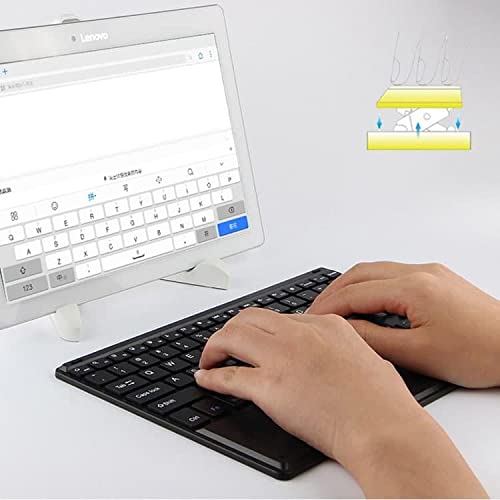
Figure 5.1: User demonstrating typing on the SlimKeys Bluetooth Keyboard.
6. Vedligeholdelse
6.1 Rengøring
- Sørg for, at tastaturet er slukket, inden rengøring.
- Brug en blød, fnugfri klud lidt dampened with water or a mild electronics cleaner to wipe the surface.
- Undgå at bruge skrappe kemikalier, slibende rengøringsmidler eller for meget fugt, da disse kan beskadige tastaturet.
- For dust or debris between keys, use compressed air.
6.2 Pleje af batterier
- To prolong battery life, power off the keyboard when not in use.
- Undgå at aflade batteriet helt ofte. Genoplad det, når indikatoren for lavt batteri vises.
- Opbevar tastaturet et køligt og tørt sted, hvis det ikke bruges i længere perioder.
7. Fejlfinding
If you encounter issues with your BoxWave SlimKeys Bluetooth Keyboard, refer to the following common solutions:
- Tastaturet tænder ikke: Sørg for, at batteriet er opladet. Tilslut opladningskablet, og lad det oplade i mindst 30 minutter, før du forsøger at tænde det igen.
- Tastatur parres ikke:
- Ensure the keyboard is in pairing mode (Bluetooth indicator blinking).
- Make sure Bluetooth is enabled on your iPhone 13 mini.
- Move the keyboard closer to your iPhone.
- Forget the device from your iPhone's Bluetooth settings and attempt to pair again.
- Restart both the keyboard and your iPhone.
- Taster reagerer ikke:
- Check if the keyboard is still connected via Bluetooth.
- Sørg for, at batteriet ikke er kritisk lavt.
- Try reconnecting the keyboard by turning it off and on, or by re-pairing.
- Pegefeltet virker ikke:
- Sørg for, at tastaturet er tilsluttet.
- Check for any settings on your iPhone that might disable external trackpads.
- Rengør overfladen på pegefeltet for at fjerne eventuelt snavs.
8. Specifikationer
| Feature | Specifikation |
|---|---|
| Mærke | BoxWave |
| Modelnummer | bw-1977-29861-11782 |
| Hardware-interface | Bluetooth |
| Bluetooth version | 3.0 |
| Kompatible enheder | Apple iPhone 13 mini, Smartphones, Laptops |
| Tastaturbeskrivelse | Trådløs |
| Særlige funktioner | Portable, Integrated Trackpad |
| Strømkilde | Batteridrevet |
| Dimensioner (ca.) | 257 mm x 172 mm x 5 mm |

Figure 8.1: Dimensions and operating system compatibility of the SlimKeys Bluetooth Keyboard.
9. Garanti og support
9.1 Garantioplysninger
For specific warranty details, please refer to the warranty card included with your product or visit the official BoxWave webwebsted. Gem din købsbevis i tilfælde af garantikrav.
9.2 Kundesupport
If you require further assistance or have questions not covered in this manual, please contact BoxWave customer support through their official webwebstedet eller de kontaktoplysninger, der følger med din købsdokumentation.