
1. Introduktion
The Behringer Octave Divider is a versatile effects pedal designed to generate sub-octave effects for guitar, bass, and synthesizers. This manual provides essential information for the proper setup, operation, and maintenance of your device, ensuring optimal performance and longevity.
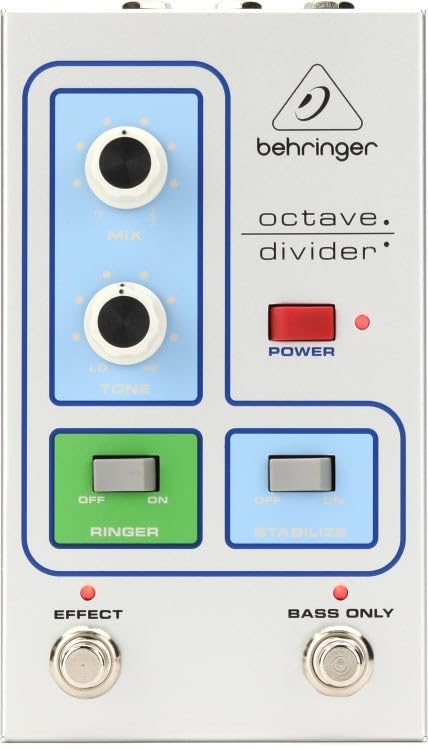
Front view of the Behringer Octave Divider Effects Pedal, showcasing its silver finish and control knobs.
2. Funktioner
- Dedicated Octave Divider effects for guitar, bass, and synthesizers.
- Compact and durable silver chassis.
- Analog signal processing for authentic tone.
- Intuitive knob controls for precise sound shaping.
- Standard 1/4 inch (6.35mm) mono audio jack for input and output.
3. Kontrolelementer og forbindelser
Familiarize yourself with the controls and connections on your Octave Divider pedal:
3.1. Styringer
- LEVEL knap: Justerer effektens samlede udgangsvolumen.
- OCTAVE Knob: Controls the blend or intensity of the sub-octave effect.
- TONE knap: Shapes the tonal characteristics of the octave effect, from dark to bright.
- FODKONTAKT: Aktiverer eller omgår effekten.
3.2. Forbindelser
- INPUT Jack: Connect your instrument (guitar, bass, synth) here using a 1/4 inch mono cable.
- OUTPUT Jack: Forbind dette med din amplifier or the next pedal in your signal chain using a 1/4 inch mono cable.
- 9V DC strømindgang: Connect the included 9V DC power supply here. Ensure polarity is correct.
4. Opsætning
Follow these steps to set up your Behringer Octave Divider pedal:
- Sørg for din ampHøjttaler og andet lydudstyr er slukket.
- Tilslut dit instrument til INPUT jack of the Octave Divider pedal using a standard 1/4 inch instrument cable.
- Tilslut PRODUKTION jack of the Octave Divider pedal to your amplifier's input or the next pedal in your effects chain using another 1/4 inch instrument cable.
- Tilslut den medfølgende 9V DC strømforsyning til 9V DC strømindgang on the pedal. Plug the power supply into a suitable AC outlet.
- Når alle forbindelser er sikre, kan du tænde din amplifter og andet udstyr.
5. Betjening
To operate your Behringer Octave Divider pedal:
- Engagerer effekten: Press the footswitch to toggle the effect on or off. An indicator light will illuminate when the effect is active.
- Justering af niveau: Brug NIVEAU knob to set the desired output volume. Start with a lower setting and increase gradually to avoid sudden volume spikes.
- Controlling Octave: Drej på OKTAV knob to adjust the intensity and blend of the sub-octave effect. Experiment with different settings to find your preferred sound.
- Formende tone: De TONE knob allows you to fine-tune the brightness or darkness of the octave effect.
- Eksperiment: The Octave Divider responds differently to various instruments and playing styles. Experiment with single notes, chords, and different pickup selections to discover its full potential.
6. Vedligeholdelse
Proper care will ensure the longevity of your Octave Divider pedal:
- Rensning: Brug en blød, tør klud til at rengøre pedalens yderside. Undgå slibende rengøringsmidler eller opløsningsmidler.
- Magt: Always use the specified 9V DC power supply. Disconnect the power supply when the pedal is not in use for extended periods.
- Miljø: Protect the pedal from extreme temperatures, humidity, and direct sunlight. Avoid dropping or subjecting the pedal to strong impacts.
- Opbevaring: Store the pedal in a clean, dry place when not in use.
7. Fejlfinding
If you encounter issues with your Octave Divider pedal, refer to the following:
- Ingen lyd:
- Kontroller alle kabelforbindelser (instrument, ampbeføjelse, magt).
- Sørg for, at strømforsyningen er korrekt tilsluttet og fungerer.
- Bekræft at dit instrument og amplifier fungerer korrekt.
- Press the footswitch to ensure the effect is engaged (indicator light on).
- Poor Sound Quality / Unwanted Noise:
- Ensure all cables are in good condition and fully inserted.
- Check for proper grounding in your power outlet.
- Juster NIVEAU og OKTAV knobs to prevent signal clipping.
- Test med en anden strømforsyning, hvis det er muligt.
- Effekt ikke engagerende:
- Confirm the power supply is connected and providing power.
- Press the footswitch firmly.
8. Specifikationer
| Mærke | Behringer |
| Modelnavn | P0EAE |
| Stil | Kompakt |
| Farve | Sølv |
| Varens vægt | 2.2 pund |
| Voltage | 9 volt (DC) |
| Lydudgangseffekter | Modulation, Distortion (Note: Primary function is Octave Division) |
| Kontroltype | Knop |
| Strømkilde | Elektrisk med ledning |
| Signalformat | Analog |
| Emnedimensioner | 9.9 x 6.25 x 3.5 tommer |
| Connector Type | 1/4 inch (6.35mm) mono audio jack |
| Inkluderede komponenter | Strømforsyning |
| UPC | 644216640706 |
9. Garanti og support
For detaljerede garantioplysninger og teknisk support henvises til den officielle Behringer-brochure. webwebstedet eller kontakt din lokale Behringer-distributør. Gem din købskvittering som købsbevis i tilfælde af garantikrav.
Online ressourcer: Besøg www.behringer.com for product registration, manuals, and support.