
1. Introduktion
This manual provides detailed instructions for the RedThunder K84 Mini Gaming Keyboard. Please read this guide thoroughly to ensure proper setup, operation, and maintenance of your keyboard. The K84 is an 84-key, 75% layout wired keyboard designed for gaming and general use, featuring RGB LED lighting and a comfortable ergonomic design.

Image: The RedThunder K84 Mini Gaming Keyboard showcasing its 75% layout, RGB LED backlight, 26-key anti-ghosting, and Type-C detachable cable.
2. Pakkens indhold
- RedThunder K84 Mini Gaming Keyboard
- USB Type-C-kabel
- Brugermanual
3. Opsætningsvejledning
3.1 Tilslutning af tastaturet
- Find USB Type-C-porten på bagsiden af tastaturet.
- Tilslut den ene ende af det medfølgende USB Type-C-kabel til tastaturets port.
- Connect the other end of the USB cable to an available USB port on your computer (PC, Mac), gaming console (PS4, PS5, XBOX), or other compatible device.
- The keyboard is plug-and-play and does not require additional driver installation. It should be recognized automatically by your operating system.

Billede: Et nærbillede view of the USB Type-C port on the keyboard, indicating where to connect the cable.
3.2 Justering af tastaturvinkel
The keyboard features an adjustable stand on the underside to customize the typing angle for improved comfort. Flip out the stands to raise the back of the keyboard.

Billede: Side view of the keyboard with its adjustable stand extended, providing ergonomic comfort support.
4. Betjeningsvejledning
4.1 Grundlæggende tastaturfunktioner
The K84 keyboard operates like a standard 84-key layout keyboard. Simply type as you normally would. The 75% layout retains essential keys like arrow keys and dedicated media keys for convenience.

Image: The 84-key layout of the RedThunder K84 keyboard, demonstrating its compact size while retaining 99% of standard keyboard functions.
4.2 RGB-lysstyring
The K84 keyboard features dynamic RGB backlighting with multiple modes and customization options. Use the following key combinations with the FN tast til at justere belysningen:
- FN + \|: Switch between different RGB breathing modes.
- FN + ]}: Change the light color within a mode.
- FN + [{: Tænd eller sluk for baggrundsbelysningen.
- FN + ↑: Øg baggrundsbelysningens lysstyrke.
- FN + ↓: Reducer baggrundsbelysningens lysstyrke.
- FN + ←: Decrease light speed (for dynamic modes).
- FN + →: Increase light speed (for dynamic modes).

Image: The RedThunder K84 keyboard displaying different RGB lighting effects, with visual cues for switching breathing modes, light colors, and adjusting brightness.
4.3 Funktionstastkombinationer
The K84 keyboard utilizes FN key combinations to access secondary functions printed on the keycaps. For example, FN + F1 ved F12 may control media playback, volume, or other system functions depending on your operating system.
The keyboard features fast membrane keys designed to provide a tactile sensation similar to mechanical keyboards, while maintaining a quiet operation.
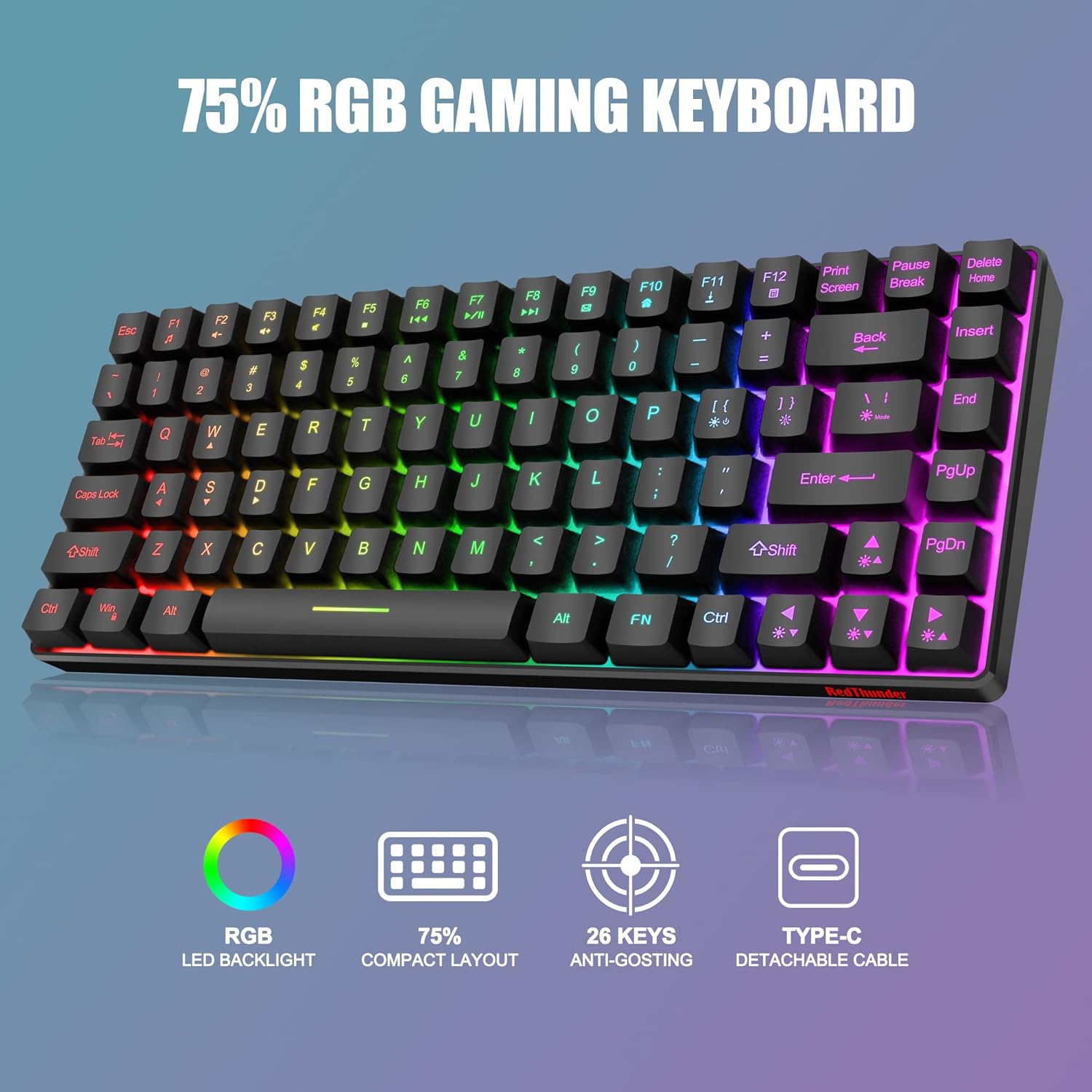
Billede: En top-down view of the RedThunder K84 keyboard, showcasing its full RGB backlighting and compact design.
Video: An official product video demonstrating the features of the RedThunder K84 Wired Keyboard, including its RGB backlighting, function keys, fast membrane keys, adjustable bracket, detachable cable, and non-slip mat. This video highlights the keyboard's design and functionality.
5. Vedligeholdelse
5.1 Rengøring af tastaturet
- Frakobl tastaturet fra din enhed, før du rengør det.
- Brug en blød, fnugfri klud lidt damprengøres med vand eller en mild rengøringsopløsning til at tørre tastaturets overflade af.
- Undgå at bruge skrappe kemikalier, slibende rengøringsmidler eller at sprøjte væsker direkte på tastaturet.
- Brug trykluft til støv og snavs mellem tasterne.
5.2 Generel pleje
- Undgå at udsætte tastaturet for ekstreme temperaturer eller direkte sollys.
- Do not spill liquids on the keyboard. While it has some water resistance, excessive liquid exposure can cause damage.
- Handle the detachable Type-C cable with care to prevent damage to the connector.
6. Fejlfinding
6.1 Tastaturet reagerer ikke
- Sørg for, at USB Type-C-kablet er korrekt tilsluttet til både tastaturet og din enhed.
- Prøv at tilslutte tastaturet til en anden USB-port på din enhed.
- Test the keyboard on another computer or device to determine if the issue is with the keyboard or the original device.
- Genstart din computer eller enhed.
6.2 RGB-belysning fungerer ikke eller er forkert
- Sørg for, at baggrundslyset ikke er slukket (tryk på FN + [{ to toggle).
- Juster lysstyrken ved hjælp af FN + ↑ or FN + ↓.
- Skift mellem lystilstande og farver ved hjælp af FN + \| og FN + ]}.
- Hvis problemet fortsætter, skal du frakoble tastaturet og tilslutte det igen.
6.3 Nøgler registreres ikke eller dobbelttastes
- Rengør den/de berørte nøgle(r) som beskrevet i afsnittet Vedligeholdelse.
- Ensure the keyboard is connected directly to your device and not through a faulty USB hub.
- Hvis problemet fortsætter, skal du kontakte kundesupport.
7. Specifikationer
| Feature | Detalje |
|---|---|
| Modelnummer | K84 |
| Layout | 75% (84-tangenter) |
| Forbindelse | Wired, USB Type-C |
| Baggrundsbelysning | RGB LED |
| Nøgletype | Membran (mekanisk fornemmelse) |
| Anti-Ghosting | 26 nøgler |
| Materiale | Acrylonitril Butadien Styren (ABS) |
| Produktdimensioner | 13.39 x 5.91 x 1.97 tommer |
| Varens vægt | 1.17 pund |
| Kompatibilitet | Windows, PC, Mac, PS4, PS5, XBOX |
8. Garanti og support
RedThunder products are designed for reliability and performance. For warranty information or technical support, please refer to the contact details provided with your purchase or visit the official RedThunder webwebsted. Gem din købsbevis til garantikrav.