
Dalton 2000VA/5-100A UPS
Brugermanual til Dalton 2000VA nødstrømsforsyning
Model: 2000VA/5-100A UPS
1. Introduktion
Thank you for choosing the Dalton 2000VA Uninterruptible Power Supply (UPS). This device is designed to provide reliable power backup and protection for your electronic equipment against power outages, surges, and fluctuations. Please read this manual thoroughly before installation and operation to ensure optimal performance and safety.
2. Vigtige sikkerhedsinstruktioner
Følg altid disse grundlæggende sikkerhedsforanstaltninger for at mindske risikoen for brand, elektrisk stød og personskade:
- Åbn ikke UPS'en casing. Der er ingen dele indeni, som brugeren kan servicere. Overlad service til kvalificeret servicepersonale.
- Do not use the UPS in environments with excessive dust, humidity, or extreme temperatures.
- Sørg for, at UPS'en er tilsluttet en jordet stikkontakt.
- Do not connect non-computer related items like medical equipment, life support equipment, or household appliances to the UPS.
- Position the UPS in a well-ventilated area, away from direct sunlight or heat sources.
- I nødstilfælde skal du trykke på tænd/sluk-knappen for at slukke UPS'en og afbryde den fra vekselstrømskilden.
3. Pakkens indhold
Bekræft at alle varer er til stede i din pakke:
- Dalton 2000VA UPS Unit
- Strømledning
- USB-kommunikationskabel (hvis relevant)
- Brugervejledning (dette dokument)

Figur 3.1: Forside view of the Dalton 2000VA UPS unit, showing the display screen and power button.
4. Opsætning og installation
Follow these steps to set up your UPS:
- Udpakning: Tag forsigtigt UPS'en ud af emballagen. Undersøg den for eventuelle forsendelsesskader.
- Placering: Place the UPS on a flat, stable surface in a cool, dry, and well-ventilated area. Ensure there is adequate space around the unit for airflow.
- Indledende opkrævning: Before connecting any devices, plug the UPS power cord into a grounded wall outlet. Allow the unit to charge for at least 8 hours to ensure the battery is fully charged. The display will indicate charging status.
- Tilslutning af enheder:
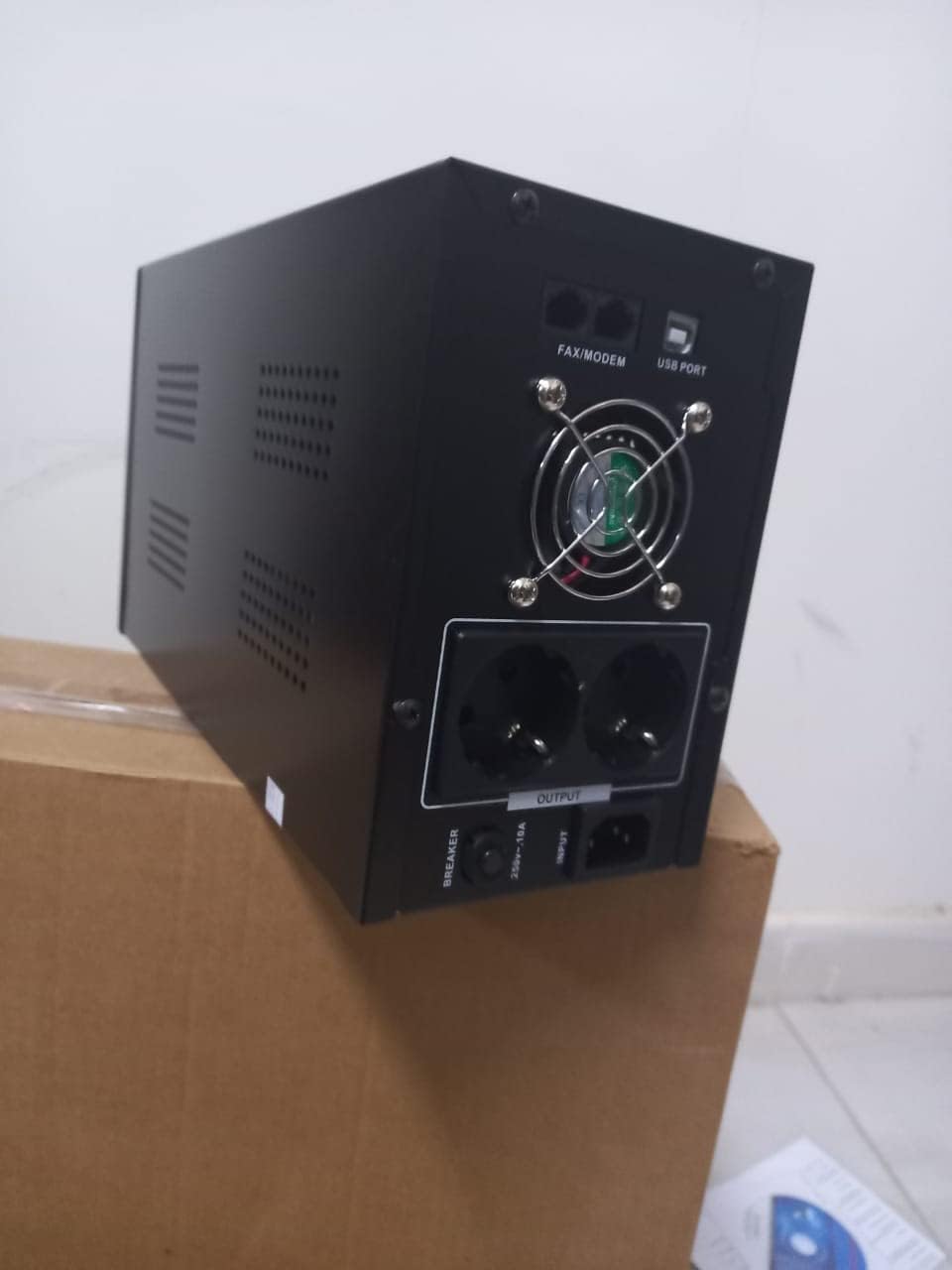
Figur 4.1: Bagside view of the Dalton 2000VA UPS, highlighting the input power port, output sockets, and USB/Modem ports.
- Once the battery is charged, connect your computer, monitor, and other critical electronic devices to the UPS output sockets.
- Do not overload the UPS. Refer to the specifications section for maximum load capacity.
- If applicable, connect the USB communication cable from the UPS to your computer for monitoring software (software not included, check manufacturer's webwebsted).
5. Betjening af UPS'en
5.1 Tænd/sluk
- For at tænde: After connecting to AC power and charging, press and hold the power button on the front panel for approximately 3 seconds until you hear a beep and the display illuminates.
- For at slukke: Press and hold the power button for approximately 3 seconds until you hear a beep and the display turns off. If the UPS is running on battery, it will shut down immediately. If connected to AC, it will switch to bypass mode before shutting down.
5.2 Forstå skærmen
The front panel LCD display provides real-time status information:
- I: Viser input voltage fra elnettet.
- UD: Viser output voltage provided by the UPS to connected devices.
- NORMAL: Angiver, at UPS'en kører på strøm fra elnettet.
- Flagermus: Viser batteriets aktuelle opladningsniveau.
- Indlæs: Angiver procententagaf UPS'ens kapacitet, der bruges af tilsluttede enheder.
- Battery Mode Icon: Appears when the UPS is running on battery power during an outage.

Figur 5.1: Side view of the UPS, showing the illuminated display with power status indicators.
5.3 Batteribackupfunktion
I tilfælde af en magt outage, the UPS will automatically switch to battery power, providing continuous power to your connected devices. The duration of backup power depends on the load connected and the battery's charge level. The UPS will emit an audible alarm during battery operation.
When utility power returns, the UPS will automatically switch back to AC power and begin recharging its battery.
6. Vedligeholdelse
- Batteripleje: To maximize battery life, ensure the UPS is always connected to an AC outlet to keep the battery charged. If the UPS is stored for an extended period, recharge it every three months for at least 8 hours.
- Rensning: Disconnect the UPS from all power sources before cleaning. Use a soft, dry cloth to wipe the exterior. Do not use liquid or aerosol cleaners.
- Ventilation: Regularly check that the ventilation openings are not blocked by dust or debris to prevent overheating.
7. Fejlfinding
Se tabellen nedenfor for almindelige problemer og løsninger på disse:
| Problem | Mulig årsag | Løsning |
|---|---|---|
| UPS'en tænder ikke. | Battery not charged or power cord disconnected. | Ensure power cord is securely plugged in and allow battery to charge for 8 hours. |
| UPS'en bipper kontinuerligt i normal tilstand. | Overbelastningstilstand. | Disconnect non-essential equipment until the alarm stops. Check total load. |
| Kort backuptid. | Battery not fully charged or battery nearing end of life. | Allow UPS to charge for 8 hours. If issue persists, battery may need replacement (contact service center). |
| UPS'en leverer ikke strøm under udgangentage. | Battery discharged or internal fault. | Ensure UPS was fully charged. If problem persists, contact authorized service center. |
8. Tekniske specifikationer
| Feature | Detalje |
|---|---|
| Produktdimensioner | 12.5 x 22.5 x 38 cm |
| Fabrikant | Dalton |
| Mærkenavn | Generisk |
| Farve | Sort |
| Materiale | Metal |
| Strøm | 5 Ampere |
| Formfaktor | Rack |
| Frekvensområde | 50-60 Hz |
| Udgang Voltage | 220 volt |
| Connector Type | AC |
9. Garanti og support
Dalton provides an authorized maintenance center for all Uninterruptible Power Supply units. For warranty claims, technical support, or service inquiries, please contact your local Dalton authorized distributor or service center. Keep your purchase receipt as proof of purchase for warranty validation.
For further assistance, please visit the official Dalton webwebsted eller kontakt kundesupport.
Ask a question about this manual
Ask about setup, troubleshooting, compatibility, parts, safety, or missing instructions. Manuals+ will review the question and use this page’s manual context to help answer it.