
Edifier W280NB
Edifier W280NB Bluetooth Wireless Neckband Earbuds Instruction Manual
Model: W280NB | Brand: Edifier
1. Introduktion
Thank you for choosing the Edifier W280NB Bluetooth Wireless Neckband Earbuds. These earbuds are designed to provide a high-quality audio experience with features like Active Noise Cancellation (ANC), Ambient Sound Monitoring, and AI call noise reduction. Their lightweight, comfortable design and IP55 water resistance make them ideal for various activities, including gym workouts and running.
2. Hvad er der i æsken
- Edifier W280NB Earbuds
- Ladekabel
- Multiple Sizes of Eartips and Ear Wings
3. Produktet er slutview
Familiarize yourself with the components of your Edifier W280NB earbuds:

Figur 3.1: Edifier W280NB Neckband Earbuds. The image shows the black neckband-style earbuds with the control module visible on the right side of the neckband.
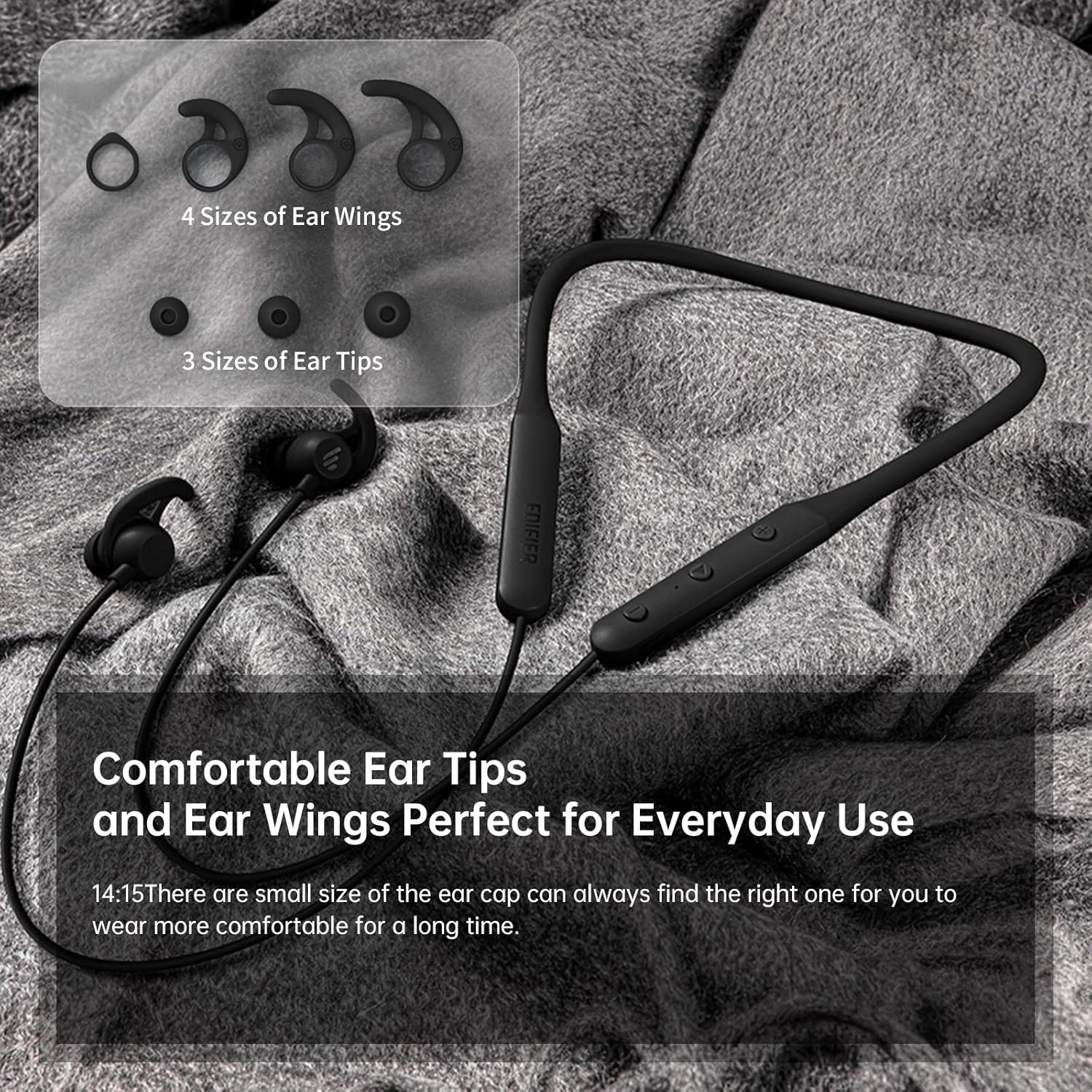
Figur 3.2: Comfortable Ear Tips and Ear Wings. This image displays different sizes of silicone ear tips and ear wings, highlighting the customizable fit for user comfort.
The earbuds feature a flexible neckband for secure wear, with integrated controls for easy access to functions like volume, playback, and call management. The ear tips and ear wings are designed for a comfortable and stable fit during various activities.
4. Opsætning
4.1 Opladning af øretelefonerne
Before first use, fully charge the earbuds. Connect the provided charging cable to the charging port on the neckband and to a USB power source. The indicator light will show charging status. A full charge provides up to 13 hours of playtime (ANC off). For quick use, a 2-minute charge can provide approximately 2 hours of playtime.

Figur 4.1: Fast Charge and Long Playback Time. This image illustrates the battery life with ANC on (11 hours) and ANC off (13 hours), and the quick charge capability (10 minutes charge for 2.5 hours use).
4.2 Bluetooth -parring
- Sørg for, at ørepropperne er opladet og slukket.
- Tryk på tænd/sluk-knappen, og hold den nede, indtil indikatorlampen blinker blåt og rødt, hvilket angiver parringstilstand.
- Aktiver Bluetooth på din enhed (smartphone, tablet, bærbar computer), og søg efter tilgængelige enheder.
- Vælg "Edifier W280NB" fra listen over fundne enheder.
- Når der er forbindelse, lyser indikatorlampen konstant blåt.
5. Betjeningsvejledning
5.1 Styringer
The control module on the neckband allows you to manage various functions:
- Power knap: Tryk og hold nede for at tænde/slukke. Tryk kort for at afspille/sætte musik på pause eller besvare/afslutte opkald.
- Lydstyrke op (+): Kort tryk for at øge lydstyrken. Langt tryk for næste nummer.
- Skrue ned for lyden (-): Kort tryk for at sænke lydstyrken. Langt tryk for forrige nummer.
- Funktionsknap: (Specific button for ANC/Ambient mode, refer to product diagram if available, otherwise assume integrated with power/volume)
5.2 Aktiv støjreduktion (ANC)
The ANC feature reduces ambient noise, providing a more immersive listening experience. Activate or deactivate ANC using the designated control button (often a long press on the power button or a dedicated button).

Figur 5.1: Active Noise Cancellation. A man is shown wearing the earbuds, with text indicating the ANC technology for a quieter experience.
5.3 Ambient Sound Monitoring
This mode allows you to hear your surroundings without removing the earbuds, enhancing safety and awareness. Toggle this mode on/off via the control module.

Figur 5.2: Ambient Sound Mode. A woman is shown wearing the earbuds, with text explaining the real-time sensation of ambient sound monitoring.
5.4 Opkaldsfunktioner
The earbuds support hands-free calling with AI call noise reduction technology, ensuring clear conversations by filtering out ambient noise.
- Besvar/afslut opkald: Tryk kort på tænd/sluk-knappen.
- Afvis opkald: Tryk længe på tænd/sluk-knappen.

Figur 5.3: Call Noise Cancellation. A woman is shown wearing the earbuds, with text describing the AI call noise-cancelling technology for clear calls.
6. Vedligeholdelse
6.1 Rengøring
- Rengør regelmæssigt ørepropperne med en blød, tør klud.
- If necessary, remove the ear tips and wash them with mild soap and water, ensuring they are completely dry before reattaching.
- Wipe the neckband and earbud surfaces with a slightly damp klæde. Undgå at bruge skrappe kemikalier eller slibende materialer.
6.2 Vand- og støvafvisende (IP55)
The Edifier W280NB earbuds are IP55 rated, meaning they are protected against dust ingress and low-pressure water jets from any direction. This makes them suitable for use during workouts and in light rain. However, they are not designed for submersion in water.

Figur 6.1: IP55 Dust and Water Resistance. A man is shown wearing the earbuds, with text highlighting their IP55 protection against dust and water.
6.3 Opbevaring
Store the earbuds in a cool, dry place away from direct sunlight and extreme temperatures. Avoid tangling the neckband to prevent damage.
7. Fejlfinding
| Problem | Mulig årsag | Løsning |
|---|---|---|
| Øretelefoner tænder ikke | Lavt batteri | Oplad ørepropperne helt. |
| Kan ikke parres med enheden | Earbuds not in pairing mode; Bluetooth off on device; too far from device | Ensure earbuds are in pairing mode (flashing blue/red). Turn on Bluetooth on your device. Move earbuds closer to your device (within 10 meters). |
| Ingen lyd eller lav lydstyrke | Volume too low; earbuds not connected; incorrect audio output selected | Increase volume on earbuds and device. Reconnect earbuds. Check your device's audio output settings. |
| Lydkvaliteten er dårlig | Interference; ear tips not sealed properly; dirty earbuds | Move away from sources of interference. Adjust ear tips for a secure fit. Clean ear tips and earbud nozzles. |
8. Specifikationer
| Feature | Detalje |
|---|---|
| Modelnummer | W280NB |
| Forbindelsesteknologi | Trådløs |
| Trådløs kommunikationsteknologi | Bluetooth 5.0 |
| Inkluderede komponenter | Cable, Eartip |
| Materiale | Silikone |
| Specifikke anvendelser af produktet | Sport og motion |
| Anbefalet anvendelse af produktet | Calling, Running |
| Kompatible enheder | Smartphones, tablets, bærbare computere, stationære computere |
| Kontroltype | Mediekontrol |
| Kabelfunktion | Uden kabel |
| Vandmodstandsniveau | Vandtæt (IP55) |
| Frekvensområde | 20Hz - 20KHz |
| Kontrolmetode | Røre |
| Antal genstande | 1 |
| Batterilevetid | 13 timer (ANC slukket) |
| Audio driver type | Dynamisk Driver |
| Bluetooth rækkevidde | 10 meter |
| Ørestykke form | In-Ear |
| Antal USB 2-porte | 1 |
| UPC | 875674006623 |
9. Garanti og support
Edifier products typically come with a limited warranty. Please refer to the warranty card included with your product or visit the official Edifier website for detailed warranty terms and conditions. For technical support, product inquiries, or service requests, please contact Edifier customer service through their official channels.
Ask a question about this manual
Ask about setup, troubleshooting, compatibility, parts, safety, or missing instructions. Manuals+ will review the question and use this page’s manual context to help answer it.