
1. Introduktion
Thank you for choosing the iPega PG-P4008 Wireless Game Controller. This manual provides detailed instructions on how to set up, operate, and maintain your controller. The PG-P4008 offers broad compatibility with PS4, PS3, Android (10.0+), iOS (13.0+), and Windows PC, connecting wirelessly via Bluetooth for an enhanced gaming experience.
2. Produktet er slutview
The iPega PG-P4008 is designed for versatile gaming across multiple platforms. It features a comfortable ergonomic design, responsive controls, and several advanced functionalities to immerse you in your games.
Nøglefunktioner:
- Wireless Bluetooth connectivity (BT2.1+EDR) with up to 8 meters range.
- No driver installation required for connection.
- Integrated colored LED light indicator for operational status.
- Dual motors for realistic vibration feedback during gameplay.
- Built-in three-dimensional acceleration sensor and gyroscope sensor with six-axis induction.
- Integrated speaker and 3.5mm earphone jack for game audio.
- Dual-point capacitive touchpad for enhanced control.
- Compatible with PS4, PS3, Android (10.0+), iOS (13.0+), and Windows PC.
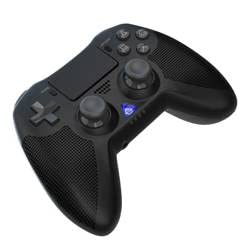
Billede 1: Front view of the iPega PG-P4008 Wireless Game Controller. This image displays the controller's ergonomic design, dual analog sticks, D-pad, action buttons, touchpad, and the central LED indicator.
3. Opsætning og tilslutning
The PG-P4008 controller connects wirelessly via Bluetooth. Follow these steps to pair your controller with your device:
- Tænd: Ensure the controller is charged. Press and hold the PS-knap (or equivalent power button) to turn on the controller.
- Parringstilstand:
- For PS4/PS3: Connect the controller to the console using a USB cable. Once recognized, you can disconnect the cable for wireless play. The connection method is similar to the official P4 controller.
- For Android/iOS: Activate Bluetooth on your mobile device. On the controller, press and hold the SHARE button + PS button simultaneously until the LED indicator flashes rapidly, indicating pairing mode. Select "PG-P4008" (or similar) from your device's Bluetooth list to connect.
- For Windows PC: Ensure your PC has Bluetooth capability. On the controller, press and hold the PS button + OPTIONS button simultaneously until the LED indicator flashes rapidly. On your PC, go to Bluetooth settings, add a new device, and select "PG-P4008" (or similar) to pair.
- Vellykket forbindelse: Once connected, the LED indicator on the controller will change to a solid color, indicating a successful pairing.
Note: No additional driver software is required for operation. The controller supports a stable connection up to 8 meters.
4. Betjeningsvejledning
LED-indikator:
The built-in colored LED light indicates the controller's operational status and player assignment, similar to the official PS4 controller. Different colors will signify different stages or player numbers.
Vibrationsfeedback:
The controller features dual motors embedded in the handles, providing tactile vibration feedback to enhance your gaming immersion. This feedback will vary based on in-game events.
Touchpad:
The dual-point capacitive touchpad allows for intuitive control in games that support touch input, offering an additional layer of interaction.
Lydfunktionalitet:
Connect your 3.5mm earphones to the integrated jack on the controller to experience game audio directly, providing a private and immersive sound experience.
5. Vedligeholdelse
- Keep the controller dry and away from moisture to prevent damage to internal components.
- Rengør controlleren regelmæssigt med en blød, tør klud. Undgå at bruge skrappe kemikalier eller slibende materialer.
- Opbevar controlleren på et køligt, tørt sted, når den ikke er i brug.
- Undgå at udsætte controlleren for ekstreme temperaturer eller direkte sollys.
- Do not attempt to disassemble or modify the controller, as this will void any potential warranty and may cause damage.
6. Fejlfinding
- Controlleren forbinder ikke:
- Sørg for, at controlleren er fuldt opladet.
- Bekræft, at Bluetooth er aktiveret på din enhed.
- Make sure the controller is in the correct pairing mode for your device (refer to Section 3).
- Prøv at genstarte både controlleren og din enhed.
- Fjern tidligere parringer fra din enheds Bluetooth-liste, og prøv at parre igen.
- Inputforsinkelse eller afbrydelse:
- Sørg for, at du er inden for en driftsrækkevidde på 8 meter.
- Minimér interferens fra andre trådløse enheder.
- Check for any physical obstructions between the controller and the device.
- Vibration virker ikke:
- Sørg for, at det spil, du spiller, understøtter vibrationsfeedback.
- Tjek indstillingerne i spillet for at sikre, at vibration er aktiveret.
- Audio not working via 3.5mm jack:
- Ensure your earphones are properly plugged in.
- Check the volume settings on your device and in-game.
- Test with another pair of earphones to rule out earphone issues.
7. Specifikationer
| Modelnummer | PG-P4008 |
| Mærke | iPega |
| Forbindelse | Bluetooth (BT2.1+EDR) |
| Wireless Range | Op til 8 meter |
| Kompatible enheder | PS4, PS3, Android (10.0+), iOS (13.0+), Windows PC |
| Særlige funktioner | Wireless, Touchpad, Vibration, 6-axis Gyroscope, Built-in Speaker, 3.5mm Audio Jack |
| Knap Antal | 17 |
| Strømkilde | Batteridrevet |
8. Garanti og support
Oplysninger om produktgaranti og kundesupport findes ikke i denne manual. Se produktemballagen eller forhandlerens webwebstedet for detaljer om garantidækning og hvordan du kontakter kundesupport for at få hjælp.