
Indledning
Thank you for choosing the Krisons Sound Blaster Tower Speaker. This manual provides essential information for the safe and efficient operation of your speaker system. Please read it thoroughly before use and retain it for future reference.
Produkt overview
The Krisons Sound Blaster Tower Speaker is designed to deliver clear and balanced audio with an 8-inch woofer. It features multiple connectivity options including Bluetooth, USB, AUX, and FM radio, along with an LCD display for mode information. The speaker includes controls for volume, bass, and mode selection.

Figur 1: Forside og side view of the Krisons Sound Blaster Tower Speaker, highlighting the display, USB port, mode button, play/pause, previous/next controls, bass, treble, volume knobs, 4-inch speakers, and 8-inch woofer.
Opsætning
1. Udpakning
Fjern forsigtigt alle komponenter fra emballagen. Sørg for, at følgende dele er til stede:
- 1 x Krisons Sound Blaster Tower Speaker
- 1 x fjernbetjening
- 1 x Brugermanual (dette dokument)
- 1 x garantikort
2. Placering
Position the tower speaker on a flat, stable surface. For optimal sound performance, place the speaker in a location that allows for clear sound dispersion. The compact design allows for flexible placement in various room sizes.
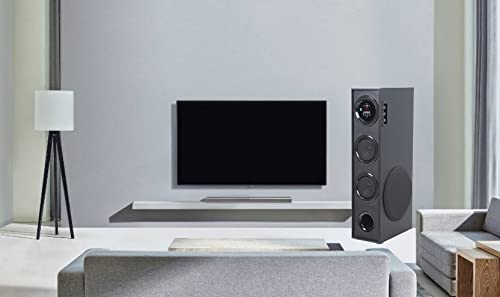
Figur 2: Eksample of speaker placement in a home environment.

Figure 3: Speaker dimensions for placement planning.
3. Strømtilslutning
Connect the speaker's power cable to a standard AC power outlet. Ensure the power switch on the speaker is in the OFF position before connecting to power.
4. Lydforbindelser
The speaker supports multiple audio input methods:
- Bluetooth: Til trådløs forbindelse til smartphones, tablets og andre Bluetooth-aktiverede enheder.
- USB: Til afspilning af lyd files direkte fra et USB-drev.
- AUX-indgang: Til kabelbaseret forbindelse til enheder ved hjælp af et 3.5 mm lydkabel.
- FM-radio: Built-in FM tuner for radio broadcasts.

Figure 4: Available connectivity options.

Figure 5: Connecting to an external device via AUX cable.
Betjeningsvejledning
1. Tænd/sluk
Locate the power switch on the rear panel of the speaker. Flip the switch to the "ON" position to power on the speaker. The LCD display will illuminate. Flip to "OFF" to power down.
2. Kontrolmetoder
The speaker can be controlled using the physical buttons and knobs on the side panel or via the included remote control.
- Kontrolpanel på sidepanelet: Includes buttons for mode change, play/pause, previous/next track, and knobs for volume and bass adjustment.
- Fjernbetjening: Provides full functionality for convenient operation from a distance.
3. Valg af tilstand
Press the "MODE" button on the speaker's control panel or the remote control to cycle through available input modes: Bluetooth, USB, AUX, and FM Radio. The selected mode will be indicated on the LCD display.
4. Bluetooth-betjening
- Switch the speaker to Bluetooth mode. The LCD display will show "BT" or a similar indicator, and the speaker will enter pairing mode.
- Aktiver Bluetooth på din enhed (smartphone, tablet) og søg efter tilgængelige enheder.
- Select "Krisons Sound Blaster" (or similar name) from the list of devices.
- Once paired, the speaker will confirm the connection, and you can play audio from your device.
5. USB-afspilning
- Indsæt et USB-drev, der indeholder MP3-lyd files i USB-porten på højttaleren.
- Skift højttaleren til USB-tilstand. Højttaleren vil automatisk registrere og begynde at afspille lyd. files fra USB-drevet.
- Use the previous/next buttons to navigate tracks and the play/pause button to control playback.
6. AUX-indgangstilslutning
- Connect one end of a 3.5mm audio cable to the AUX-in port on the speaker.
- Connect the other end of the 3.5mm audio cable to the audio output jack of your external device (e.g., TV, computer, MP3 player).
- Switch the speaker to AUX mode. Audio from your connected device will now play through the speaker.
7. FM Radio
- Skift højttaleren til FM-radiotilstand.
- The speaker will automatically scan and store available FM stations.
- Use the previous/next buttons to cycle through the stored stations.
8. Justering af lydstyrke og tone
Use the "Volume" knob to adjust the overall sound level. Use the "Bass" knob to increase or decrease the low-frequency output. The speaker is designed to provide a balanced sound across treble, midrange, and bass frequencies.
Opretholdelse
To ensure the longevity and optimal performance of your Krisons Sound Blaster Tower Speaker, follow these maintenance guidelines:
- Rensning: Use a soft, dry cloth to wipe the exterior surfaces of the speaker. Do not use abrasive cleaners, waxes, or solvents, as these can damage the finish.
- Støv: Regularly dust the speaker grilles and vents to prevent accumulation, which can affect sound quality and internal components.
- Væskeeksponering: Keep the speaker away from water and other liquids. Do not place liquid-filled containers on or near the speaker.
- Opbevaring: If storing the speaker for an extended period, disconnect it from power and store it in a cool, dry place, away from direct sunlight and extreme temperatures.
Fejlfinding
Hvis du støder på problemer med din højttaler, kan du se følgende almindelige problemer og løsninger:
| Problem | Mulig løsning |
|---|---|
| Ingen strøm |
|
| Ingen lyd |
|
| Bluetooth forbinder ikke |
|
| Fjernbetjening virker ikke |
|
| Sound during power on/off | A brief sound or pop during power on/off is normal for this type of audio equipment and does not indicate a malfunction. |
Specifikationer
| Feature | Detalje |
|---|---|
| Mærke | Krisons |
| Modelnavn | Sound Blaster |
| Højttaler Maksimal udgangseffekt | 80 watt |
| Forbindelsesteknologi | Auxiliary, Bluetooth, USB, Wireless |
| Lydudgangstilstand | Omgive |
| Monteringstype | Floor Standing |
| Indkapslingsmateriale | Krystal |
| Højttaler type | Subwoofer/Bookshelf/Woofer/Tower |
| Farve | Sort |
| Kontrolmetode | Berøring, fjernbetjening |
| Woofer Driver Diameter | 8 tommer |
| Tweeter Driver Diameter | 1 tommer |
| Samlede USB 2.0-porte | 1 |
| Antal lydkanaler | 2.1 |
| Varedimensioner (D x B x H) | 39D x 24B x 57H Centimeter |
| Varens vægt | 8900 gram |
| Kompatible enheder | Smartphone, tablet |
| Strømkilde | AC |
Garantioplysninger
This Krisons Sound Blaster Tower Speaker comes with a 6 måneders garanti on manufacturing defects. Please refer to the included Warranty Card for detailed terms and conditions. Retain your purchase receipt as proof of purchase for warranty claims.
Kundesupport
For any questions, assistance, or support regarding your Krisons Sound Blaster Tower Speaker, please contact Krisons Customer Care:

Figure 6: Krisons Customer Support contact details.
- E-mail: service@krisons.com
- Telefon: +91-8287124581 / +91-9910016757
- Driftstider: 10 til 6
- Fabrikant: Krisons Electronic Systems Limited, ZYTEL ENTERPRISES PVT


