
FOREVER SB-315
FOREVER SB-315 Fitband Smartwatch Brugermanual
Model: SB-315
1. Introduktion
The FOREVER SB-315 Fitband Smartwatch is a versatile activity tracker designed to help you monitor your fitness and stay connected. Featuring a heart rate sensor, step counter, distance tracker, and sleep monitor, it provides comprehensive insights into your daily activity. Its discreet and lightweight design, coupled with a long-lasting battery, ensures maximum comfort and convenience.
This manual provides detailed instructions on how to set up, operate, and maintain your SB-315 smartwatch to ensure optimal performance and longevity.

Figur 1.1: Forside view of the FOREVER SB-315 Fitband Smartwatch.
2. Opsætning
2.1 Udpakning og første opkrævning
Carefully remove all components from the packaging. The box should contain the SB-315 smartwatch and its charging cable. Before first use, fully charge the device.
- Connect the charging cable to the charging contacts on the back of the smartwatch.
- Sæt USB-enden af kablet i en standard USB-strømadapter (medfølger ikke) eller en computers USB-port.
- The watch display will indicate charging status. A full charge typically takes 2-3 hours.
- The 155 mAh battery provides up to 10 days of standby time on a single charge.

Figure 2.1: The SB-315 Smartwatch and its retail packaging.
2.2 Appinstallation og parring
To unlock the full potential of your SB-315 smartwatch, you need to install the companion application on your smartphone and pair the devices via Bluetooth.
- Download appen: Søg efter the "Forever Smart" or "Forever Fit" app (refer to the packaging or quick start guide for the exact app name) on the Apple App Store (for iOS 10.0 and above) or Google Play Store (for Android 5.0 and above).
- Aktiver Bluetooth: Sørg for, at Bluetooth er aktiveret på din smartphone.
- Åbn appen: Launch the installed application on your smartphone.
- Par enheden: Follow the in-app instructions to add a new device. Select "SB-315" from the list of available devices. The app will guide you through the pairing process.
- Giv tilladelser: Allow necessary permissions (e.g., notifications, location, health data) for the app to function correctly.
Når parringen er gennemført, synkroniserer uret tid og data med din smartphone.
3. Betjening af dit smartwatch
3.1 Grundlæggende navigation
The SB-315 features a bright 0.96-inch (or 1.3-inch, depending on specific model variant) display. Navigate through menus by swiping across the screen and tapping to select options.
- Stryg op/ned: Scroll through different functions and menus.
- Stryg til venstre/højre: Access quick views like daily activity, heart rate, or notifications.
- Tryk på: Select an option or enter a sub-menu.
- Press Side Button (if applicable): Gå tilbage til startskærmen eller tænd/sluk.
3.2 Kernefunktioner
The SB-315 is equipped with several features to help you monitor your health and fitness.
- Heart Rate Monitoring: Den integrerede pulsmåler overvåger kontinuerligt din puls. View realtidsdata på uret eller detaljerede trends i appen.
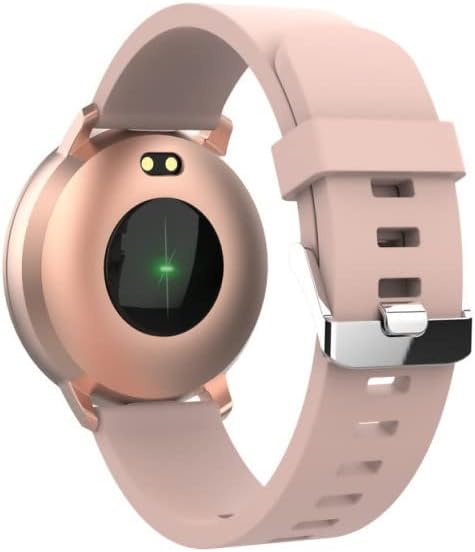
Figur 3.1: Bagside view of the SB-315, highlighting the heart rate sensor.
- Aktivitetssporing: Tracks steps taken, distance covered, and calories burned throughout the day.
- Søvnovervågning: Automatically monitors your sleep patterns, including deep sleep, light sleep, and awake times. Access detailed sleep analysis in the companion app.
- Sportstilstande: Select from various sports modes such as running, cycling, climbing, and walking to track specific workout data.
- Påmindelse om hydrering: Set reminders to ensure you drink enough water throughout the day.
3.3 Smarte funktioner
- Meddelelser: Receive instant notifications for incoming calls, SMS messages, and alerts from social media applications directly on your wrist.
- Fjernbetjening til kamera: Brug dit smartwatch som fjernbetjent udløser til din smartphones kamera.
- Musik kontrol: Styr musikafspilning på din smartphone (afspil, pause, spring numre over) direkte fra uret.
- Tilpasning af urskive: Personalize your watch by choosing from various watch faces available through the companion app.
- Vækkeur: Set silent vibrating alarms to wake you up or remind you of important events.
4. Vedligeholdelse
4.1 Rengøring og pleje
To ensure the longevity and proper functioning of your SB-315 smartwatch, follow these cleaning and care guidelines:
- Rensning: Tør regelmæssigt urets skærm og rem af med en blød klud.amp, lint-free cloth. Avoid using harsh chemicals, abrasive cleaners, or solvents.
- Tørring: Ensure the watch is completely dry before charging or wearing, especially after exposure to water.
- Vedligeholdelse af rem: If the strap is removable, clean it separately. Allow it to air dry completely before reattaching.
4.2 Vandtæthed (IP67)
The SB-315 smartwatch is rated IP67, meaning it is protected from dust and can withstand immersion in water up to 1 meter for up to 30 minutes. While it is water-resistant, it is not waterproof for prolonged submersion or high-pressure water activities.
- Do not wear the watch while showering with hot water, in saunas, or steam rooms.
- Undgå at trykke på knapper under vandet.
- If the watch gets wet, wipe it dry thoroughly before charging.
4.3 Pleje af batterier
For at maksimere batterilevetid og ydeevne:
- Oplad uret helt inden første brug.
- Undgå at aflade batteriet helt ofte.
- Opbevar uret et køligt og tørt sted, når det ikke er i brug i længere perioder.
- Brug kun det medfølgende ladekabel.
5. Fejlfinding
If you encounter issues with your SB-315 smartwatch, refer to the following common problems and solutions:
| Problem | Mulig årsag | Løsning |
|---|---|---|
| Uret tænder ikke | Lavt batteri; enheden er frosset | Charge the watch for at least 30 minutes. If still unresponsive, try a soft reset (refer to app or manufacturer's webwebsted for specifikke instruktioner). |
| Kan ikke parres med smartphone | Bluetooth off; app not running; watch not discoverable; interference | Ensure Bluetooth is on for both devices. Restart both the watch and phone. Make sure the app is open and searching. Forget previous pairings on phone. |
| Notifikationer ikke modtaget | App permissions not granted; notification settings off; app not running in background | Check app permissions in phone settings. Verify notification settings within the companion app. Ensure the app is running in the background. |
| Inaccurate heart rate/step count | Improper fit; sensor obstruction; software glitch | Ensure the watch is worn snugly on the wrist, about one finger's width above the wrist bone. Clean the sensor on the back of the watch. Restart the watch. |
| Kort batterilevetid | Frequent use of features; high brightness; constant notifications | Reduce screen brightness. Limit continuous heart rate monitoring. Turn off unnecessary notifications. Ensure background app refresh is optimized. |
If the problem persists, please contact FOREVER customer support for further assistance.
6. Specifikationer
Key technical specifications for the FOREVER SB-315 Fitband Smartwatch:
| Feature | Detalje |
|---|---|
| Modelnavn | SB-315 |
| Mærke | FOR ALTID |
| Farve | Lyserød |
| Forbindelsesteknologi | Bluetooth 5.0 |
| Skærmstørrelse | 0.96" (or 1.3", depending on specific model variant) - 240 x 240 pixels |
| Batterikapacitet | 155 mAh Lithium-polymer |
| Max standbytid | Op til 10 dage |
| Vandmodstandsvurdering | IP67 |
| Kompatible enheder | Smartphones (iOS ≥ 10.0, Android ≥ 5.0) |
| Særlige funktioner | Heart Rate Monitor, Sleep Monitor, Notification, Alarm Clock, Activity Tracker, Remote Camera/Music Control |
| Nettovægt | 57 g |
7. Garanti og support
For warranty information, please refer to the warranty card included in your product packaging or contact your point of purchase. Warranty terms and conditions may vary by region and retailer.
For technical support, troubleshooting assistance beyond this manual, or inquiries about spare parts, please visit the official FOREVER webwebstedet eller kontakt deres kundeserviceafdeling. Kontaktoplysninger findes typisk på producentens webwebsted eller produktemballage.
Manufacturer: TelForceOne
Relaterede dokumenterSB-315


Ask a question about this manual
Ask about setup, troubleshooting, compatibility, parts, safety, or missing instructions. Manuals+ will review the question and use this page’s manual context to help answer it.