
Indledning
This manual provides detailed instructions for the installation, operation, and maintenance of your Soundstream VRCPAA-7DR 7-inch Double DIN Touchscreen Car Stereo. Please read this manual thoroughly before using the product to ensure proper function and to prevent damage. Keep this manual for future reference.
Vigtige sikkerhedsoplysninger
- Professionel installation anbefales: Installation of this product requires technical expertise. It is highly recommended to have it installed by a qualified professional.
- Strømkilde: Tilslut kun enheden til en 12V DC strømforsyning med negativ jord.
- Ledningsføring: Ensure all wiring is correctly connected according to the wiring diagram to prevent short circuits or damage. Insulate all exposed wires.
- Kørselssikkerhed: Do not operate the unit's functions that may distract you from driving. Always prioritize road safety.
- Temperatur: Undgå at udsætte enheden for ekstreme temperaturer eller direkte sollys i længere perioder.
- Fugtighed: Keep the unit away from moisture and water to prevent electrical hazards.
- Ventilation: Sørg for tilstrækkelig ventilation omkring enheden for at forhindre overophedning.
Pakkens indhold
Kontroller, at alle dele er til stede i pakken før installation:
- Soundstream VRCPAA-7DR Head Unit
- Ledningssæt
- Monteringsbeslag
- GPS-antenne (hvis relevant)
- Fjernbetjening
- Brugervejledning (dette dokument)

Image: Contents of the Soundstream VRCPAA-7DR package, showing the head unit, various wiring harnesses, mounting hardware, and the instruction manual.
Opsætning og installation
Ledningsforbindelser
Refer to the wiring diagram provided with your unit for specific connections. Ensure all connections are secure and properly insulated. Incorrect wiring can cause damage to the unit or your vehicle's electrical system.
- Strøm (Gul): Tilslut til konstant 12V strøm.
- Tilbehør (rød): Tilsluttes til en tændingskontakt på 12 V.
- Jord (sort): Tilslut til køretøjets chassis jord.
- Højttalerudgange: Tilslut til bilens højttalere (sørg for korrekt polaritet).
- Reverse Camera Input (Brown/Purple): Connect to the reverse light trigger for automatic camera display.
- Ratbetjening (SWC): Connect to your vehicle's SWC wires. An external adapter may be required for some vehicles.
- RCA udgange: Til ekstern amphøjttalere (foran, bag, subwoofer).
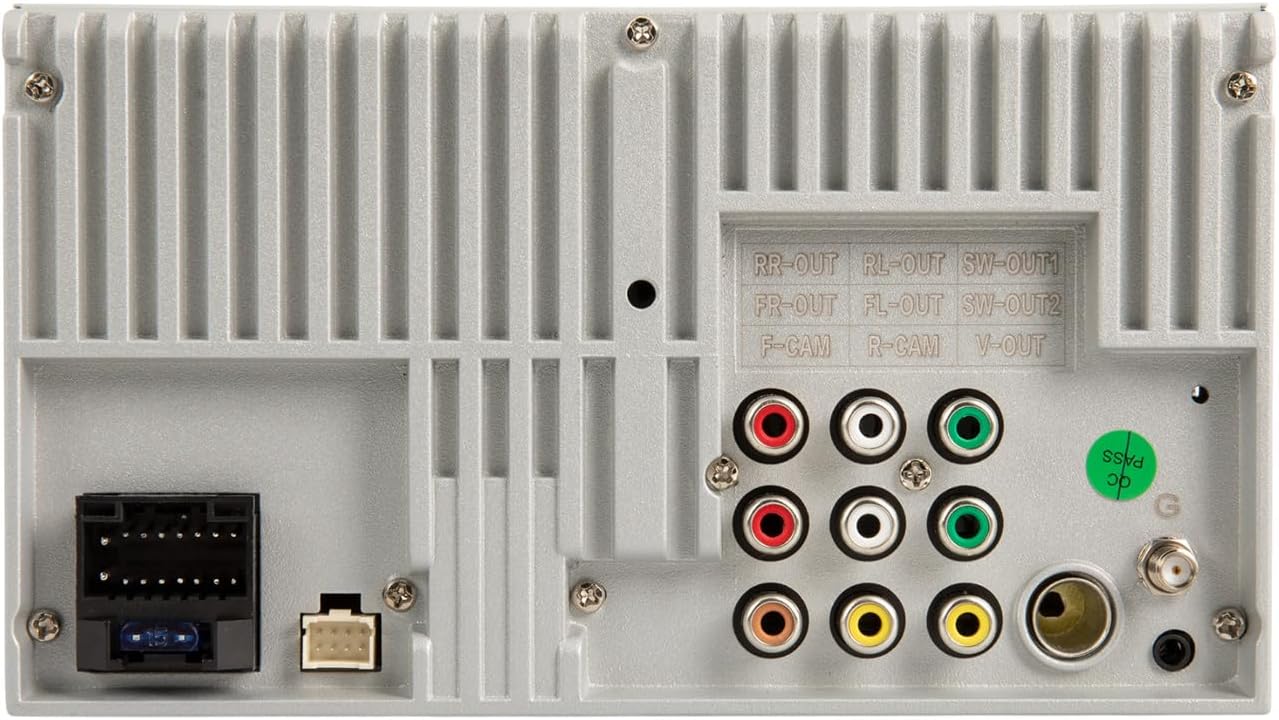
Image: Rear panel of the VRCPAA-7DR unit, highlighting RCA outputs for front, rear, and subwoofer, along with camera inputs and main power/speaker harness connections.
Fysisk installation
- Remove the existing car stereo from your vehicle's dashboard.
- Mount the VRCPAA-7DR unit into the double DIN opening using the provided mounting brackets.
- Connect all necessary wiring harnesses, including power, ground, speakers, and any auxiliary inputs/outputs.
- Fastgør enheden på plads.
- Test alle funktioner, før instrumentbrættet samles helt igen.
Betjeningsvejledning
Grundlæggende kontrol
The VRCPAA-7DR features a 7-inch high-definition touchscreen for primary control. Physical buttons and a rotary encoder are located on the left side for quick access to volume, voice assistant, and mode selection.

Image: The VRCPAA-7DR touchscreen interface showing various application icons, including Maps, Spotify, YouTube Music, and Phone.
Trådløs Apple CarPlay & Android Auto
This unit supports wireless Apple CarPlay and Android Auto for seamless smartphone integration.
- Ensure Bluetooth is enabled on your smartphone and the VRCPAA-7DR.
- On the VRCPAA-7DR, navigate to the CarPlay or Android Auto icon.
- Follow the on-screen prompts to pair your phone. For Apple CarPlay, select your device from the list. For Android Auto, ensure the Android Auto app is installed on your phone.
- Once connected, your phone's compatible apps will appear on the stereo's display, allowing for navigation, music, and communication.

Image: A visual representation of the VRCPAA-7DR's compatibility with Wireless Apple CarPlay and Android Auto, showing the interface and relevant logos.
Bluetooth håndfri opkald og lydstreaming
Tilslut din smartphone via Bluetooth for håndfri opkald og trådløs lydstreaming.
- On the VRCPAA-7DR, go to the Bluetooth menu.
- Aktivér Bluetooth på din telefon, og søg efter tilgængelige enheder.
- Select "Soundstream VRCPAA-7DR" from your phone's list and confirm the pairing code.
- Once paired, you can make/receive calls and stream audio directly to the stereo.

Image: The VRCPAA-7DR interface demonstrating hands-free calling capabilities via Bluetooth 5.0, with support for voice assistants like Siri and Google Assistant.
Media Playback (USB, AUX, MicroSD)
Enheden understøtter forskellige mediekilder til afspilning af lyd og video.
- USB: Insert a USB drive into the designated USB port. The unit will automatically detect and display playable media files.
- AUX: Connect an external audio device using a 3.5mm audio cable to the AUX input. Select AUX mode on the stereo.
- MicroSD: Insert a MicroSD card into the slot. The unit will access media files gemt på kortet.
FM/AM radio
Access the Radio function from the main menu. Use the touchscreen to scan for stations, save presets, and switch between FM and AM bands.
Camera Input Operation
The VRCPAA-7DR supports both front and rear camera inputs (cameras sold separately).
- Bagkamera: When properly connected, the display will automatically switch to the rear camera view when the vehicle is put into reverse. Parking guide lines may be displayed.
- Forreste kamera: Can be accessed manually through the menu or configured for automatic display in certain scenarios (e.g., after shifting out of reverse).

Image: Illustration of front and rear parking camera functionality, showing the car stereo displaying a rear camera feed with parking assist lines.
Ratbetjening (SWC)
If your vehicle has factory steering wheel controls and you have connected the SWC wires (and potentially an adapter), you can program the unit to respond to these controls. Refer to the unit's settings menu for SWC learning/programming options.
Lydindstillinger (Equalizer)
Access the audio settings menu to adjust sound characteristics. The unit features a 13-band equalizer to fine-tune the audio output to your preference. Adjust bass, treble, balance, fader, and subwoofer levels as needed.
Opretholdelse
- Rengøring af skærmen: Brug en blød, fnugfri klud til forsigtigt at tørre berøringsskærmen af. Ved genstridige pletter, tør let afampRengør kluden med vand eller en skærmrens, der er beregnet til elektronik. Undgå skrappe kemikalier.
- Generel rengøring: Use a dry, soft cloth to clean the unit's exterior.
- Undgå væsker: Sprøjt ikke væsker direkte på enheden.
- Firmwareopdateringer: Check the Soundstream webbesøg webstedet regelmæssigt for at se, om der er tilgængelige firmwareopdateringer til din model. Følg instruktionerne omhyggeligt, hvis du udfører en opdatering.
Fejlfinding
| Problem | Mulig årsag | Løsning |
|---|---|---|
| Ingen strøm | Forkert ledningsføring; Sprunget sikring; Løs forbindelse. | Check power and ground connections. Verify fuse integrity. Ensure all wires are securely connected. |
| Ingen lyd | Højttalerledninger frakoblet; Lydstyrke for lav; Mute-funktion aktiv; Forkert lydkilde. | Check speaker wiring. Increase volume. Deactivate mute. Select correct audio source. |
| Bluetooth forbinder ikke | Bluetooth er ikke aktiveret på telefon/enhed; Forkert parringsproces; Interferens. | Ensure Bluetooth is on for both devices. Re-attempt pairing. Move closer to the unit. |
| CarPlay/Android Auto not working wirelessly | Phone not compatible; Wi-Fi/Bluetooth issues; Software glitch. | Ensure phone supports wireless CarPlay/Android Auto. Restart phone and unit. Check for phone OS updates. |
| Bakkamera viser ikke | Camera not connected; Reverse trigger wire not connected; Camera faulty. | Verify camera and trigger wire connections. Test camera functionality. |
| Unit resets randomly | Lav voltage at startup; Electrical interference; RDS feature enabled. | Ensure stable 12V power supply. Check for proper grounding. Try disabling the RDS feature in settings. Consult a professional for advanced electrical diagnostics. |
If problems persist after attempting these solutions, please contact Soundstream customer support or a qualified technician.
Specifikationer
| Modelnummer | VRCPAA-7DR |
| Skærmstørrelse | 7 tommer |
| Display Type | LCD-berøringsskærm |
| Skærmopløsning | 1024x600 |
| Forbindelsesteknologier | Aux, Bluetooth, RCA, USB |
| Trådløs kommunikation | Bluetooth, Wireless Apple CarPlay, Wireless Android Auto |
| Særlige funktioner | Equalizer, berøringsskærm |
| Produktdimensioner | 7 x 7 x 4 tommer |
| Varens vægt | 4.44 pund |
| Fabrikant | LYDSTRØM |
Garanti og support
For garantioplysninger og teknisk support henvises til garantikortet, der følger med dit produkt, eller besøg den officielle Soundstream-side. webwebsted. Gem din købsbevis til garantikrav.
Online ressourcer: www.soundstream.com