
1. Introduktion
This manual provides essential information for the safe and efficient use of your BRANDT BOP7536B pyrolytic built-in oven. Please read these instructions carefully before installation, operation, and maintenance. Keep this manual for future reference.
The BRANDT BOP7536B oven features a 73-liter capacity and multiple cooking modes. It includes 'OptiSteam' steam cooking for faster, healthier results, and a 'Clean 39' minute pyrolytic cleaning program. For enhanced safety, especially with children, the oven is equipped with a 4-glass cold door and a telescopic rail for easy and safe dish handling.
2. Vigtige sikkerhedsinstruktioner
WARNING: To reduce the risk of fire, electric shock, injury to persons, or damage when using the appliance, follow basic precautions.
- Læs alle instruktioner før brug af apparatet.
- Sørg for, at apparatet er korrekt installeret og jordforbundet af en kvalificeret tekniker.
- Rør ikke ved varme overflader. Brug ovnluffer eller grydelapper.
- Brug aldrig apparatet til opvarmning eller opvarmning af rummet.
- Do not allow children to climb or stand on the oven door or shelves.
- During pyrolysis, the oven reaches very high temperatures. Keep children and pets away.
- Hold altid børn under opsyn, når de er i nærheden af apparatet.
- Opbevar ikke brændbare materialer i eller i nærheden af ovnen.
- Afbryd strømforsyningen før servicering.
3. Opsætning og installation
3.1 Udpakning
Carefully remove all packaging materials. Check the oven for any signs of damage. Report any damage to your retailer immediately.
3.2 Elektrisk tilslutning
The oven must be connected to the mains supply by a qualified electrician, in accordance with local wiring regulations. Ensure the voltage og frekvens stemmer overens med klassificeringen på apparatets dataplade.
3.3 Oven Placement and Dimensions
The BRANDT BOP7536B is a built-in oven designed for integration into kitchen cabinetry. Ensure adequate ventilation around the appliance.

Figur 1: Installation diagram with detailed dimensions for the BRANDT BOP7536B oven and the required cabinet opening. The diagram shows the oven's width, height, and depth, along with minimum clearance requirements for proper ventilation and fit within a standard kitchen cabinet. Dimensions are provided in millimeters.
Refer to the diagram above for precise dimensions and cabinet cutout requirements. Ensure the cabinet material can withstand temperatures up to 90°C.
3.4 Indledende rengøring
Rengør ovnens inderside med en sprayflaske før første brug.amp cloth and mild detergent. Run the oven empty at 200°C for approximately 30 minutes to burn off any manufacturing residues. Ensure the kitchen is well-ventilated during this process.
4. Betjeningsvejledning
4.1 Kontrolpanel overview
The oven features a central control knob for mode selection and temperature adjustment, along with touch controls for timer and specific functions. Familiarize yourself with the symbols and their corresponding functions.
Figur 2: Front view of the BRANDT BOP7536B built-in oven, highlighting the control panel with its central knob and digital display. This image illustrates the sleek design and user interface for selecting cooking programs and setting parameters.
4.2 Indstilling af uret
Ved første tilslutning eller efter strømafbrydelsetage, the clock will flash. Use the +/- buttons to set the current time, then confirm. Refer to the full PDF manual for detailed instructions on setting the clock and timer functions.
4.3 Tilberedningsmetoder
Turn the control knob to select your desired cooking mode. Available modes include:
- Konvektion: For even cooking of multiple dishes simultaneously.
- OptiSteam: Steam-assisted cooking for moist and crispy results, ideal for poultry and pastries.
- Grill: Til bruning og ristning.
- Undervarme: For crisping bases.
- Other specialized programs as indicated on the control panel.
4.4 Indstilling af temperatur og tid
After selecting a cooking mode, adjust the temperature using the control knob. Use the timer functions to set cooking duration or a delayed start. The oven will automatically switch off when the set time expires.
Note: As per user feedback, extending cooking time after the timer has expired may require restarting the program. Plan your cooking duration accordingly.
5. Vedligeholdelse og rengøring
Regelmæssig vedligeholdelse sikrer din ovns levetid og optimale ydeevne.
5.1 Pyrolytic Cleaning (Clean 39)
The oven features a pyrolytic self-cleaning function. This process heats the oven to very high temperatures, turning food residues into ash, which can then be easily wiped away.
- Remove all accessories (racks, trays, telescopic rails) from the oven cavity before starting pyrolysis.
- Tør eventuelle store spild eller løse rester væk.
- Select the "Clean 39 min" program from the control panel.
- The oven door will lock automatically during the cycle.
- After the cycle, allow the oven to cool completely.
- Tør indvendigt af med adamp klud til at fjerne asken.
CAUTION: The oven door and exterior surfaces will become very hot during pyrolysis. Keep children and pets away. Ensure good ventilation during and after the cycle.
5.2 Generel rengøring
- Rengør de udvendige overflader med en blød klud og et mildt rengøringsmiddel. Undgå slibende rengøringsmidler.
- The oven door's 4-glass construction can be disassembled for thorough cleaning between the panes if necessary. Refer to the full manual for instructions.
- Clean accessories (racks, trays) with warm soapy water.
6. Fejlfinding
Before contacting customer service, consult the following table for common issues and solutions.
| Problem | Mulig årsag | Løsning |
|---|---|---|
| Ovnen varmer ikke. | No power supply; door not closed properly; incorrect settings. | Check power connection and circuit breaker. Ensure door is fully closed. Verify cooking mode and temperature settings. |
| Ovnlyset virker ikke. | Pæren er defekt. | Replace the oven bulb. Disconnect power before replacement. |
| Pyrolytic cleaning not starting. | Oven door not fully closed; accessories still inside. | Ensure door is securely latched. Remove all racks and trays. |
| Ujævn madlavning. | Incorrect rack position; overloaded oven; faulty heating element. | Use recommended rack positions. Avoid overcrowding. If problem persists, contact service. |
| Timer issues (cannot add time). | Designbegrænsning. | If the timer has expired, the program may need to be reset. Plan cooking duration carefully. |
7. Tekniske specifikationer
| Feature | Detalje |
|---|---|
| Modelnavn | BOP7536B |
| Mærke | BRANDT |
| Kapacitet | 73 liter |
| Installationstype | Indbygget |
| Brændstoftype | Elektrisk |
| Opvarmningsmetode | Konvektion |
| Rengøringstilstand | Pyrolytic (Clean 39 min) |
| Særlige funktioner | Pyrolysis, OptiSteam Steam Cooking, 4-Glass Cold Door, Telescopic Rail |
| Magt | 3385 watt |
| Varens vægt | 39 kilo |
| Materiale | Rustfrit stål |
| Farve | Grå |
| Timer funktion | Tilgængelig |
| Døråbning | Front |
| International artikelkode | 03660767976139 |
| Producentens varenummer | BOP7536B |

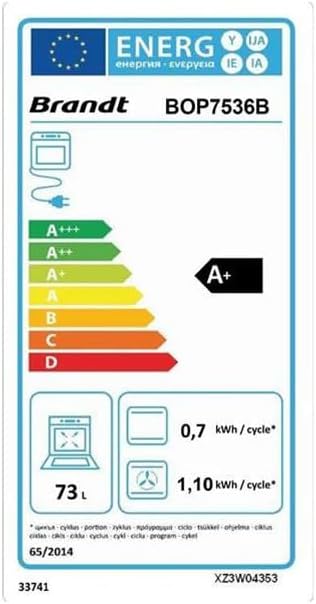
Figur 3: Energy efficiency label for the BRANDT BOP7536B oven, indicating an A+ energy class, 73L capacity, and energy consumption values per cycle for conventional and forced air modes.
8. Garanti og support
8.1 Garantioplysninger
Your BRANDT BOP7536B oven comes with a manufacturer's warranty. Please refer to the warranty card included with your purchase or visit the official BRANDT webwebstedet for detaljerede vilkår og betingelser. Gem din købsbevis til garantikrav.
8.2 Kundesupport
For technical assistance, spare parts, or service requests, please contact BRANDT customer support. You can find contact information on the official BRANDT webhjemmeside eller gennem din forhandler.
For a comprehensive guide, you can download the official user manual (PDF) from the following link: BRANDT BOP7536B User Manual (PDF)