
1. Introduktion
The MARKLIFE P11 Label Maker is a mini thermal wireless inkless sticker printer designed for efficient organization in various environments. It connects via Bluetooth to your smartphone, allowing for easy label creation and printing without the need for ink or toner. Its compact and portable design makes it suitable for home, kitchen, office, and classroom use.
Nøglefunktioner:
- Fashion & Portable Design: Print labels directly from your smartphone via Bluetooth, eliminating the need for a traditional keyboard and screen. Smaller, lighter, and more convenient.
- Multifunktionel brug: Ideal for organizing home, office, and classroom. Print labels for kitchen jars, cables, storage rooms, and even commodity prices.
- Design Your Own Labels: Customize labels using the mobile app with options for text, small pictures, dates, borders, stickers, lines, icons, QR codes, barcodes, graffiti, and serial numbers. Supports 9 languages and 15 font options.
- Multiple Styles of Label Tapes: Compatible with various tape styles including white, color, fruit, cherry blossoms, cable labels, and transparent labels. Tapes are long-lasting, waterproof, wipeable, tear-resistant, and self-adhesive.
- Spar tid og penge: Thermal printing requires no ink or toner. Features 1-second instant printing, 3 times faster than traditional label printers. Rechargeable with automatic off for power saving.

The MARKLIFE P11 Label Maker Machine, showcasing its compact design and various label tape options.
2. Hvad er der i æsken
Upon unboxing your MARKLIFE P11 Label Maker, you should find the following components:
- MARKLIFE P11 etiketmaskine
- Labels (pre-installed or included as separate rolls)
- USB-C ladekabel
- Brugermanual

The compact MARKLIFE P11 compared to a traditional label maker, highlighting its modern design.
3. Opsætningsvejledning
3.1 Tænd
To power on the device, long press the power button located on the front of the label maker until the indicator light turns green.
3.2 Ilægning af etiketpapir
- Open the label compartment by gently pushing the top cover.
- Insert the label roll with the printing side facing up, ensuring it feeds smoothly into the printer mechanism.
- Luk topdækslet, indtil det klikker sikkert på plads.
- Quickly press the power button twice to automatically adjust the paper to the correct printing position.

The thermal printing technology of the P11, which requires no ink.
3.3 App-download og Bluetooth-forbindelse
The MARKLIFE P11 operates via a dedicated mobile application. Follow these steps to connect:
- Download the "Marklife" app from your smartphone's app store (available on App Store and Google Play).
- Sørg for, at din telefons Bluetooth er tændt.
- Open the Marklife app. Click on the "Unlink" or "Connect" option within the app to search for nearby devices.
- Select your P11 device (e.g., "P11_XXXX_BLE") from the list to establish a Bluetooth connection. The app will indicate when the connection is successful.
Video: Step-by-step guide on how to use the P11 label machine, including app connection and basic operation.
4. Betjeningsvejledning
4.1 Oprettelse og udskrivning af etiketter
- Once connected, select "Create Label" in the app.
- Choose a template or start with a blank label.
- Double-click the text area to input your desired text. You can adjust font, size, alignment, and add various elements like pictures, borders, stickers, dates, QR codes, and barcodes.
- Review your label design in the preview mode.
- Vælg det antal kopier, du ønsker at udskrive.
- Tap the "Print" button. The label maker will quickly print your labels.
- Tear off the printed label from the dispenser.
Video: Demonstration of the Marklife P11 label maker in use, showing the app interface and printing process.
Video: En hurtig gennemgangview of the P11 label maker's printing capabilities and speed.
4.2 Label Properties and Applications
The MARKLIFE P11 uses durable labels with excellent properties:
- Vandtæt: Labels resist water damage, making them suitable for kitchen or bathroom items.
- Oil-proof: Labels maintain integrity even when exposed to oils.
- Modstandsdygtig mod ridser: Designed to withstand minor abrasions.
- No Residue: Labels can be removed without leaving sticky residue.

Demonstration of label durability: waterproof, oil-proof, scratch-resistant, and residue-free removal.
Ansøgningsscenarier:
- Køkken: Mærk krydderikrukker, madbeholdere og spisekammervarer.
- Kontor: Organisere files, documents, cables, and stationery.
- Hjem: Label storage bins, personal items, and children's belongings.
- Gaver: Create personalized tags for presents.
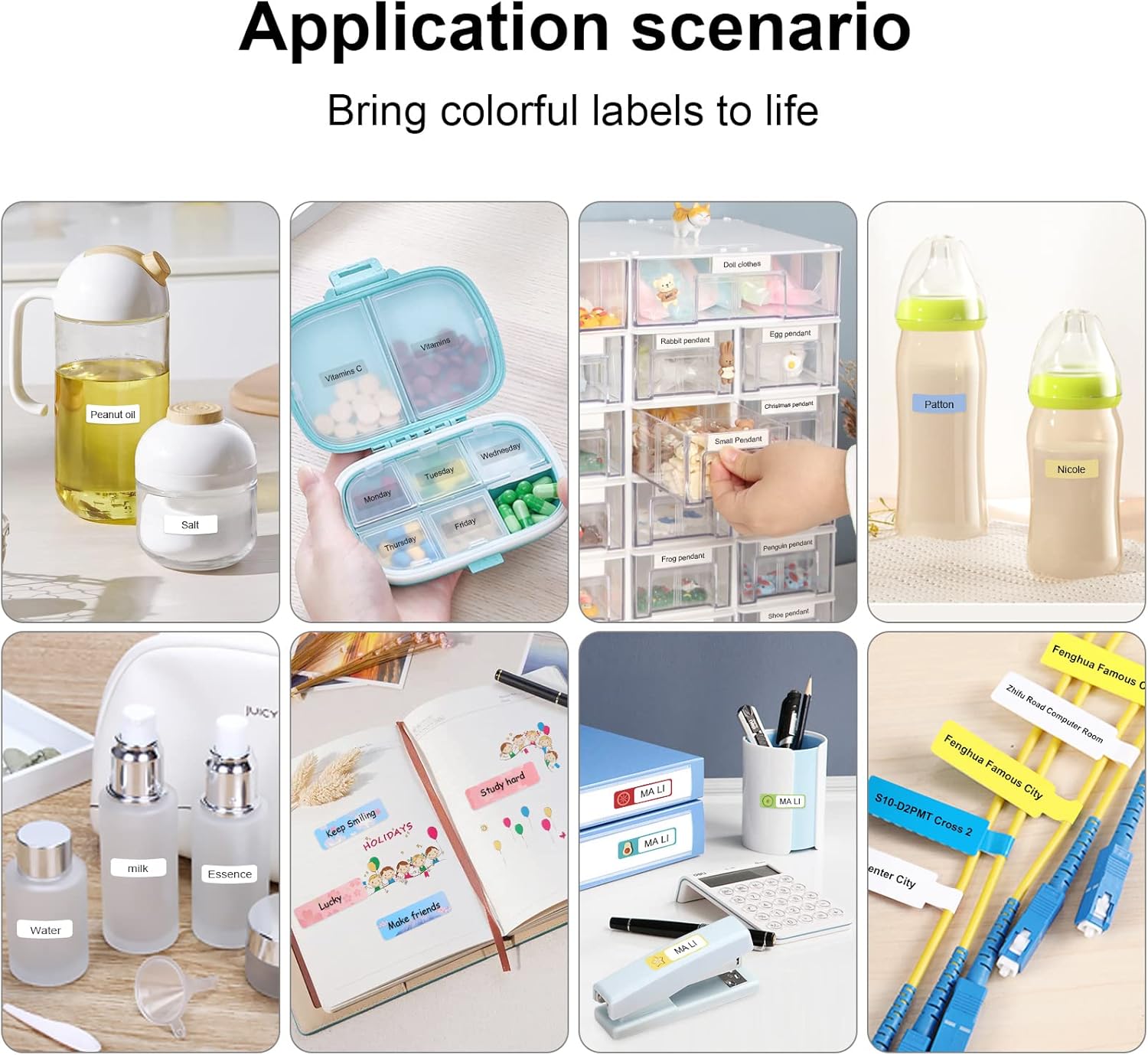
Examples of label maker use in different settings, from kitchen organization to baby item labeling.

Office organization made easy with the P11 label maker. Example of a label with a barcode: 6953124066961

Personalized gift labeling for various occasions.

Home organization with labels for pantry items and personal storage.
5. Vedligeholdelse
To ensure the longevity and optimal performance of your MARKLIFE P11 Label Maker, follow these maintenance tips:
- Rengøring af printhovedet: Regularly clean the thermal print head with a cotton swab lightly dampened with isopropyl alcohol. Ensure the device is off and cool before cleaning.
- Storing Labels: Opbevar etiketruller et køligt, tørt sted væk fra direkte sollys og ekstreme temperaturer for at forhindre nedbrydning.
- Batteripleje: Oplad enheden regelmæssigt, selvom den ikke bruges hyppigt, for at opretholde batteriets tilstand. Undgå at aflade batteriet helt i længere perioder.
- Generel rengøring: Tør etiketprinterens yderside af med en blød, tør klud. Undgå at bruge skrappe kemikalier eller slibende materialer.
6. Fejlfinding
If you encounter issues with your MARKLIFE P11 Label Maker, try the following solutions:
- Enhed opretter ikke forbindelse via Bluetooth:
- Ensure the label maker is powered on and fully charged.
- Turn your phone's Bluetooth off and on again.
- Restart the Marklife app.
- If previously paired with another device, ensure it's disconnected.
- Poor Print Quality (Faint or Incomplete Prints):
- Check if the label roll is inserted correctly and is not jammed.
- Rengør det termiske printhoved som beskrevet i afsnittet Vedligeholdelse.
- Ensure the label tape is suitable for thermal printing and is not expired or damaged.
- Adjust the print density setting in the Marklife app.
- Papir i klemme:
- Sluk for enheden.
- Open the label compartment and carefully remove any jammed paper or debris.
- Reinsert the label roll and close the cover. Power on and press the feed button twice to re-position.
- App nedbrud eller frysning:
- Luk og åbn appen igen.
- Sørg for, at din app er opdateret til den nyeste version.
- Clear the app's cache or reinstall the app if issues persist.
7. Specifikationer
| Feature | Detalje |
|---|---|
| Mærke | MARKLIFE |
| Modelnavn | P11 |
| Forbindelsesteknologi | Bluetooth |
| Udskrivningsteknologi | Termisk |
| Speciel funktion | Transportabel |
| Farve | Lyserød |
| Printer output | Monokrom |
| Max Printspeed Monokrom | 30 ppm |
| Varens vægt | 270 gram (9.5 ounce) |
| Produktdimensioner | 2" D x 2" B x 2" H |
| Kompatible enheder | Smartphones |
| Kontrolmetode | App, berør |
| Opløsning | 600 x 600 |
| Max mediestørrelse | 12x40 cm |
8. Garanti og support
8.1 Garantioplysninger
The MARKLIFE P11 Label Maker Machine comes with a Limited Warranty. Please refer to the warranty card included in your product packaging for specific terms and conditions, including coverage duration and claim procedures.
8.2 Kundesupport
For any technical assistance, troubleshooting not covered in this manual, or warranty inquiries, please contact MARKLIFE customer support. Contact details can typically be found on the official MARKLIFE webwebstedet eller på produktemballagen.