
1. Produktet er slutview
The emotal Dual-Mic AI Noise Cancelling Bluetooth Headset is designed for clear communication and extended use, ideal for cell phone calls, driving, and business environments. It features advanced AI noise-cancelling technology, dual HD microphones, and a lightweight, ergonomic design for comfort.
Nøglefunktioner omfatter:
- AI Noise-Cancelling: Isolates your voice from background noise for crystal-clear conversations.
- Udvidet taletid: Up to 30 hours of HD talk time and 240 hours of standby on a 1.5-hour charge. Includes a quick charge feature for 3 hours of playtime with a 10-minute charge.
- Ultralight & Ergonomic: Weighing only 0.5oz, designed for comfortable, secure fit during long periods of use.
- IPX6 Vandtæt: Giver beskyttelse mod stænk og sved.
- Dobbelt batterisystem: Comes with an extra battery for continuous use.

Image: The emotal Dual-Mic AI Noise Cancelling Bluetooth Headset, showcasing its sleek black design and over-ear hook.
2. Pakkens indhold
Sørg for at alle varer er til stede i pakken:
- 1x emotal Bluetooth Headset
- 1x USB-C opladerkabel
- 6x Eartips (one pair pre-installed)
- 1x brugermanual
- 1x ekstra batteri
3. Opsætningsvejledning
3.1 Indledende opladning
Before first use, fully charge the headset. The headset needs to be detached from the ear hook for charging.
- Detach the main headset unit from the ear hook.
- Connect the USB-C cable to the charging port on the headset unit.
- Tilslut den anden ende af USB-C-kablet til en kompatibel USB-strømkilde (f.eks. en vægadapter eller en computers USB-port).
- The indicator light will show charging status (refer to LED indicator section for details). A full charge takes approximately 1.5 hours.
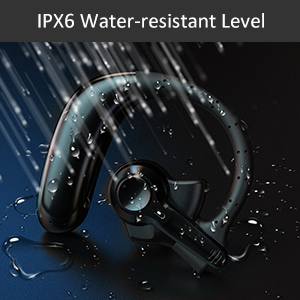
Image: Correct USB-C charging method for the headset, showing the detachable unit being charged.
3.2 Eartip Selection
For optimal sound quality and comfort, select the eartip size that best fits your ear canal. Three sizes are provided.

Image: Illustration of different eartip sizes and how to achieve a secure and comfortable fit in the ear.
3.3 Sådan bærer du headsettet
The headset is designed for use in either the left or right ear. The main unit can be rotated and the microphone adjusted for optimal positioning.
- Placer ørekrogen over dit øre.
- Insert the eartip into your ear canal.
- Adjust the main unit by rotating it 180 degrees to switch between left and right ear wear.
- Adjust the microphone boom to point towards your mouth for clear voice pickup.
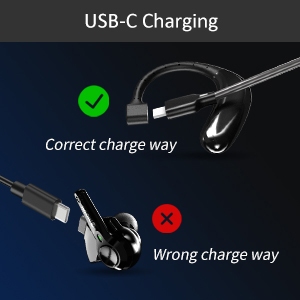
Image: Step-by-step guide on how to switch the headset for left or right ear use by rotating the main unit and adjusting the microphone.
3.4 Bluetooth -parring
Sådan tilslutter du dit headset til en enhed:
- Sørg for, at headsettet er opladet og slukket.
- Press and hold the multi-function button on the headset for 3-5 seconds until the indicator light flashes blue and red, indicating pairing mode.
- Aktiver Bluetooth på din enhed (smartphone, tablet, bærbar computer).
- Søg efter "emotal UFO4-01" (or similar name) in the list of available Bluetooth devices.
- Select the headset to connect. Once connected, the indicator light will turn solid blue or flash slowly.
Note: The headset cannot connect with two devices simultaneously.
4. Betjeningsvejledning
4.1 Grundlæggende kontroller
The headset features a single multi-function button for various operations:
- Tænd/sluk: Long touch for 3 seconds to power on, 5 seconds to power off.
- Næste sang: Double touch the button.
- Besvar/læg på opkald: Double touch the button.
- Lydstyrke op: Long touch the button. (Note: There is no dedicated volume down or mute button on the headset itself. Volume down must be controlled via the connected device.)
- Aktivér stemmeassistent (Siri/Google Assistant): Triple touch the button.

Image: Visual representation of the single button controls for power, music playback, call management, volume, and voice assistant activation.
4.2 Opkaldshåndtering
The dual-mic AI noise-cancelling technology ensures clear conversations even in noisy environments.

Image: Diagram illustrating how dual-mic and AI noise cancelling technology reduce background noise for clearer calls, showing "Before" and "After" sound wave comparisons.
For business professionals and truckers, the headset provides a hands-free solution for reliable communication on the go.
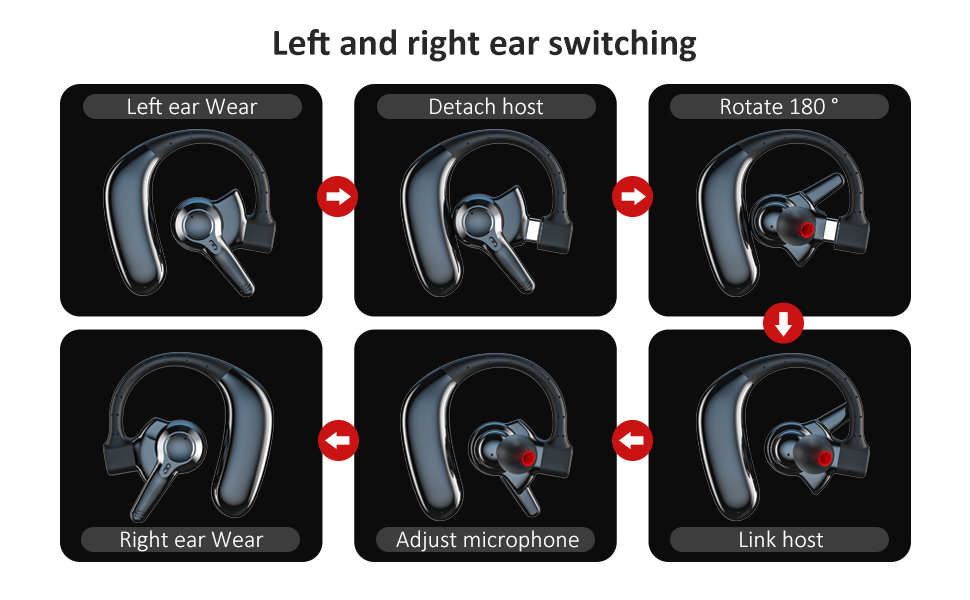
Image: A man driving a car while wearing the headset, emphasizing its hands-free functionality for calls on the road.
4.3 Batteristyring
The headset offers significant battery life and comes with an extra battery for extended use.

Image: Visual representation of the headset's battery life, highlighting 30 hours of HD talk time and 240 hours of standby time.
To swap batteries:
- Gently detach the current battery unit from the headset.
- Attach the fully charged spare battery to the headset.
- Charge the depleted battery using the USB-C cable for future use.
5. Vedligeholdelse og pleje
To ensure the longevity and optimal performance of your emotal Bluetooth Headset, follow these care instructions:
- Rensning: Tør headsettet af med en blød, tør klud. Brug ikke slibende rengøringsmidler eller opløsningsmidler.
- Vandtæthed: The headset is IPX6 waterproof, meaning it is protected against powerful water jets. It can withstand sweat and light rain, but it is not designed for submersion in water.
- Opbevaring: Opbevar headsettet et køligt, tørt sted væk fra ekstreme temperaturer og direkte sollys.
- Batteripleje: Avoid fully depleting the battery frequently. Charge it regularly to maintain battery health.
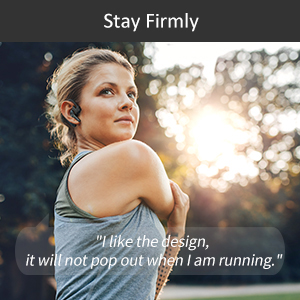
Image: Visual depicting the headset's IPX6 water resistance, showing water splashing on the device.
6. Fejlfinding
Hvis du støder på problemer med dit headset, kan du prøve følgende løsninger:
| Problem | Mulig løsning |
|---|---|
| Headsettet vil ikke tænde. | Ensure the headset is fully charged. Press and hold the multi-function button for 3 seconds. |
| Kan ikke parres med enheden. | Ensure Bluetooth is enabled on your device and the headset is in pairing mode (flashing blue/red light). Make sure the headset is not already connected to another device. Restart both devices and try again. |
| Dårlig lydkvalitet under opkald. | Ensure the microphone is adjusted to point towards your mouth. Check for obstructions. Move closer to your connected device to avoid interference. |
| Lydstyrken er for lav/høj. | Adjust volume using the long touch on the multi-function button (volume up only) or directly from your connected device. |
| Headsettet afbrydes ofte. | Ensure you are within the Bluetooth range (approx. 33 feet/10 meters). Avoid strong electromagnetic interference. Re-pair the headset if necessary. |
7. Specifikationer
| Feature | Detalje |
|---|---|
| Modelnavn | UFO4-01 |
| Forbindelsesteknologi | Trådløs (Bluetooth 5.0) |
| Støjkontrol | Active Noise Cancellation (AI Noise Cancelling) |
| Taletid | Up to 30 Hours HD Talk Time |
| Standby tid | Op til 240 timer |
| Opladningstid | Ca. 1.5 timer |
| Vandmodstandsniveau | IPX6 vandtæt |
| Varens vægt | 0.48 ounces (ca. 0.03 pund) |
| Produktdimensioner | 2.36 x 1.96 x 1.1 tommer |
| Kompatible enheder | Cellphones (iOS/Android), Windows |
| Kontroltype | Voice Control (Siri, Google Assistant) |
| Ørestykke form | Circle (In Ear with Over-Ear Hook) |
| Materiale | Komposit |
| UPC | 850040753158 |
8. Garanti og support
emotal offers comprehensive customer support for your headset:
- Garanti: Replacement within 18 months of purchase.
- Kundeservice: 24-hour customer service is available for any concerns or inquiries. Please contact us via message through your purchase platform.
- Yderligere ressourcer: For further details, you may refer to the official User Guide and Safety Information PDFs available online.
For the most up-to-date support information, please visit the official emotal store or contact customer service directly.