
AOSHIDA RC-15A
Topping RC-15A Remote Control User Manual
Model: RC-15A
Brand: AOSHIDA
1. Introduktion
This manual provides detailed instructions for the proper use and maintenance of your Topping RC-15A Remote Control. The RC-15A is designed to provide convenient wireless control over various Topping Digital-to-Analog Converters (DACs) and Headphone Amplifiers, enhancing your audio experience.
Please read this manual thoroughly before operating the device to ensure optimal performance and longevity.
2. Produktet er slutview
The Topping RC-15A is a compact infrared remote control. It features a range of buttons for power, volume adjustment, input selection, and other specific functions depending on the connected Topping device.
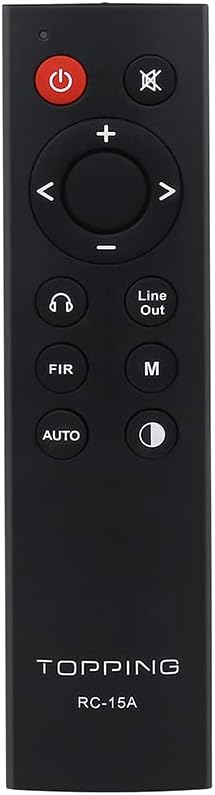
Figur 2.1: Front view of the RC-15A remote control, displaying the button layout including power, mute, volume up/down, navigation, input selection, and mode buttons.
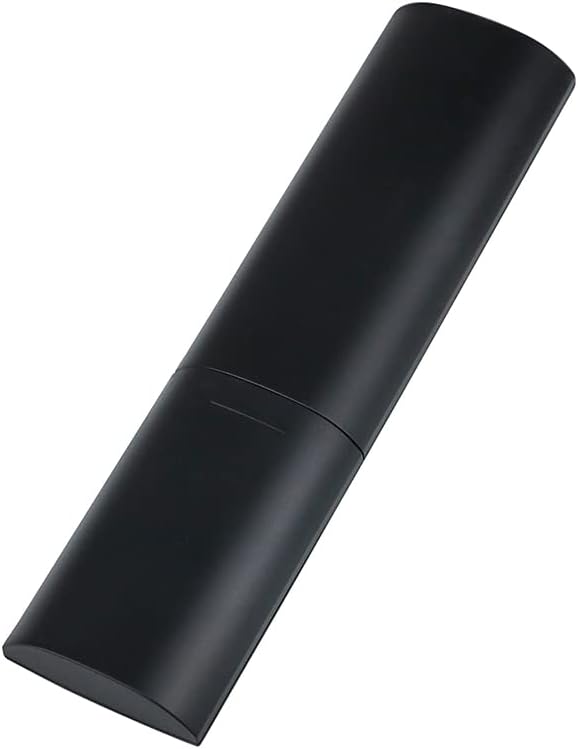
Figur 2.2: Side og bagside view of the RC-15A remote control, highlighting its sleek, black casing and ergonomic design.
Knap funktioner:
- Tænd/sluk-knap (●): Turns the connected Topping device on or off.
- Mute knap (✕): Slår lyden fra eller til.
- Lydstyrke op/ned (+/-): Øger eller sænker lydstyrken.
- Navigation Buttons (◀ ▶ ▲ ▼): Used for menu navigation or input selection, depending on the device.
- Headphone Output Button (♫): Switches to headphone output mode (if supported by the device).
- Line Out Button: Switches to line output mode (if supported by the device).
- FIR Button: Function varies by device, often related to filter settings.
- M knap: Mode or Menu button, function varies by device.
- AUTO knap: Automatic input selection or mode (function varies by device).
- Display Brightness Button (☽): Adjusts the display brightness of the connected device.
3. Opsætning
Batteri installation:
The RC-15A remote control requires batteries for operation. Batteries are not included and must be purchased separately. It typically uses two AAA batteries (Lithium recommended for longer life).
- Find batterirummet på bagsiden af fjernbetjeningen.
- Skub batteridækslet nedad eller i den retning, der er angivet med en pil, for at åbne det.
- Isæt to AAA-batterier, og sørg for, at de positive (+) og negative (-) poler er justeret korrekt med markeringerne inde i batterirummet.
- Luk batteridækslet ved at skubbe det tilbage på plads, indtil det klikker sikkert.
Note: Fjern batterierne, hvis fjernbetjeningen ikke skal bruges i længere tid, for at forhindre lækage og skader.
4. Betjeningsvejledning
The RC-15A remote control operates via infrared (IR) signals. Ensure there is a clear line of sight between the remote control and the IR receiver on your Topping device.
Kompatible enheder:
The RC-15A is pre-programmed to work with a range of Topping DACs and audio devices, including but not limited to:
- Topping E30, E30 II, E50, E70, E70V
- Topping DX3 Pro, DX3 Pro+, DX5, DX5 Lite, DX7 Pro, DX7 Pro+
- Topping D30 Pro, D50s, D90se, D90
Grundlæggende betjening:
- Tænd/sluk: Point the remote at your Topping device and press the Magt knap.
- Lydstyrkekontrol: Brug + knappen for at øge lydstyrken og - knappen for at reducere lydstyrken.
- Stum: Tryk på Stum button to temporarily silence the audio. Press again to unmute.
- Valg af input: Use the navigation buttons (left/right arrows) or dedicated input buttons (if available on your device) to cycle through available inputs.
- Menu navigation: For devices with on-screen menus, use the navigation arrows (up/down/left/right) and potentially the 'M' or 'AUTO' button for selection or confirmation. Refer to your specific Topping device's manual for detailed menu operations.
Vigtig: The specific functions of some buttons (e.g., FIR, M, AUTO, Headphone Output, Line Out) may vary depending on the model and firmware version of your Topping DAC or amplifier. Always consult the user manual of your specific Topping audio device for detailed compatibility and functionality.
5. Vedligeholdelse
Proper maintenance ensures the longevity and reliable operation of your RC-15A remote control.
- Rensning: Wipe the remote control with a soft, dry cloth. Do not use abrasive cleaners, waxes, or solvents as they may damage the finish or internal components.
- Udskiftning af batteri: Udskift batterierne, når fjernbetjeningens rækkevidde falder, eller den ikke reagerer. Udskift altid alle batterier på samme tid med nye af samme type.
- Opbevaring: Opbevar fjernbetjeningen på et køligt, tørt sted væk fra direkte sollys og ekstreme temperaturer.
- Undgå dråber: Beskyt fjernbetjeningen mod fysiske stød og fald, som kan beskadige de interne kredsløb.
6. Fejlfinding
If you encounter issues with your RC-15A remote control, try the following troubleshooting steps:
| Problem | Mulig årsag | Løsning |
|---|---|---|
| Fjernbetjeningen svarer ikke. | Døde eller lave batterier. | Udskift batterierne med nye. |
| Fjernbetjeningen svarer ikke. | No clear line of sight to device. | Ensure no obstructions between remote and device's IR receiver. Point directly at the device. |
| Fjernbetjeningens rækkevidde er dårlig. | Svage batterier. | Udskift batterierne. |
| Specific button not working. | Knap sidder fast eller er beskadiget. | Gently press the button multiple times. If still unresponsive, the remote may be faulty. |
| Fjernbetjeningen virker til nogle funktioner, men ikke til andre. | Function not supported by your specific Topping device model. | Refer to the user manual of your Topping DAC/amplifier to confirm supported remote functions. |
7. Specifikationer
| Feature | Detalje |
|---|---|
| Model | RC-15A |
| Mærke | AOSHIDA (Manufacturer: TOPPING) |
| Forbindelsesteknologi | Infrarød (IR) |
| Særlige funktioner | Pre-programmed for Topping devices |
| Kompatible enheder | Topping E30, E30 II, E50, E70, E70V, DX3 Pro, DX3 Pro+, DX5, DX5 Lite, DX7 Pro, DX7 Pro+, D30 Pro, D50s, D90se, D90 |
| Batterier påkrævet | Ja (2 x AAA, medfølger ikke) |
| Dimensioner (ca.) | 21.6 x 11.7 x 9.1 cm (pakkemål) |
| Vægt (ca.) | 40 g |
8. Garanti og support
Information regarding the specific warranty period and support contact for the Topping RC-15A remote control is typically provided with the original purchase of your Topping audio device or on the manufacturer's official webwebsted.
For technical support, warranty claims, or further inquiries, please refer to the documentation included with your Topping DAC/amplifier or visit the official Topping or AOSHIDA webwebsted.
Ask a question about this manual
Ask about setup, troubleshooting, compatibility, parts, safety, or missing instructions. Manuals+ will review the question and use this page’s manual context to help answer it.