
BLAUX 30888
BLX Earbuds - Wireless Bluetooth 5.1 Earbuds User Manual
Model: 30888 | Brand: BLAUX
1. Introduktion
Thank you for choosing BLX Earbuds. These True Wireless Stereo (TWS) earbuds are designed to provide a seamless and high-quality audio experience with the convenience of Bluetooth 5.1 technology. This manual will guide you through the setup, operation, and maintenance of your new earbuds to ensure optimal performance and longevity.
2. Hvad er der i æsken
Kontroller venligst pakkens indhold for at sikre, at alle varer er til stede:
- BLX Wireless Earbuds (Left and Right)
- Trådløs opladningsetui
- Micro USB opladningskabel
- Silikone ørepropper (små, mellemstore, store)
- Brugermanual
3. Produktet er slutview
The BLX Earbuds offer a compact and ergonomic design for comfortable, all-day wear. The included charging case provides extended battery life and convenient storage.
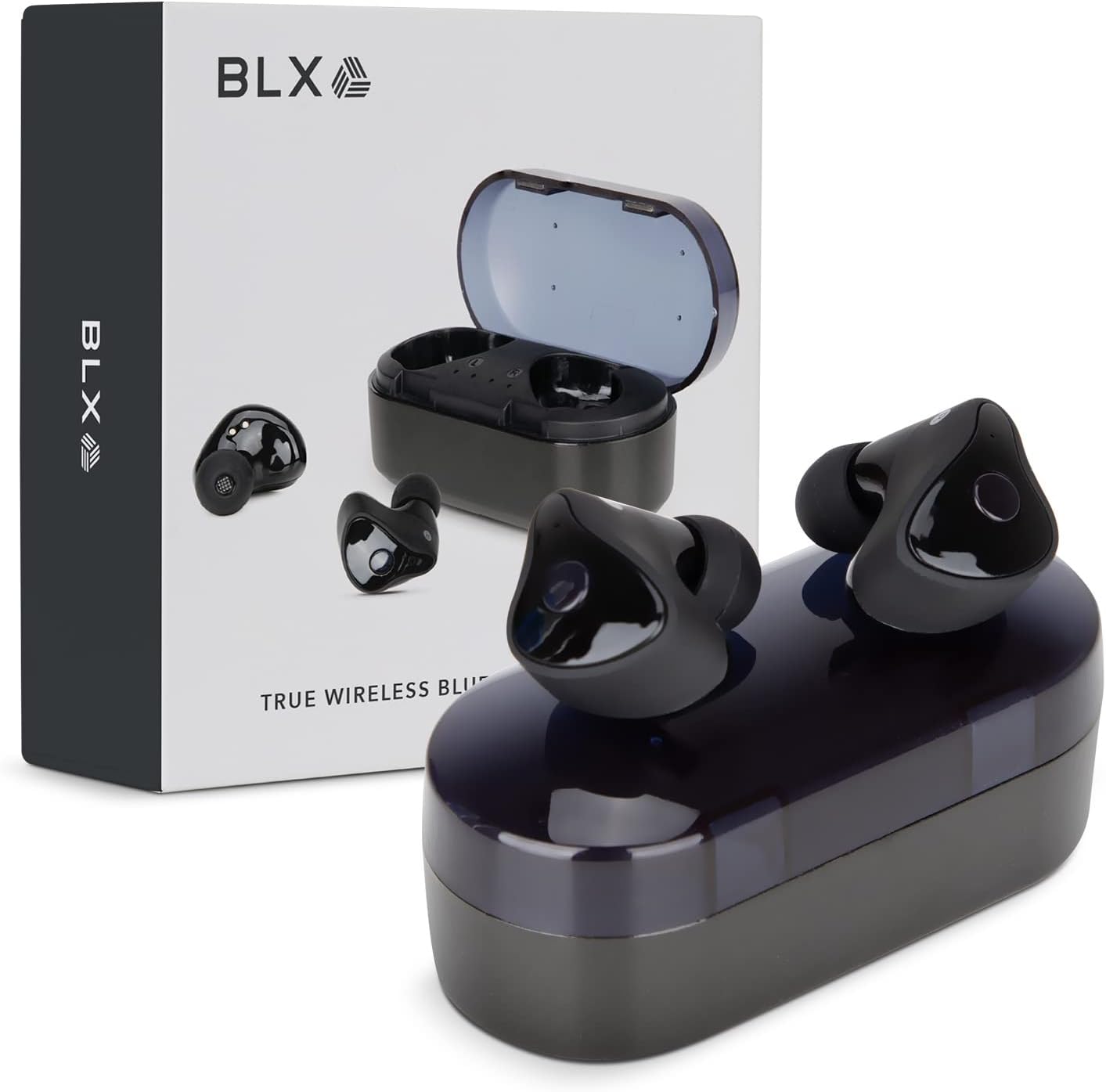
Image: BLX Earbuds, charging case, and product packaging.
3.1 Nøglefunktioner
- True Wireless Stereo (TWS): Enjoy a completely wireless audio experience with independent earbuds.
- Bluetooth 5.1-teknologi: Provides a stable and efficient wireless connection with a range of up to 10 meters.
- Hurtig parring: Earbuds automatically connect to your device once removed from the charging case.
- Intuitive berøringskontroller: Manage music playback, calls, and voice assistants with simple taps.
- IPX4 vandtæthed: Designed to withstand sweat and splashes, making them suitable for workouts and outdoor activities.
- Indbygget mikrofon: Muliggør håndfri opkald og interaktion med stemmeassistent.

Image: BLX Earbuds demonstrating true wireless freedom with Bluetooth 5.1, fast pairing, and a 10-meter range.

Billede: Detaljeret view of a BLX Earbud highlighting its smart touch control capabilities for various functions.

Image: A person running while wearing BLX Earbuds, emphasizing their IPX4 water resistance for sweat and splashes, and the portability of the compact charging case.

Image: A woman wearing a BLX Earbud, with an illustration of the three included silicone ear tip sizes (11mm, 12mm, 13mm) to help users find their perfect fit.

Image: A woman enjoying music with BLX Earbuds, illustrating the battery performance: 4.5 hours of listening time, up to 18 hours with the charging case, and a 1-hour full charge time for the case.

Image: A close-up of a BLX Earbud, emphasizing its clear immersive audio quality with a frequency response range of 20Hz to 20KHz.

Image: BLX Earbuds depicted with icons for Google Assistant and Siri, along with a built-in microphone icon, indicating hands-free voice assistant capabilities.
4. Opsætning
4.1 Opladning af øretelefoner og etuiet
Before first use, fully charge the BLX Earbuds and their charging case.
- Placer ørepropperne i opladningsetuiet. Sørg for, at de sidder korrekt i deres respektive holdere (V for venstre, H for højre).
- Tilslut Micro USB-opladerkablet til opladningsporten på etuiet, og den anden ende til en USB-strømkilde (f.eks. computer, vægadapter).
- The indicator lights on the charging case will illuminate to show charging status. A full charge for the case takes approximately 1 hour.
- Når de er fuldt opladet, skal du frakoble opladningskablet. Ørepropperne oplades automatisk, når de placeres i det strømforsynede etuie.
4.2 Parring med din enhed
BLX Earbuds feature auto-pairing technology for quick and easy connection.
- Sørg for, at opladningsetuiet er opladet, og at din enheds Bluetooth er aktiveret.
- Åbn opladningsetuiet. Ørepropperne tændes automatisk og går i parringstilstand.
- Gå til Bluetooth-indstillingerne på din enhed (smartphone, tablet, bærbar computer) og søg efter tilgængelige enheder.
- Select "BLX Earbuds" from the list of found devices.
- Once connected, your device will confirm the pairing, and the earbuds will be ready for use.
- Ved efterfølgende brug vil ørepropperne automatisk oprette forbindelse til den sidst parrede enhed, når de tages ud af etuiet.
4.3 Finding the Perfect Fit
A proper fit is crucial for sound quality and comfort. Experiment with the included silicone ear tips (Small, Medium, Large) to find the size that best seals your ear canal.
- Indsæt forsigtigt øretelefonen i din øregang.
- Twist slightly to secure it in place. The earbud should feel snug and comfortable without causing pressure.
- Hvis lydkvaliteten er dårlig, eller ørepropperne føles løse, kan du prøve ørepropper i en anden størrelse.
5. Operating Your BLX Earbuds
The BLX Earbuds utilize touch controls for easy management of audio and calls.
5.1 Tænd/sluk
- Tænd: Åbn opladningsetuiet, og øretelefonerne tænder automatisk.
- Sluk: Sæt ørepropperne tilbage i opladningsetuiet, og luk låget. De slukker automatisk og begynder at oplade.
5.2 Musikafspilning
| Handling | Kontrollere |
|---|---|
| Afspil/pause | Et enkelt tryk på begge øretelefoner |
| Næste spor | Dobbelttryk på den højre øreprop |
| Forrige spor | Dobbelttryk på den venstre øreprop |
5.3 Opkaldshåndtering
| Handling | Kontrollere |
|---|---|
| Besvar/afslut opkald | Et enkelt tryk på begge øretelefoner |
| Afvis opkald | Tryk på en af øretelefonerne, og hold den nede i 2 sekunder |
5.4 Stemmeassistent
| Handling | Kontrollere |
|---|---|
| Aktivér stemmeassistent (Siri, Google Assistant osv.) | Tryk tre gange på begge øretelefoner |
5.5 Lydstyrkekontrol
Volume control is managed directly through your connected device (phone, tablet, laptop).
6. Vedligeholdelse
Proper care and maintenance will extend the life of your BLX Earbuds.
6.1 Rengøring
- Brug en blød, tør og fnugfri klud til at rengøre ørepropperne og opladningsetuiet.
- Fjern ørepropper fra ørepropperne og rengør dem om nødvendigt med en mild sæbeopløsning. Skyl dem derefter grundigt og tør dem helt, før de sættes på igen.
- Brug ikke slibende rengøringsmidler, alkohol eller kemiske opløsningsmidler.
- Sørg for, at opladningskontakterne på både ørepropper og etuiet er rene og fri for snavs.
6.2 Opbevaring
Når ørepropperne ikke er i brug, skal de altid opbevares i deres opladningsetuier for at beskytte dem mod støv og skader og for at holde dem opladet.
6.3 Vandtæthed (IPX4)
Your BLX Earbuds are rated IPX4, meaning they are resistant to splashing water from any direction. This makes them suitable for:
- Sweaty workouts
- Light rain or splashes
Vigtig bemærkning:
- IPX4 rating does NOT mean the earbuds are waterproof. Do not submerge them in water.
- Do not wear them while swimming, showering, or in heavy rain.
- If the earbuds get wet, wipe them dry immediately before placing them back in the charging case.
7. Fejlfinding
If you encounter issues with your BLX Earbuds, try the following solutions:
7.1 Ørepropper parrer eller opretter ikke forbindelse
- Sørg for, at begge øretelefoner er opladet.
- Sørg for, at Bluetooth er aktiveret på din enhed.
- Sæt ørepropperne tilbage i etuiet, luk låget, vent et par sekunder, og åbn derefter låget igen for at gå i parringstilstand igen.
- Forget/delete "BLX Earbuds" from your device's Bluetooth list and try pairing again.
- Flyt ørepropperne tættere på din enhed (inden for 10 meter).
7.2 Ingen lyd eller lav lydstyrke
- Kontroller lydstyrkeniveauet på din tilsluttede enhed.
- Sørg for, at ørepropperne er korrekt tilsluttet din enhed.
- Rengør eventuelt snavs fra øreproppens højttalernet.
- Prøv at afspille lyd fra et andet program eller en anden kilde.
7.3 En øreprop virker ikke
- Placer begge ørepropper tilbage i opladningsetuiet, luk låget, og åbn det derefter igen.
- Sørg for, at begge øretelefoner er opladet.
- Prøv at nulstille ørepropperne (se producentens anvisninger). website or support for specific reset instructions if needed).
7.4 Opladningsetuiet oplader ikke
- Sørg for, at opladningskablet er korrekt tilsluttet til både etuiet og strømkilden.
- Prøv en anden USB-port eller vægadapter.
- Sørg for, at opladningskablet ikke er beskadiget.
8. Specifikationer
| Feature | Detalje |
|---|---|
| Modelnavn | 30888 |
| Forbindelsesteknologi | Trådløs (Bluetooth 5.1) |
| Wireless Range | Op til 10 meter |
| Frekvensrespons | 20 Hz - 20,000 Hz |
| Batterilevetid (ørepropper) | Approx. 4.5 Hours (listening time) |
| Batterilevetid (med opladningsetui) | Approx. 18 Hours total |
| Opladningstid (etui) | Ca. 1 time |
| Vandmodstandsniveau | IPX4 (vandtæt) |
| Mikrofon | Indbygget, tovejs |
| Kontroltype | Tryk på kontrol |
| Kompatible enheder | Cellphones, Tablets, Laptops (iOS, Android, PC) |
| Materiale | Plast |
| Varens vægt | 44 gram |
| Produktdimensioner | 9.9 x 9.9 x 3.8 cm |
9. Garanti og support
BLAUX products are manufactured to high standards and undergo rigorous testing. For information regarding warranty coverage, technical support, or service inquiries, please visit the official BLAUX webhjemmeside eller kontakt deres kundeservice direkte.
Du kan finde mere information og support på BLAUX Store on Amazon.