
Indledning
This manual provides detailed instructions for the safe and effective use of your Brookstone Powershine Platinum Micro Hair Dryer. Please read all instructions carefully before use and retain this manual for future reference.
Produkt overview
The Brookstone Powershine Platinum Micro Hair Dryer is designed for efficient hair drying with features aimed at reducing frizz and enhancing shine. Its compact and lightweight design makes it suitable for both home use and travel.

Image: The Brookstone Powershine Platinum Micro Hair Dryer, showcasing dens elegante sorte og rosagulddesign.
Nøglefunktioner
- Ionic Generator: Helps to reduce frizz and enhance hair shine by drying hair faster with lower heat.
- Cool Shot knap: Provides a burst of cool air to set your hairstyle for a long-lasting hold and added shine.
- Infinity Temperature and Speed Control Wheel: Offers precise adjustment of heat and airflow settings for various hair types and styling needs.
- Professionelt design: Engineered for quiet operation and powerful performance, delivering superior styling results.
- Praktisk hængesløjfe: Allows for easy storage, saving counter and cabinet space.
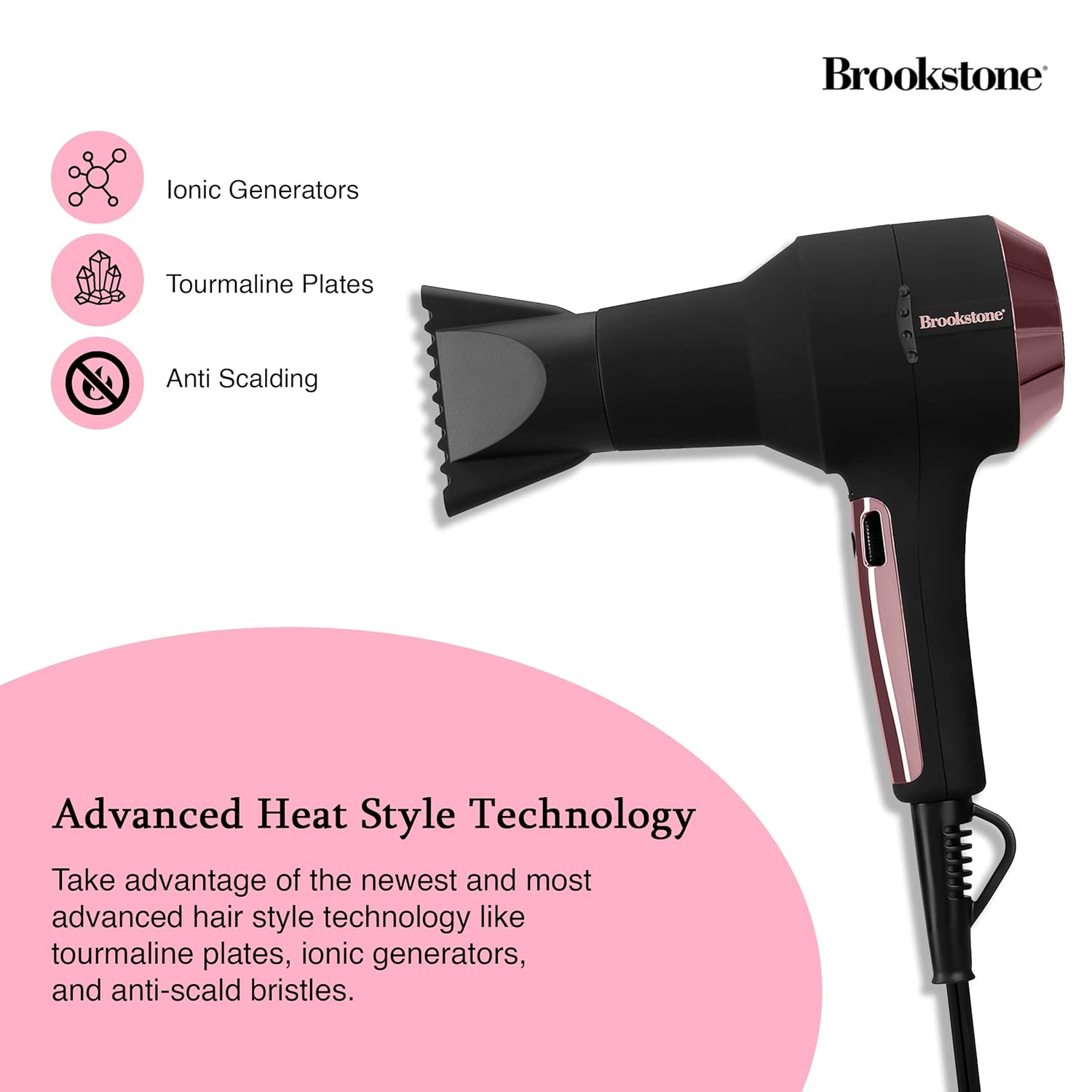
Image: Close-up of the hair dryer with icons indicating Ionic Generators, Tourmaline Plates, and Anti Scalding technology.
Vigtige sikkerhedsoplysninger
For at mindske risikoen for elektrisk stød, forbrændinger, brand eller personskade skal du altid følge disse grundlæggende sikkerhedsforanstaltninger:
- Opbevares utilgængeligt for børn.
- Må ikke anvendes under badning eller i nærheden af vand.
- Nedsænk ikke apparatet i vand eller anden væske.
- Hold stikket og ledningen væk fra opvarmede overflader.
- Allow the hair dryer to cool completely before storing.
- Always unplug the hair dryer immediately after use and before cleaning.
- Brug ikke et apparat med en beskadiget ledning eller et beskadiget stik, eller hvis apparatet ikke fungerer korrekt, eller hvis det er blevet tabt eller beskadiget på nogen måde.
- Bloker ikke luftåbningerne, og placer ikke apparatet på en blød overflade, såsom en seng eller sofa, hvor luftåbningerne kan blive blokeret.
- Brug aldrig, mens du sover.

Image: The hair dryer illustrating protective features such as prevention of scalp burns, overheating, and the inclusion of protective heat sleeves.
Opsætning
- Pakker ud: Tag forsigtigt hårtørreren og alt tilbehør ud af emballagen.
- Inspicere: Kontrollér apparatet for tegn på skader. Brug det ikke, hvis det er beskadiget.
- Strømtilslutning: Ensure your hands are dry, then plug the power cord into a standard electrical outlet (120V AC, 60Hz).
- Attachment (Optional): If using a concentrator nozzle, align it with the front of the dryer and push it firmly into place.
Betjeningsvejledning
Tænd/sluk
- To turn the dryer ON, slide the power switch to the desired setting.
- To turn the dryer OFF, slide the power switch to the '0' position.
Adjusting Temperature and Speed
The hair dryer features an infinity control wheel for precise adjustment of both temperature and airflow speed.
- Temperaturkontrol: Rotate the infinity control wheel to increase or decrease the heat level. Lower settings are ideal for fine, fragile, or sensitive hair, while higher settings are suitable for faster drying of thicker hair.
- Hastighedskontrol: The same infinity control wheel also adjusts the airflow speed. Rotate it to find the optimal speed for your styling needs.
Using the Cool Shot Button
After drying and styling your hair with heat, press and hold the Cool Shot button to deliver a stream of cool air. This helps to seal the hair cuticle, lock in your style, and add shine. Release the button to return to the previous heat setting.
Opretholdelse
Rengøring af luftfilteret
Regular cleaning of the air filter is essential for optimal performance and to prolong the life of your hair dryer.
- Tag stikket ud: Tag altid stikket ud af stikkontakten til hårtørreren, inden du rengør den.
- Fjern filterdækslet: Locate the removable rear filter cover. Gently twist or pull to detach it.
- Rens filter: Use a soft brush or a vacuum cleaner with a brush attachment to remove any accumulated dust, lint, or hair from the filter screen.
- Genmonter: Once clean, securely reattach the filter cover.
Opbevaring
When not in use, ensure the hair dryer is unplugged and completely cool. Store it in a dry location. The integrated hanging loop allows for convenient storage on a hook, saving space.

Image: The hair dryer with its integrated hanging loop, illustrating a convenient storage option.
Fejlfinding
If you encounter any issues with your Brookstone Powershine Platinum Micro Hair Dryer, please refer to the following common problems and solutions:
- Dryer does not turn on:
- Sørg for, at netledningen er korrekt tilsluttet en fungerende stikkontakt.
- Kontroller, om tænd/sluk-knappen er i 'ON'-positionen.
- Kontroller, at afbryderen ikke er udløst.
- Utilstrækkelig varme eller luftstrøm:
- Check the infinity control wheel to ensure it is set to a higher heat/speed setting.
- Clean the air intake filter at the rear of the dryer, as a blocked filter can restrict airflow.
- Dryer is excessively noisy:
- A clogged air filter can cause increased noise. Clean the air intake filter.
- Ensure no foreign objects are obstructing the air vents.
- Hair is still frizzy:
- Ensure the ionic generator is functioning (though not visibly indicated, it operates automatically).
- Use the Cool Shot button at the end of your drying routine to help seal the hair cuticle.
- Consider using a heat protectant or anti-frizz styling product in conjunction with the dryer.
Hvis problemet fortsætter efter at have forsøgt disse løsninger, bedes du kontakte kundesupport.
Specifikationer
| Produktdimensioner | 9.5 x 4 x 12 tommer |
| Varens vægt | 3.4 pund |
| Modelnummer | HS1002-BK8 |
| Mærke | Brookstone |
| Farve | Black/Rose Gold |
| Strømkilde | Elektrisk med ledning |
| Særlige funktioner | Compact, Cool Shot Button, Hanging Loop |
| Anbefalede anvendelser | Tørring |
| UPC | 191205489919 |
Garanti og support
Your Brookstone Powershine Platinum Micro Hair Dryer is covered by a limited warranty. Please refer to the warranty card included with your purchase for specific terms and conditions.
For technical support, warranty claims, or further assistance, please visit the official Brookstone website or contact their customer service department using the contact information provided in your product packaging.