
BFOUR BF-6-4us
BFOUR Digital Wireless Meat Thermometer
Model: BF-6-4us
Brugervejledning
Indledning
Thank you for choosing the BFOUR Digital Wireless Meat Thermometer. This device is designed to help you achieve perfectly cooked meats and other foods with precision and convenience. Featuring four colored probes, Bluetooth connectivity, a large backlight display, and a wireless range of up to 328 feet (100 meters), this thermometer allows you to monitor your cooking progress from a distance. Please read this manual thoroughly before use to ensure proper operation and maintenance.
Produktegenskaber
- Four Stainless Steel Probes: Includes four distinctively colored probes for simultaneous monitoring of different foods. The 1.2 meter (47-inch) cables are heat-resistant up to 380°C (716°F).
- USDA Preset Temperatures & Timer: Features 11 preset temperatures and 5 doneness levels recommended by the USDA. Users can also set custom high/low temperature ranges and timers. An alarm will sound when the target temperature or time is reached.
- High Accuracy & Wide Temperature Range: Provides temperature readings from 1°C to 300°C (33°F to 572°F) with an accuracy of ±1°C (±1.8°F).
- Extended Wireless Range & APP Control: Offers a wireless range of up to 100 meters (328 feet), allowing remote monitoring via a dedicated smartphone application. The app supports switching between Celsius and Fahrenheit, viewing temperature graphs, and customizing settings.
- Magnetic Design & Large LCD Display: Equipped with a magnetic back for convenient attachment to metal surfaces like refrigerators, grills, or ovens. The 3-inch large backlit display ensures easy readability in various lighting conditions.
Pakkens indhold
Ved udpakning skal du kontrollere, at alle nedenstående varer er til stede og i god stand:
- 1 x BFOUR Wireless Meat Thermometer Unit
- 4 x Colored Stainless Steel Probes
- 2 x Probe Clips
- 1 x Brugermanual
Note: 2 AA batteries are required and not included in the package. Please purchase them separately.
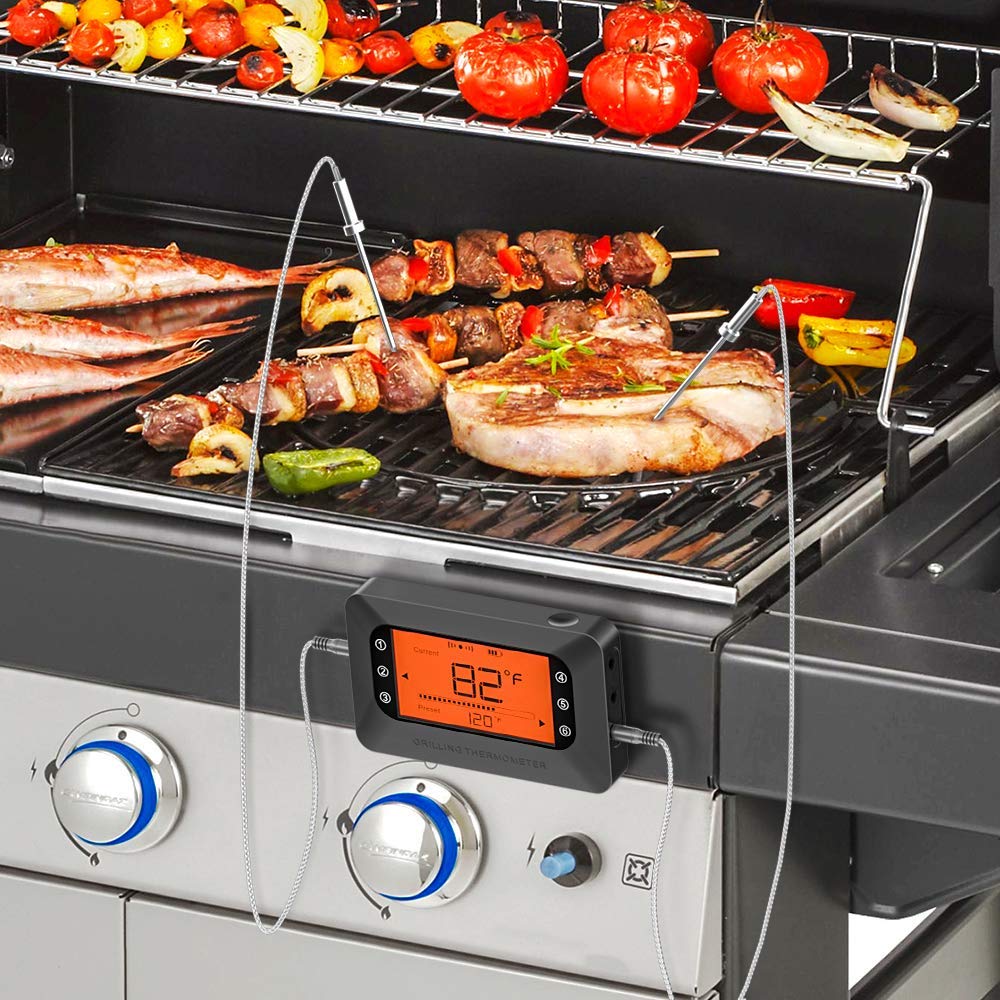
Image: Contents of the BFOUR Wireless Meat Thermometer package.
Opsætning
1. Batteriinstallation
- Find batterirummet på bagsiden af termometerenheden.
- Åbn batterirummets dæksel.
- Indsæt 2 AA-batterier, og sørg for korrekt polaritet (+/-).
- Luk batterirummets dæksel forsvarligt.
2. Tilslutning af sonde
- Identify the four colored probe ports on the side of the thermometer unit.
- Insert the colored probes into the corresponding ports. The unit can support up to six probes if additional ones are purchased.
- Ensure probes are fully inserted for accurate readings.

Image: Four colored probes for monitoring multiple foods simultaneously.
3. Appinstallation og parring
The BFOUR thermometer connects to your smartphone via Bluetooth for remote monitoring and advanced settings.
- Download the "Grill BT5.0" app from your device's app store:
- Til Android: Google Play Butik
- Til iOS: Apple App Store
- Sørg for, at Bluetooth er aktiveret på din smartphone.
- Power on the BFOUR thermometer unit.
- Open the "Grill BT5.0" app. The app will automatically search for and connect to the thermometer. Note: Do not attempt to pair the device directly through your phone's Bluetooth settings; use the app for connection.
- Once connected, the app will display current temperature readings from the probes.

Image: The thermometer unit and its companion app on a smartphone.
Betjeningsvejledning
1. Grundlæggende betjening
- Tænd/sluk: Press and hold the power button on the unit to turn it on or off.
- Enhedskonvertering: The default temperature unit is Celsius. You can switch between Celsius (°C) and Fahrenheit (°F) directly on the unit or within the app settings.

Image: The large backlit display for easy reading.
2. Using the Probes
- Insert the tip of the probe into the thickest part of the meat, avoiding bones or gristle.
- Use the included probe clips to secure probes to the grill grate or oven rack if monitoring ambient temperature or thin cuts of meat.
- The thermometer unit can be placed magnetically on a metal surface near your cooking appliance.

Image: Thermometer unit magnetically attached to a grill while in use.

Image: Probes inserted into food cooking in an oven.
3. Using the App for Monitoring and Settings
- Overvågning i realtid: View current temperatures for all connected probes directly on your smartphone.
- Forudindstillede temperaturer: Select from 11 USDA-recommended preset temperatures for various meats (Beef, Veal, Lamb, Pork, Chicken, Turkey, Fish, Hamburger) and cooking methods (BBQ Smoke, Hot Smoke, Cold Smoke).
- Doneness Levels: Choose from 5 doneness levels (Rare, Medium Rare, Medium, Medium Well, Well) for certain meat types.
- Brugerdefinerede indstillinger: Set your own target temperatures and high/low temperature alarms for specific cooking needs.
- Timer funktion: Utilize the built-in timer to track cooking duration.
- Alarmer: The thermometer unit and the app will sound an alarm when the target temperature is reached or if the temperature goes outside the set range.
- Temperaturgraf: The app provides a temperature graph to visualize the cooking progress over time.
Image: Doneness levels and preset meat modes available in the app.

Image: Temperature alarm and timer functionality.

Image: Remote monitoring capability with 328ft wireless range.
4. Videodemonstration
Video: A demonstration of the BFOUR Digital Wireless Meat Thermometer in use, showcasing probe connection, app pairing, and remote monitoring during grilling.
Opretholdelse
- Rengøringsprober: After each use, clean the stainless steel probes with a damp cloth and mild detergent. Wipe them dry thoroughly. Do not immerse the probe connectors or the main unit in water.
- Rengøringsenhed: Wipe the main thermometer unit with a soft, damp klud. Brug ikke slibende rengøringsmidler, og nedsænk ikke enheden i vand.
- Opbevaring: Store the thermometer and probes in a clean, dry place when not in use. Ensure probes are not bent or damaged during storage.
The product is designed for easy care: Do Not Soak, Oven Safe (probes only), Wipe Clean.
Fejlfinding
| Problem | Mulig årsag | Løsning |
|---|---|---|
| Intet display/Enheden tænder ikke | Low or dead batteries; Incorrect battery polarity. | Replace batteries with new AA batteries; Ensure batteries are inserted with correct polarity. |
| Upræcise temperaturmålinger | Probe not fully inserted; Probe tip touching bone/gristle; Damaged probe. | Re-insert probe into the thickest part of the meat; Adjust probe position; Contact support for probe replacement if damaged. |
| Bluetooth disconnection/Cannot pair with app | Out of range; Bluetooth off on phone; App not open; Device paired via phone settings. | Move closer to the thermometer unit; Ensure phone Bluetooth is on; Open the "Grill BT5.0" app and connect from within the app; Forget device in phone's Bluetooth settings and reconnect via app. |
| Alarmen lyder ikke | Alarm settings incorrect; Phone/unit volume too low. | Check and adjust alarm settings in the app; Increase volume on your phone and the thermometer unit. |
Specifikationer
| Feature | Detalje |
|---|---|
| Modelnummer | BF-6-4us |
| Temperaturområde | 1°C til 300°C (33°F til 572°F) |
| Nøjagtighed | ±1°C (±1.8°F) |
| Probe Cable Heat Resistance | Op til 380°C (716°F) |
| Wireless Range | Op til 100 meter (328 fod) |
| Forbindelse | Bluetooth |
| Display Type | Digital LCD med baggrundsbelysning |
| Strømkilde | 2 x AA batterier (medfølger ikke) |
| Produktdimensioner | 0.01 x 0.01 x 0.01 inches (approx. 9.91 ounces) |
| Materiale | Stainless Steel (probes), Plastic (unit) |
| Særlige funktioner | Alarm, App Companion, High Accuracy, Large Display, Magnetic Back |
Garanti og support
BFOUR is committed to providing high-quality products. If you encounter any problems with your device or probes, please do not hesitate to contact us. We are dedicated to ensuring your satisfaction and will provide replacements for any defective devices or probes.
For support, please refer to the contact information provided in your product packaging or visit the official BFOUR webwebsted.
Ask a question about this manual
Ask about setup, troubleshooting, compatibility, parts, safety, or missing instructions. Manuals+ will review the question and use this page’s manual context to help answer it.