
1. Introduktion
Tak for købetasing the VILINICE BL89 Native 1080P Projector. This manual provides essential information for the safe and efficient operation of your projector. Please read it thoroughly before use and retain it for future reference.
The VILINICE BL89 projector delivers a native 1920x1080P resolution, 9000 Lux brightness, and an 8000:1 contrast ratio, designed for a high-quality viewing experience. It features a long-lasting LED lamp and versatile connectivity options.

Image: The VILINICE BL89 Native 1080P Projector set up for a home theater experience, including a 100-inch screen.
2. Sikkerhedsoplysninger
To ensure safe operation and prolong the life of your projector, please observe the following precautions:
- Bloker ikke ventilationsåbningerne. Sørg for tilstrækkelig luftgennemstrømning omkring projektoren for at forhindre overophedning.
- Se ikke direkte ind i projektorlinsen, når lamp er tændt. Det skarpe lys kan forårsage øjenskader.
- Hold projektoren væk fra vand eller andre væsker. Må ikke anvendes i damp miljøer.
- Placer projektoren på en stabil, plan overflade for at forhindre den i at falde.
- Brug kun den strømadapter, der følger med projektoren.
- Unplug the projector during lightning storms or when unused for extended periods.
- Forsøg ikke at reparere projektoren selv. Overlad al service til kvalificeret personale.
- This projector is less harmful to children's eyesight than television due to diffuse reflection imaging, but direct viewing of the lens should still be avoided.
3. Pakkens indhold
Kontroller venligst, at alle genstande er til stede ved udpakning:
- VILINICE BL89 Projector
- Strømkabel
- Fjernbetjening
- HDMI kabel
- AV-kabel
- Brugermanual
- 100-tommer projektorskærm
4. Produktet er slutview
Familiarize yourself with the various parts and connections of your VILINICE BL89 projector.
Front View

Billede: Forside view of the VILINICE BL89 projector, highlighting the projection lens.
Bag og Side Views (Porte og kontroller)

Billede: Bagside og side view of the VILINICE BL89 projector, illustrating the power input, HDMI ports, USB ports, VGA port, AV port, and control panel.
- Linse: Projicerer billedet på skærmen.
- Fokusring: Justerer billedets klarhed.
- Keystone-korrektion: Korrigerer trapezformet billedforvrængning.
- Kontrolpanel: Power, menu, source, navigation buttons.
- HDMI-porte (x2): Connect to HDMI-enabled devices (laptops, TV sticks, game consoles).
- USB-porte (x2): Tilslut USB-drev til medieafspilning.
- VGA port: Connect to computers with VGA output.
- AV-port: Tilslut til ældre enheder ved hjælp af et AV-kabel.
- Lydudgang (AUX): Tilslut eksterne højttalere eller hovedtelefoner.
- Strømindgang: Tilslut strømkablet.
5. Opsætning
5.1 Projektorplacering
Choose a suitable location for your projector. The optimal projection distance ranges from 1.2 meters (approximately 5 feet) to 5 meters (approximately 30 feet), yielding screen sizes from 44 inches to 300 inches. For the included 100-inch screen, position the projector at an appropriate distance to fill the screen.

Image: A family enjoying a movie projected onto a 100-inch screen, demonstrating typical projector placement.
5.2 Strømtilslutning
- Tilslut strømkablet til projektorens strømindgang.
- Sæt den anden ende af strømkablet i en stikkontakt.
- Tryk på tænd/sluk-knappen på projektoren eller fjernbetjeningen for at tænde den.
5.3 Tilslutning af inputenheder
The VILINICE BL89 projector supports various input sources:
- HDMI: Connect TV sticks (e.g., Amazon Fire Stick, Roku), laptops, game consoles (Playstation, Xbox), or Blu-ray players using an HDMI cable.
- USB: Insert a USB flash drive into a USB port for direct media playback.
- VGA: Tilslut ældre computere eller bærbare computere med et VGA-kabel.
- AV: Connect legacy devices like DVD players using the provided AV cable.
- Smartphones/tablets: Connect via HDMI adapter (not included) or screen mirroring devices (e.g., Chromecast).
Image: Visual representation of compatible devices and their connection types for the VILINICE BL89 projector.
6. Betjeningsvejledning
6.1 Tænd/sluk
Tryk på tænd/sluk-knappen på projektoren eller fjernbetjeningen for at tænde eller slukke enheden.
6.2 Justering af billedfokus og keystone
After powering on, adjust the image for clarity and correct shape:
- Fokus: Drej fokusringen nær objektivet, indtil billedet fremstår skarpt og klart.
- Keystone-korrektion: If the image appears trapezoidal (wider at the top or bottom), use the manual keystone correction dial (±15°) to adjust the image to a rectangular shape.
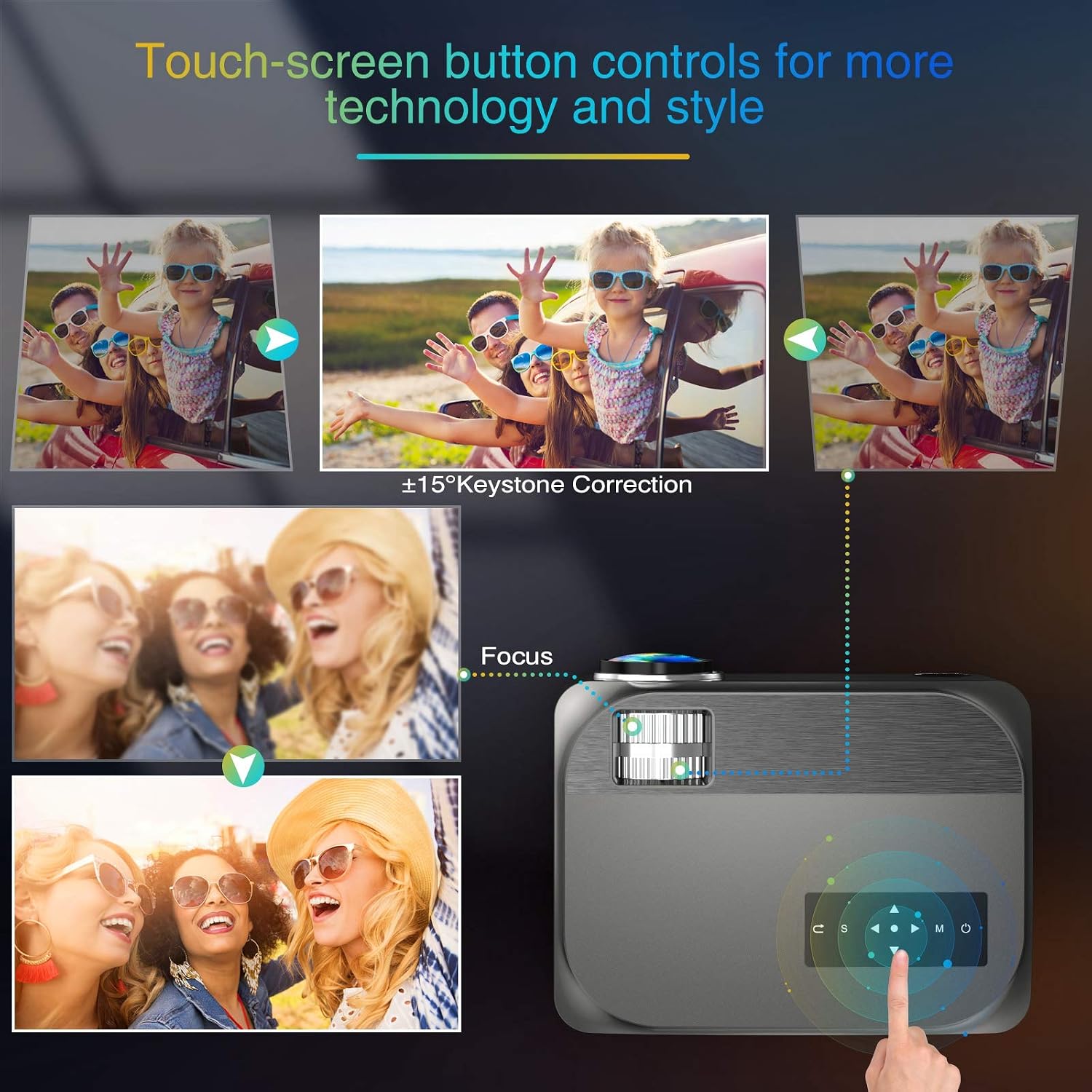
Image: Visual guide for adjusting keystone correction and focus on the VILINICE BL89 projector.
6.3 Zoomfunktion
The projector features a -25% zoom function, allowing you to reduce the image size without moving the projector. This is particularly useful for ceiling-mounted installations. Use the remote control to access and adjust the zoom setting.

Image: Illustration of the projector's zoom function, showing how the image size can be reduced from 100% to 75%.
6.4 Valg af indgangskilde
Press the 'Source' button on the projector or remote control to cycle through available input sources (HDMI1, HDMI2, USB1, USB2, VGA, AV). Select the input corresponding to your connected device.
6.5 Lydudgang
The projector has built-in 10W HiFi stereo speakers. For an enhanced audio experience, you can connect external speakers or headphones to the 3.5mm audio out (AUX) port.

Billede: Et overheadbillede view showing the VILINICE BL89 projector in use, emphasizing its integrated Hi-Fi stereo sound system.
6.6 Streamingtjenester
Due to app copyright restrictions, direct streaming of services like Netflix, Prime Video, or Hulu is not supported via the projector's internal system. To watch content from these platforms, connect an external device such as a laptop, Amazon Fire TV Stick, Roku, or Chromecast via an HDMI port.
7. Vedligeholdelse
7.1 Rengøring af linsen
Brug en blød, fnugfri klud, der er specielt designet til optiske linser, til forsigtigt at tørre projektorlinsen af. Undgå at bruge slibende rengøringsmidler eller overdreven kraft, da dette kan ridse linsen.
7.2 Rengøring af projektorhuset
Wipe the exterior of the projector with a soft, dry cloth. Do not use liquid or aerosol cleaners.
7.3 Ventilation
Regularly check that the ventilation openings are clear of dust and debris to ensure proper airflow and prevent overheating. The projector's ECO-mode helps extend the lamp liv.
7.4 Lamp Liv
LED lamp in your VILINICE BL89 projector has an estimated operating life of up to 100,000 hours, significantly reducing the need for lamp udskiftning.
8. Fejlfinding
Hvis du støder på problemer med din projektor, kan du se følgende almindelige problemer og løsninger:
| Problem | Mulig årsag | Løsning |
|---|---|---|
| Intet billede eller sløret billede | Focus not adjusted; Keystone not adjusted; Lens cap on; Incorrect input source. | Adjust the focus ring; Adjust keystone correction; Remove lens cap; Select correct input source. |
| Ingen lyd | Volume too low; Mute enabled; External audio device not connected or configured correctly; Source device volume low. | Increase projector volume; Disable mute; Check external audio connections; Increase volume on source device. |
| Fjernbetjening virker ikke | Batteries dead or incorrectly inserted; Obstruction between remote and projector; Remote out of range. | Replace batteries; Remove obstructions; Ensure remote is within range and pointed at the IR receiver. |
| Projektoren overopheder og slukker | Ventilation blocked; Operating in high ambient temperature. | Ensure ventilation openings are clear; Operate in a well-ventilated area. |
| Billedet er forvrænget eller misfarvet | Faulty cable connection; Source device issue; Projector settings. | Check and re-secure all cable connections; Test with a different source device; Reset projector display settings. |
9. Specifikationer
| Feature | Detalje |
|---|---|
| Mærke | VILINICE |
| Modelnummer | BL89 |
| Indfødt opløsning | 1920 x 1080P Fuld HD |
| Lysstyrke | 9000 lux |
| Kontrastforhold | 8000:1 |
| Display Type | LCD |
| Lyskildens levetid | 100,000 timer |
| Keystone korrektion | Manuel ±15° |
| Zoomfunktion | -25 % |
| Projektionsstørrelse | 44" - 300" |
| Kasteafstand | 1.2 - 5 Meters (5 - 30 ft) |
| Indbyggede højtalere | 10W HiFi Stereo Sound |
| Forbindelsesteknologi | HDMI, USB, VGA, AV, AUX |
| Kompatible enheder | TV Box, Amazon Fire Stick TV, Chromecast, Laptop, Speakers, Playstation, Xbox, DVD player, Card reader, USB stick, Media players, iPad, iPhone, Android smartphone |
| Kontrolmetode | Fjernbetjening, app (hvis relevant) |
| Farve | Grå |
| Wattage | 130 watt-timer |
10. Garanti og support
10.1 Garantioplysninger
The VILINICE BL89 Projector comes with a 2-year warranty. Additionally, upon product registration, you may receive an extended 3-month return period and a 24-month promise.
10.2 Teknisk support
VILINICE offers lifetime technical support for this product. If you have any questions, require assistance, or encounter issues not covered in this manual, please contact VILINICE customer service. Refer to the product packaging or the official VILINICE website for contact details (e.g., email address or support portal).