
1. Introduktion
This manual provides essential information for the proper use and care of your Rollei Actioncam 7S Plus. Please read it thoroughly before operating the device to ensure optimal performance and longevity. The Rollei Actioncam 7S Plus is a versatile 4K action camera designed for capturing high-quality video and photos in various environments, including underwater, thanks to its robust waterproof housing.

Figure 1.1: Rollei Actioncam 7S Plus. This image shows the front view of the camera, highlighting its compact design and lens.
2. Pakkens indhold
Bekræft, at alle nedenstående varer er inkluderet i din pakke. Hvis der mangler eller er beskadigede varer, bedes du kontakte kundesupport.
- Rollei Actioncam 7S Plus Camera
- Undervandshus
- Fjernbetjening
- Replaceable Lithium-Ion Battery (850 mAh)
- Monteringsramme
- Tripod Thread Adapter
- Cykelholder
- Hjelmmontering
- Velcro stropper
- Klistermærker
- Kabelbindere
- USB kabel
- Linse Rengøringsklud

Figure 2.1: Included accessories for the Rollei Actioncam 7S Plus. This image displays the camera along with various mounts, straps, cables, and the remote control.
3. Opsætning
3.1. Batteriinstallation og opladning
- Åbn batteridækslet i bunden af kameraet.
- Insert the provided 850 mAh Lithium-Ion battery, ensuring the contacts align correctly.
- Luk batterirummets dæksel forsvarligt.
- Connect the camera to a USB power source using the supplied USB cable to charge the battery. The charging indicator light will illuminate.
- En fuld opladning tager typisk cirka 2-3 timer.
3.2. Installation af microSD-kort
The camera requires a MicroSD card (Class 10 or U3 recommended) for storing recordings.
- Find MicroSD-kortstikket på siden af kameraet.
- Indsæt MicroSD-kortet med de gyldne kontakter vendt mod kameraets forside, indtil det klikker på plads.
- For at fjerne det skal du forsigtigt skubbe kortet, indtil det springer ud.
3.3. Tænd/sluk
- Sådan tænder du: Tryk på tænd/sluk-/tilstandsknappen og hold den nede i et par sekunder.
- Sådan slukker du kameraet: Tryk på tænd/sluk-/tilstandsknappen og hold den nede igen, indtil kameraet slukker.
3.4. Indledende indstillinger
Upon first use, or after a factory reset, you may need to set the language, date, and time via the touchscreen menu.
4. Betjening af kameraet
4.1. Kamera overview og kontroller

Figur 4.1: Bagside view of the Rollei Actioncam 7S Plus in its waterproof housing, showing the 2-inch touchscreen display.
The Rollei Actioncam 7S Plus features a 2-inch touchscreen for intuitive navigation and settings adjustment. Physical buttons are typically for power/mode and shutter/OK functions.
4.2. Videooptagelse
The camera supports various video resolutions and frame rates:
- 4K ved 30 billeder i sekundet (fps)
- Full HD (1080p) at 120 fps for smooth slow-motion playback
- Other resolutions and frame rates available via settings.
Available video modes include: Normal, Time-Lapse, Idle, and Loop Recording.
4.3. Fotooptagelse
Capture high-resolution still images up to 16 Megapixels (4608 x 3456 pixels).
Photo modes include: Single Shot, Burst, Delay, Time-Lapse, and Long Exposure.
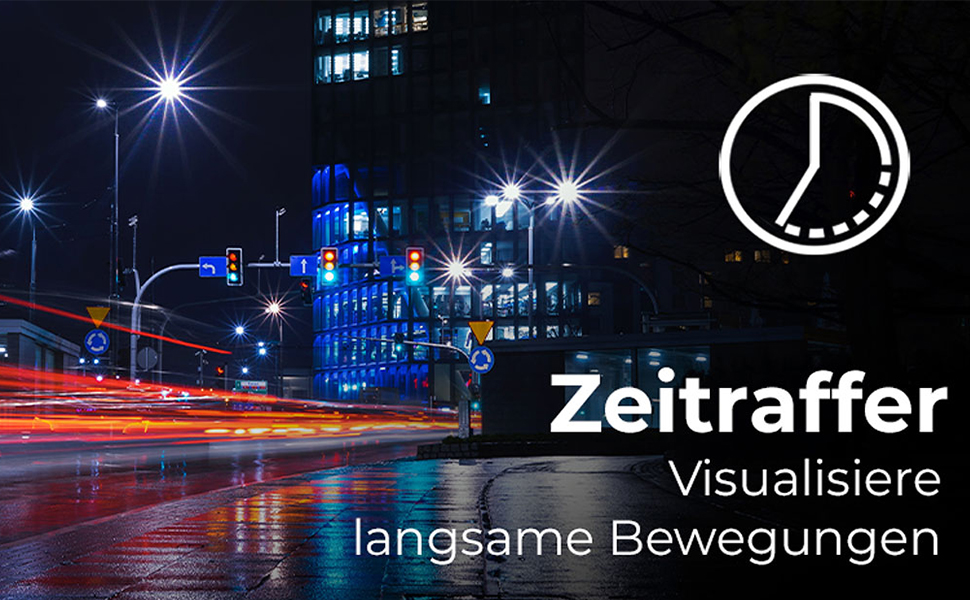
Figure 4.2: Illustration of the Time-Lapse feature. This image depicts a city night scene with light trails, demonstrating the camera's ability to capture time-lapse videos.

Figure 4.3: Illustration of the Slow Motion feature. This image shows colorful powder being thrown, emphasizing the camera's capability to capture detailed slow-motion footage.
4.4. Elektronisk billedstabilisering (EIS)
The camera features electronic image stabilization to reduce blur and shake in your recordings, especially during active use.
4.5. Wi-Fi Connectivity and Webcam Funktion
Connect your Actioncam to a smartphone or tablet via Wi-Fi using the dedicated app for remote control and file transfer. The camera also supports a webcam function for live streaming or video calls when connected to a computer.
4.6. Underwater Use
The included waterproof housing allows the Actioncam 7S Plus to be used at depths of up to 30 meters (approximately 98 feet).

Figure 4.4: The camera in its waterproof housing being used underwater. This image shows a diver interacting with a shark, demonstrating the camera's waterproof capability up to 30m.
4.7. Fjernbetjening
Use the included remote control to start/stop recording or take photos from a distance, enhancing convenience during various activities.
5. Vedligeholdelse
5.1. Rengøring af kamera og objektiv
- Use the provided lens cleaning cloth to gently wipe the lens and display.
- For the camera body, use a soft, dry cloth. Do not use chemical cleaners.
- Ensure the waterproof housing is clean and free of debris before each underwater use to maintain its seal. Rinse with fresh water after saltwater exposure.
5.2. Batteripleje
- Opbevar batterier på et køligt, tørt sted.
- Undgå at aflade batteriet helt i længere perioder.
- Hvis batteriet opbevares i længere tid, skal det oplades til ca. 50% hver par måneder.
5.3. Opbevaring
When not in use, store the camera and accessories in a protective case in a dry environment, away from direct sunlight and extreme temperatures.
6. Fejlfinding
| Problem | Mulig årsag | Løsning |
|---|---|---|
| Kameraet tænder ikke. | Batteriet er afladet eller ikke isat korrekt. | Oplad batteriet helt. Sørg for, at batteriet er isat med den korrekte polaritet. |
| Kan ikke optage video/tage billeder. | MicroSD card is full, corrupted, or not inserted. | Insert a MicroSD card. Format the card (this will erase all data). Replace the card if corrupted. |
| Dårlig video-/fotokvalitet. | Lens is dirty, insufficient lighting, incorrect settings. | Clean the lens. Ensure adequate lighting. Adjust resolution and exposure settings. |
| Problemer med Wi-Fi-forbindelse. | Incorrect Wi-Fi settings, app issues, distance from device. | Ensure Wi-Fi is enabled on camera and device. Reinstall the app. Reduce distance between camera and device. |
| Kameraet fryser eller reagerer ikke. | Softwarefejl. | Tryk på tænd/sluk-knappen og hold den nede i 10 sekunder for at tvinge en nedlukning. Genstart kameraet. |
7. Specifikationer
| Feature | Detalje |
|---|---|
| Mærke | Rollei |
| Modelnavn | Actioncam 7S Plus |
| Sensor Technology | CMOS |
| Video opløsning | 4K (3840x2160) at 30fps, Full HD (1080p) at 120fps |
| Foto opløsning | 16 MP (4608 x 3456) |
| Max blænde | F 2.8 |
| Linsetype | Vidvinkel (120 grader) |
| Flash-hukommelsestype | Micro SD (Class 10, U3 recommended) |
| Videoformat | MP4 |
| Lydformat | AAC |
| Skærmstørrelse | 2 tommer (berøringsskærm) |
| Forbindelse | USB, Wi-Fi (802.11b/g) |
| Særlige funktioner | Touchscreen, Time-Lapse, Slow Motion, Remote Control, Webcam Funktion |
| Vandtæt niveau | Waterproof with housing up to 30 meters |
| Billedstabilisering | Elektronisk (EIS) |
| Vægt | 61 gram |
| Batterilevetid | Up to 75 Minutes (850 mAh Li-ion battery) |
| Mål (D x B x H) | 3.2 x 6 x 4.2 cm |
| Operativsystem | Proprietary operating system developed by Rollei |
8. Garanti og support
8.1. Garantioplysninger
The Rollei Actioncam 7S Plus comes with a 24 måneders garanti from the date of purchase. This warranty covers manufacturing defects and material faults. It does not cover damage caused by improper use, accidents, unauthorized repairs, or normal wear and tear.
8.2. Kundesupport
For technical assistance, warranty claims, or further inquiries, please refer to the official Rollei webwebstedet eller kontakt deres kundeserviceafdeling. Hav dit købsbevis klar, når du kontakter support.
Officiel Rollei Webwebsted: www.rollei.com