
1. Introduktion og pakkeindhold
The QYT KT-8900 GMRS Mobile Radio is a compact and powerful two-way radio designed for reliable communication across various environments, including farms, ranches, and overlanding adventures. It operates on GMRS frequencies and features NOAA Weather Scan and Alert capabilities, privacy codes, and dual-band reception with dual standby.
1.1 Pakkens indhold
Kontroller venligst, at alle nedenstående varer er inkluderet i din pakke:
- 1x QYT KT-8900 Mobile Transceiver
- 1x Microphone with DTMF Keypad
- 1x 2.8 ft DC Cable with Cigarette Plug Connector
- 1x Mounting Bracket (Fuse and Screws included)
- 1x programmeringskabel

Image 1.1: The QYT KT-8900 GMRS Mobile Radio with its integrated control microphone.

Image 1.2: All components included in the QYT KT-8900 GMRS Mobile Radio package.
2. Nøglefunktioner
The QYT KT-8900 GMRS Mobile Radio offers a range of features designed for optimal performance and user convenience:
- Full 25-Watt GMRS Mobile Radio: Operates on GMRS frequencies with 15 GMRS channels and 8 repeater channels, compatible with all FRS and GMRS radios. Output power: 25W/20W (VHF/UHF).
- Bredt frekvensområde: VHF: 136-174MHz / UHF: 400-480MHz.
- FCC Licensed GMRS Channels: The GMRS channels are licensed by the FCC (FCC ID: 2AV62KT-8900) for personal and business use, offering a range of several miles depending on conditions.
- NOAA Vejrscanning + Alarm: Automatically scans available weather band channels and locks onto the strongest signal to provide severe weather updates and alerts.
- CTCSS/DCS Privacy Codes: Allows selection of specific codes for channels to prevent unwanted transmissions.
- Kompakt design: A mini car GMRS radio, ideal for overlanders, off-roaders, farmers, and RV users.
3. Komponentidentifikation
3.1 Frontpanel

Billede 3.1: Forside view of the QYT KT-8900 radio with key components labeled.
| Ingen. | Komponent | Beskrivelse |
|---|---|---|
| ① | Antenne Connector | Connects to the external antenna. |
| ② | CALL -knap | Initiates a call or activates a specific function. |
| ③ | MONI Button | Monitors the current channel for activity. |
| ④ | Power knap | Tænder eller slukker for radioen. |
| ⑤ | Højttaler | Audio output for received transmissions. |
| ⑥ | Mikrofon port | Connects the control microphone. |
| ⑦ | Programmeringsport | Used for connecting the programming cable to a computer. |
| ⑧ | FM -knap | Aktiverer FM-radiofunktionen. |
| ⑨ | EXIT/AB Button | Exits menu or switches between A/B display. |
| ⑩ | V/M Button | Switches between VFO (Frequency) and Memory (Channel) modes. |
| ⑪ | Lydstyrke/afbryderknap | Adjusts audio volume and serves as the power switch. |
3.2 Bagpanel

Billede 3.2: Bagside view of the QYT KT-8900 radio, showing power and antenna connections.
| Ingen. | Komponent | Beskrivelse |
|---|---|---|
| ① | Eksternt højttalerstik | Connects an optional external speaker. |
| ② | DC-strømindgang | Connects the DC power cable for power supply. |
| ③ | Køleventilator | Afleder varme under drift. |
| ④ | Antenna Connector (SO-239) | Connects the external antenna cable. |
3.3 Control Microphone

Image 3.3: The control microphone with its DTMF keypad.
| Ingen. | Komponent | Beskrivelse |
|---|---|---|
| ① | MENU knap | Giver adgang til radioens menusystem. |
| ② | OP-knap | Navigates up through menus or increases frequency/channel. |
| ③ | NED knap | Navigates down through menus or decreases frequency/channel. |
| ④ | EXIT/AB Button | Exits menu or switches between A/B display. |
| ⑤ | Tastatur | Used for direct frequency entry, DTMF tones, and menu selection. |
| ⑥ | PTT-knap (Push-to-Talk). | Tryk og hold nede for at sende, slip for at modtage. |
4. Opsætning og installation
4.1 Strømtilslutning
Connect the provided DC power cable to the DC Power Input port on the rear of the radio (labeled ② in Image 3.2). Ensure the connection is secure. The other end of the cable, with the cigarette plug connector, should be plugged into your vehicle's 12V DC power outlet. The radio requires 13.8 Volts (DC) for optimal operation.
4.2 Antenneforbindelse
Connect your GMRS antenna to the SO-239 antenna connector on the rear of the radio (labeled ④ in Image 3.2). Ensure the antenna is properly tuned for the GMRS frequencies to prevent damage to the radio and ensure efficient transmission. A properly matched antenna is crucial for performance.
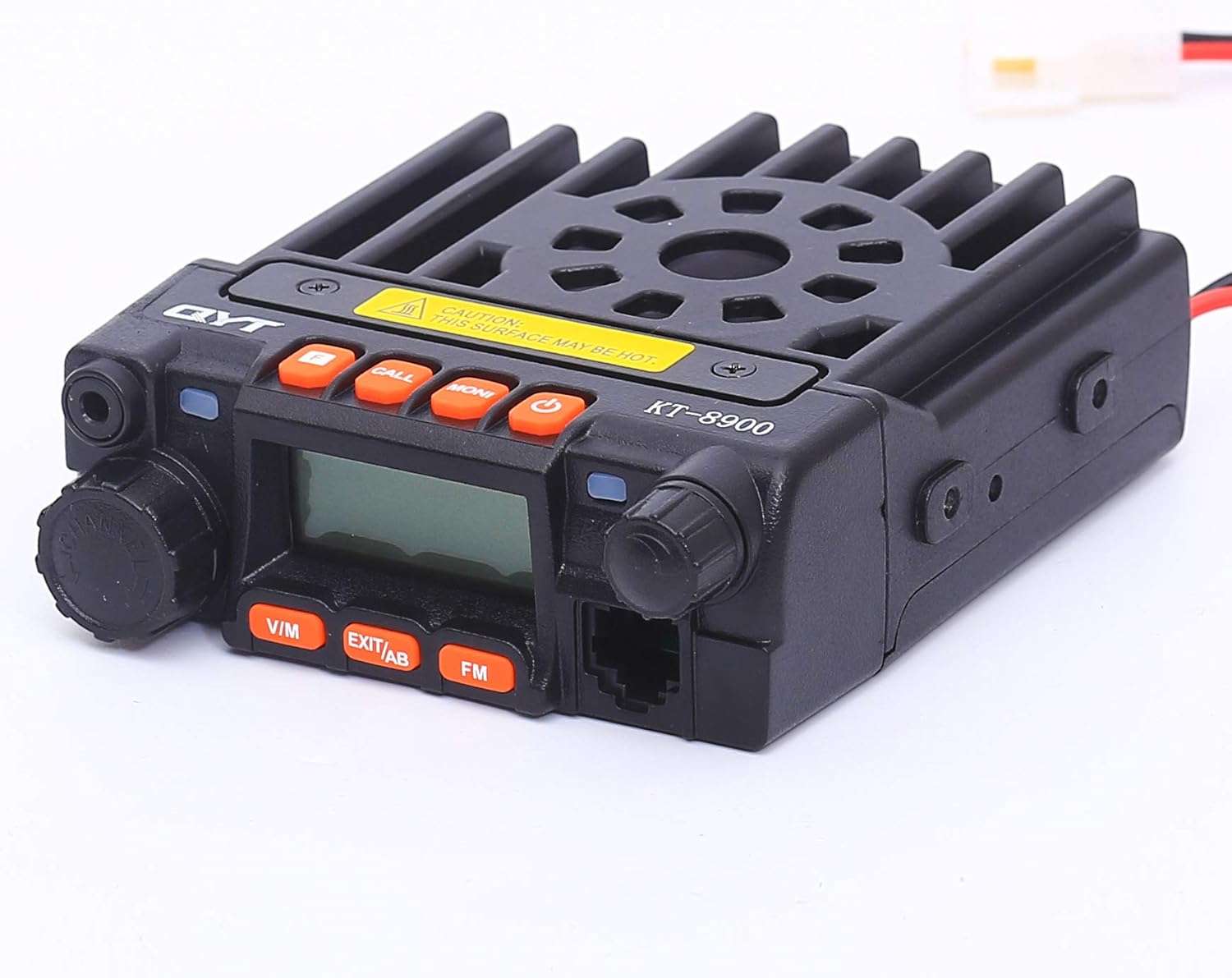
Billede 4.1: Side view of the QYT KT-8900 radio, showing its compact size.
4.3 Montering
Use the included mounting bracket and screws to securely install the radio in your desired location within your vehicle or setup. Ensure the mounting location allows for adequate ventilation, especially around the cooling fan on the rear of the unit, and easy access to controls and connections.

Billede 4.2: Bagside view of the QYT KT-8900 radio, highlighting the cooling fan.
5. Grundlæggende betjening
5.1 Tænd/sluk
To power on the radio, rotate the Volume/Power Knob (⑪ in Image 3.1) clockwise until the display illuminates. To power off, rotate the knob counter-clockwise until it clicks.
5.2 Lydstyrkejustering
Adjust the audio output volume by rotating the Volume/Power Knob (⑪ in Image 3.1) clockwise to increase and counter-clockwise to decrease.
5.3 Kanalvalg
The radio supports both VFO (Frequency) mode and Memory (Channel) mode. Press the V/M button (⑩ in Image 3.1) to switch between these modes. In Memory mode, use the UP/DOWN buttons on the microphone (② and ③ in Image 3.3) to cycle through programmed channels. In VFO mode, use the keypad on the microphone (⑤ in Image 3.3) to directly enter frequencies.
5.4 Afsendelse og modtagelse
To transmit, press and hold the PTT (Push-To-Talk) button on the side of the microphone (⑥ in Image 3.3). Speak clearly into the microphone. Release the PTT button to return to receive mode. Ensure you are on an appropriate GMRS channel before transmitting.
5.5 Dual Band Receiver Dual Standby
The KT-8900 can monitor two different frequencies (VHF and UHF) simultaneously. The display will show both frequencies. The radio will automatically switch to the active frequency when a signal is detected. You can select which frequency is the primary transmit frequency using the A/B function, typically accessed via the EXIT/AB button (⑨ in Image 3.1 or ④ in Image 3.3).
5.6 NOAA Weather Scan and Alert
To activate NOAA Weather Scan, navigate through the radio's menu system. Once activated, the radio will automatically scan available NOAA weather channels. If a severe weather alert is broadcast, the radio will sound an alarm to notify you.
5.7 Privatlivskoder (CTCSS/DCS)
The radio supports CTCSS (Continuous Tone-Coded Squelch System) and DCS (Digital Coded Squelch) privacy codes. These codes help filter out unwanted transmissions by only opening the squelch when a signal with the matching tone/code is received. Refer to the detailed menu guide for setting these codes on specific channels.
6. Advanced Functions: Programming
6.1 Programmering af radioen
While some basic settings can be adjusted directly on the radio, advanced functions, such as custom channel programming, repeater offsets, and specific privacy code assignments, are best managed using programming software. The QYT KT-8900 can be programmed using a computer and the included programming cable.
Connect the programming cable to the Programming Port (⑦ in Image 3.1) on the front of the radio and to a USB port on your computer. You will need to install the appropriate driver for the programming cable and the QYT programming software. Alternatively, the radio is known to be compatible with third-party programming software like KIRP, which offers a user-friendly interface for managing radio settings.
Note: Ensure you have the correct software version and drivers for your operating system. Incorrect programming can lead to radio malfunction or operation outside of legal parameters.
7. Vedligeholdelse
7.1 Rengøring
Rengør regelmæssigt radioens yderside med en blød, tør klud.amp klud. Undgå at bruge skrappe kemikalier eller slibende rengøringsmidler, da disse kan beskadige casing and display. Ensure all ports are free of dust and debris.
7.2 Opbevaring
When not in use for extended periods, store the radio in a cool, dry place away from direct sunlight and extreme temperatures. Disconnect it from power sources and ensure the antenna is removed or properly secured.
7.3 Antennepleje
Periodically check your antenna and its connection for any signs of wear or damage. A damaged antenna can significantly reduce the radio's performance and potentially cause damage to the radio's transmitter.
8. Fejlfinding
Dette afsnit omhandler almindelige problemer, du kan støde på med din QYT KT-8900-radio.
| Problem | Mulig årsag | Løsning |
|---|---|---|
| Radioen tænder ikke. | Ingen strømforsyning; løst strømkabel; sprunget sikring. | Check power connection; ensure vehicle's 12V outlet is active; inspect and replace fuse in DC cable if necessary. |
| Cannot transmit or transmit power is low. | Antenna not connected or damaged; incorrect frequency/channel; SWR issue; radio in receive-only mode. | Ensure antenna is securely connected and in good condition; verify you are on a GMRS transmit-enabled channel; check SWR with an external meter; ensure radio is not in a scan or monitor mode. |
| Dårlig modtagelse eller statisk støj. | Weak signal; antenna issue; high interference; squelch level too high. | Adjust squelch level; check antenna connection and position; move away from sources of electrical interference. |
| Microphone buttons unresponsive. | Microphone not fully plugged in; microphone cable damaged. | Ensure microphone cable is securely connected to the radio's microphone port. |
| Problemer med programmeringssoftware. | Incorrect drivers; software compatibility; faulty programming cable. | Install correct USB drivers for the programming cable; try different USB ports; ensure software is compatible with your OS; consider using alternative programming software like CHIRP. |
9. Tekniske specifikationer
Below are the key technical specifications for the QYT KT-8900 GMRS Mobile Radio:
| Specifikation | Værdi |
|---|---|
| Mærke | QYT |
| Modelnummer | KT-8900-BLACK |
| Varens vægt | 14.4 ounces (0.9 pund) |
| Produktdimensioner | 4.65 x 3.86 x 1.38 tommer |
| Oprindelsesland | Kina |
| Display Type | LCD |
| Antal kanaler | 200 |
| Frekvensområde | VHF: 136-174MHz / UHF: 400-480MHz (GMRS specific channels) |
| Udgangseffekt | 25W/20W (VHF/UHF) |
| Tuner-teknologi | UHF, VHF |
| Voltage | 13.8 volt (DC) |
| Vandmodstandsniveau | Ikke vandafvisende |
| FCC ID | 2AV62KT-8900 |
10. Garanti og support
10.1 Garantioplysninger
The QYT KT-8900 GMRS Mobile Radio typically comes with a 1-year manufacturer's warranty from the date of purchase. This warranty covers defects in materials and workmanship under normal use. Please retain your proof of purchase for warranty claims.
Note: The warranty may not cover damage caused by improper installation, misuse, unauthorized modifications, or natural disasters.
10.2 Kundesupport
For technical assistance, troubleshooting beyond this manual, or warranty inquiries, please contact QYT customer support. Refer to the contact information provided on the product packaging or the official QYT webwebsted.