
1. Introduktion
Thank you for choosing the Sonew G6 Gaming Mouse. This manual provides essential information for setting up, operating, and maintaining your new gaming mouse. Please read this manual carefully before use to ensure optimal performance and longevity of your device.
2. Produktfunktioner
- Ergonomisk design: Shaped to fit the palm for comfortable long-term use.
- Justerbar DPI: Six-gear adjustable photoelectric resolution up to 3200dpi for precise control.
- Kablet USB-forbindelse: Reliable and stable connection with a 1.5m (4.9ft) cable.
- Farverige LED-lys: Integrated LED lighting for visual effects.
- High-End Chip: Built-in chip for accurate positioning and responsiveness.

Image 2.1: The ergonomic design of the Sonew G6 Gaming Mouse, illustrating how it conforms to the hand for comfortable use.

Image 2.2: The Sonew G6 Gaming Mouse showcasing its colorful LED lighting effects.
3. Pakkens indhold
Kontroller venligst, at alle varer er til stede i pakken:
- 1 x Sonew G6 Gaming Mouse
4. Opsætning
Follow these steps to connect your Sonew G6 Gaming Mouse:
- Find en ledig USB-port på din computer (stationær eller bærbar).
- Plug the USB connector of the Sonew G6 Gaming Mouse into the USB port.
- Dit operativsystem burde automatisk registrere og installere de nødvendige drivere. Denne proces kan tage et par øjeblikke.
- Når musen er installeret, er den klar til brug.

Image 4.1: The Sonew G6 Gaming Mouse showing its integrated USB cable, ready for connection to a computer.
5. Betjeningsvejledning
5.1 Grundlæggende betjening
The Sonew G6 Gaming Mouse functions as a standard computer mouse. Move the mouse to control the cursor on your screen. Use the left and right buttons for primary and secondary clicks, respectively. The scroll wheel allows for vertical scrolling through documents and web sider.
5.2 DPI-justering
The mouse features an adjustable DPI (Dots Per Inch) setting, allowing you to change the sensitivity and speed of the cursor. This mouse offers six adjustable gears. To change the DPI, press the dedicated DPI button, usually located behind the scroll wheel. Each press will cycle through the available DPI settings, indicated by changes in the LED lighting or a brief pause in movement.
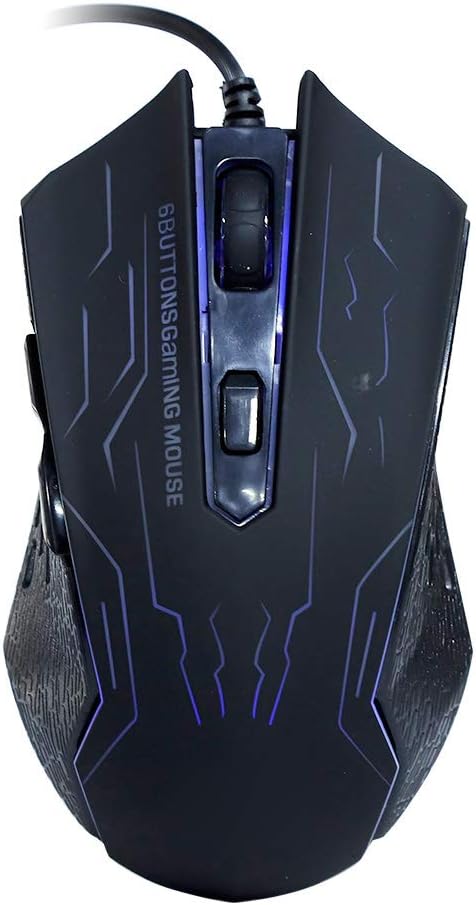
Billede 5.1: Top view of the Sonew G6 Gaming Mouse, highlighting the left and right click buttons, scroll wheel, and the DPI adjustment button.
6. Vedligeholdelse
To ensure the longevity and optimal performance of your Sonew G6 Gaming Mouse, follow these maintenance guidelines:
- Rensning: Brug en blød, tør klud til at tørre musens overflade af. Ved genstridigt snavs, tør let afampRengør kluden med vand eller en mild rengøringsopløsning. Undgå skrappe kemikalier eller slibende materialer.
- Sensorpleje: Hold den optiske sensor i bunden af musen ren og fri for støv og snavs. Brug en vatpind eller trykluft om nødvendigt.
- Kabelstyring: Undgå at bøje eller vride USB-kablet skarpt for at forhindre indvendig skade.
- Opbevaring: Når musen ikke er i brug, skal den opbevares et rent, tørt sted væk fra ekstreme temperaturer.
7. Fejlfinding
If you encounter issues with your Sonew G6 Gaming Mouse, refer to the following table for common problems and solutions:
| Problem | Mulig årsag | Løsning |
|---|---|---|
| Musen reagerer ikke | Løs USB-forbindelse, defekt USB-port, driverproblem. | Sørg for, at USB-kablet er korrekt tilsluttet. Prøv en anden USB-port. Genstart computeren. |
| Markørbevægelsen er uregelmæssig eller hoppende | Beskidt optisk sensor, uegnet overflade på musemåtten. | Clean the optical sensor on the bottom of the mouse. Use a clean, uniform mouse pad or surface. |
| DPI-justering virker ikke | Softwarekonflikt, knapfejl. | Ensure no conflicting software is running. If the issue persists, contact customer support. |
8. Specifikationer
Technical specifications for the Sonew G6 Gaming Mouse:
| Feature | Detalje |
|---|---|
| Model | G6 |
| Photoelectric Resolution | Up to 3200dpi (Six gears adjustable) |
| Interface | USB |
| Linjelængde | Ca.. 1.5m / 4.9ft |
| Forbindelsesteknologi | Kablet |
| Bevægelsesdetekteringsteknologi | Optisk |
| Speciel funktion | Ergonomisk design |
| Varens vægt | 5.5 ounce |
| Pakkedimensioner | 5.51 x 4.33 x 1.97 tommer |

Billede 8.1: Bund view of the Sonew G6 Gaming Mouse, displaying regulatory marks and electrical ratings (5V 100mA).
9. Garanti og support
For garantioplysninger eller teknisk support henvises til den dokumentation, der fulgte med dit køb, eller kontakt forhandleren. Gem dit købsbevis i tilfælde af garantikrav.