
1. Introduktion
The COMICA VDLIVE10 is a versatile 2.4G dual wireless lavalier microphone system designed for high-quality audio recording across various devices. This system offers dual-channel recording, flexible output modes, and a portable charging case, making it suitable for vlogging, live streaming, interviews, and online meetings. This manual provides detailed instructions for setting up, operating, and maintaining your VDLIVE10 microphone system.
2. Hvad er der i æsken
Your COMICA VDLIVE10 package includes the following components:
- VDLIVE10 Charging Case
- 2 x VDLIVE10 Transmitters (TX)
- 1 x VDLIVE10 Receiver (USB.RX)
- 2 x Fur Wind Muffs
- 1 x 3.5 mm TRRS-TRRS lydkabel
- 1 x USB-C til USB-A ladekabel
- 1 x USB-C til USB-A-adapter
- 1 x Cold Shoe Adapter
- 1 x bæretaske
- Brugermanual
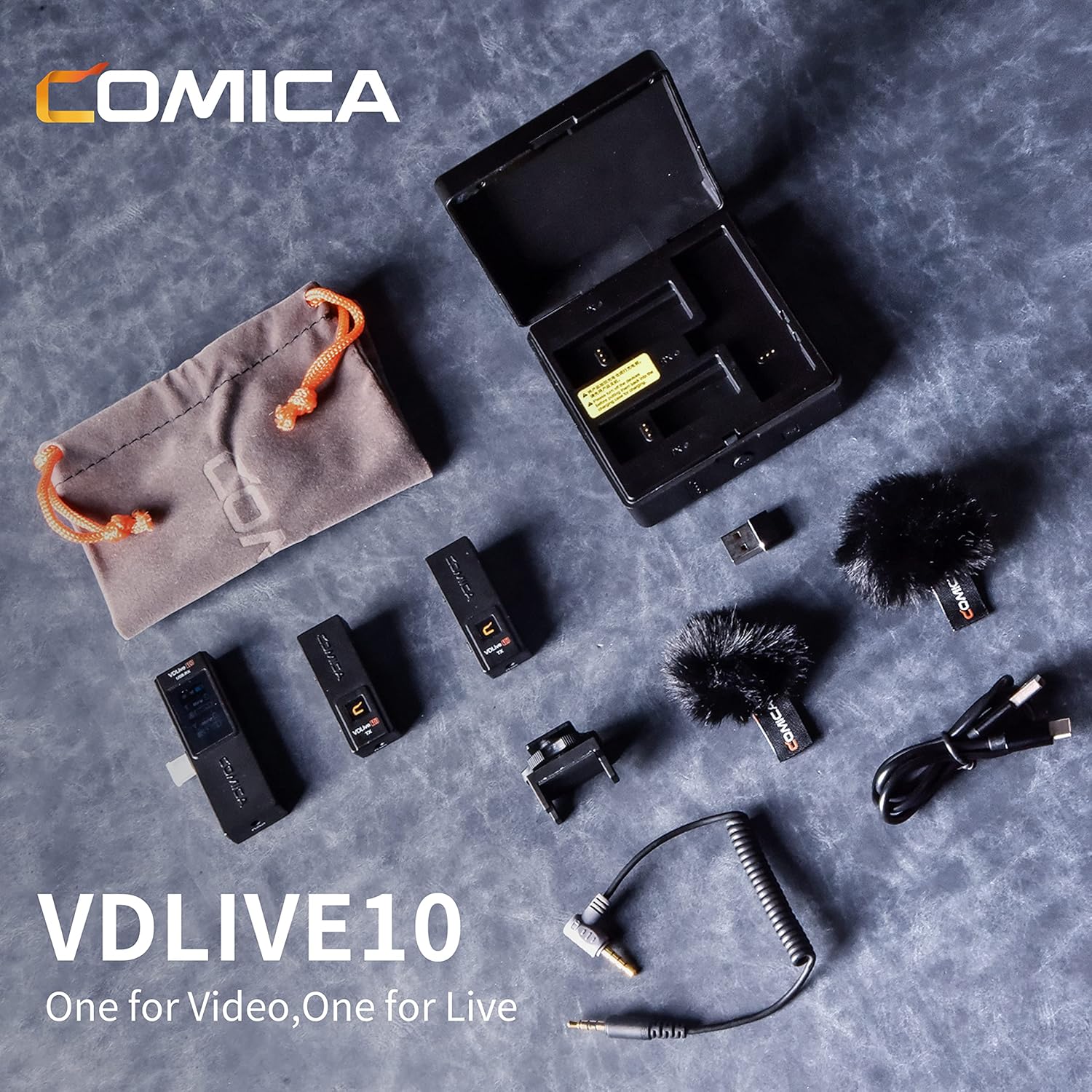
Image: All components of the COMICA VDLIVE10 system, including transmitters, receiver, charging case, cables, and accessories.
3. Produktfunktioner
- Dual-channel Wireless Microphone: The VDLIVE10 supports dual-channel recording with mono/stereo switch, volume adjustment, and mute functions. It offers internal and external microphone input modes for flexible use in various recording scenarios.
- Bred kompatibilitet: Equipped with USB-C and 3.5mm TRRS-TRRS adapters, the receiver can connect to DSLR cameras, smartphones (USB-C), iPads, and laptops.
- Lang standby-tid: The charging case fully charges in 4 hours and can recharge two transmitters and one receiver three times. The IPS display shows battery status, output mode, and audio dynamics.
- Two-Way Monitoring and Interaction: A 3.5mm headphone monitor hole allows real-time audio monitoring during recording. Remote monitoring on the transmitter is also possible for live streaming, online meetings, and teaching.
- Lav forsinkelse: With latency less than 20ms and intelligent noise reduction, the system ensures smooth and stable recording sound.

Image: The COMICA VDLIVE10 receiver attached to a smartphone gimbal, highlighting its IPS screen, mono/stereo output, and low latency feature.

Image: The COMICA VDLIVE10 receiver detailing its USB-C plug, 3.5mm audio output port, and various compatible devices including smartphones, cameras, and laptops.
4. Opsætning
4.1 Indledende opladning
Before first use, ensure all components are fully charged. Place the transmitters and receiver into the charging case. Connect the USB-C to USB-A charging cable to the case and a power source. The charging status indicators will illuminate.

Image: The COMICA VDLIVE10 multi-function charging case with transmitters and receiver inserted, displaying battery levels and charging status.
4.2 Connecting the Receiver to Your Device
The VDLIVE10 receiver offers multiple connection options:
- USB-C Devices (Smartphones, iPads, Laptops): Directly plug the USB-C connector of the receiver into your device's USB-C port.
- Cameras (DSLR/Mirrorless): Attach the cold shoe adapter to your camera's hot shoe. Insert the receiver into the cold shoe adapter. Connect the 3.5mm TRRS-TRRS audio cable from the receiver's 3.5mm output port to your camera's microphone input.
- USB-A Devices (Laptops/PCs): Use the provided USB-C to USB-A adapter to connect the receiver to a standard USB-A port.
4.3 Parring af sendere og modtager
The transmitters and receiver are pre-paired from the factory. If re-pairing is needed:
- Ensure the transmitters and receiver are powered on.
- Long press the pairing button on the charging case (if applicable) or follow the specific pairing instructions in the quick start guide for individual units.
- The devices will automatically connect. The IPS screen on the receiver will show connection status.

Image: The COMICA VDLIVE10 multi-function charging case, highlighting the pairing button and power indicator lights.
5. Betjeningsvejledning
5.1 Tænd/sluk
Slide the power switch on each transmitter and the receiver to the 'ON' position to power them on. Slide to 'OFF' to power off.
5.2 Mono/Stereo Switch
On the receiver, press the M/S button to toggle between Mono and Stereo output modes. In Stereo mode, audio from each transmitter is recorded on separate channels.
5.3 Volume Adjustment and Mute
Each transmitter has a 'VOL/MUTE' button. Short press to adjust the volume level. Long press to mute/unmute the microphone. The mute status will be displayed on the receiver's IPS screen.
5.4 Two-Way Monitoring (Simplex/Duplex Modes)
The transmitters feature an S/D switch for Simplex and Duplex transmission modes:
- Simplex Mode (S): Unidirectional audio transmission (TX to RX). Use for standard recording where only the speaker's audio is needed.
- Duplex Mode (D): Two-way audio transmission (TX to RX, and RX to TX). This allows remote monitoring on the transmitter. Plug headphones into the 3.5mm port on the transmitter to monitor audio from the connected device or platform.

Image: A diagram illustrating the Simplex and Duplex transmission modes of the COMICA VDLIVE10, showing the S/D switch and monitoring port for two-way audio interaction.
5.5 IPS Screen Display
The receiver's IPS screen provides real-time information:
- USB digital output mode / 3.5mm analog output mode
- Modtager strøm
- Transmitter signal strength
- Transmitter volume
- Group A/B paired/unpaired status
- Sendereffekt
- Transmitter audio dynamic bar

Image: Detailed instructions for understanding the information displayed on the COMICA VDLIVE10 receiver's IPS screen, including connection status, volume levels, and battery indicators.
6. Opladning og batterilevetid
The VDLIVE10 system is designed for extended use with its integrated charging solution.
- Opladningsetuiet tager cirka 4 timer at oplade helt.
- Once fully charged, the case can recharge the two transmitters and one receiver up to 3 times.
- Each transmitter and the receiver provide up to 12 hours of operation on a single full charge.

Image: The COMICA VDLIVE10 charging case highlighting its 1000mAh battery capacity and 12 hours of operation, with charging status indicators for TX and RX units.
7. Kompatibilitet
The COMICA VDLIVE10 is compatible with a wide range of devices:
- Smartphones: USB-C enabled Android phones. (Note: For iOS devices, select the VDLIVE10 MI version or purchase an adapter cable.)
- Tabletter: USB-C enabled iPads and other tablets.
- Bærbare computere/pc'er: Devices with USB-C or USB-A ports (using the provided adapter).
- Kameraer: DSLR and mirrorless cameras with a 3.5mm microphone input.

Image: The COMICA VDLIVE10 demonstrating its USB digital output mode for smartphones, tablet PCs, and laptops, and 3.5mm analog output mode for cameras, camcorders, and GoPros.
8. Specifikationer
| Feature | Specifikation |
|---|---|
| Audio Følsomhed | 70 decibel |
| Mikrofon formfaktor | Mikrofonsystem |
| Emnemål L x B x H | 2.36 x 5.31 x 7.68 tommer |
| Strømkilde | Batteridrevet |
| Antal batterier | 1 Lithium Polymer batterier påkrævet. |
| Signal-støjforhold | 80 dB |
| Hardware platform | Camera, Laptop, Smartphone |
| Antal kanaler | 10 |
| Frekvensrespons | 2.4 GHz |
| Varens vægt | 1.19 pund |
| Forbindelsesteknologi | USB |
| Connector Type | 3.5 mm jackstik, USB |
| Speciel funktion | Mute Function, Stand |
| Kompatible enheder | Kamera, Personlig Computer, Smartphone |
| Polar mønster | Omnidirektionel |
9. Fejlfinding
- Ingen lydoutput: Ensure the receiver is correctly connected to your device and the volume levels on both the transmitters and receiver are adjusted. Check that microphones are not muted.
- Dårlig lydkvalitet/støj: Ensure transmitters and receiver are fully charged. Avoid blocking the antenna position during use. If using external microphones, ensure they are properly connected.
- Forbindelsesproblemer: Ensure all devices are powered on. Try re-pairing the transmitters and receiver. Move closer to the receiver to check for range limitations.
- Enhed ikke genkendt: For USB connections, ensure your device's operating system recognizes the VDLIVE10 as an audio input/output device. Restart your device if necessary.
10. Garanti og support
COMICA products typically come with a standard manufacturer's warranty. For specific warranty details, product support, or technical assistance, please refer to the warranty card included in your package or visit the official COMICA webwebsted. Gem din købskvittering for garantikrav.
11. Officielle produktvideoer
Comica VD Live10 USB wireless lavalier microphone
Video: En kort gennemgangview of the Comica VD Live10 USB wireless lavalier microphone, demonstrating its compact design and ease of use.
I Choose Comica VDLive10 as A Budget ALL in ONE Wireless Mic
Video: En detaljeret gengivelseview and demonstration of the Comica VDLive10, highlighting its features and performance as an all-in-one wireless microphone solution.
VDLive USB wireless mic for online meeting and livestreaming
Video: A demonstration of the VDLive USB wireless microphone's capabilities for online meetings and live streaming, showcasing its audio quality and ease of integration.