
1. Introduktion
Thank you for choosing the Andoer W200RGB LED Video Light. This manual provides detailed instructions for the proper setup, operation, and maintenance of your device. Please read this manual thoroughly before use to ensure optimal performance and longevity of the product. Keep this manual for future reference.
2. Produktet er slutview
2.1 Pakkens indhold
Når du åbner pakken, skal du kontrollere, at alle nedenstående varer er til stede og i god stand:
- Andoer W200RGB LED Video Light
- USB Type-C opladerkabel
- Mini stativ
- Håndledsrem
- User Manual (English and Chinese)

Image: Contents of the Andoer W200RGB LED Video Light package, showing the light, USB cable, mini tripod, and wrist strap.
2.2 Nøglefunktioner
- Kompakt og bærbart design: Rod-shaped design, 20cm in length, lightweight for easy transport.
- Høj lysstyrke: Equipped with 184 high-quality LED beads (69 white, 69 yellow, 46 RGB) with 7W output and CRI 95+.
- RGB Colored Light Mode: 360° adjustable HUE and 0%-100% adjustable brightness for diverse colorful lighting effects.
- CCT Cold & Warm Light Mode: Wide adjustable color temperature range from 2500K to 9000K.
- 20 specielle lyseffekter: Includes ambulance, fireworks, TV, candle, party, strobe, RGB strobe, red flash, green flash, blue flash, slow HSI, fast HSI, and more.
- Indbygget genopladeligt batteri: Integrated 3.7V 3000mAh lithium battery for extended working time, rechargeable via Type-C port.
- Magnetisk bagside: Built-in magnets at both ends allow for easy attachment to magnetic surfaces.
2.3 Betjeningselementer og display
The Andoer W200RGB features intuitive controls and an LCD screen for easy operation.

Image: The control panel of the Andoer W200RGB LED Video Light, showing the power button, mode button, adjustment buttons, and LCD screen.
- Power knap: Press and hold to turn the light on or off. Short press to switch between modes.
- Mode-knap (M): Short press to cycle through CCT, HSI (RGB), and Scene modes.
- Op/ned-knapper (▲/▼): Adjust parameters such as brightness, color temperature, HUE, or saturation depending on the selected mode.
- LCD skærm: Displays current settings including mode, brightness, color temperature, HUE, and battery level.
- Type-C opladningsport: Located at one end for charging the internal battery.
3. Opsætning
3.1 Opladning af batteriet
The Andoer W200RGB LED Video Light comes with a built-in rechargeable lithium battery. Before first use, it is recommended to fully charge the device.
- Connect the supplied USB Type-C cable to the charging port on the light.
- Tilslut den anden ende af USB-kablet til en standard USB-strømadapter (medfølger ikke) eller en USB-port på computeren.
- The LCD screen will indicate the charging status. A full charge typically takes a few hours.

Image: The Andoer W200RGB LED Video Light highlighting its internal 3.7V 3000mAh battery and Type-C charging capability.
3.2 Attaching the Mini Tripod
The included mini tripod can be attached to the 1/4-inch screw hole at the bottom of the light for stable placement.
- Locate the 1/4-inch screw hole on the bottom of the LED light.
- Screw the mini tripod securely into the screw hole.
- Juster stativbenene for den ønskede højde og stabilitet.
4. Betjeningsvejledning
4.1 Tænd/sluk
- To turn on the light, press and hold the Power button (labeled with a circle and vertical line) for a few seconds.
- To turn off the light, press and hold the Power button again for a few seconds.
4.2 Skift tilstande
After powering on, short press the Mode button (M) to cycle through the available lighting modes:
- CCT Mode (Color Correlated Temperature): For adjusting white light from warm to cool.
- HSI-tilstand (farvetone, mætning, intensitet): For adjusting RGB colored light.
- Scenetilstand: For selecting special lighting effects.
4.3 CCT Mode Operation
I CCT-tilstand kan du justere farvetemperaturen og lysstyrken.
- Use the Up/Down buttons (▲/▼) to adjust the brightness from 0% to 100%.
- Short press the Power button to switch to color temperature adjustment. Use the Up/Down buttons (▲/▼) to adjust the color temperature from 2500K (warm) to 9000K (cool).

Image: Visual representation of brightness adjustments (0%, 50%, 100%) and color temperature settings (6000K, 5000K, 2800K) in CCT mode.
4.4 HSI Mode (RGB) Operation
In HSI mode, you can adjust the HUE (color), saturation, and brightness.
- Use the Up/Down buttons (▲/▼) to adjust the HUE (360° color spectrum).
- Short press the Power button to switch to saturation adjustment. Use the Up/Down buttons (▲/▼) to adjust saturation.
- Short press the Power button again to switch to brightness adjustment. Use the Up/Down buttons (▲/▼) to adjust brightness from 0% to 100%.
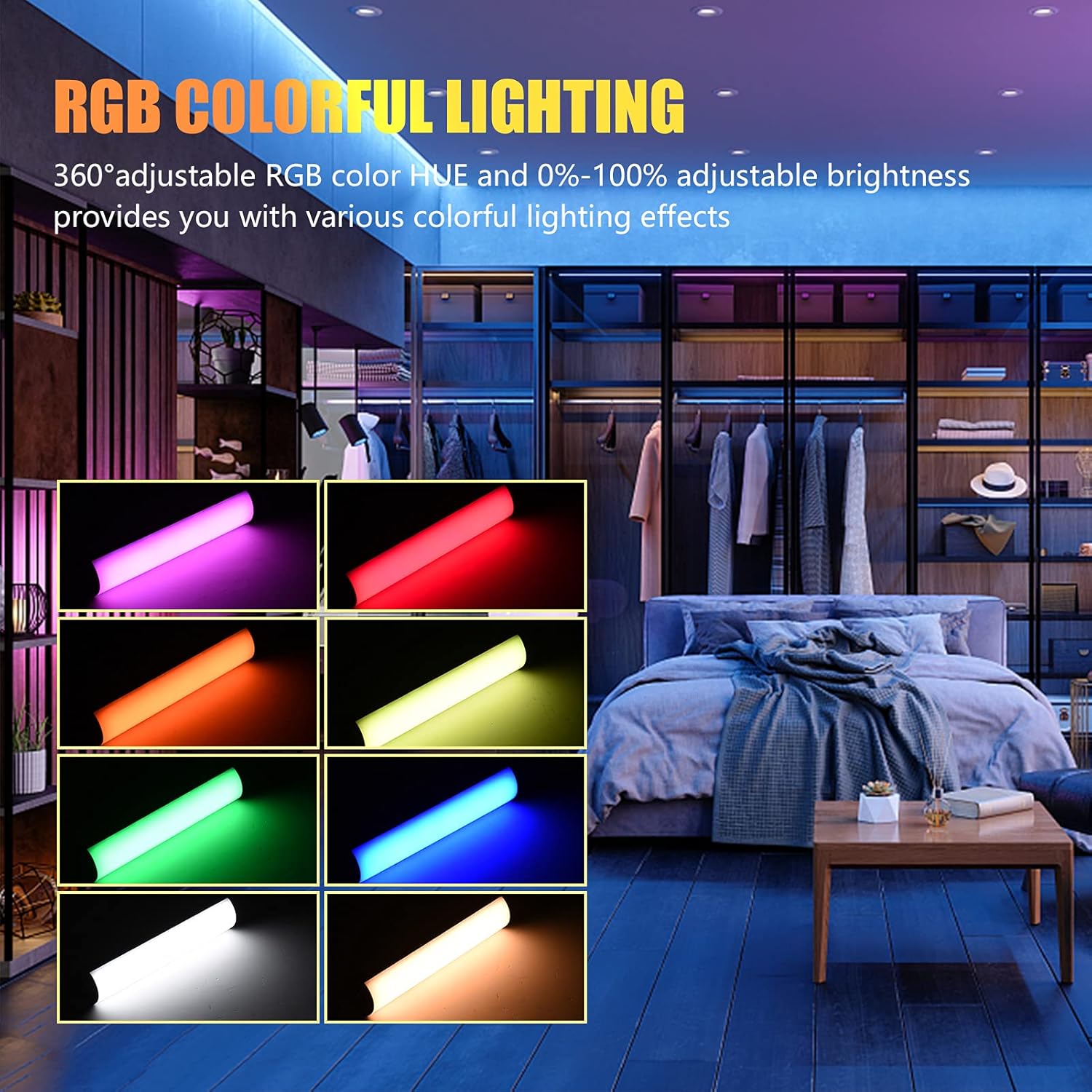
Image: The Andoer W200RGB LED Video Light demonstrating its RGB colorful lighting capabilities, showing different hues and brightness levels.

Image: Several Andoer W200RGB LED Video Lights illuminated in various solid RGB colors, showcasing the rod-shaped design.
4.5 Scene Mode Operation (Special Effects)
In Scene mode, you can select from 20 pre-programmed special lighting effects.
- Use the Up/Down buttons (▲/▼) to cycle through the 20 special effects.
- Some effects may have adjustable parameters (e.g., speed or intensity), which can be adjusted by short pressing the Power button and then using the Up/Down buttons.

Image: A visual guide to the 20 dynamic scene light effects, such as police car, ambulance, fireworks, TV, candle, party, strobe, and various color flashes.
4.6 Using the Magnetic Back
The Andoer W200RGB LED Video Light features built-in magnets at both ends, allowing it to be easily attached to metallic surfaces for flexible lighting setups.
- Simply place either end of the light onto a suitable magnetic surface.
- Ensure the surface is stable and can support the weight of the light.

Image: The Andoer W200RGB LED Video Light highlighting its magnetic ends, demonstrating how it can be attached to metal surfaces.
4.7 Praktiske anvendelser

Image: A comparison of scenes before and after using the Andoer W200RGB LED Video Light, illustrating its effectiveness in enhancing illumination for various activities.
5. Vedligeholdelse
5.1 Rengøring
- Sørg for, at enheden er slukket og frakoblet enhver strømkilde før rengøring.
- Brug en blød, tør klud til at tørre lampens overflade af.
- Til genstridigt snavs, let dampRengør kluden med vand. Undgå at bruge skrappe kemikalier, opløsningsmidler eller slibende rengøringsmidler.
- Do not allow water or liquids to enter the device.
5.2 Opbevaring
- Opbevar lampen et køligt, tørt sted væk fra direkte sollys og ekstreme temperaturer.
- Hvis batteriet opbevares i en længere periode, skal det oplades til cirka 50% hver tredje måned for at opretholde batteriets tilstand.
5.3 Pleje af batterier
- Undgå at aflade batteriet helt ofte.
- Udsæt ikke batteriet for høje temperaturer eller punkter det.
- If the battery shows signs of swelling or leakage, discontinue use immediately and dispose of it properly according to local regulations.
6. Fejlfinding
If you encounter any issues with your Andoer W200RGB LED Video Light, please refer to the following common problems and solutions:
- Lyset tænder ikke:
- Sørg for, at batteriet er opladet. Tilslut lyset til en strømkilde med USB Type-C-kablet.
- Press and hold the Power button for a few seconds to ensure it's not just a short press.
- Light flickers or output is unstable:
- Check the battery level; low battery can cause unstable performance. Recharge if necessary.
- Sørg for, at lyset ikke udsættes for ekstreme temperaturer.
- Cannot change modes or adjust parameters:
- Ensure you are pressing the correct buttons (Mode button for mode changes, Power button to cycle through adjustable parameters within a mode, Up/Down buttons for value adjustment).
- Genstart enheden ved at slukke og tænde den igen.
- Batteri oplades ikke:
- Verify the USB Type-C cable is securely connected to both the light and the power source.
- Prøv et andet USB-kabel eller en anden strømadapter for at udelukke defekt tilbehør.
- Sørg for, at strømkilden er funktionel.
Hvis problemet fortsætter efter at have prøvet disse løsninger, bedes du kontakte kundesupport for yderligere assistance.
7. Specifikationer
| Feature | Specifikation |
|---|---|
| Mærke | Andoer |
| Model | W200RGB |
| LED perler | 69pcs White + 69pcs Yellow + 46pcs RGB |
| Farvetemperatur | 2500K-9000K |
| CRI (Color Rendering Index) | 95+ |
| Max udgangseffekt | 7W |
| Lysstrøm | 800Lux / 0.3m |
| Strålevinkel | 120° |
| Batteritype | Indbygget 3.7V 3000mAh lithiumbatteri |
| Opladningsport | USB Type-C |
| Varestørrelse | 20 x 4 x 3.5 cm (7.9 x 1.6 x 1.4 tommer) |
| Varens vægt | 11.3 ounces (ca. 320 g) |
| Tripod (folded length) | 7.5cm (use height 4.5cm) |
| Modelnummer (ASIN) | QEX6686347803069PL (B09F8RLMSY) |
8. Sikkerhedsoplysninger
Advarsel:
Hvis du finder produktet beskadiget, deformeret eller udviser unormal ydeevne, bedes du straks stoppe med at bruge det og kontakte os.
Always handle the device with care. Do not disassemble or modify the product. Keep out of reach of children.
9. Garanti og support
Andoer products are designed for reliability and performance. This product is covered by a standard manufacturer's warranty against defects in materials and workmanship. For specific warranty terms and conditions, please refer to the documentation provided at the time of purchase or contact your retailer.
For technical support, troubleshooting assistance, or warranty claims, please contact Andoer customer service through the retailer's platform or the official Andoer webwebsted. Hav venligst din produktmodel og købsoplysninger klar, når du kontakter support.
Besøg Andoer Store on Amazon for mere information og produkter.