
Indledning
Thank you for choosing the Acer GPHDS1100T Over-Ear Headset. This manual provides essential information for setting up, operating, and maintaining your headset. Designed for comfort and clear communication, this headset features an omnidirectional microphone, 94 dB sensitivity, and a 3.5 mm jack for plug-and-play connectivity across various devices.

Figur 1: Acer GPHDS1100T Over-Ear Headset. This image shows the headset from a front-angled perspective, highlighting the over-ear design and the Acer logo on the earcup.
Pakkens indhold
Sørg for at alle varer er til stede i pakken:
- Acer GPHDS1100T Over-Ear Headset (with integrated cable)
Opsætning
- Tilslut headsettet: Locate the 3.5 mm audio jack on your computer, laptop, tablet, or smartphone. Insert the headset's 3.5 mm plug firmly into the audio jack. This headset is designed for plug-and-play functionality, requiring no additional drivers for basic operation.
- Juster pandebåndet: Træk forsigtigt hovedbøjleskinnerne på begge sider af headsettet ud eller ind, indtil ørekopperne hviler behageligt over dine ører.
- Placer mikrofonen: The headset features a flexible, omnidirectional microphone. Adjust the microphone boom so that the microphone is positioned approximately 2-3 centimeters (1 inch) from your mouth for optimal voice clarity.
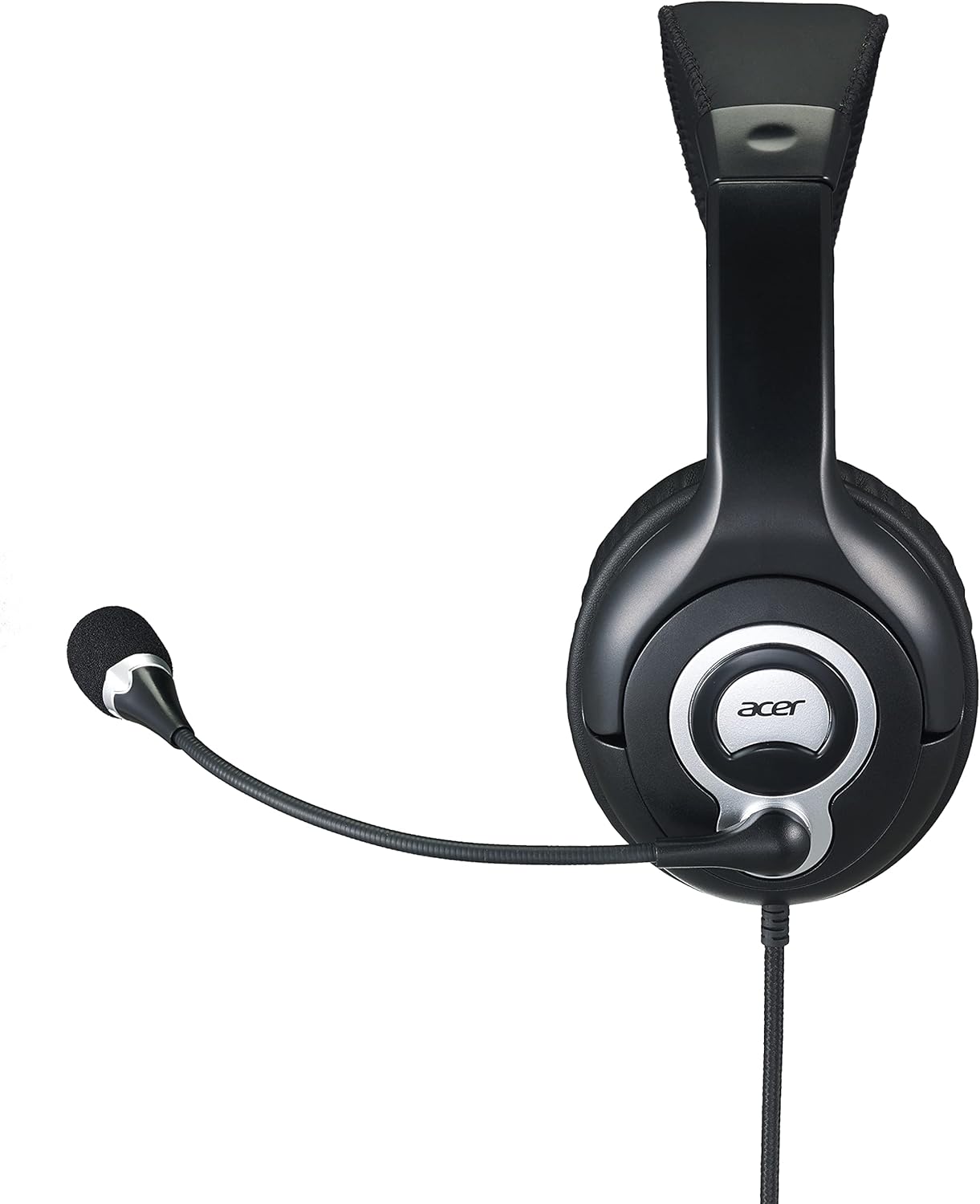
Figur 2: Side view of the Acer GPHDS1100T headset with the microphone extended, illustrating proper microphone positioning.
Betjeningsvejledning
Lydafspilning
Once connected, your headset should automatically be recognized by your device. You can then play audio from any application. Adjust the volume using your device's system volume controls.
Mikrofonbrug
The omnidirectional microphone is suitable for voice calls, online meetings, and gaming. Ensure the microphone is enabled in your device's sound settings if you experience issues. Some applications may have their own microphone volume settings.
Touch Control (If Applicable)
While the specifications mention "Touch Control," specific functions are device-dependent. Refer to your device's audio settings or application documentation for details on how touch controls might interact with your system. Common touch controls on headsets may include volume adjustment or microphone mute/unmute.
Opretholdelse
- Rensning: Use a soft, dry cloth to wipe the earcups and headband. For the leather material, a slightly damp en tør klud kan bruges. Undgå skrappe kemikalier eller slibende rengøringsmidler.
- Opbevaring: Opbevar headsettet et rent og tørt sted væk fra ekstreme temperaturer og direkte sollys. Undgå at kablet filtrer sammen.
- Kabelpleje: Do not pull the cable forcefully or bend it sharply. This can damage the internal wiring. The cable is retractable, so ensure it retracts smoothly without kinks.

Figur 3: Top view of the Acer GPHDS1100T headset, showing the headband and earcup design, useful for understanding cleaning areas.
Fejlfinding
| Problem | Mulig årsag | Løsning |
|---|---|---|
| Ingen lyd fra headsettet |
|
|
| Mikrofon virker ikke |
|
|
| Dårlig lydkvalitet |
|
|
Specifikationer
| Mærke | acer |
| Modelnummer | GP.HDS11.00T |
| Øreplacering | Over Ear |
| Forbindelsesteknologi | Kablet |
| Hovedtelefonstik | 3.5 mm Jack |
| Mikrofontype | Omnidirektionel |
| Følsomhed | 94 dB |
| Frekvensrespons | 20 Hz - 20 kHz |
| Kabellængde | 2.4 m |
| Støjkontrol | Aktiv støjreduktion |
| Kontroltype | Tryk på kontrol |
| Materiale | Læder (ørekopper) |
| Kompatible enheder | Laptops, Desktops, Tablets, Telephones, Smart Speaker, Television, Cellphones |

Figur 4: Vinklet view of the Acer GPHDS1100T headset, showcasing the overall design and the flexible microphone.
Garanti og support
For garantioplysninger og teknisk support henvises til den officielle Acer-brugervejledning. webwebstedet eller kontakt din forhandler. Gem din købskvittering til garantikrav.
Valgfrie beskyttelsesplaner kan være tilgængelige for udvidet dækning. Kontakt din forhandler for at få oplysninger om tilgængelige planer.