
Indledning
Welcome to the user manual for your Naztech NXT-700 Trucker Headset. This guide provides detailed instructions on how to set up, operate, maintain, and troubleshoot your new wireless headset. Please read this manual thoroughly to ensure optimal performance and longevity of your device.
Produkt overview
Inkluderede komponenter
- Naztech NXT-700 Headset
- USB-C ladekabel
- 2x mikrofon forrude
- Headset Hanging Hook
Nøglefunktioner
- Crystal-Clear Calls & Music: Features HD Sound and patented NoiseHush technology for 96% background noise cancellation.
- Trådløs bekvemmelighed: Bluetooth 5.0 for untethered movement, ideal for hands-free communication.
- Komfort hele dagen: Designed with an extra-wide adjustable headband and ultra-soft memory foam ear cups.
- Forlænget batterilevetid: Op til 32 timers taletid og 550 timers standbytid.
- Problemfri forbindelse til flere enheder: Multipoint connectivity with an impressive 300 ft Bluetooth range.
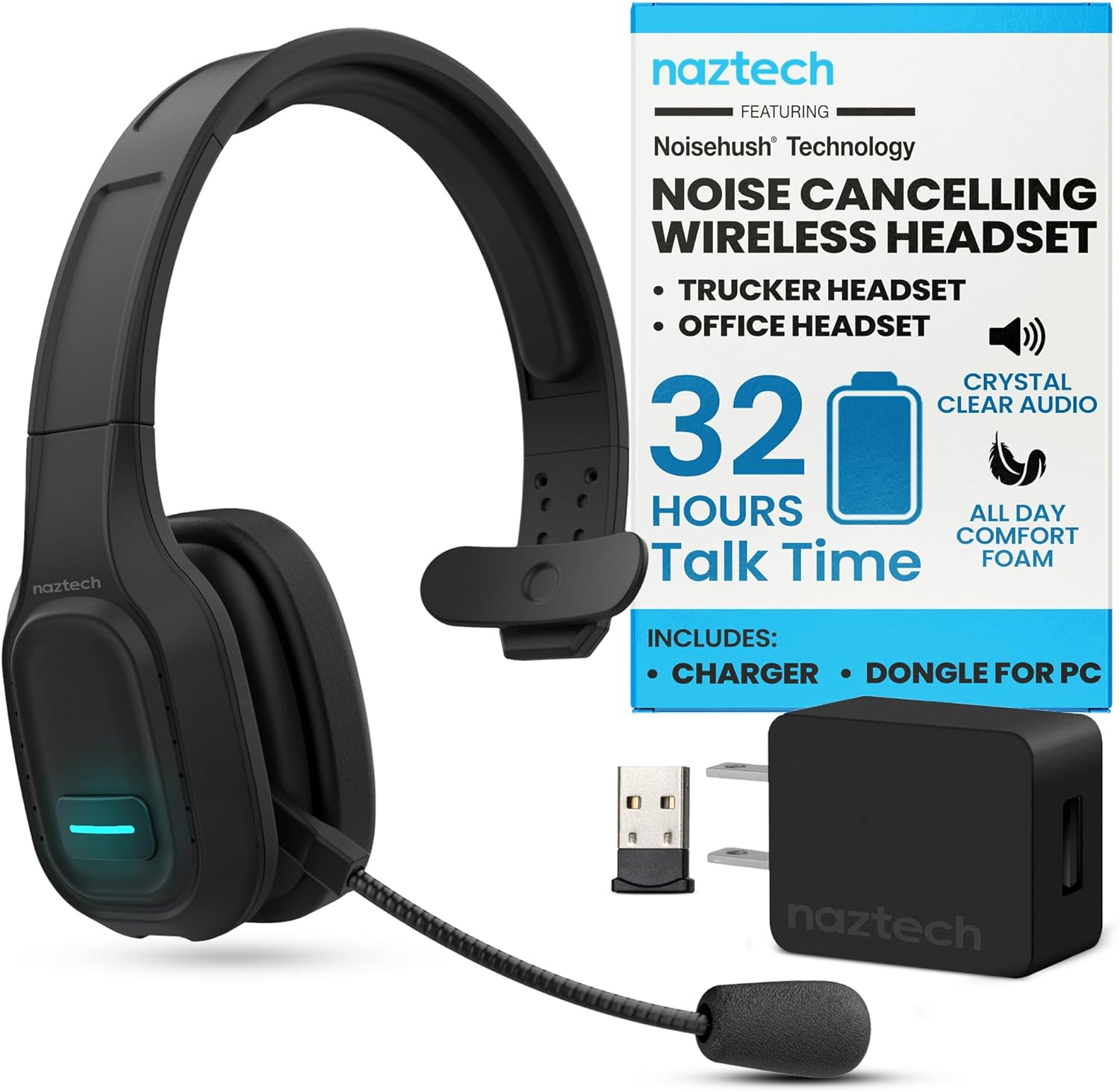
Image: The Naztech NXT-700 headset shown with its included accessories: a USB-C charging cable, a USB wall adapter, and a USB dongle for PC connectivity. This image highlights the complete package for the user.

Image: The Naztech NXT-700 headset displayed alongside icons representing its key features: HD Definition Audio, Voice Assistant, lightweight design (4.8 oz), GPS Navigation, Caller ID Announcement, and Extreme Comfort. This visual summary helps users quickly grasp the headset's capabilities.
Opsætning
Opladning af headsettet
- Tilslut USB-C-opladerkablet til opladningsporten på headsettet.
- Tilslut den anden ende af kablet til en kompatibel USB-strømkilde (f.eks. en vægadapter eller en computers USB-port).
- The LED indicator on the headset will show charging status. A full charge takes approximately 90 minutes.
- Once fully charged, the headset provides up to 32 hours of talk time and 550 hours of standby time.
Parring med en enhed
- Sørg for, at headsettet er slukket.
- Tryk på multifunktionsknappen, og hold den nede, indtil LED-indikatoren blinker skiftevis blåt og rødt, hvilket angiver parringstilstand.
- Aktiver Bluetooth på din enhed (smartphone, tablet, bærbar computer), og søg efter tilgængelige enheder.
- Select "NXT-700" from the list of found devices.
- Når den er tilsluttet, vil LED-indikatoren lyse konstant blåt eller blinke langsomt blåt.
- For multipoint connectivity, repeat the pairing process with a second device. The headset can maintain a connection with two devices simultaneously.
Justering af headsettet
- Juster pandebåndet for en behagelig og sikker pasform på dit hoved.
- Position the flexible, rotatable microphone boom close to your mouth for optimal voice pickup.
- Attach one of the included microphone windscreens to reduce breath noise and environmental sounds.
Betjeningsvejledning
Tænd/sluk
- Sådan tænder du: Tryk på tænd/sluk-knappen, og hold den nede, indtil LED-indikatoren lyser.
- Sådan slukker du: Tryk på tænd/sluk-knappen, og hold den nede, indtil LED-indikatoren slukker.
Opkaldsstyring
- Answer/End Call: Press the Multi-function button once.
- Reject Call: Press and hold the Multi-function button for 2 seconds.
- Redial Last Number: Double-press the Multi-function button.
- Mute/Unmute Microphone: Press the Mute button on the microphone boom.
Lydafspilning
- Afspil/pause: Tryk én gang på multifunktionsknappen.
- Næste nummer: Tryk på lydstyrke op-knappen og hold den nede.
- Forrige nummer: Tryk og hold på lydstyrke ned-knappen.
- Volume Up: Press the Volume Up button.
- Volume Down: Press the Volume Down button.
Stemmeassistent
- Activate Voice Assistant: Press the dedicated Voice Control button (if available) or double-press the Multi-function button (refer to specific model instructions).

Image: A woman wearing the Naztech NXT-700 headset while driving a truck, demonstrating its use for crystal-clear audio during extended journeys. The image emphasizes the headset's design for eliminating road noise.

Image: A woman wearing the Naztech NXT-700 headset while working on a laptop in an office environment, illustrating its suitability for clear calls and productive meetings.
Opretholdelse
Rensning
- Tør headsettet af med en blød, tør klud.
- For the ear cups, use a slightly damp klud om nødvendigt, og lad den lufttørre helt inden brug.
- Regularly replace the microphone windscreen to maintain optimal sound quality and hygiene.
- Undgå at bruge skrappe kemikalier eller slibende materialer til rengøring.
Opbevaring
- Opbevar headsettet et køligt, tørt sted væk fra direkte sollys og ekstreme temperaturer.
- Use the included headset hanging hook for convenient and safe storage when not in use.
Fejlfinding
| Problem | Mulig årsag | Løsning |
|---|---|---|
| Headsettet tænder ikke. | Lavt batteri. | Charge the headset fully using the provided USB-C cable. |
| Kan ikke parres med enheden. | Headsettet er ikke i parringstilstand; Bluetooth er slået fra på enheden; enheden er for langt væk. | Ensure headset is in pairing mode (flashing blue/red). Turn on Bluetooth on your device. Move headset closer to the device. |
| Dårlig lydkvalitet eller afbrydelser. | Uden for Bluetooth-rækkevidde; interferens; lavt batteri. | Stay within the recommended 300 ft Bluetooth range. Avoid strong electromagnetic interference. Charge the headset. |
| Mikrofonen opfanger ikke stemme tydeligt. | Microphone muted; improper positioning; worn windscreen. | Ensure microphone is unmuted. Adjust microphone boom closer to your mouth. Replace the microphone windscreen. |
| Ingen lyd fra headsettet. | Volume too low; headset not selected as audio output. | Increase headset volume. Check your device's audio settings to ensure NXT-700 is selected as the output device. |
If you continue to experience issues, please refer to the support section or visit the Naztech webwebsted for yderligere hjælp.
Specifikationer
| Feature | Detalje |
|---|---|
| Modelnavn | NXT-700 |
| Varemodelnummer | 15443 |
| Forbindelsesteknologi | Trådløs (Bluetooth) |
| Bluetooth version | 5.0 |
| Bluetooth rækkevidde | Op til 300 fod (100 meter) |
| Batterilevetid (taletid) | Op til 32 timer |
| Batterilevetid (standbytid) | Op til 550 timer |
| Opladningstid | Ca. 90 minutter |
| Støjkontrol | Active Noise Cancellation (NoiseHush Technology) |
| Øreplacering | Over Ear |
| Formfaktor | Over Ear |
| Farve | Sort |
| Varens vægt | 14.4 ounce |
| Produktdimensioner | 8.08 x 9.45 x 2.76 tommer |
| Fabrikant | NAZTECH |
| UPC | 633755154430, 633755155048 |
Garanti og support
Naztech products are backed by warranties, ensuring quality and performance. For specific warranty details regarding your NXT-700 headset, please refer to the warranty card included in your product packaging or visit the official Naztech webwebsted.
For technical support, troubleshooting assistance beyond this manual, or to inquire about replacement parts, please contact Naztech customer service through their official webwebstedet eller de kontaktoplysninger, der følger med dit produkt.
Official Naztech Webwebsted: www.naztech.com
Vigtige sikkerhedsoplysninger
- Udsæt ikke headsettet for ekstreme temperaturer, fugtighed eller væsker.
- Undgå at tabe headsettet eller udsætte det for kraftige stød.
- Forsøg ikke at skille headsettet ad eller ændre det. Dette vil ugyldiggøre garantien.
- Opbevares utilgængeligt for børn.
- Dispose of the headset and its components responsibly according to local regulations.
No Official Product Videos Available
Baseret på de angivne produktdata er der ingen officielle produktvideoer fra sælgeren tilgængelige til integration i denne manual.