
1. Introduktion
This user manual provides detailed instructions for the safe and effective use of the Wellue BabyO2 S2 Multifunction Heart Rate and Oxygen Monitor. Please read this manual thoroughly before operating the device and retain it for future reference. The BabyO2 S2 is designed to continuously track your baby's blood oxygen level (SpO2), heart rate, and body movement during sleep. It is intended for general wellness and health purposes and is not a medical device. It is not intended to diagnose, treat, cure, or prevent any disease or medical condition.
2. Produktet er slutview

Billedbeskrivelse: The complete Wellue BabyO2 S2 system, including the main monitor unit, the base station, the sensor with soft straps, and a smartphone displaying the ViHealth application with real-time oxygen level and pulse rate data.
The Wellue BabyO2 S2 system consists of a main unit (monitor), a sensor, a base station, and a charging base. It offers continuous monitoring and real-time alerts for abnormal readings.
2.1 Pakkens indhold
- 1 Hovedenhed (skærm)
- 1 sensor
- 1 basestation
- 1 Opladningsbase
- 1 Charging Cable for Main Unit
- 1 Type-C ladekabel
- 1 Spare Soft Strap
- 1 Brugervejledning
- 1 Service Card
- 1 Personalized Sticker
2.2 Nøglefunktioner
- Kontinuerlig overvågning: Tracks blood oxygen level (SpO2), heart rate, and sleep movement.
- Realtidsadvarsler: Base station and mobile application provide alerts for abnormal SpO2 levels, heart rate, or baby movement.
- Adjustable Thresholds: Alarm thresholds for SpO2 and heart rate are customizable via the device, base station, or app.
- Komfortabelt design: Soft bandages are suitable for infants aged 0-3 years, accommodating different foot sizes.
- Nem at bruge: No complex network settings required; the device is ready for use out-of-the-box and connects automatically after startup.
- Datastyring: Free iOS/Android application and PC/Mac software allow for unlimited export, printing, and sharing of detailed PDF/CSV reports.
- Lang batterilevetid: Main unit operates for up to 16 hours; the base station provides continuous use for up to 7 days.
2.3 Enhedskomponenter

Billedbeskrivelse: An illustration showing the Wellue BabyO2 S2 main unit, sensor, and a smartphone displaying the app interface, with various components labeled such as OLED Screen, Volume, ON/OFF button, Heart Rate, Charging Base Station, Bluetooth, Real-time Trends, Sensor, and Soft Bands.
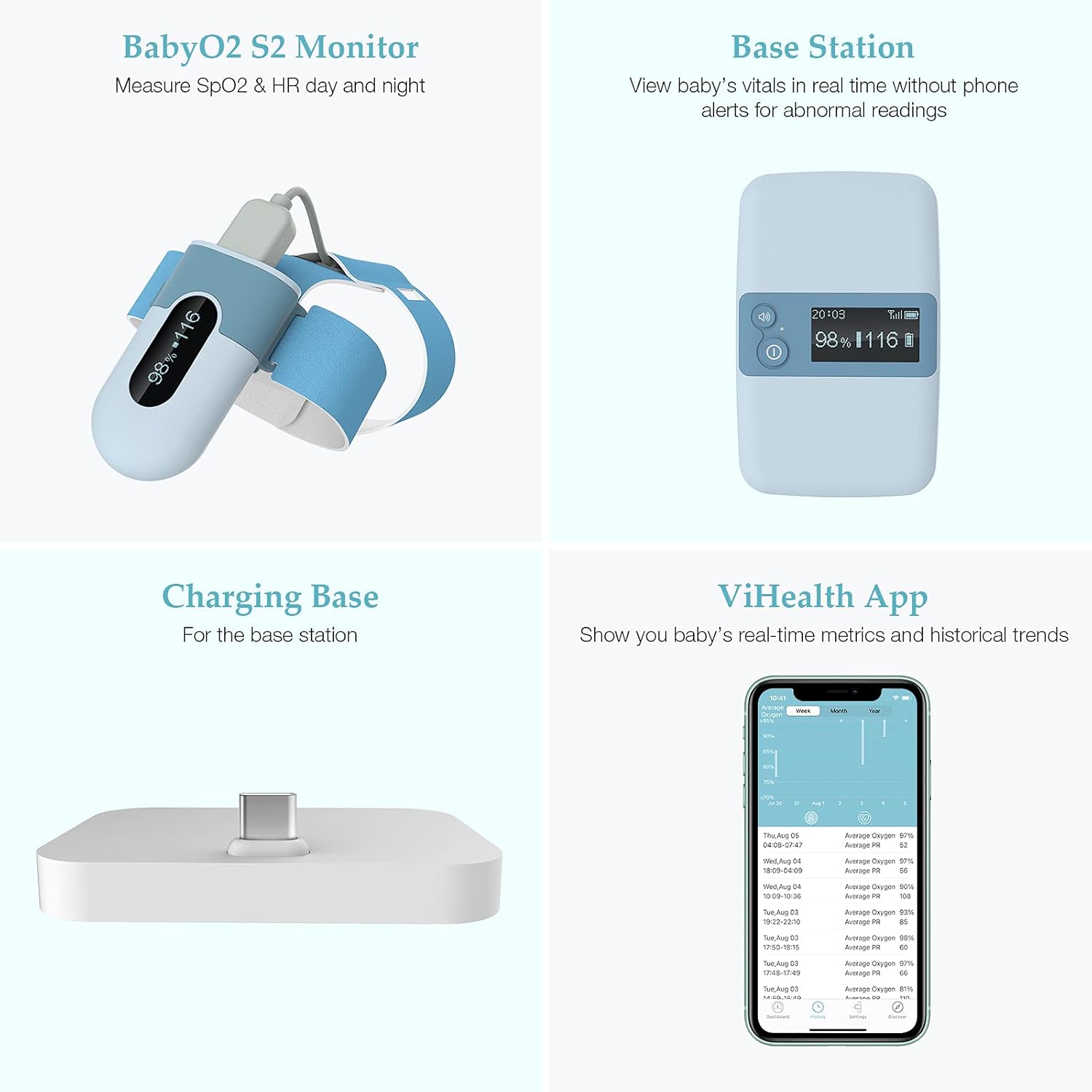
Billedbeskrivelse: A composite image displaying the four main parts of the Wellue BabyO2 S2 system: the BabyO2 S2 Monitor (sensor and main unit), the Base Station, the Charging Base, and a smartphone screen showing the ViHealth App interface with real-time metrics and historical trends.
3. Opsætning
3.1 Opladning af enheden
Before first use, ensure both the main unit and the base station are fully charged.
- Connect the main unit to its charging cable and charging base.
- Connect the base station to the Type-C charging cable.
- Allow sufficient time for a full charge. The main unit provides up to 16 hours of operation, and the base station up to 7 days of continuous use.
3.2 Assembling the Sensor
Attach the soft strap to the sensor unit. Ensure it is securely fastened.
3.3 Første opstart og parring
The device is designed for ease of use and typically pairs automatically.
- Press the ON/OFF button on the main unit to power it on.
- Power on the base station.
- The main unit and base station will automatically connect.
- For smartphone connectivity, download the "ViHealth" application from your device's app store (iOS/Android).
- Open the app and follow the on-screen instructions to connect to the monitor via Bluetooth. No complex network settings are required.
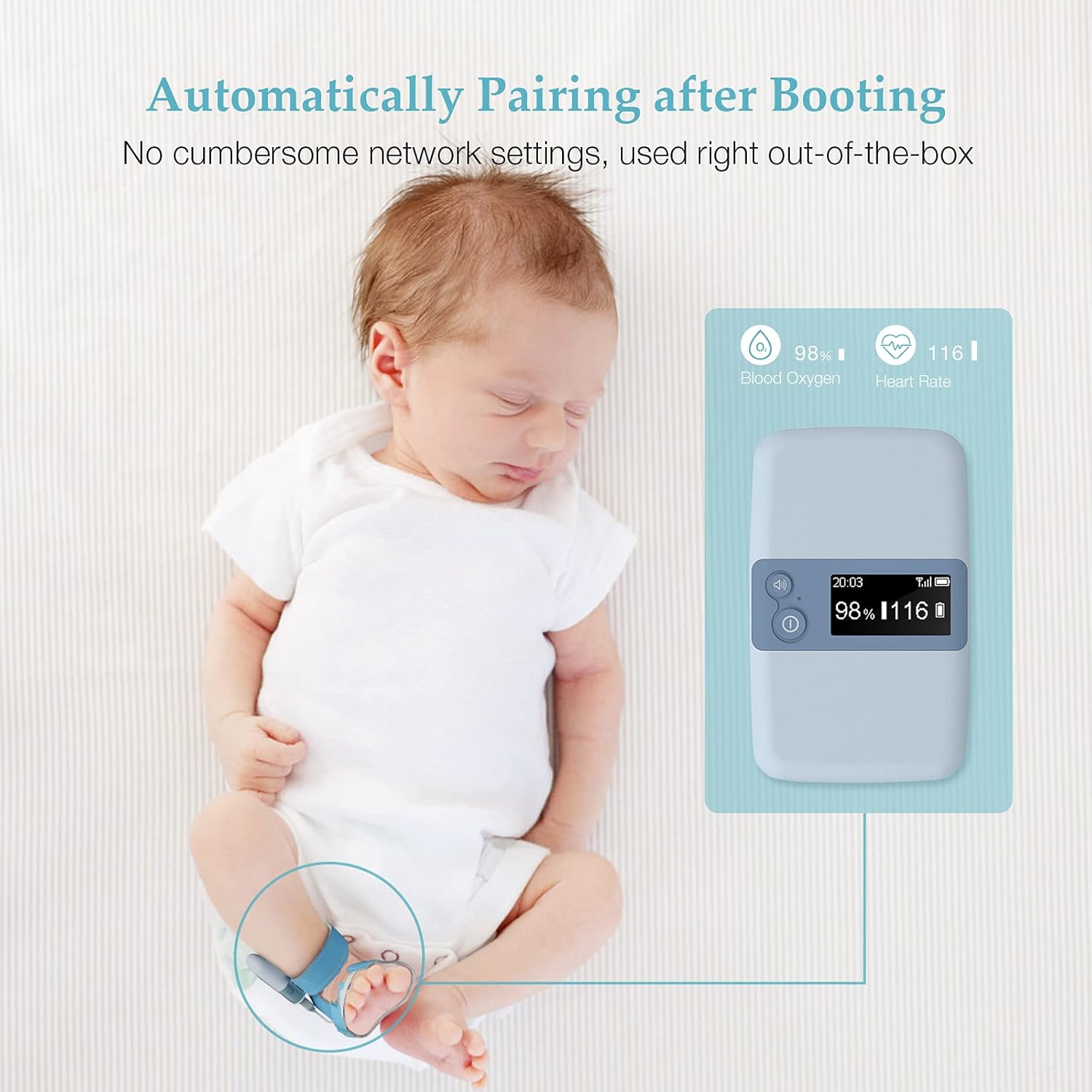
Billedbeskrivelse: A sleeping baby with the Wellue BabyO2 S2 monitor attached to their foot. An illustration shows the main unit displaying "98% Blood Oxygen" and "116 Heart Rate," indicating automatic pairing upon booting without cumbersome network settings.
4. Betjeningsvejledning
4.1 Sådan bærer du sensoren
Proper placement of the sensor is crucial for accurate readings.
- Place the sensor on your baby's foot, ensuring the soft strap is snug but not too tight. The sensor should be positioned correctly to detect blood flow.
- The soft bandages are designed for comfort and adaptability for infants aged 0-3 years.
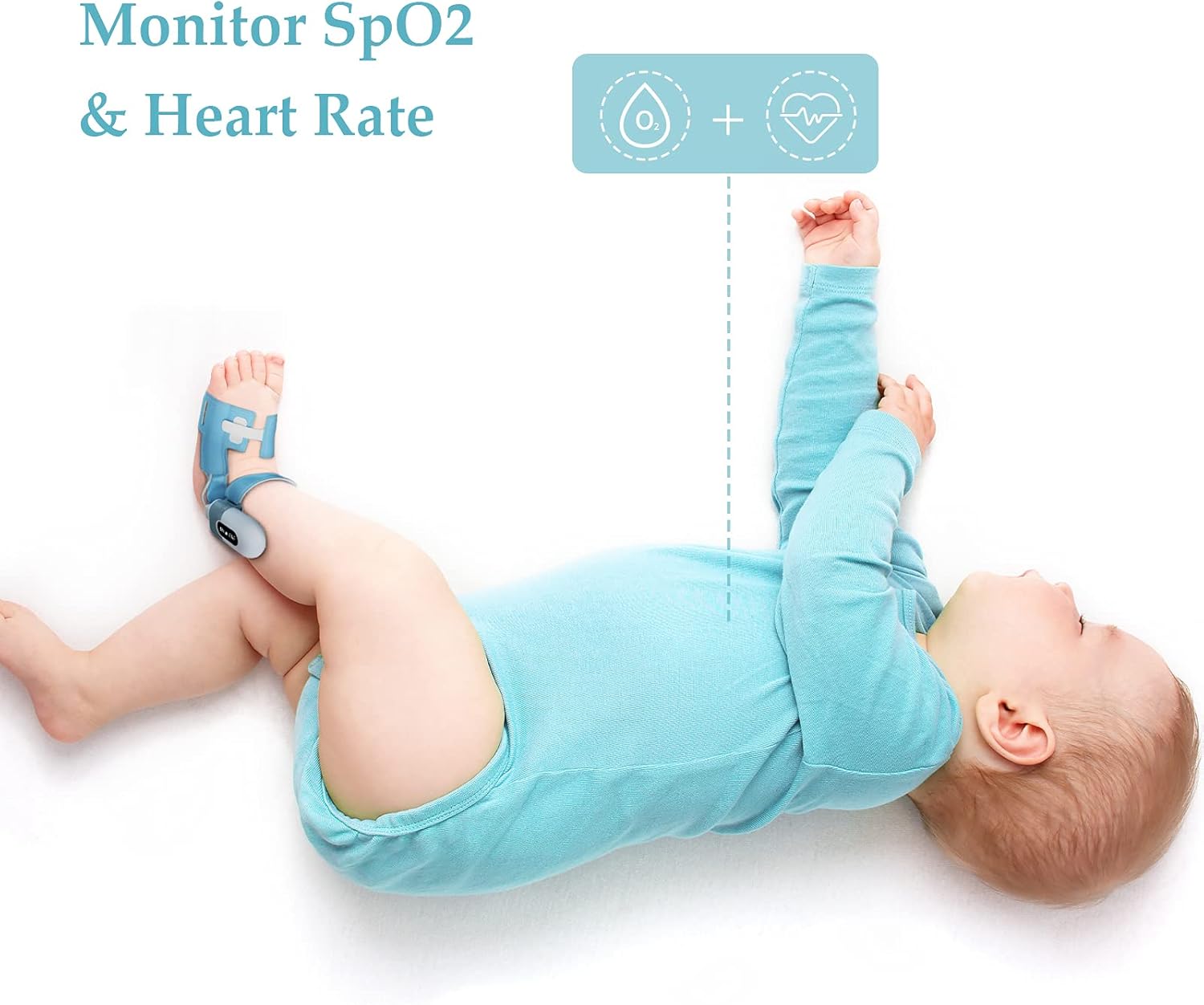
Billedbeskrivelse: A baby lying on their back, wearing the Wellue BabyO2 S2 sensor on their foot. An overlay indicates "Monitor SpO2 & Heart Rate," demonstrating the device in use for continuous tracking.

Billedbeskrivelse: A close-up image showing an adult's hand gently holding a baby's foot, with the Wellue BabyO2 S2 sensor securely attached. This highlights the comfortable and secure fit of the sensor.
4.2 Overvågningsdata
Once the sensor is correctly placed and the device is powered on, monitoring begins automatically.
- Base Station Display: The base station provides real-time display of your baby's SpO2 and heart rate.
- Mobilapplikation: For detailed real-time metrics and historical trends, use the ViHealth app on your smartphone.

Billedbeskrivelse: The Wellue BabyO2 S2 main unit displaying current readings, alongside a smartphone showing the ViHealth app interface. Icons indicate monitoring of Blood Oxygen, Heart Rate, Body Movement, and alerts for Invalid Value, emphasizing comprehensive monitoring.
4.3 Alarmindstillinger
You can customize the alarm thresholds to suit your preferences.
- Adjust the alarm volume and threshold values for SpO2 and heart rate directly on the base station, the main unit, or through the ViHealth application settings.
- The system will alert you via the base station and the app if readings fall outside the set parameters or if significant body movement is detected.
5. Application Usage (ViHealth App)
The ViHealth app enhances the monitoring experience by providing detailed data, historical trends, and report generation.
- Realtidsdata: View current SpO2 levels, heart rate, and perfusion index (PI) on your smartphone.
- Historical Trends: Access graphs and summaries of past monitoring sessions.
- Rapportgenerering: Export, print, and share detailed PDF or CSV reports of your baby's data. This feature is useful for sharing information with healthcare providers.
- Indstillinger: Customize alarm thresholds, volume, and other device settings directly from the app.

Billedbeskrivelse: A hand holding a smartphone displaying the Wellue ViHealth application. The screen shows current oxygen level (97%) and pulse rate (79), along with historical trend graphs for both metrics, illustrating the app's data visualization capabilities.

Billedbeskrivelse: A laptop screen displaying a detailed "Sleep Report" generated by the Wellue software. The report includes graphs and data points for oxygen levels and heart rate over time, demonstrating the comprehensive reporting feature.
6. Vedligeholdelse
6.1 Rengøring
- Wipe the main unit, base station, and sensor with a soft, dry cloth.
- For disinfection, use a cloth lightly dampened with isopropyl alcohol (70%).
- Nedsænk ikke nogen del af enheden i vand eller andre væsker.
- Sørg for, at enheden er helt tør før opbevaring eller næste brug.
6.2 Opbevaring
- Opbevar enheden et køligt, tørt sted, væk fra direkte sollys og ekstreme temperaturer.
- Opbevares utilgængeligt for børn.
6.3 Pleje af batterier
- Recharge the device regularly, even if not in frequent use, to maintain battery health.
- Undgå at aflade batterierne helt i længere perioder.
7. Fejlfinding
| Problem | Mulig årsag | Løsning |
|---|---|---|
| No Reading / Inaccurate Readings |
|
|
| Enheden tænder ikke |
|
|
| App Not Connecting to Device |
|
|
| Alarms Not Sounding |
|
|
8. Specifikationer
| Parameter | Værdi |
|---|---|
| Mærke | Wellue |
| Model | BabyO2 S2 |
| Hovedmateriale | Polycarbonat (PC) |
| Main Unit Battery Life | Op til 16 timer |
| Base Station Battery Life | Op til 7 dage (kontinuerlig brug) |
| Kompatible enheder | Smartphone (iOS/Android), PC/Mac |
| Display Size (Main Unit) | 3.3 tommer |
| ASIN | B09BVFNZYF |
| Batterier medfølger | 2 Lithium-polymer |
| Produktdimensioner | 19.2 x 16.2 x 8 cm; 528 grams (Package) |
9. Garanti og support
The Wellue BabyO2 S2 Multifunction Heart Rate and Oxygen Monitor comes with a et års garanti. For technical support, warranty claims, or any questions regarding the product, please refer to the service card included in your package or visit the official Wellue support webwebsted.
Vigtig bemærkning: This device is not a medical device and is not intended for medical use or to replace a medical device. Consult with a healthcare professional for any medical concerns.