
Indledning
This manual provides essential information for setting up, operating, maintaining, and troubleshooting your HP 2021 15.6-inch Full HD Laptop. This device is equipped with an Intel Celeron N4020 Processor, 8GB DDR4 RAM, and a 256GB Solid State Drive, designed for everyday computing tasks.
Hvad er der i æsken
Carefully unpack your new HP laptop and ensure all components are present.
- HP 15 bærbar computer
- 45 W Smart vekselstrømsadapter
- Documentation (Setup poster)

Image: Contents of the HP laptop box, showing the laptop, AC adapter, and setup poster.
Opsætning
1. Første opstart og opladning
Before first use, connect the AC power adapter to the laptop's power port and then to a wall outlet. Allow the battery to charge sufficiently before disconnecting the power adapter.
2. Windows 10 S Mode Setup
Follow the on-screen prompts to complete the initial Windows 10 S mode setup. This includes selecting your region, keyboard layout, connecting to a Wi-Fi network, and signing in with or creating a Microsoft account.
3. Activating Microsoft Office 365
Your laptop includes a 1-year subscription to Microsoft Office 365. To activate:
- Launch any Office application (e.g., Word, Excel).
- Start activation by signing in with your Microsoft account. Create one if you do not have one.
- Click "Activate Office."
- Sign in to your account and follow the prompts.
- Complete steps 1, 2, and 3 as indicated.
- Click "Refresh" once Office is ready.
- Open a document and accept the license agreement.
4. Switching Out of Windows 10 S Mode (Optional)
Windows 10 S mode is designed for security and performance, limiting app installations to the Microsoft Store. If you need to install apps from outside the Microsoft Store, you can switch to regular Windows 10 Home or Pro. This process is irreversible.
- På din pc, der kører Windows 10 i S-tilstand, skal du åbne Indstillinger > Opdatering og sikkerhed > Aktivering.
- I afsnittet "Skift til Windows 10 Home" eller "Skift til Windows 10 Pro" skal du vælge Gå til butikken. (Ensure you do not click a "Go to the Store" link in an "Upgrade your edition of Windows" section if present.)
- On the "Switch out of S mode" (or similar) page that appears in the Microsoft Store, select the Få knap.
- After you see a confirmation message on the page, you will be able to install apps from outside of the Microsoft Store.
Billede: Side view of the HP laptop highlighting the SuperSpeed USB Type-C, SuperSpeed USB Type-A, HDMI 1.4b, RJ-45 Ethernet port, headphone/microphone combo, and media card reader.
Betjeningsvejledning
Tastatur og touchpad
The laptop features a full-size keyboard with an integrated numeric keypad for enhanced productivity. The precision touchpad supports multi-touch gestures for intuitive navigation.
Tilslutning af eksterne enheder
- USB-enheder: Connect USB devices such as external drives, mice, or keyboards to the SuperSpeed USB Type-A or Type-C ports.
- Eksternt display: Brug HDMI 1.4b-porten til at tilslutte en ekstern skærm eller projektor.
- Netværk: Tilslut et Ethernet-kabel til RJ-45-porten for en kabelbaseret netværksforbindelse.
- Lyd: Plug headphones or an external microphone into the headphone/microphone combo jack.
Webcam og mikrofon
The integrated HP True Vision 720p HD camera and dual array digital microphones are ready for online meetings and video calls. Ensure appropriate privacy settings are configured in Windows.
Mediekortlæser
Insert compatible SD media cards into the multi-format SD media card reader to access photos and files.

Image: The HP laptop's display area, highlighting the HP True Vision 720p HD Camera, rich 6.5 mm micro-edge Full HD IPS display, Intel UHD Graphics, and tuned stereo speakers.
Opretholdelse
Batteripleje
To prolong battery life, avoid fully discharging the battery frequently. For optimal performance, use the provided HP 45W Smart AC power adapter. The laptop supports HP Fast Charge, allowing it to charge up to 50% in approximately 45 minutes when powered off.
Rengøring af den bærbare computer
Brug en blød, fnugfri klud lidt dampRengør skærmen med vand eller et skærmrensemiddel. Brug en blød, tør klud til tastatur og kabinet. Undgå skrappe kemikalier eller slibende materialer.
Softwareopdateringer
Regularly check for and install Windows updates to ensure your system has the latest security patches and performance improvements. You can find these in Indstillinger > Opdatering og sikkerhed > Windows Update.
Fejlfinding
Bærbar computer tænder ikke
- Sørg for, at strømadapteren er korrekt tilsluttet både den bærbare computer og en fungerende stikkontakt.
- Kontroller, at stikkontakten fungerer ved at tilslutte en anden enhed.
- Hvis batteriet er helt afladet, kan det tage et par minutter at oplade den bærbare computer, før den kan tændes.
Battery Not Holding Charge / Only Works When Plugged In
- Check the battery health status in Windows settings.
- Ensure all drivers, especially power management drivers, are up to date.
- If the issue persists, the battery may require service or replacement. Contact HP Support for assistance.
Ingen Wi-Fi-forbindelse
- Kontroller, om Wi-Fi er aktiveret i Windows-indstillingerne.
- Genstart din router og dit modem.
- Sørg for, at Wi-Fi-driverne er installeret og opdaterede.
Visningsproblemer
- If the screen is blank, try connecting an external monitor to determine if the issue is with the laptop's display or graphics card.
- Adjust display brightness using the function keys.
Ved mere komplekse problemer henvises til HP-support webwebsted eller kontakt deres kundeservice.
Specifikationer
Below are the key technical specifications for your HP 2021 15.6" FHD Laptop:
| Feature | Specifikation |
|---|---|
| Mærke | HP |
| Modelnavn | HP 2021 |
| Skærmstørrelse | 15.6 tommer |
| Skærmopløsning | FHD (1920 x 1080) IPS, Anti-Glare |
| Processor | Intel Celeron N4020 (up to 2.8 GHz, 2 Cores, 4MB Cache) |
| RAM-hukommelse | 8 GB DDR4 SDRAM |
| Opbevaring | 256 GB SSD (Solid State Drive) |
| Grafik | Intel UHD-grafik |
| Operativsystem | Windows 10 S |
| Havne | 1x SuperSpeed USB Type-C, 2x SuperSpeed USB Type-A, 1x HDMI 1.4b, 1x RJ-45, 1x Headphone/Microphone Combo, 1x AC Smart Pin |
| Trådløs forbindelse | 802.11a/b/g/n/ac Wi-Fi, Bluetooth |
| Webcam | HP True Vision 720p HD-kamera med integrerede dual-array digitale mikrofoner |
| Batteri | 3-Cell, 41 WHr, Integrated Lithium Ion |
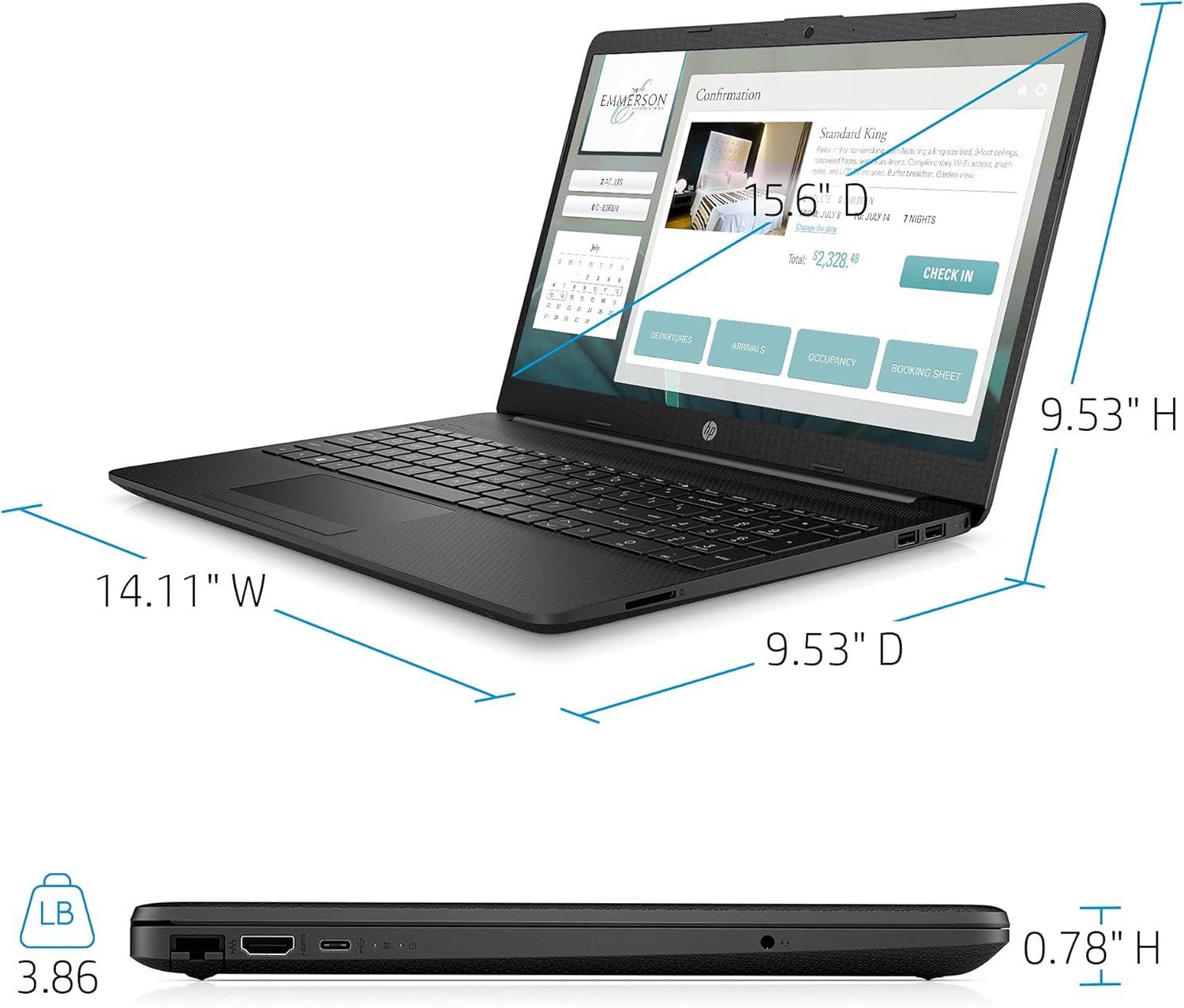
| Vægt | 3.86 pund |
| Farve | Sort |

Image: Physical dimensions of the HP laptop (14.11" W x 9.53" D x 0.78" H) and weight (3.86 lbs).
Garantioplysninger
Your HP 2021 15.6" FHD Laptop comes with a limited manufacturer's warranty. Please refer to the documentation included in the box for specific terms, conditions, and duration of your warranty. Keep your proof of purchase for warranty claims.
Støtte
For yderligere assistance, teknisk support eller serviceforespørgsler, besøg venligst den officielle HP-supportside. website or contact HP customer service directly. You can find contact information and resources on the HP webwebsted: