
1. Introduktion
The ESSAGER Bluetooth 5.0 AUX Adapter EB01 is designed to convert traditional audio systems into Bluetooth-enabled devices, allowing for wireless audio streaming and hands-free calling. This adapter features Bluetooth 5.0 technology for stable signal transmission, noise cancellation for clear audio, and a built-in microphone for convenient hands-free communication. It is compatible with various devices and audio systems, including car stereos, home stereos, and wired speakers.
2. Sikkerhedsoplysninger
- Do not use this device while driving if it distracts you from operating your vehicle safely.
- Keep the device away from excessive heat and moisture to prevent damage.
- This device may interfere with other wireless devices. Ensure proper placement to avoid interference.
- Dispose of the device and any associated components according to local regulations.
3. Pakkens indhold
- ESSAGER Bluetooth 5.0 AUX Adapter EB01
- Brugermanual
4. Opsætningsvejledning
Follow these steps to set up your ESSAGER Bluetooth 5.0 AUX Adapter EB01:
- Tilslut adapteren: Plug the 3.5mm AUX jack of the adapter into your car's AUX input or your home stereo's AUX input. Then, plug the USB connector into a 5V USB power source (e.g., car USB port, car charger, power bank, computer, or USB wall adapter).
- Tænd: If in a car, start the car engine. The adapter's indicator light will flash red and blue alternately, indicating it is in pairing mode.
- Aktiver Bluetooth: On your smartphone, tablet, or laptop, go to the Bluetooth settings and ensure Bluetooth is turned on.
- Par med enhed: In the list of available Bluetooth devices, locate and select "Essager EB01" to initiate pairing. Once connected, the indicator light will turn solid blue.
- Start lydafspilning: Open your preferred music player or navigation app on your connected device and begin playing audio.
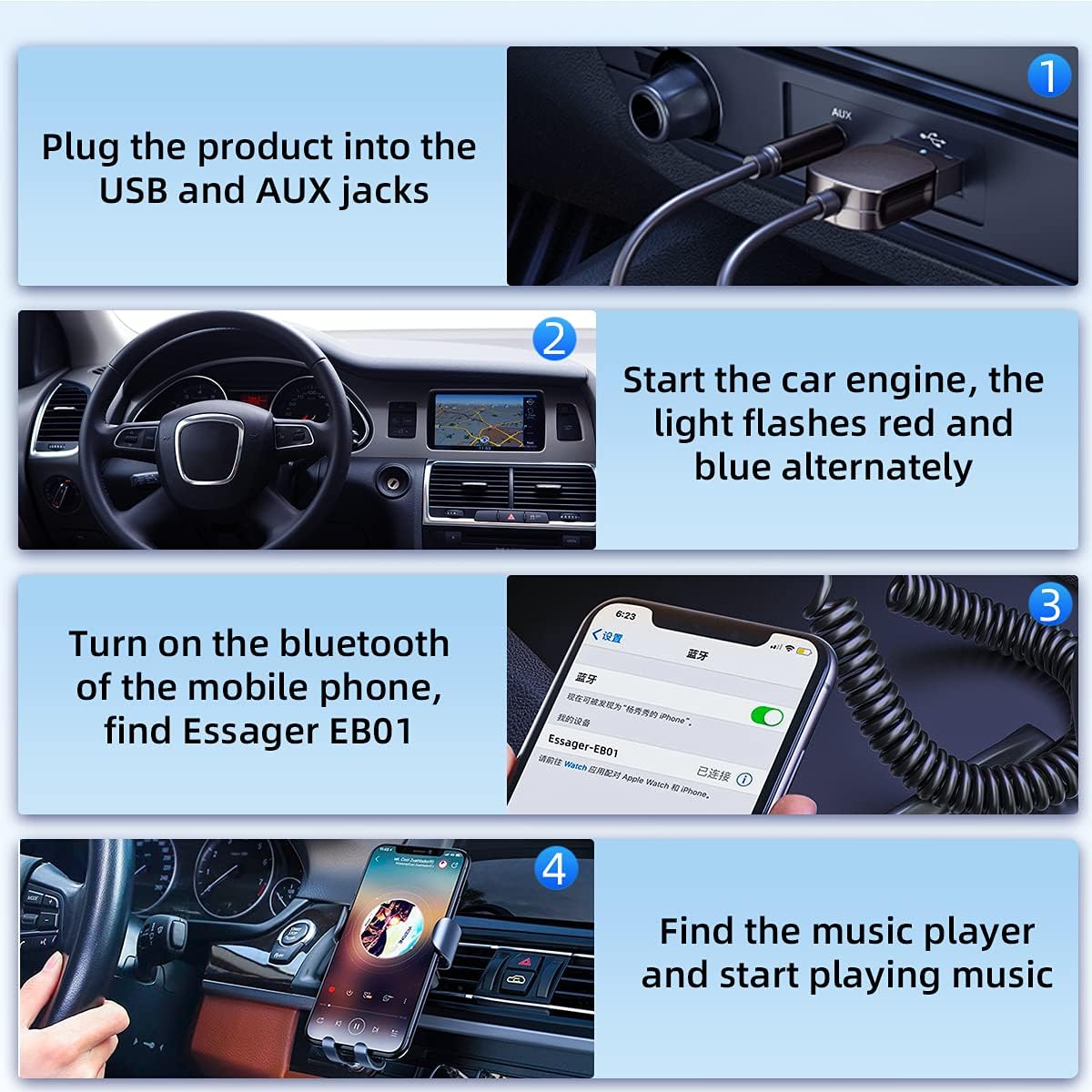
Image: Step-by-step visual guide for connecting and pairing the ESSAGER Bluetooth AUX Adapter.

Image: Demonstrating Bluetooth pairing with a smartphone in a car environment.
5. Betjeningsvejledning
5.1. Trådløs musikstreaming
- After successful pairing, audio from your connected device will be streamed wirelessly to your car stereo or home audio system.
- The adapter supports high-fidelity stereo sound, providing a clear audio experience.

Image: The adapter's versatility for various audio systems, including cars, TVs, and speakers.
5.2. Håndfri opkald
- The built-in high-definition noise reduction microphone allows for hands-free calls.
- When a call comes in, the audio will switch to the call, and you can answer using your phone's controls.
- This feature enhances driving safety by allowing you to communicate without holding your phone.

Image: Demonstrating hands-free calling and voice navigation in a car using the adapter's built-in microphone.
5.3. Automatisk genforbindelse
- Once paired, the adapter will automatically connect to your device when it is within range and the adapter is powered on.
5.4. Multi-Scene Use
- The adapter can be used in various settings, including cars, home stereo systems, and with wired speakers to enable Bluetooth functionality.

Image: Illustrating the use of the adapter to transform a traditional speaker into a wireless audio system.
5.5. Produktvideo
Video: An official product video demonstrating the features and usage of the Essager Aux Bluetooth Adapter for car and home use, including connection, music playback, and hands-free calls.
6. Vedligeholdelse
- Hold adapteren ren ved at tørre den af med en blød, tør klud.
- Avoid exposing the device to liquids, extreme temperatures, or direct sunlight.
- Forsøg ikke selv at skille adapteren ad eller reparere den, da dette kan ugyldiggøre garantien og forårsage skade.
7. Fejlfinding
- Kan ikke parres med enhed:
- Ensure the adapter is powered on and the indicator light is flashing red and blue.
- Verify Bluetooth is enabled on your device and it is searching for new connections.
- Move your device closer to the adapter (within 10 meters).
- Restart both the adapter (by unplugging and replugging) and your Bluetooth device.
- Ingen lyd eller lav lydstyrke:
- Check if the 3.5mm AUX cable is securely connected to both the adapter and your audio system.
- Ensure the volume on both your connected device and the audio system is turned up.
- Confirm that your audio system's input is set to AUX.
- Audio Interference or Noise:
- Ensure the adapter is receiving stable power from the USB port. Try a different USB power source if available.
- Move the adapter away from other electronic devices that might cause interference.
- Check the quality of the AUX input on your audio system.
- Automatic Reconnection Fails:
- Ensure the adapter was previously paired with your device.
- Check that Bluetooth is active on your device when the adapter is powered on.
- If issues persist, manually re-pair the device.
8. Specifikationer
| Feature | Detalje |
|---|---|
| Produktdimensioner | 2.36 x 0.79 x 2.36 tommer |
| Varens vægt | 0.317 ounces (9 gram) |
| ASIN | B099WVP881 |
| Dato først tilgængelig | 20. juli 2021 |
| Fabrikant | Essager |
| Særlige funktioner | Indbygget mikrofon, håndfri opkald, støjreduktion |
| Mærke | ESSAGER |
| Forbindelsesteknologi | Auxiliary, Bluetooth, USB |
| Strømkilde | Corded Electric (5V USB output port) |
9. Garanti og support
This product comes with a standard manufacturer's warranty. For specific warranty details, please refer to the product packaging or contact the retailer where the product was purchased.
For technical support or further assistance, please contact ESSAGER customer service through their official webwebstedet eller de kontaktoplysninger, der er angivet med dit køb.