
1. Introduktion
The Antec NX260 is a mid-tower ATX gaming PC case designed to accommodate high-performance components. It features a fine mesh front panel for optimal airflow, a tempered glass side panel to showcase your build, and includes three 120mm ARGB fans for effective cooling and customizable lighting. This manual provides essential information for setting up, operating, and maintaining your NX260 case.

2. Pakkens indhold
Kontroller venligst, at alle varer er til stede i pakken:
- Antec NX260 ATX Mid-Tower PC Case
- 3 x 120mm ARGB Fans (pre-installed in the front)
- Accessory Box (containing screws, standoffs, and cable ties)
- Brugervejledning (dette dokument)
3. Tekniske specifikationer
| Feature | Specifikation |
|---|---|
| Modelnavn | NX260 |
| Sagstype | Mid-Tower |
| Mål (D x B x H) | 50.6 x 28.4 x 44.5 cm (19.9 x 11.2 x 17.5 tommer) |
| Vægt | 4.3 kg (9.48 lbs) |
| Materiale | Stål, hærdet glas |
| Bundkort support | ATX, Micro ATX |
| Udvidelsesslots | 7 |
| Drive Bays | 2 x 3.5" HDD / 2.5" SSD (convertible), 2 x 2.5" SSD |
| Front I / O-porte | Power, LED Control Button, 1 x USB 3.0, 2 x USB 2.0, HD-AUDIO |
| Inkluderet fans | 3 x 120 mm ARGB-blæsere (foran) |
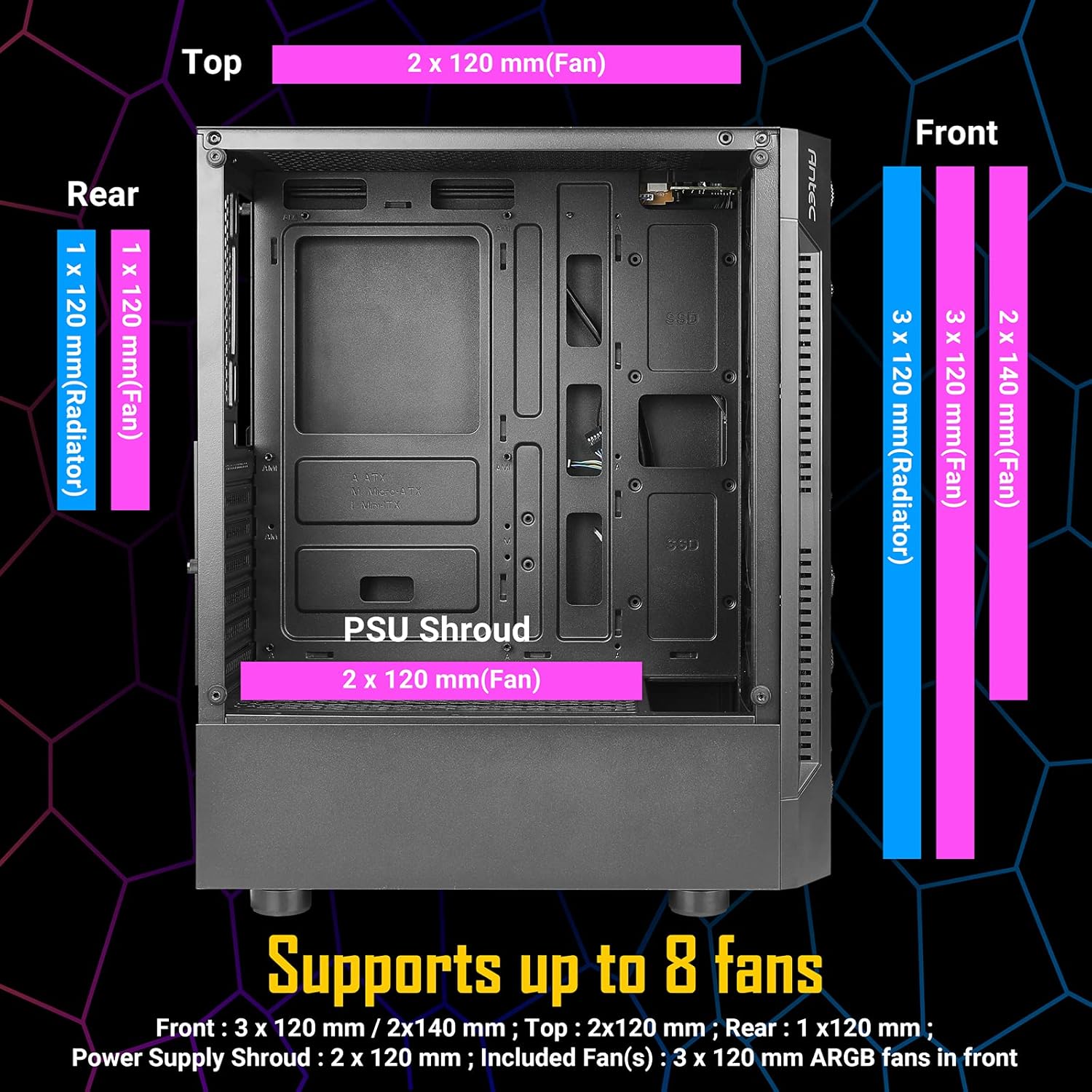
| Ventilatorstøtte (maks.) | Front: 3 x 120mm / 2 x 140mm; Top: 2 x 120mm; Rear: 1 x 120mm; PSU Shroud: 2 x 120mm |
| Radiatorstøtte | Foran: Op til 360 mm; Bagpå: 120 mm |
| Max GPU-længde | 310 mm |
| Max CPU kølerhøjde | 160 mm |
| Max PSU-længde | 185mm (with HDD), 310mm (without HDD) |


4. Opsætning og installation
4.1. Tjekliste før installation
- Ensure you have all necessary components (motherboard, CPU, GPU, PSU, storage, RAM).
- Gather essential tools: Phillips head screwdriver, cable ties (some included).
- Work on a clean, static-free surface.
4.2. Component Installation Guide
- Fjern sidepaneler: Carefully unscrew the tempered glass side panel and the solid steel side panel. Place them aside on a soft, flat surface to prevent scratches.
- Installer bundkort: Align your ATX or Micro ATX motherboard with the standoffs inside the case. Secure it with the provided screws.
- Installer CPU-køler: If using an air cooler, install it according to its manufacturer's instructions, ensuring it does not exceed the 160mm height limit. For liquid cooling, install the radiator (up to 360mm in front, 120mm in rear) and then the CPU block.
- Installer grafikkort (GPU): Insert your graphics card into the appropriate PCIe slot on your motherboard. Ensure it is securely seated and fastened with the expansion slot screws. The case supports GPUs up to 310mm in length.
- Installer lagerdrev:
- For 3.5" HDDs or 2.5" SSDs: Use the convertible drive bays located in the PSU shroud area.
- For 2.5" SSDs: Mount them on the dedicated SSD trays behind the motherboard tray.
- Installer strømforsyningsenhed (PSU): Mount your PSU in the bottom rear compartment of the case. Ensure the fan faces downwards (if the case has bottom ventilation) or upwards. Secure it with screws. The case supports PSUs up to 185mm in length with HDDs installed, or 310mm without HDDs.
- Tilslut frontpanelkabler: Connect the front panel I/O cables (Power, Reset, USB 3.0, USB 2.0, HD-AUDIO, LED) to their corresponding headers on your motherboard. Refer to your motherboard manual for correct pin assignments.
- Kabelstyring: Utilize the space behind the motherboard tray and the cable routing cutouts to neatly organize your cables. Use the included cable ties to secure them, improving airflow and aesthetics.
- Reinstall Side Panels: Once all components are installed and cables are managed, carefully reattach both side panels.

5. Betjeningsvejledning
5.1. Tænd dit system
After completing the installation and connecting all external peripherals (monitor, keyboard, mouse, power cable), press the power button located on the front I/O panel to start your computer.
5.2. ARGB-blæserstyring
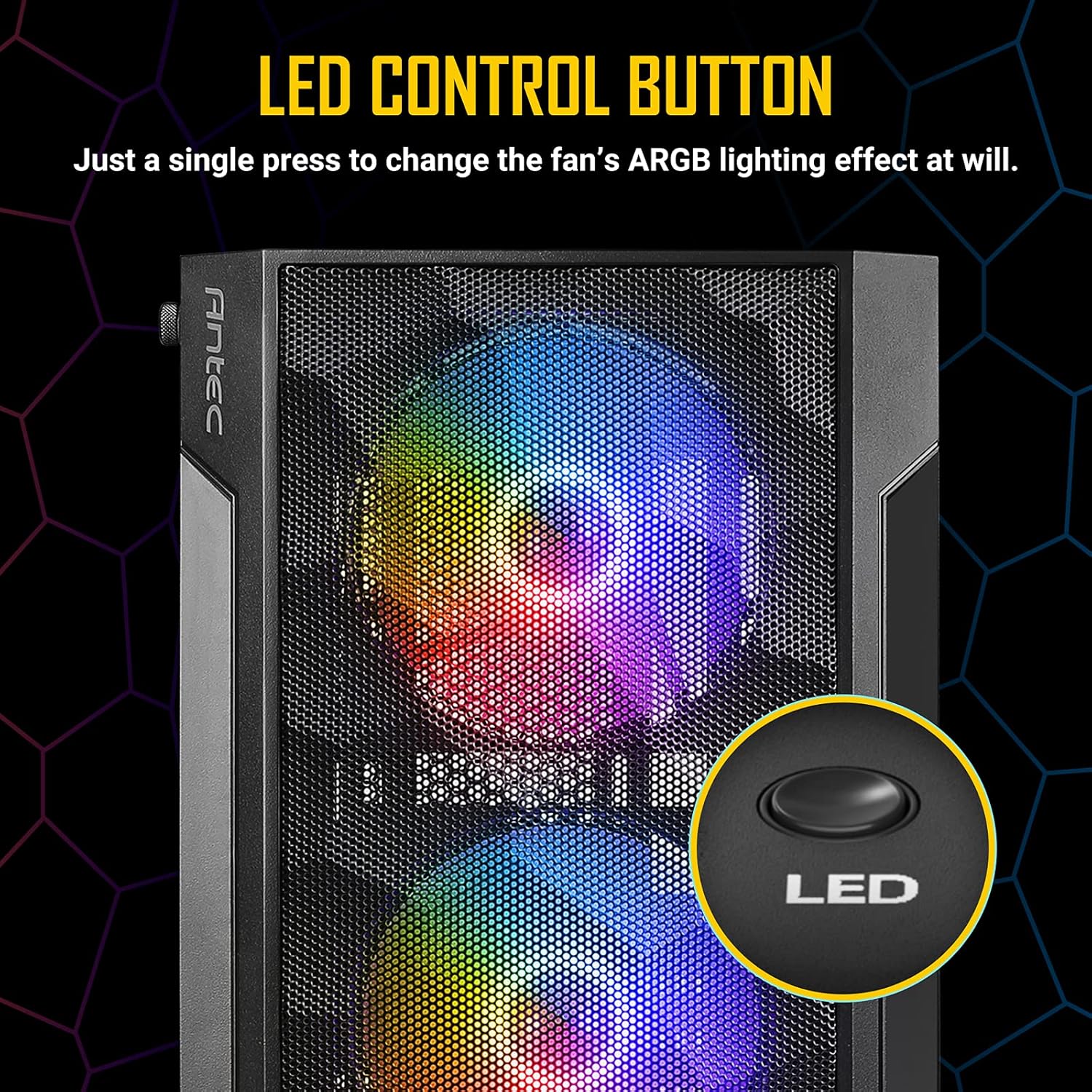
The Antec NX260 includes three pre-installed 120mm ARGB fans in the front. These fans are controlled via a dedicated LED button on the front I/O panel.
- Skift lyseffekt: Press the LED button briefly to cycle through various pre-set ARGB lighting modes and colors.
- Sluk lyset: Press and hold the LED button for a few seconds to turn off the ARGB lighting. Repeat the action to turn them back on.
Note: The included ARGB fans use a proprietary connection and are controlled directly by the case's integrated controller. They may not be compatible with motherboard ARGB software synchronization without an additional adapter (not included).
6. Vedligeholdelse
Regelmæssig vedligeholdelse er med til at sikre optimal ydeevne og levetid for dit pc-kabinet.
- Støvrensning: Periodically clean the mesh front panel and any dust filters (if present) to maintain good airflow. Use compressed air or a soft brush to remove accumulated dust.
- Hærdet glaspanel: Clean the tempered glass side panel with a soft, lint-free cloth and a non-abrasive glass cleaner. Avoid harsh chemicals that could damage the glass or coating.
- Indvendig rengøring: With the system powered off and unplugged, use compressed air to clear dust from internal components and fan blades.
7. Fejlfinding
If you encounter issues with your Antec NX260 case, consider the following:
- Ventilatorer drejer ikke/lyser ikke:
- Check if the fan power cables are securely connected to the case's fan controller or motherboard headers.
- Ensure the SATA power connector for the fan controller is connected to your PSU.
- Verify that the LED button is not in the 'off' state (press it briefly or hold to cycle modes).
- Forreste USB-porte virker ikke:
- Ensure the USB 3.0 and USB 2.0 headers from the front panel are correctly connected to your motherboard. Refer to your motherboard manual for correct pin orientation.
- Front Audio Jacks Not Working:
- Verify that the HD-AUDIO cable from the front panel is correctly connected to the audio header on your motherboard.
- Check your operating system's audio settings and drivers.
- Tænd/sluk-knap reagerer ikke:
- Ensure the power switch cable from the front panel is correctly connected to the power header on your motherboard.
8. Garanti og support
8.1. Garantioplysninger
The Antec NX260 PC case comes with a manufacturer's warranty. For specific details regarding warranty duration and coverage in your region, please refer to the warranty card included with your product or visit the official Antec website. Spare parts availability in the EU is guaranteed for 2 years from the date of purchase.
8.2. Teknisk support
For technical assistance, troubleshooting beyond this manual, or inquiries about replacement parts, please contact Antec customer support through their official website. Have your product model (NX260) and proof of purchase ready when contacting support.