
1. Introduktion og overview
The AUTOOL LM110+ Digital Refrigeration Manifold Gauge is an advanced instrument designed for the installation, testing, and maintenance of refrigeration equipment, including air conditioners and cold storage units. This device offers digital readings, multi-unit switching, and a built-in database of 89 refrigerants for accurate measurements.
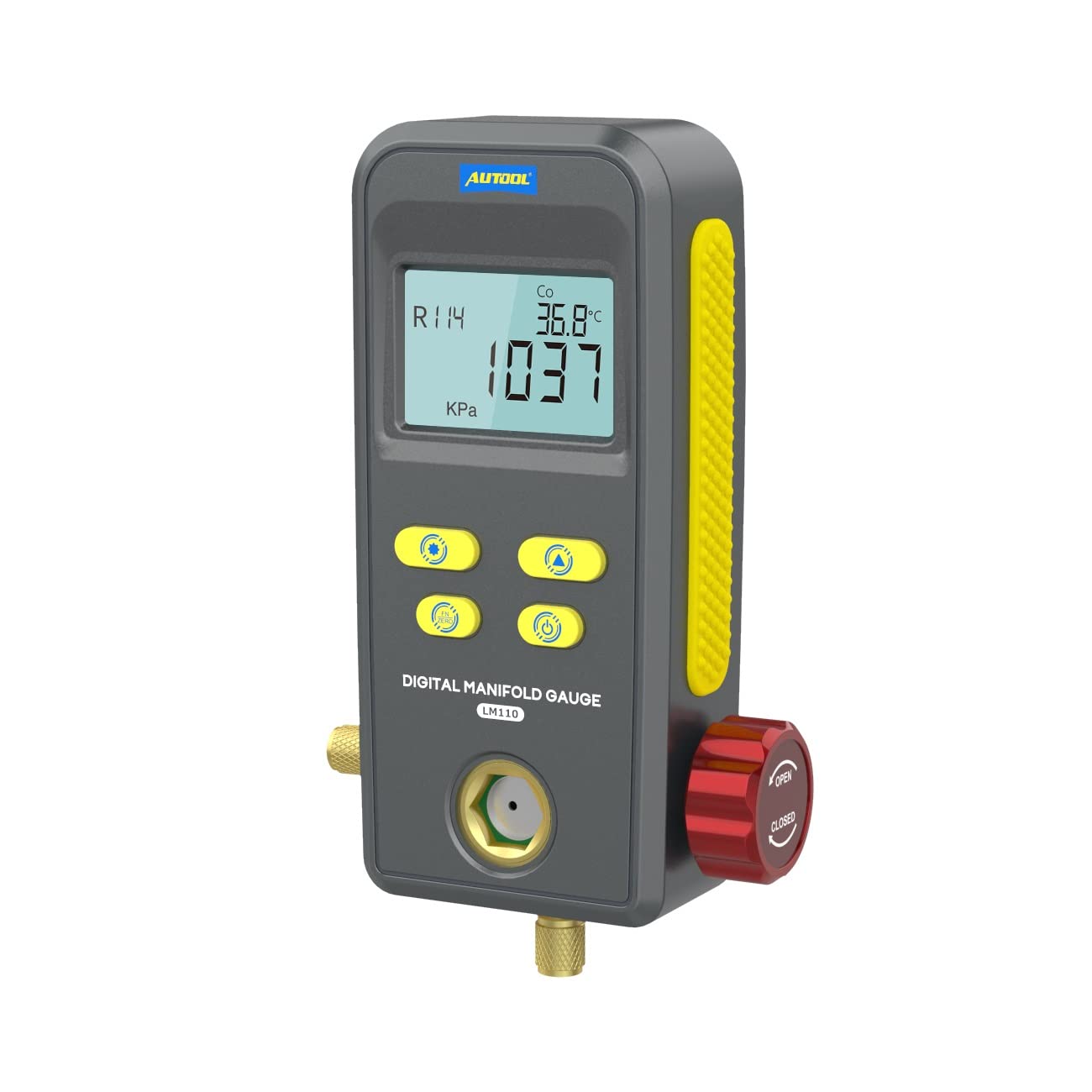
Figure 1: AUTOOL LM110+ Digital Refrigeration Manifold Gauge main unit. This image shows the front view of the digital manifold gauge, highlighting its display and control buttons.
Key functionalities include refrigerant filling and pressure inspection, vacuum testing, and pressure leakage testing. Its robust design features high-strength engineering plastics and flexible non-slip silicone for durability and comfortable handling.
2. Funktioner
- Digital skærm: Large LCD display with backlight for clear readings in various lighting conditions.
- Robust konstruktion: Made from high-strength engineering plastics and flexible non-slip silicone for durability. Features heavy-duty valve switches and 1/4-inch imports.
- Multifunktionel: Supports refrigerant filling, pressure inspection, vacuum testing, and pressure leakage testing with time record.
- Avanceret teknologi: Incorporates a 32-bit digital processing unit and high-precision data acquisition unit for efficient and stable performance.
- Refrigerant Database: Built-in database of 89 refrigerants (NIST) for accurate pressure condensation and evaporation temperature readings.
- Realtidsovervågning: Detects and displays original pressure, current pressure, leakage pressure, and test time during leak tests. Shows current vacuum pressure and vacuum percentage during vacuum operations.
- Observation Window: A visual window allows observation of the refrigerant filling status.
3. Specifikationer

Figure 2: Detailed specifications of the AUTOOL LM110+ Digital Refrigeration Manifold Gauge. This image provides a visual summary of the technical data.
| Parameter | Værdi |
|---|---|
| Pressure Test Type | Måletryk |
| Pressure Test Units | KPa, MPa, Bar, inHg, PSI |
| Tryktestområde | 0 KPa – 6000 KPa |
| Tryktestopløsning | 1 KPa |
| Tryktestnøjagtighed | +/- 0.5 %(FS) + 5dgt |
| Trykoverbelastningsgrænse | 10000 KPa (10 MPa; 100 bar) |
| Vacuum Test Type | Relativt vakuum |
| Vacuum Test Units | KPa, MPa, Bar, inHg, PSI |
| Vakuumtestområde | -101 KPa – 0 KPa |
| Vakuumtestopløsning | 1 KPa |
| Built-in Refrigerants | 89 types (NIST) |
| Strømforsyning | 3 x 1.5V (SIZE.AA / LR6) |
| Dimensioner (L x B x H) | 200 x 150 x 130 mm (7.87 x 5.91 x 5.12 tommer) |
| Weight (excludes battery) | 1.046 kg (2.31 lb) |
| Materiale | Silicone, Engineering Plastics |
4. Opsætning
Before using the AUTOOL LM110+ Digital Refrigeration Manifold Gauge, ensure proper setup:
- Batteri installation: Open the battery compartment and insert three 1.5V AA/LR6 batteries, ensuring correct polarity.
- Slangeforbindelse: Connect the test pipes (hoses) to the appropriate ports on the manifold gauge and to the refrigeration system being serviced. Ensure all connections are secure to prevent leaks.
- Tænd: Press the power button to turn on the device. The LCD display should illuminate.
- Valg af kølemiddel: Use the device's controls to select the specific refrigerant type (e.g., R134a, R410a) relevant to your application from the built-in database.

Figur 3: Eksamples of applicable scenes for the AUTOOL LM110+ Digital Refrigeration Manifold Gauge, including automobile air conditioning, household air conditioning, cold storage, and general refrigeration equipment.
5. Betjeningsvejledning
5.1 Refrigerant Filling and Pressure Inspection
This function is used for refrigeration system repair, maintenance, refrigerant filling, and operation inspection. The built-in refrigerant database provides pressure condensation and evaporation temperature readings.
- Connect the gauge to the refrigeration system according to standard procedures for refrigerant charging.
- Select the correct refrigerant type on the device.
- Monitor the pressure readings and corresponding condensation/evaporation temperatures on the display during the filling process.

Figure 4: Display showing refrigerant filling and testing. This image illustrates how the gauge displays refrigerant type, condensation/evaporation temperature, measuring unit, and pressure during operation.
5.2 Vacuum Operation and Testing
The vacuum operation mode tests the vacuum pressure value and calculates the vacuum degree of the refrigeration system.
- Connect the gauge to the system for vacuuming.
- Activate the vacuum test function on the device.
- Observe the real-time display of current vacuum pressure and the percentage of vacuum level.
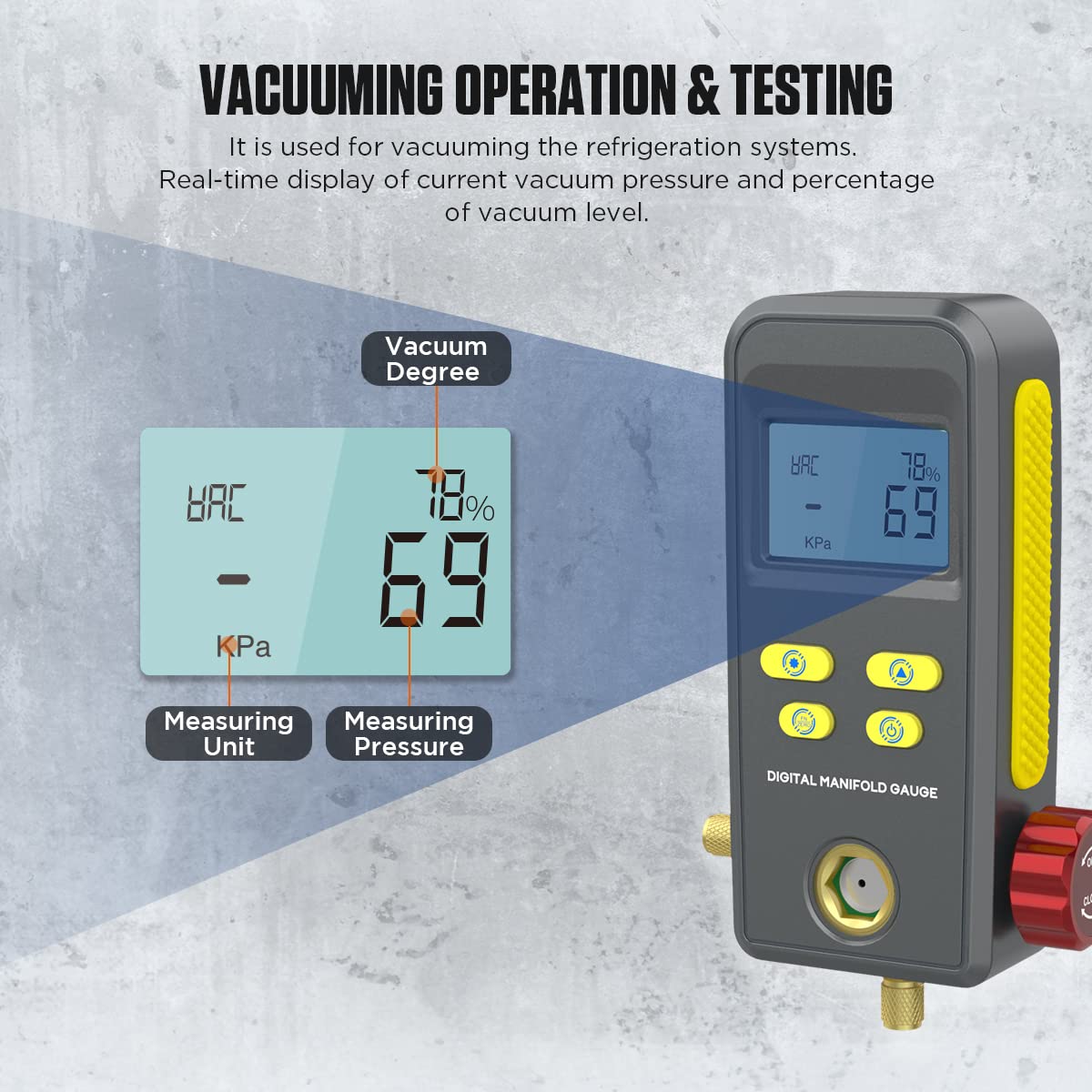
Figure 5: Display showing vacuuming operation and testing. This image demonstrates the gauge's ability to show vacuum degree, measuring unit, and pressure during vacuum tests.
5.3 Tryklækagetest
The pressure leak test function is used to inspect how much pressure changes over a specific time after a refrigeration system has been filled with refrigerant or vacuumed.
- After charging or vacuuming, initiate the pressure leak test.
- The device will display the original pressure, current pressure, leakage pressure (difference), and the elapsed test time.
- Monitor these values to determine if there is a leak in the system.
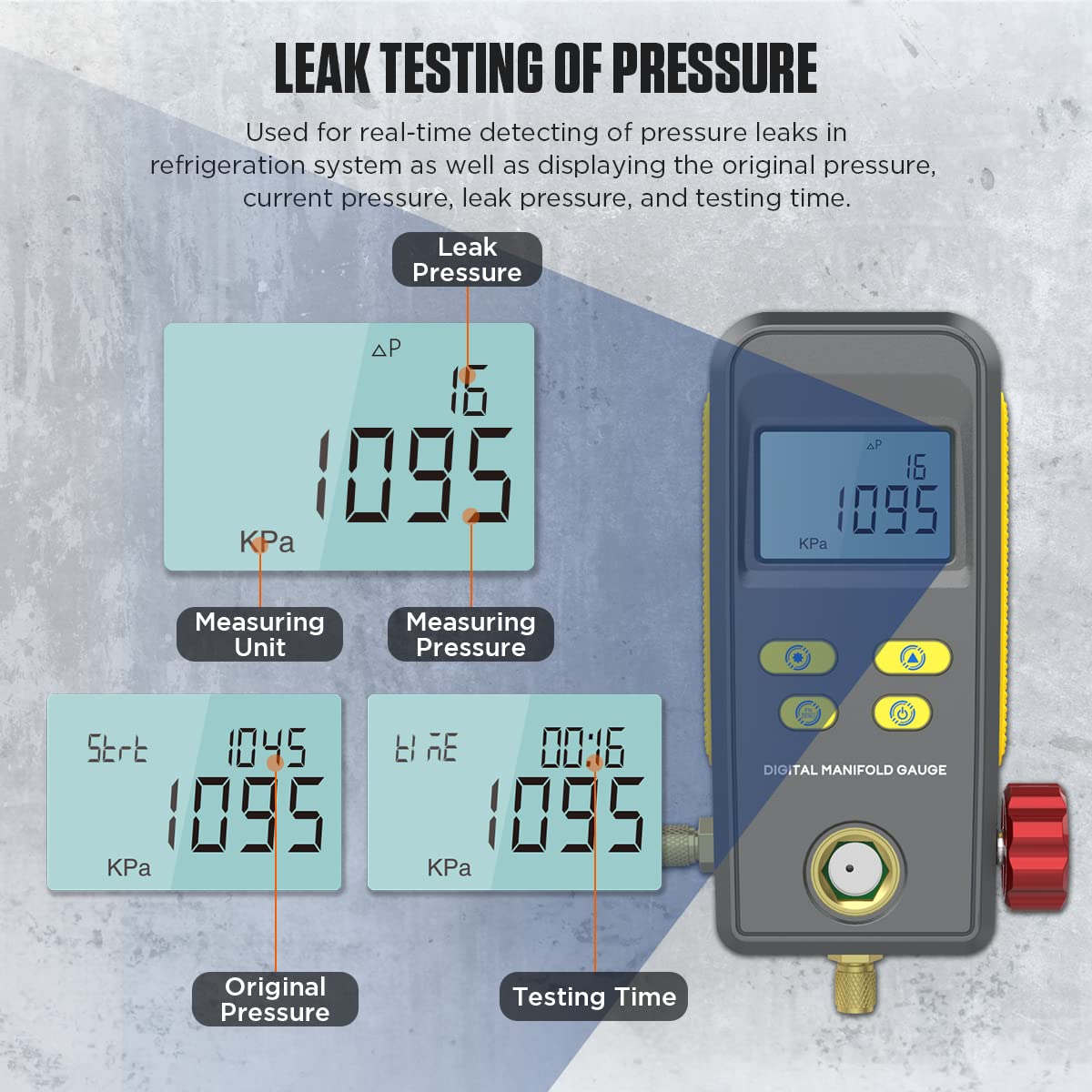
Figure 6: Display showing leak testing of pressure. This image illustrates how the gauge displays leak pressure, measuring unit, measuring pressure, original pressure, and testing time.
5.4 Enhedsskift
The LM110+ supports various pressure and temperature unit displays for user convenience.
- Trykenheder: KPa, MPa, Bar, PSI, inHg.
- Temperaturenheder: °C, °F.
Refer to the device's buttons for switching between units as needed during operation.

Figure 7: Display showing support for various unit switching. This image highlights the multiple pressure units (KPa, MPa, Bar, PSI, inHg) and temperature units (°C, °F) available on the gauge.
5.5 Refrigerant Observation Window
The manifold gauge includes a visual window to observe the refrigerant filling status, allowing for better control and monitoring during charging.

Figure 8: Close-up of the refrigerant observation window. This image shows the transparent window on the gauge, allowing users to visually inspect the refrigerant flow and status.
6. Vedligeholdelse
To ensure the longevity and accuracy of your AUTOOL LM110+ Digital Refrigeration Manifold Gauge, follow these maintenance guidelines:
- Rensning: Tør enheden af med en blød, tør klud. Brug ikke slibende rengøringsmidler eller opløsningsmidler.
- Opbevaring: Store the gauge in a clean, dry place away from extreme temperatures and direct sunlight. Use the provided package box for protection when not in use.
- Udskiftning af batteri: Replace batteries promptly when the low battery indicator appears to prevent data loss or device malfunction. Remove batteries if the device will not be used for an extended period.
- Slangeinspektion: Regularly inspect test pipes for cracks, wear, or damage. Replace damaged hoses immediately to ensure accurate readings and prevent refrigerant leaks.
- Kalibrering: While the device is factory calibrated, periodic checks against known standards are recommended for professional use to maintain accuracy.
7. Fejlfinding
If you encounter issues with your AUTOOL LM110+ Digital Refrigeration Manifold Gauge, consider the following common troubleshooting steps:
- Enheden tænder ikke:
- Kontroller, om batterierne er korrekt installeret og har tilstrækkelig opladning. Udskift med nye batterier om nødvendigt.
- Sørg for, at batterirummet er forsvarligt lukket.
- Upræcise læsninger:
- Verify that the correct refrigerant type is selected on the device.
- Check all hose connections for leaks. Even small leaks can affect pressure readings.
- Ensure the system is properly purged of air before taking measurements.
- If persistent, consider professional calibration.
- Visningsproblemer:
- If the backlight is not working, check battery levels.
- If the display is frozen or showing erratic characters, try turning the device off and on again.
- Leak Test Fails/Indicates Leak:
- Double-check all connections on the refrigeration system and the gauge itself.
- Perform a visual inspection for obvious signs of refrigerant leakage (e.g., oil residue).
- If a leak is confirmed, locate and repair it before retesting.
Hvis disse trin ikke har løst problemer, bedes du kontakte kundesupport.
8. Garanti og support
AUTOOL provides a warranty for the LM110+ Digital Refrigeration Manifold Gauge. For damage caused by non-human factors, AUTOOL promises to resend parts for free within 3 years from the date of purchase.
For any technical assistance, warranty claims, or product inquiries, please contact AUTOOL customer support. We aim to respond to all inquiries within 24 hours.
Kontaktoplysninger: Refer to the product packaging or the official AUTOOL webhjemmeside for de seneste kontaktoplysninger.