
Indledning
This manual provides detailed instructions for the GLIDiC SB-WS91-MRTW/BK TW-9000 Fully Wireless Earphones. Please read this guide thoroughly before using your device to ensure proper operation and to maximize its lifespan. Keep this manual for future reference.

Image: The GLIDiC SB-WS91-MRTW/BK TW-9000 fully wireless earphones, shown with their charging case. The earphones are black and feature the GLIDiC logo. The charging case is also black and has an open lid, revealing the earbud compartments.
Opsætning
Pakkens indhold
Sørg for at alle varer er til stede i pakken:
- GLIDiC SB-WS91-MRTW/BK TW-9000 Earphones (Left and Right)
- Trådløs opladningsetui
- USB opladningskabel
- Brugervejledning (dette dokument)
Opladning af høretelefoner og etui
Before first use, fully charge the earphones and the charging case. The case can be charged via the included USB cable or wirelessly.
- Placer øretelefonerne i opladningsetuiet, og sørg for, at de er korrekt isat.
- Kablet opladning: Connect the USB charging cable to the charging port on the case and to a USB power adapter (not included) or a computer's USB port.
- Trådløs opladning: Place the charging case on a compatible Qi-certified wireless charging pad.
- The indicator lights on the case will show the charging status. Refer to the LED indicator section for details.

Image: The GLIDiC SB-WS91-MRTW/BK TW-9000 charging case with earphones inside, placed on a wireless charging pad. A USB cable is connected to the pad. The setup is on a table with breakfast items in the background, illustrating everyday use.
Indledende Bluetooth-parring
Follow these steps to pair your earphones with a new device for the first time:
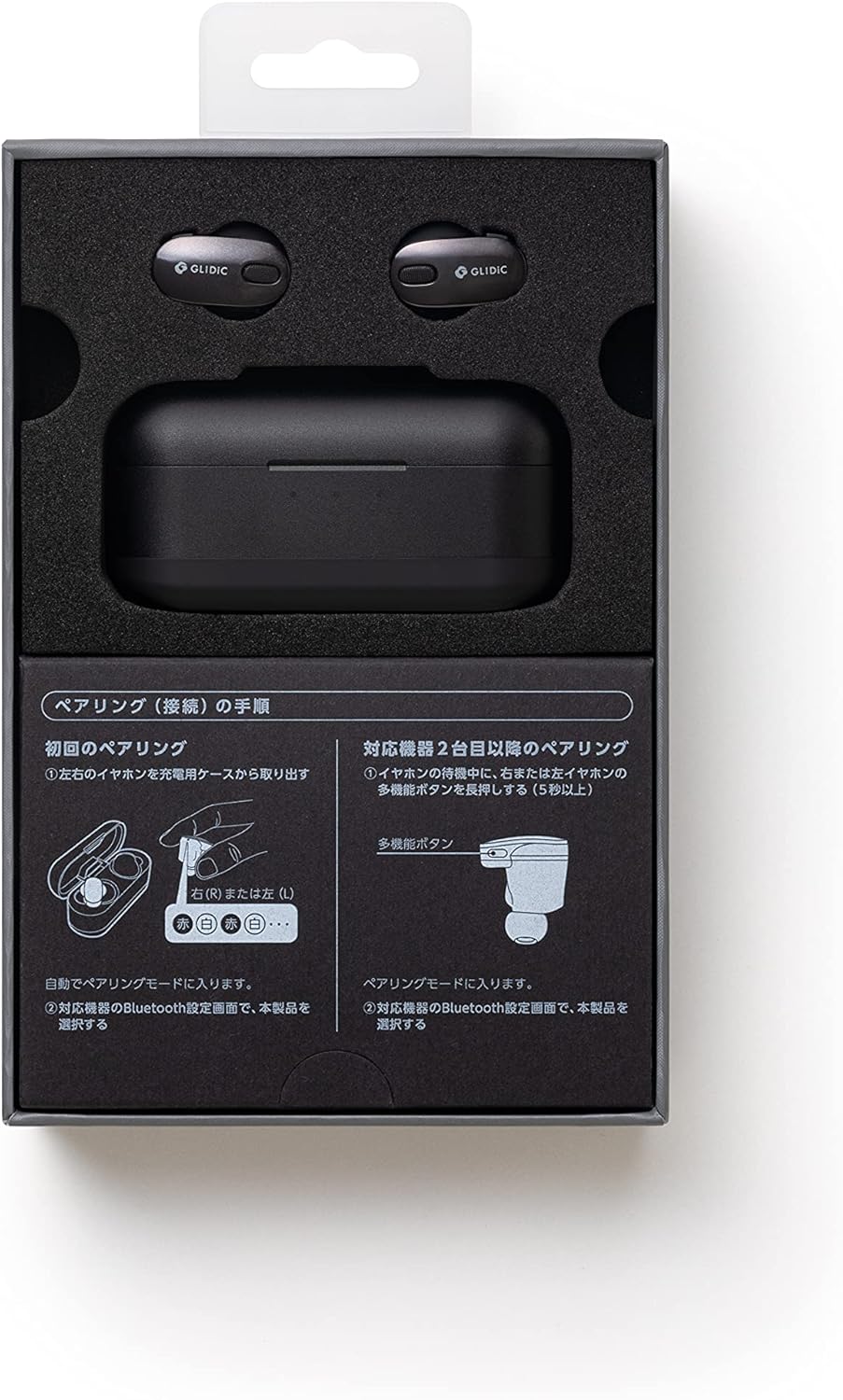
Image: A diagram illustrating the pairing procedure for the GLIDiC SB-WS91-MRTW/BK TW-9000 earphones. It shows two main sections: "First Pairing" and "Pairing with a second device or later". For first pairing, it depicts taking the earphones out of the case, which automatically enters pairing mode. For subsequent pairings, it shows pressing and holding the multi-function button on either the left or right earphone for 5 seconds while in standby mode to enter pairing mode.
- Open the charging case and remove both the left and right earphones. They will automatically enter pairing mode.
- Gå til Bluetooth-indstillingerne på din enhed (smartphone, tablet, bærbar computer).
- Søg efter tilgængelige enheder og vælg "GLIDiC TW-9000" fra listen.
- Når forbindelsen er oprettet, vil en bekræftelseslyd eller -meddelelse indikere, at parringen er gennemført.
Pairing with a Second Device or Later
To pair with another device or re-pair after initial setup:
- Ensure the earphones are in standby mode (not connected to another device).
- Press and hold the multi-function button on either the left (L) or right (R) earphone for approximately 5 seconds until the indicator light flashes, indicating pairing mode.
- On your device, go to Bluetooth settings and select "GLIDiC TW-9000" to connect.
Betjening af øretelefonerne
Tænd/sluk
- Tænd: Tag øretelefonerne ud af opladningsetuiet. De tænder automatisk.
- Sluk: Sæt øretelefonerne tilbage i opladningsetuiet. De slukker automatisk og begynder at oplade.
Iført øretelefoner
Insert the earphones gently into your ears, ensuring a comfortable and secure fit. Adjust them until the sound quality is optimal and external noise is minimized. The correct fit is crucial for effective Active Noise Cancellation.
Kontrolelementer
The GLIDiC TW-9000 earphones feature touch controls and support voice control for various functions. Specific touch gestures and voice commands may vary. Refer to the quick start guide or manufacturer's website for detailed control mappings.
- Afspil/pause: Typically a single tap on either earphone.
- Næste nummer: Often a double tap on the right earphone.
- Forrige nummer: Often a double tap on the left earphone.
- Besvar/afslut opkald: Enkelt tryk under et indgående opkald.
- Aktiver stemmeassistent: Long press or specific tap sequence.
Aktiv støjafbrydelse (ANC)
The earphones are equipped with Active Noise Cancellation to reduce ambient noise. This feature can be toggled on or off, or switched to an ambient sound mode, typically through a specific touch control gesture. Consult the detailed control instructions for your model.
Opretholdelse
Rensning
Regelmæssig rengøring hjælper med at opretholde lydkvalitet og hygiejne.
- Brug en blød, tør og fnugfri klud til at tørre øretelefonerne og opladningsetuiet af.
- Til genstridigt snavs, let dampRengør kluden med vand eller et mildt, ikke-slibende rengøringsmiddel. Undgå at fugt kommer i åbningerne.
- Clean the ear tips regularly. If removable, they can be washed with mild soap and water, then thoroughly dried before reattaching.
- Brug ikke skrappe kemikalier, alkohol eller slibende materialer.
Opbevaring
Når de ikke er i brug, skal du opbevare øretelefonerne i deres opladningsetui for at beskytte dem mod støv og skader og for at holde dem opladet.
Batteripleje
For at forlænge batterilevetiden:
- Undgå at aflade batterierne helt ofte.
- Opbevar enheden et køligt, tørt sted væk fra ekstreme temperaturer.
- If storing for an extended period, charge the case and earphones to about 50% capacity.
Fejlfinding
Hvis du støder på problemer, kan du prøve følgende løsninger:
Ingen lyd eller uregelmæssig forbindelse
- Sørg for, at høretelefonerne er opladet.
- Kontroller, at Bluetooth er aktiveret på din enhed, og at øretelefonerne er tilsluttet.
- Move the earphones closer to your device and away from potential interference sources (e.g., Wi-Fi routers, other Bluetooth devices).
- Prøv at ophæve parringen af øretelefonerne med din enhed og parre dem igen.
- Genstart din lydkildeenhed.
Høretelefoner oplader ikke
- Sørg for, at opladningskablet er korrekt tilsluttet til både etuiet og strømkilden.
- Hvis du bruger trådløs opladning, skal du sørge for, at etuiet er korrekt placeret på opladningspad'en.
- Kontrollér for snavs i etuiets opladningsport eller på øretelefonernes opladningskontakter.
- Prøv et andet opladningskabel eller en anden strømadapter.
One Earphone Not Working
- Place both earphones back into the charging case, close the lid, wait a few seconds, then remove them.
- Sørg for, at begge øretelefoner er opladet.
- Perform a factory reset if the issue persists (refer to manufacturer's webwebsted for specifikke instruktioner).
Specifikationer
| Modelnavn | SB-WS91-MRTW/BK (TW-9000) |
| Mærke | GLIDiC |
| Forbindelsesteknologi | Trådløs (Bluetooth) |
| Trådløse kommunikationsteknologier | Bluetooth |
| Øreplacering | In Ear |
| Formfaktor | In Ear |
| Støjkontrol | Aktiv støjreduktion |
| Kontroltype | Stemmekontrol |
| Kompatible enheder | Laptops, Smart Speakers, Smartphones |
| Batterier | 3 Lithium Polymer batterier (medfølger) |
| Varens vægt | 0.24 kilogram (240 g) |
| Produktdimensioner | 3 x 8 x 4 cm |
| Materiale Type | Metallic (Material not specified) |
| Inkluderede komponenter | Kabel, trådløst opladningsetui |
Garanti og support
For warranty information and technical support, please refer to the warranty card included with your product or visit the official GLIDiC webwebsted. Gem din købsbevis til garantikrav.
If you require further assistance, please contact GLIDiC customer service through their official channels.