
1. Introduktion
Thank you for choosing the BenQ DVD-2019 DVD Player. This manual provides essential information for the safe and efficient use of your new device. Please read it thoroughly before operating the player and retain it for future reference.
Vigtige sikkerhedsoplysninger:
- Udsæt ikke enheden for regn eller fugt.
- Åbn ikke c'enasing; overlad al service til kvalificeret personale.
- Sørg for korrekt ventilation omkring enheden.
- Brug kun den strømforsyning, der er angivet til denne enhed.
2. Pakkens indhold
Kontroller venligst, at alle varer er til stede i pakken:
- BenQ DVD-2019 DVD Player
- Fjernbetjening
- AV-kabel (RCA)
- Strømkabel
- Instruktionsmanual (dette dokument)
3. Produktet er slutview
3.1 Frontpanel

Figure 1: Front Panel of the DVD-2019 Player
The front panel features the disc tray, power button, play/pause, stop, and skip buttons. It also includes a USB port and an SD card slot for playing media from external storage devices.
3.2 Bagpanel

Figure 2: Rear Panel of the DVD-2019 Player
The rear panel provides various connection ports for audio and video output, including HDMI, RCA (composite video and stereo audio), and component video outputs. The power input is also located here.
3.3 Fjernbetjening
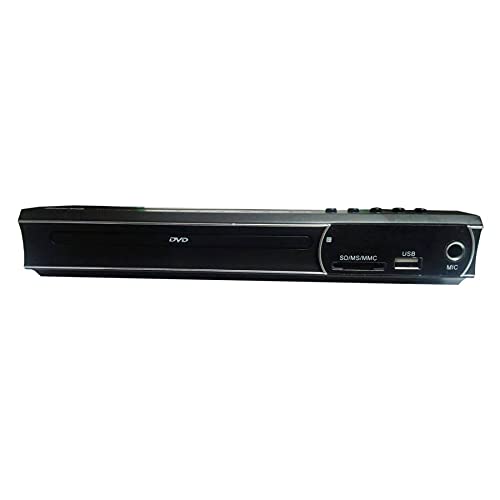
Figure 3: Remote Control for the DVD-2019 Player
The remote control allows you to operate all functions of the DVD player from a distance. It requires two AAA batteries (not included).
4. Opsætning
4.1 Tilslutning til et fjernsyn
Vælg en af følgende tilslutningsmetoder:
- HDMI Connection (Recommended for best quality):
Connect one end of an HDMI cable (not included) to the HDMI OUT port on the DVD player and the other end to an HDMI IN port on your television. Select the corresponding HDMI input on your TV. - RCA-forbindelse:
Connect the yellow video cable to the VIDEO OUT port on the DVD player and the yellow video input on your TV. Connect the red and white audio cables to the AUDIO OUT (R/L) ports on the DVD player and the corresponding red and white audio input ports on your TV. Select the AV input on your TV.
4.2 Strømtilslutning
After connecting the video and audio cables, plug the power cable into the AC IN port on the rear of the DVD player and then into a wall outlet.
5. Betjeningsvejledning
5.1 Grundlæggende DVD-afspilning
- Turn on your TV and the DVD player.
- Select the correct input source on your TV (e.g., HDMI 1, AV).
- Tryk på OPEN/CLOSE-knappen på frontpanelet eller fjernbetjeningen for at åbne diskskuffen.
- Place a DVD disc gently into the tray with the label side facing up.
- Press the OPEN/CLOSE button again to close the tray. The disc will load automatically.
- Playback should begin automatically. If a menu appears, use the arrow keys and OK button on the remote to navigate.
5.2 USB/SD-kortafspilning
- Indsæt et USB-flashdrev i USB-porten eller et SD-kort i SD-kortstikket på frontpanelet.
- The player should automatically detect the device and display a media browser. If not, press the SOURCE or USB/CARD button on the remote.
- Use the arrow keys and OK button to navigate through your files (videos, music, photos).
- Vælg en file og tryk på OK for at starte afspilningen.
5.3 Lyd- og videoindstillinger
Access the player's setup menu by pressing the SETUP button on the remote control. Here you can adjust settings such as:
- Video Indstillinger: Aspect ratio (4:3, 16:9), video output resolution.
- Lydindstillinger: Audio output mode (Stereo, Dolby Digital, DTS), dynamic range control.
- Sprogindstillinger: OSD-sprog, lydsprog, undertekstsprog.
6. Vedligeholdelse
6.1 Rengøring af enheden
- Tør afspillerens yderside af med en blød, tør klud.
- Brug ikke flydende rengøringsmidler eller aerosolspray.
- For the disc tray, use a soft, lint-free cloth to gently remove dust.
6.2 Håndtering af diske
- Hold altid diske i kanterne.
- Keep discs clean and free from scratches. Use a soft cloth to wipe from the center outwards.
- Opbevar diske i deres etuier, når de ikke er i brug.
7. Fejlfinding
| Problem | Mulig årsag | Løsning |
|---|---|---|
| Ingen strøm | Strømkabel ikke tilsluttet; stikkontakt defekt. | Sørg for, at strømkablet er korrekt tilsluttet. Prøv en anden stikkontakt. |
| Intet billede | Incorrect TV input selected; video cable loose or faulty. | Select the correct HDMI/AV input on your TV. Check video cable connections. |
| Ingen lyd | Audio cables loose or faulty; TV volume muted. | Check audio cable connections. Increase TV volume and ensure it's not muted. |
| Disken afspilles ikke | Disken er snavset, ridset eller har et inkompatibelt format. | Clean the disc. Try a different disc. Ensure the disc format is supported (DVD). |
| Fjernbetjening virker ikke | Batterierne er døde eller isat forkert; blokering mellem fjernbetjening og afspiller. | Udskift batterierne. Sørg for korrekt polaritet. Fjern eventuelle forhindringer. |
8. Specifikationer
| Feature | Detalje |
|---|---|
| Modelnummer | DVD-2019 |
| Mærke | BenQ |
| Medietype | DVD |
| Connector Type | HDMI, RCA |
| Forbindelsesteknologi | HDMI, RCA, USB |
| Understøttede lydformater | Dolby Digital, DTS, PCM |
| Kompatible enheder | Television |
9. Garanti og support
This BenQ DVD-2019 DVD Player comes with a standard manufacturer's warranty. Please refer to the warranty card included in your package for specific terms and conditions, including the warranty period and coverage details.
For technical support, service inquiries, or to obtain replacement parts, please contact BenQ customer service through their official website or the contact information provided on your warranty documentation. Keep your purchase receipt as proof of purchase for warranty claims.