
BirdDog BD-BDPF120
BirdDog PF120 Full HD NDI 20x bokskamera brugermanual
Model: BD-BDPF120
1. Introduktion
BirdDog PF120 er et højtydende Full HD NDI-bokskamera designet til professionelle videoproduktionsmiljøer. Det har en Exmor R-bagbelyst sensor, 20x optisk zoom og en fuldfarvematrix, alt sammen indkapslet i et holdbart metalkabinet. Denne manual indeholder vigtige oplysninger om korrekt opsætning, betjening og vedligeholdelse af dit PF120-kamera.
2. Pakkens indhold
Kontroller venligst, at alle nedenstående varer er inkluderet i din pakke. Hvis der mangler eller er beskadigede varer, skal du straks kontakte din forhandler.
- BirdDog PF120 Full HD NDI 20x bokskamera
- Strømadapter (DC 12V)
- Lens Cap
- Dokumentation (hurtigstartguide, sikkerhedsoplysninger)
3. Produktet er slutview
BirdDog PF120 er konstrueret til alsidighed og robust ydeevne. Nøglefunktioner inkluderer:
- Fuld NDI-understøttelse for problemfri integration i IP-arbejdsgange.
- 20x optisk zoom til detaljerede nærbilleder.
- Exmor R baggrundsbelyst sensor for overlegen ydeevne i svagt lys.
- Holdbart hus i metal.
- Flere tilslutningsmuligheder, herunder HDMI, NDI/PoE, RS-232 og USB 2.0.
3.1 Kamera Views og komponenter

Figur 3.1: Forsiden view af BirdDog PF120-kameraet, vistasinlinsen og BirdDog-logoet på sidepanelet.
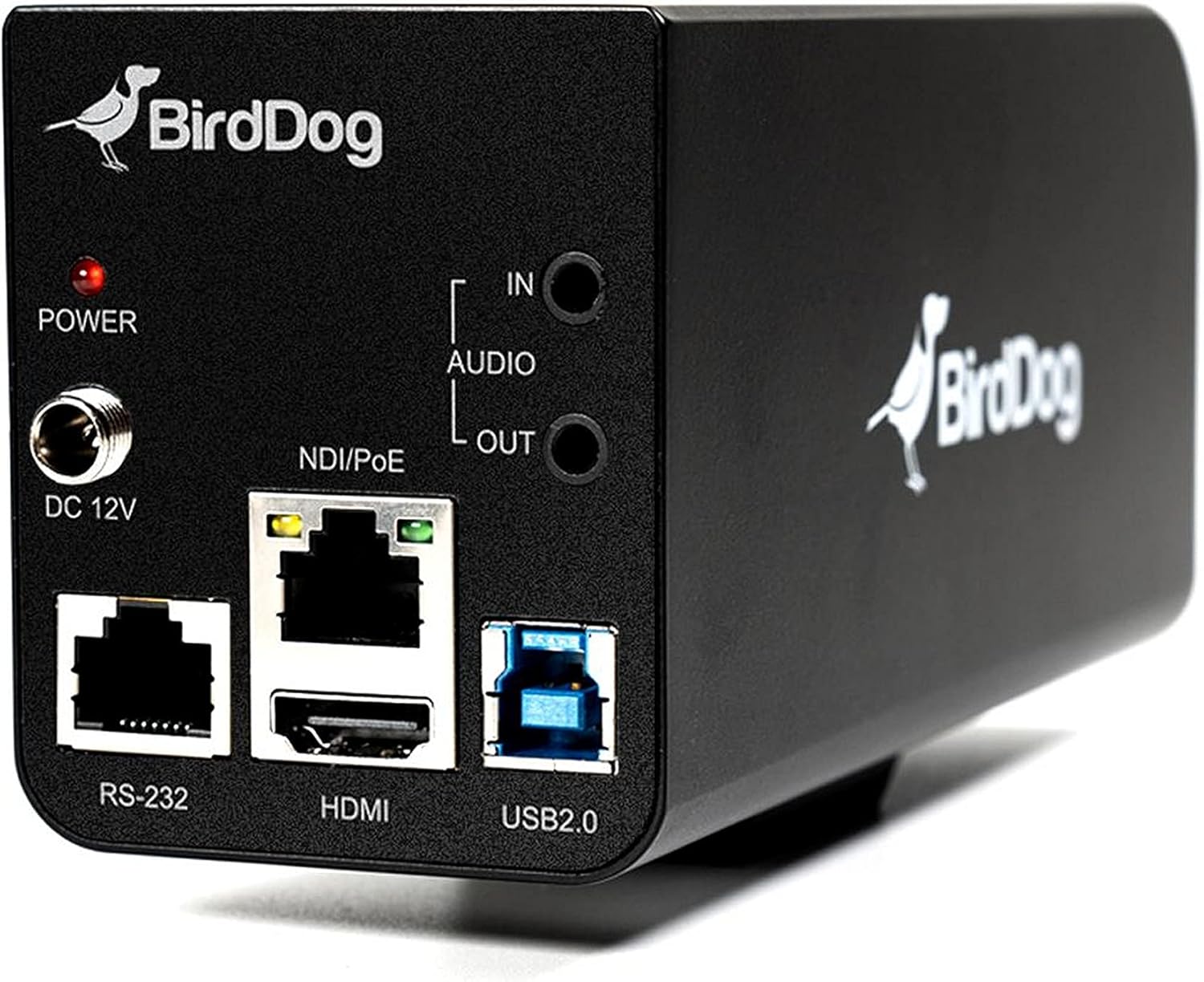
Figur 3.2: Bagpanelet på BirdDog PF120, der viser strømindgang (DC 12V), lydindgang/udgang, NDI/PoE-port, HDMI-udgang, RS-232-port og USB 2.0-port.
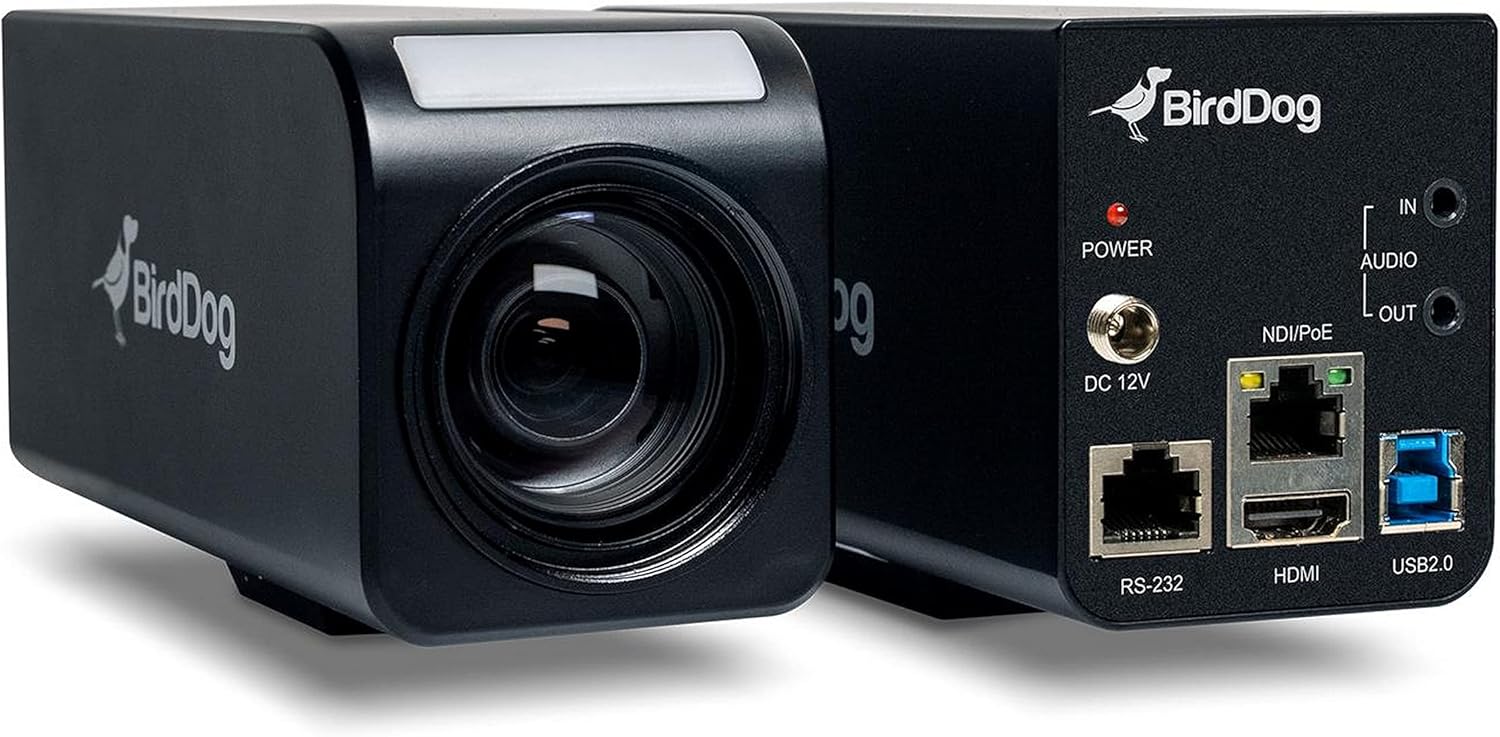
Figur 3.3: Kombineret view af BirdDog PF120, der viser både den forreste linseenhed og det bageste tilslutningspanel.

Figur 3.4: Top view af BirdDog PF120-kameraet, der fremhæver det elegante design og BirdDog-branding.
4. Opsætning
4.1 Tænd
- Tilslut den medfølgende DC 12V strømadapter til "DC 12V"-porten på bagsiden af kameraet.
- Sæt strømadapteren i en passende stikkontakt.
- Alternativt, hvis du bruger en PoE-aktiveret netværksswitch, skal du tilslutte et Ethernet-kabel til "NDI/PoE"-porten. Kameraet tændes via Power over Ethernet.
4.2 Netværksforbindelse (NDI)
- Tilslut et Ethernet-kabel fra "NDI/PoE"-porten på kameraet til din netværksswitch eller router.
- Sørg for, at dit netværk er konfigureret til at understøtte NDI-protokoller.
- Kameraet vil automatisk få en IP-adresse via DHCP. For statisk IP-konfiguration henvises til BirdDog Central-applikationen eller web interface.
4.3 Videoudgang
- NDI-output: Den primære videoudgang er via NDI over Ethernet-forbindelsen.
- HDMI udgang: Tilslut et HDMI-kabel fra "HDMI"-porten på kameraet til en skærm eller videoomskifter for direkte videoovervågning.
5. Betjening af kameraet
5.1 Adgang til Web Interface
- Når kameraet er forbundet til netværket, skal du bruge BirdDog Central-applikationen eller en IP-scanner til at finde kameraets IP-adresse.
- Åbn a web browseren og indtast kameraets IP-adresse for at få adgang til dens web interface.
- Fra web grænsefladen kan du konfigurere videoindstillinger, netværksparametre og styre kamerafunktioner.
5.2 Kamerakontrol
PF120 kan styres via:
- NDI-værktøjer: Brug NewTek NDI-værktøjer (f.eks. NDI Studio Monitor) til grundlæggende kontrol.
- BirdDog Central / Kamstyring: BirdDogs dedikerede software giver omfattende kontrol over kameraindstillinger, herunder zoom, fokus, iris og farvematrix.
- RS-232: Tilslut en kompatibel seriel controller til RS-232-porten for hardwarestyring.
- Fjernbetjening: Kameraet understøtter fjernbetjeningsmetoder som angivet i produktdokumentationen.
5.3 Zoom og fokus
PF120 har et 20x optisk zoomobjektiv. Zoom- og fokusjusteringer foretages typisk via web interface eller kompatibel kontrolsoftware.
6. Vedligeholdelse
- Rensning: Brug en blød, tør klud til at rengøre kamerahuset. Brug en specialiseret linserengøringsopløsning og en mikrofiberklud til objektivet. Undgå slibende rengøringsmidler.
- Firmwareopdateringer: Tjek BirdDog regelmæssigt webwebsted for firmwareopdateringer. Ved at holde firmwaren opdateret sikres optimal ydeevne og adgang til nye funktioner.
- Opbevaring: Når kameraet ikke er i brug i længere perioder, skal det opbevares et køligt og tørt sted, væk fra direkte sollys og ekstreme temperaturer.
7. Fejlfinding
7.1 Ingen strøm
- Sørg for, at strømadapteren er korrekt tilsluttet både kameraet og en fungerende stikkontakt.
- Hvis du bruger PoE, skal du kontrollere, at Ethernet-kablet er tilsluttet en PoE-aktiveret port på din switch, og at switchen leverer strøm.
7.2 Intet NDI-signal
- Kontroller Ethernet-kabelforbindelsen.
- Bekræft, at kameraet har fået en IP-adresse (tjek din routers DHCP-klientliste, eller brug BirdDog Central).
- Sørg for, at din netværksfirewall ikke blokerer NDI-trafik.
- Bekræft, at NDI-værktøjer eller -software på din modtagerenhed er korrekt konfigureret til at registrere NDI-kilder.
7.3 Problemer med billedkvalitet
- Kontroller linsen for pletter eller støv, og rengør den om nødvendigt.
- Juster fokusindstillinger via web grænseflade eller kontrolsoftware.
- Review indstillinger for eksponering, hvidbalance og farvematrix i kameraets web interface.
8. Specifikationer
| Feature | Detalje |
|---|---|
| Modelnummer | BD-BDPF120 |
| Videooptagelsesopløsning | 1080p |
| Effektiv videoopløsning | 720 pixel |
| Optisk zoom | 20x |
| Zoom type | Digital zoom, optisk zoom |
| Forbindelsesteknologi | Kablet |
| Forbindelsesprotokol | Wi-Fi (til kontrol/administration, NDI er primær video) |
| Kontrolmetode | Fjernbetjening, iris, RS-232 |
| Strømkilde | AC/DC, PoE |
| Wattage | 5 watt |
| Materiale | Metal |
| Varedimensioner (L x B x H) | 9.9 x 9 x 3.6 tommer |
| Varens vægt | 2.94 pund |
| Monteringstype | Vægmontering (ifølge specifikationerne, men typisk er bokskameraer alsidige) |
| International Protection Rating | IP65 |
| Low Light teknologi | Nat farve |
9. Garanti og support
For garantioplysninger og teknisk support henvises til den officielle BirdDog-side. webwebstedet eller kontakt din autoriserede BirdDog-forhandler. Gem din købsbevis til garantikrav.
BirdDog Officiel Webwebsted: www.bird-dog.tv
Ask a question about this manual
Ask about setup, troubleshooting, compatibility, parts, safety, or missing instructions. Manuals+ will review the question and use this page’s manual context to help answer it.