
1. Introduktion
This manual provides comprehensive instructions for the setup, operation, and maintenance of your Mitzu MRC-UNI13 Universal Remote Control. Please read this manual carefully before using the device to ensure proper functionality and to maximize its lifespan.
2. Produktet er slutview
The Mitzu MRC-UNI13 is a universal remote control designed for Smart TVs and Slim Screens. It features a lightweight and ergonomic design, providing a practical solution for controlling multiple television brands.
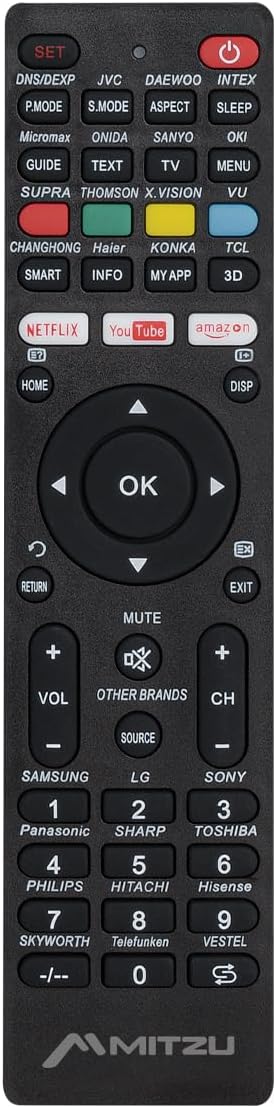
Billede 2.1: Front view of the Mitzu MRC-UNI13 Universal Remote Control, showing all buttons and layout.

Billede 2.2: Vinklet view of the Mitzu MRC-UNI13 Universal Remote Control, highlighting its slim profile.

Billede 2.3: Mitzu MRC-UNI13 Universal Remote Control with approximate dimensions: 17.7 cm length, 4.5 cm width, and 2 cm thickness.
3. Opsætning
3.1. Batteriinstallation
The Mitzu MRC-UNI13 remote control requires two AAA batteries (not included) for operation. Follow these steps to install the batteries:
- Find batterirummets dæksel på bagsiden af fjernbetjeningen.
- Skub dækslet nedad, eller tryk på låsen for at åbne det.
- Isæt to AAA-batterier, og sørg for, at de positive (+) og negative (-) poler er justeret korrekt med markeringerne inde i batterirummet.
- Sæt batteridækslet på igen ved at skubbe det på plads, indtil det klikker sikkert.
Note: Brug altid nye batterier, og udskift begge batterier samtidig. Bland ikke gamle og nye batterier eller forskellige typer batterier.
3.2. Programmering af fjernbetjeningen
The MRC-UNI13 is a universal remote control that needs to be programmed to operate your specific television. The programming method typically involves entering a code or using an auto-search function. Refer to the included code list (if provided with the physical product) for your TV brand. If no code list is available, or if the codes do not work, use the auto-search method.
3.2.1. Code Entry Method (Exampdet)
- Turn on the TV you wish to control manually.
- Tryk og hold på SÆT button on the remote until the indicator light (usually red) illuminates.
- Enter the 3-digit code for your TV brand using the numeric keypad. (e.g., for Samsung, LG, Sony, Panasonic, Sharp, Toshiba, Philips, Hitachi, Hisense, Skyworth, Telefunken, Vestel, etc., as indicated on the remote).
- Hvis koden er korrekt, slukkes indikatorlampen. Test fjernbetjeningen ved at trykke på MAGT button. If the TV turns off, the remote is programmed.
- If the TV does not respond, repeat the process with the next code listed for your brand.
3.2.2. Auto-Search Method (Exampdet)
- Turn on the TV you wish to control manually.
- Ret fjernbetjeningen mod tv'et.
- Tryk og hold på SÆT knappen og MAGT button simultaneously until the indicator light illuminates.
- Release both buttons. The indicator light will flash.
- Tryk kontinuerligt på VOL+ knap (eller CH+) repeatedly until the TV volume changes or the channel changes. This indicates the remote has found a compatible code.
- Once the TV responds, immediately press the SÆT knappen for at gemme koden. Indikatorlampen slukker.
- Test all functions of the remote. If some functions do not work, you may need to repeat the auto-search process to find a more compatible code.
Note: The exact programming steps may vary slightly. If these methods do not work, consult the specific instructions that came with your physical remote or visit the Mitzu support website for detailed programming guides.
4. Betjeningsvejledning
Once programmed, the Mitzu MRC-UNI13 remote control functions similarly to your original TV remote. Below is a general guide to its main functions:
- POWER (rød knap): Tænder eller slukker for tv'et.
- SÆT: Bruges til programmering af fjernbetjeningen.
- DNS/DEXP, JVC, DAEWOO, INTEX, etc. (Brand Buttons): Specific buttons for direct brand code entry or selection.
- P-TILSTAND, S-TILSTAND, FORMÅL, DVALEFORMAT: Picture mode, Sound mode, Aspect ratio, Sleep timer functions.
- GUIDE, TEXT, TV, MENU, VU: Electronic Program Guide, Teletext, TV/AV input, Menu, Volume Up/Down (likely a typo on the remote, VU usually means Volume Up).
- SMART, INFO, MY APP, 3D: Smart TV functions, Information display, Custom app access, 3D mode.
- NETFLIX, YouTube, Amazon: Direkte adgangsknapper til streamingtjenester.
- HOME, DISP: Home menu, Display information.
- Navigationstastatur (op, ned, venstre, højre, OK): Navigerer i menuer og bekræfter valg.
- RETURN, EXIT: Gå tilbage til den forrige skærm eller luk en menu.
- STUM: Slår lyden fra eller til på tv'et.
- VOL+ / VOL-: Justerer lydstyrken op eller ned.
- CH+ / CH-: Skifter kanalen op eller ned.
- KILDE: Vælger inputkilder (HDMI, AV osv.).
- Numerisk tastatur (0-9): Direkte kanaladgang.
- -/--: For two-digit channel entry.
Note: The functionality of some buttons may depend on the specific TV model and brand you are controlling. Not all buttons may be supported by all TVs.
5. Vedligeholdelse
To ensure the longevity and optimal performance of your Mitzu MRC-UNI13 Universal Remote Control, follow these maintenance guidelines:
- Rensning: Brug en blød, tør klud til at rengøre fjernbetjeningen. Ved genstridigt snavs, tør letampen the cloth with water or a mild cleaning solution. Do not use abrasive cleaners, alcohol, or solvents.
- Batteripleje:
- Fjern batterierne, hvis fjernbetjeningen ikke skal bruges i længere tid, for at forhindre lækage.
- If battery leakage occurs, clean the compartment thoroughly before inserting new batteries.
- Bortskaf brugte batterier i henhold til lokale regler.
- Opbevaring: Opbevar fjernbetjeningen et køligt, tørt sted, væk fra direkte sollys, ekstreme temperaturer og høj luftfugtighed.
- Håndtering: Undgå at tabe fjernbetjeningen eller udsætte den for kraftige stød, da dette kan beskadige de indvendige komponenter.
6. Fejlfinding
If you encounter issues with your Mitzu MRC-UNI13 Universal Remote Control, refer to the following troubleshooting tips:
- Remote is not working at all:
- Kontroller, om batterierne er isat korrekt med den korrekte polaritet (+/-).
- Udskift gamle batterier med nye.
- Sørg for, at der er frit udsyn mellem fjernbetjeningen og tv'ets infrarøde sensor.
- Remote controls some functions but not others:
- The current code may not be fully compatible with your TV model. Try reprogramming the remote using a different code for your TV brand or using the auto-search method again.
- Some advanced functions (e.g., specific Smart TV features) may not be supported by universal remotes.
- Indicator light does not illuminate during programming:
- Sørg for at trykke og holde nede SÆT button for the required duration.
- Kontroller eller udskift batterier.
- TV does not respond during auto-search:
- Ensure the TV is turned on manually before starting the auto-search.
- Sørg for at pege fjernbetjeningen direkte mod tv'et.
- Tryk på VOL+ or CH+ button repeatedly and quickly enough to cycle through codes.
If the problem persists after trying these steps, contact Mitzu customer support for further assistance.
7. Specifikationer
| Feature | Detalje |
|---|---|
| Mærke | Mitzu |
| Model | MRC-UNI13 |
| Kompatible enheder | Televisions (Smart TVs, Slim Screens) |
| Særlige funktioner | Lightweight, Universal Compatibility (up to 10 devices, though typically programmed for one TV at a time) |
| Forbindelsesteknologi | Infrarød (IR) |
| Strømkilde | 2 x AAA batterier (medfølger ikke) |
| Dimensioner (ca.) | 22.2 x 8.8 x 2.8 cm (Package); Remote: ~17.7 x 4.5 x 2 cm |
| Vægt (ca.) | 70 g (pakke) |
8. Garanti og support
8.1. Garantioplysninger
Mitzu products are designed for quality and reliability. For specific warranty terms and conditions, please refer to the warranty card included with your purchase or visit the official Mitzu webwebsted. Gem din købsbevis til garantikrav.
8.2. Kundesupport
For technical assistance, programming codes, or any other inquiries regarding your Mitzu MRC-UNI13 Universal Remote Control, please contact Mitzu customer support. Contact details can typically be found on the Mitzu official webwebstedet eller på produktemballagen.
Du kan også besøge Mitzu Brand Store on Amazon for mere produktinformation.