
Indledning
This manual provides detailed instructions for the installation, operation, and maintenance of your darkFlash DT360 CPU Liquid Cooler. This All-In-One (AIO) liquid cooler features a 360mm radiator, a dual-chamber RGB pump, and three 120mm high-performance PWM RGB fans, ensuring efficient cooling for both Intel and AMD processors.
Produktspecifikationer
| Mærke | mørkFlash |
| Model | DT360 |
| Strømstik type | 4-benet |
| Voltage | 12 volt |
| Afkølingsmetode | Vand |
| Kompatible enheder | CPU (Intel LGA 775/1155/1156/1366/2011, AMD AM4/FM2/FM1/AM3+/AM3/AM2+/AM2) |
| Støjniveau | 21 decibel |
| Materiale | Kobber, gummi |
| Maksimal rotationshastighed | 1800 RPM |
| Luftmængde kapacitet | 70 kubikfod i minuttet |
| UPC | 769044870481 |
Pakkens indhold
Kontroller, at alle komponenter er til stede, før installationen påbegyndes:
- 1x DT360 AIO Liquid Cooler (360mm Radiator, Pump, Tubing)
- 3x 120mm PWM RGB Fans
- Mounting Hardware for Intel Sockets (LGA 775/1155/1156/1366/2011)
- Mounting Hardware for AMD Sockets (AM4/FM2/FM1/AM3+/AM3/AM2+/AM2)
- Termisk pasta
- Fan/RGB Controller (if included)
- Brugermanual

Image showing all components included in the darkFlash DT360 CPU Liquid Cooler package, including the radiator, pump, fans, and various mounting accessories.
Sikkerhedsoplysninger
- Sørg for, at dit system er slukket og frakoblet stikket før installation.
- Håndter komponenterne forsigtigt for at undgå skader.
- Refer to your motherboard manual for specific CPU socket and fan header locations.
- Do not attempt to open the pump or radiator as this may void the warranty and cause leaks.
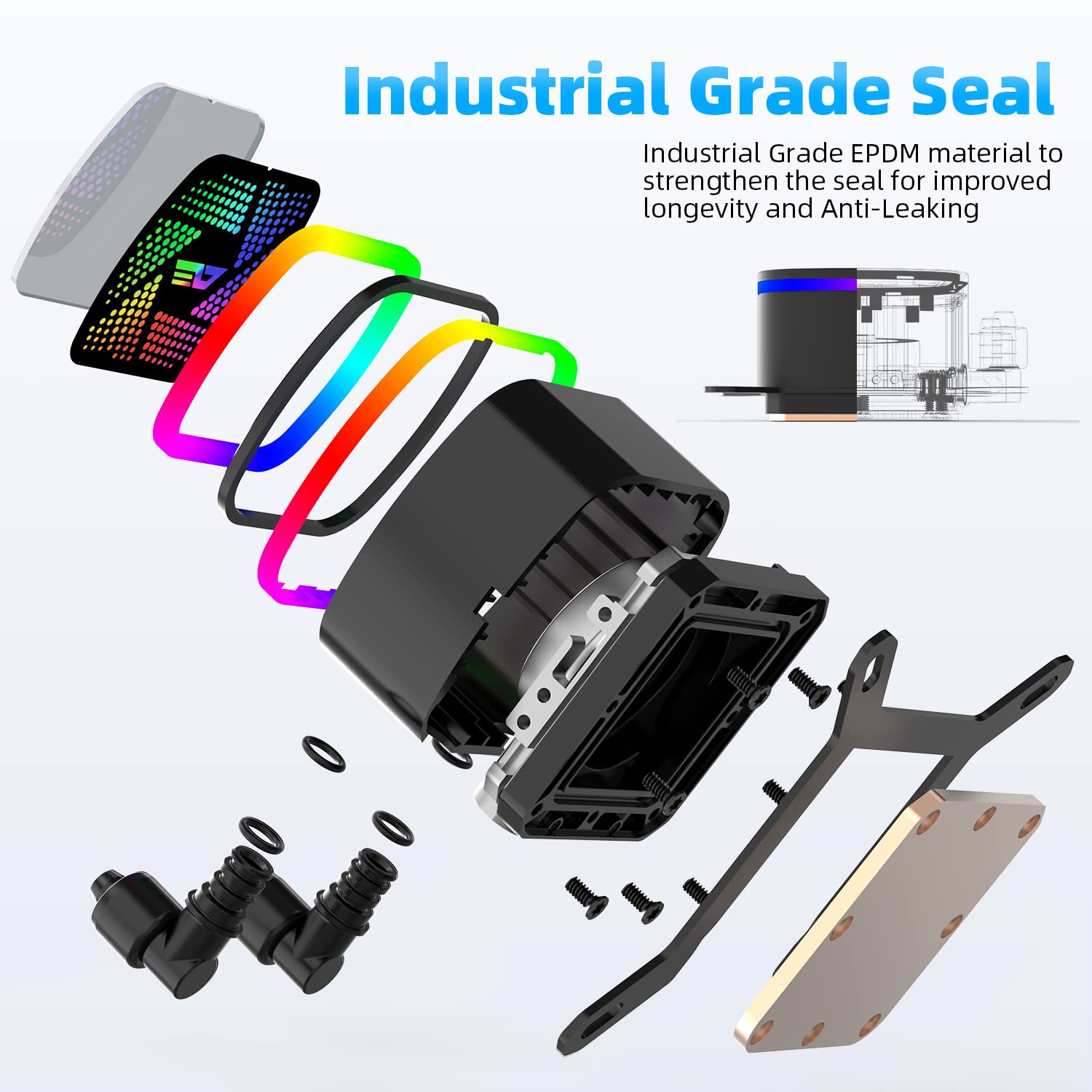
Diagram illustrating the internal components of the dual-chamber pump, highlighting the industrial-grade seal for leak prevention.
Installationsvejledning
Step 1: Prepare the CPU Socket
Identify your CPU socket type (Intel or AMD) and select the appropriate mounting brackets and backplate.

Image displaying compatible Intel and AMD CPU sockets for the darkFlash DT360 cooler.
Step 2: Install the Radiator and Fans
Mount the three 120mm fans to the 360mm radiator using the provided screws. Ensure the fans are oriented to provide optimal airflow (e.g., intake or exhaust, depending on your case configuration).
Secure the assembled radiator and fans to an available 360mm mounting location in your PC case, typically at the top or front.
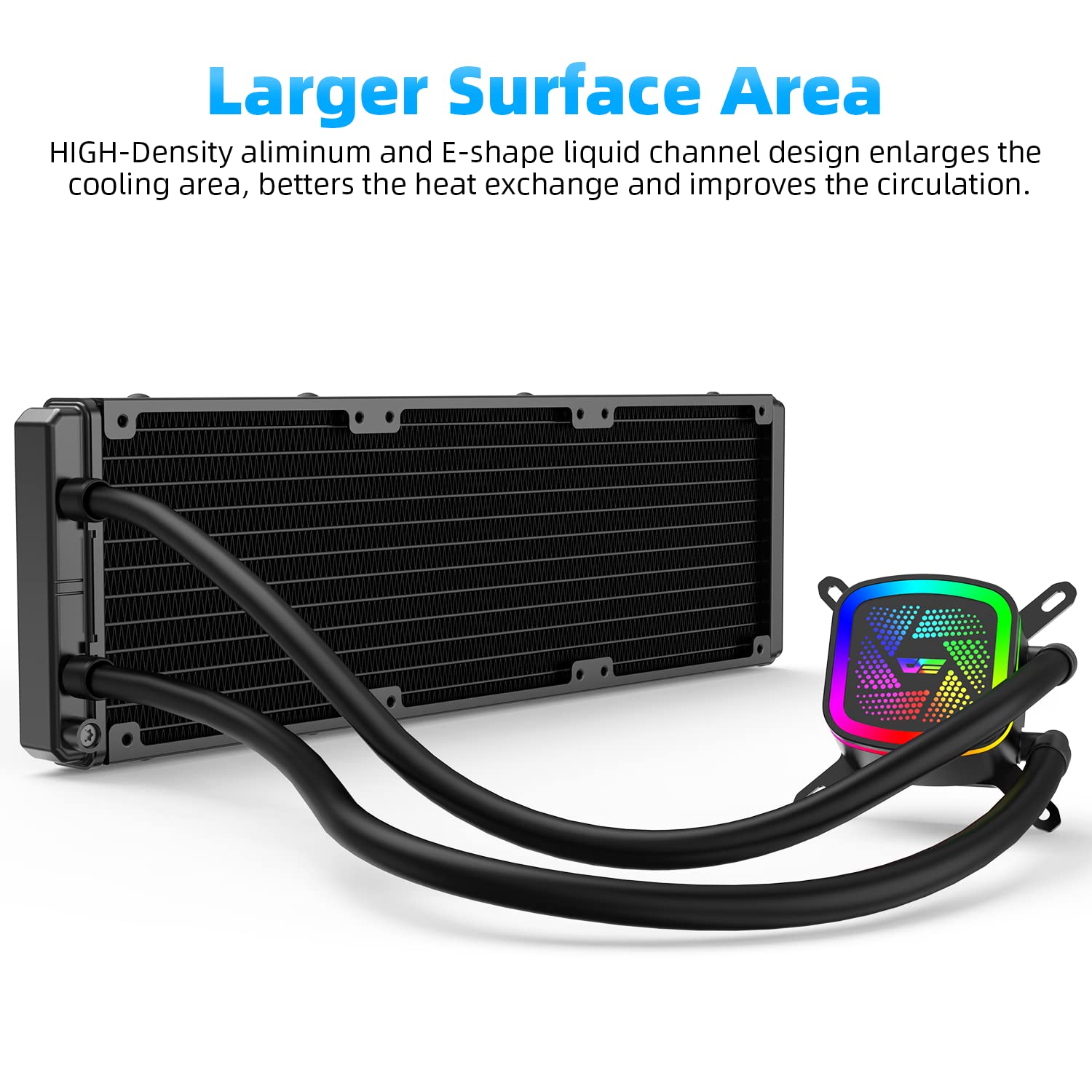
Image showing the 360mm radiator connected to the pump, illustrating its larger surface area for heat dissipation.

Close-up of a 120mm PWM RGB fan, highlighting its 11-blade design for optimized airflow and reduced noise.
Step 3: Apply Thermal Paste and Mount the Pump
Clean the CPU surface with isopropyl alcohol. Apply a small amount of thermal paste (included) to the center of the CPU's Integrated Heat Spreader (IHS).
Carefully place the pump block onto the CPU, aligning it with the mounting holes. Secure the pump with the appropriate screws and backplate, tightening them in a diagonal pattern until snug. Do not overtighten.

Image depicting the dual-chamber pump block mounted on a CPU, showing the water flow path.
Trin 4: Tilslut kabler
Tilslut pumpens 3-bens eller 4-bens strømkabel til CPU_FAN- eller AIO_PUMP-headeren på dit bundkort.
Connect the fan power cables to available fan headers on your motherboard or to a fan controller (if applicable).
Connect the RGB cables from the pump and fans to the appropriate RGB header on your motherboard (e.g., 5V ARGB header) or to an RGB controller.

The darkFlash DT360 pump head with vibrant RGB lighting, showcasing its aesthetic design.
Betjeningsvejledning
Første gang tændt
After installation, double-check all connections. Power on your PC. The fans and pump RGB lighting should illuminate, and the fans should begin spinning.
BIOS/UEFI-indstillinger
Access your motherboard's BIOS/UEFI settings. Ensure the CPU_FAN or AIO_PUMP header is set to PWM mode (if applicable) and configured for optimal cooling performance. You may adjust fan curves to balance cooling and noise levels.
RGB-kontrol
If connected to a compatible motherboard RGB header, you can control the lighting effects using your motherboard's RGB software (e.g., ASUS Aura Sync, MSI Mystic Light Sync, ASRock Polychrome Sync, Gigabyte RGB Fusion).

Image illustrating the darkFlash DT360's compatibility with various motherboard RGB synchronization technologies.
Opretholdelse
Støvsugning
Regularly clean dust from the radiator fins and fan blades using compressed air or a soft brush. Excessive dust can impede airflow and reduce cooling efficiency.
Slanger og forbindelser
Periodically inspect the tubing and connections for any signs of leaks or damage. Ensure all connections remain secure.
Termisk pasta
Selvom det ikke er nødvendigt ofte, bør du overveje at påføre termisk pasta igen hvert par år, eller hvis du bemærker en betydelig stigning i CPU-temperaturerne.
Fejlfinding
No Power/RGB
- Kontroller alle strøm- og RGB-kabelforbindelser til bundkortet eller controlleren.
- Sørg for, at strømforsyningen fungerer korrekt.
Høje CPU-temperaturer
- Verify that the pump is running (you may feel a slight vibration or hear a faint hum).
- Sørg for, at ventilatorerne drejer og er orienteret korrekt for at sikre luftgennemstrømning.
- Kontroller påføring af termisk pasta; påfør igen om nødvendigt.
- Confirm proper mounting pressure of the pump on the CPU.
- Rengør eventuelt støvophobning på radiatoren.
Usædvanlige lyde
- Check for loose fan cables or objects obstructing fan blades.
- A slight hum from the pump is normal. Excessive gurgling might indicate air bubbles; gently gently tilt your PC case to help dislodge them.
Utætheder
- If a leak is detected, immediately power off your PC and disconnect it from the power source. Contact darkFlash support.
Official darkFlash video demonstrating the CPU water cooler, including installation tips and features.
Garanti og support
darkFlash products are designed for reliability and performance. For warranty information, technical support, or service inquiries, please visit the official darkFlash webwebstedet eller kontakt deres kundeservice. Gem din købsbevis til garantikrav.
Mærkebutik: darkFlash-butik på Amazon