
Produkt overview
The Poly Sync 60 USB/Bluetooth smart speakerphone is designed to provide clear audio for small to medium conference rooms. It features powerful twin speakers and a six-microphone array that focuses on voices while reducing background noise. This allows for natural conversations, even when multiple participants speak simultaneously. The device offers versatile connectivity options, including USB-A, USB-C, and Bluetooth, enabling connection to PCs, Macs, and smartphones. It is powered by an AC adapter, eliminating the need for battery charging during use. For larger spaces, two units can be wirelessly paired to expand voice pickup coverage.
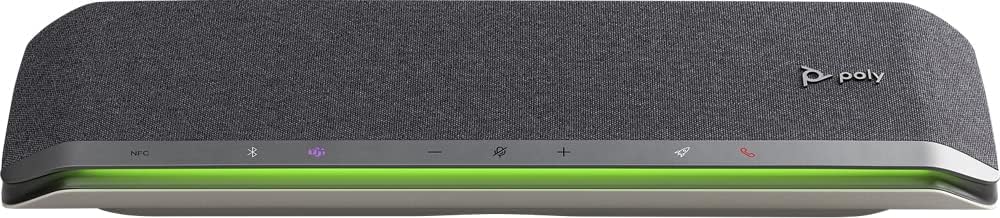
Billede: Forside view of the Poly Sync 60 Smart Speakerphone, showing the speaker grille, control buttons, and an illuminated LED light bar.
Pakkens indhold
- Poly Sync 60 Speakerphone
- Main power supply with global pin adapters
- USB cable with USB-A and USB-C connectors
Nøglefunktioner
- Avanceret lyd: Six-microphone steerable array for echo and noise reduction, ensuring clear voice pickup.
- Dobbelte højttalere: High-performance speakers deliver rich, clear audio for all participants.
- AC drevet: Operates continuously via AC power, eliminating battery concerns.
- Daisy Chain-evne: Wirelessly pair two units for extended coverage in larger meeting spaces.
- Fleksibel tilslutning: Connects to computers via combined USB-A/USB-C cable and to smartphones via Bluetooth.
- USB Video Camera Support: Connect a USB video camera to the speakerphone for combined audio and video with a single cable to the computer.
- Opladning af mobilenhed: Two USB ports allow charging of up to two mobile phones simultaneously.
- Microsoft Teams-certificeret: Includes a dedicated Teams button for instant access to the Teams application.
Opsætningsvejledning
1. Strømtilslutning
Connect the provided main power supply to the Poly Sync 60 and plug it into a wall outlet. The device requires AC power for operation.
2. Connecting to a Computer (PC/Mac)
Use the integrated USB cable to connect the Poly Sync 60 to your computer. The cable supports both USB-A and USB-C ports. Once connected, the device should be recognized automatically by your operating system.
3. Connecting to a Smartphone (Bluetooth)
- Tryk og hold på Bluetooth knap on the Poly Sync 60 until the LED indicator flashes blue.
- On your smartphone, navigate to the Bluetooth settings and select "Poly Sync 60" from the list of available devices.
- Når den er parret, lyser LED-indikatoren konstant blåt.
4. Daisy Chain Two Units (Optional)
For expanded audio coverage, two Poly Sync 60 units can be wirelessly paired. Refer to the official Poly support documentation for detailed instructions on how to enable this feature.
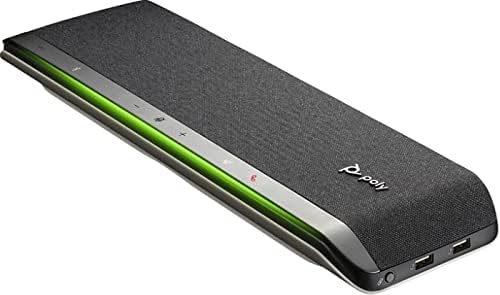
Billede: Side view of the Poly Sync 60 Smart Speakerphone, highlighting the USB ports for charging mobile devices and connecting a video camera.
Betjeningsvejledning
Grundlæggende kontrol
- Lydstyrke op/ned: Brug + og - knapper til at justere højttalerens lydstyrke.
- Slå lyden fra/til: Tryk på microphone icon button to mute or unmute the microphone. The LED indicator will change color to show mute status.
- Opkaldssvar/afslut: Tryk på phone icon button for at besvare eller afslutte et opkald.
- Microsoft Teams-knap: Tryk på Teams icon button to launch or interact with the Microsoft Teams application (if certified version).
Opladning af mobile enheder
Connect your mobile phone or other USB-powered device to one of the two USB ports on the Poly Sync 60 to charge it during a meeting.
Vedligeholdelse og pleje
- Clean the Poly Sync 60 with a soft, dry, lint-free cloth.
- Brug ikke slibende rengøringsmidler, opløsningsmidler eller stærke kemikalier, da disse kan beskadige enheden.
- Undgå at udsætte enheden for ekstreme temperaturer, fugt eller direkte sollys.
- Opbevar højttalertelefonen på et køligt, tørt sted, når den ikke er i brug.
Fejlfinding
- Ingen lyd/mikrofon virker ikke:
- Ensure the device is powered on and the AC adapter is securely connected.
- Verify that the speakerphone is not muted (check the mute button LED).
- Check the volume levels on both the Poly Sync 60 and your connected computer/smartphone.
- Confirm that the Poly Sync 60 is selected as the audio input/output device in your computer's sound settings or conferencing application.
- Forbindelsesproblemer (USB):
- Prøv at tilslutte USB-kablet til en anden port på din computer.
- Genstart din computer.
- Forbindelsesproblemer (Bluetooth):
- Ensure Bluetooth is enabled on your smartphone and the Poly Sync 60 is in pairing mode.
- Unpair and then re-pair the device from your smartphone's Bluetooth settings.
- Sørg for, at ingen andre Bluetooth-enheder forårsager interferens.
- Echo or Background Noise:
- Place the speakerphone centrally in the room, away from walls or highly reflective surfaces.
- Ensure the room is quiet and free from excessive background noise.
Tekniske specifikationer
| Feature | Specifikation |
|---|---|
| Modelnavn | Synkroniser 60 |
| Varemodelnummer | 216873-01 |
| Højttaler type | Multimedier |
| Forbindelsesteknologi | Bluetooth, USB |
| Trådløs kommunikationsteknologi | Bluetooth |
| Bluetooth rækkevidde | 3 meter |
| Strømkilde | Elektrisk med ledning |
| Højttaler Maksimal udgangseffekt | 60 watt |
| Lydudgangstilstand | Stereoanlæg |
| Surround Sound Kanalkonfiguration | 2.0 |
| Kontrolmetode | Tryk knap |
| Produktdimensioner | 1.5" D x 15.5" B x 4.8" H |
| Varens vægt | 2.2 pund (1000 gram) |
| Anbefalede anvendelser | Office work, remote work, conference calls, personal entertainment, charging mobile devices |
| Monteringstype | Bordplademontering |
| Fabrikant | Poly |
| UPC | 017229172517, 197029590572 |
Garantioplysninger
The Poly Sync 60 Smart Speakerphone comes with a full manufacturer's warranty. For detailed information regarding warranty terms, duration, and claim procedures, please refer to the official Poly webwebstedet eller garantidokumentationen, der fulgte med dit køb.
Støtte
For further assistance, product updates, software downloads, or detailed guides, please visit the official Poly support website. You can also contact Poly customer service for technical support or service inquiries.
Officiel Poly Webwebsted: www.poly.com