
1. Introduktion
Tak for købetasing the Daewoo DIBT2122 Mini Portable Bluetooth Speaker. This manual provides essential information for the safe and efficient operation of your device. Please read it thoroughly before use and retain it for future reference.

Billede 1: Forside view of the Daewoo DIBT2122 Mini Portable Bluetooth Speaker in blue, featuring a black speaker grille with the Daewoo logo and an attached carabiner clip.
2. Sikkerhedsoplysninger
- Udsæt ikke højttaleren for ekstreme temperaturer, direkte sollys eller åben ild.
- Undgå at tabe eller udsætte højttaleren for kraftige stød.
- Du må ikke selv adskille, reparere eller ændre enheden. Kontakt kvalificeret servicepersonale for at få hjælp.
- Keep the speaker away from water and other liquids to prevent electric shock or damage, unless specifically designed for water resistance (this model is not specified as waterproof).
- Brug kun det medfølgende eller godkendte opladningskabel.
- Bortskaf batteriet og enheden i henhold til lokale regler.
3. Pakkens indhold
Tjek venligst pakken for følgende varer:
- Daewoo DIBT2122 Mini Portable Bluetooth Speaker
- USB opladningskabel
- Sugekop
- Metal Hanging Hook (Carabiner)
- Brugervejledning (dette dokument)

Image 2: The product packaging box for the Daewoo Wireless Shower Speaker, showing the speaker image and brand logo.
4. Opsætning
4.1 Opladning af højttaleren
- Locate the USB charging port on the side of the speaker, usually protected by a rubber flap.
- Connect the small end of the provided USB charging cable to the speaker's USB port.
- Tilslut den større ende af USB-kablet til en USB-strømadapter (medfølger ikke) eller en computers USB-port.
- LED-indikatoren lyser for at vise opladningsstatus. En fuld opladning tager cirka 2.5 timer.
- Once fully charged, disconnect the cable and ensure the rubber flap is securely closed to protect the port.

Billede 3: Et nærbillede view of the side of the speaker, showing the micro USB charging port and the SD card slot, both protected by a rubber cover.
4.2 Tænd/sluk
- To power on, press and hold the Power button (usually marked with a power symbol) for a few seconds until you hear an audible prompt or see the LED indicator light up.
- For at slukke enheden skal du trykke på tænd/sluk-knappen og holde den nede i et par sekunder igen, indtil den slukker.
4.3 Bluetooth -parring
- Ensure the speaker is powered on and within 10 meters (33 feet) of your Bluetooth-enabled device (smartphone, tablet, computer).
- Højttaleren går automatisk i parringstilstand, hvilket indikeres af et blinkende LED-lys.
- Gå til Bluetooth-indstillinger på din enhed og søg efter tilgængelige enheder.
- Select "DIBT2122" or a similar name from the list.
- Once paired, the LED indicator will stop flashing and remain solid, and you will hear a confirmation tone.
- Hvis parringen mislykkes, skal du slukke for højttaleren og din enheds Bluetooth og derefter gentage trinnene.
4.4 Using the Suction Cup and Hanging Hook
- Sugekop: The speaker features a full-size suction cup on its back. To attach, ensure the surface is clean, smooth, and dry. Press the speaker firmly against the surface until the suction cup adheres.
- Ophængskrog: Use the integrated metal carabiner hook to hang the speaker from a shower rail, backpack, or any suitable loop.
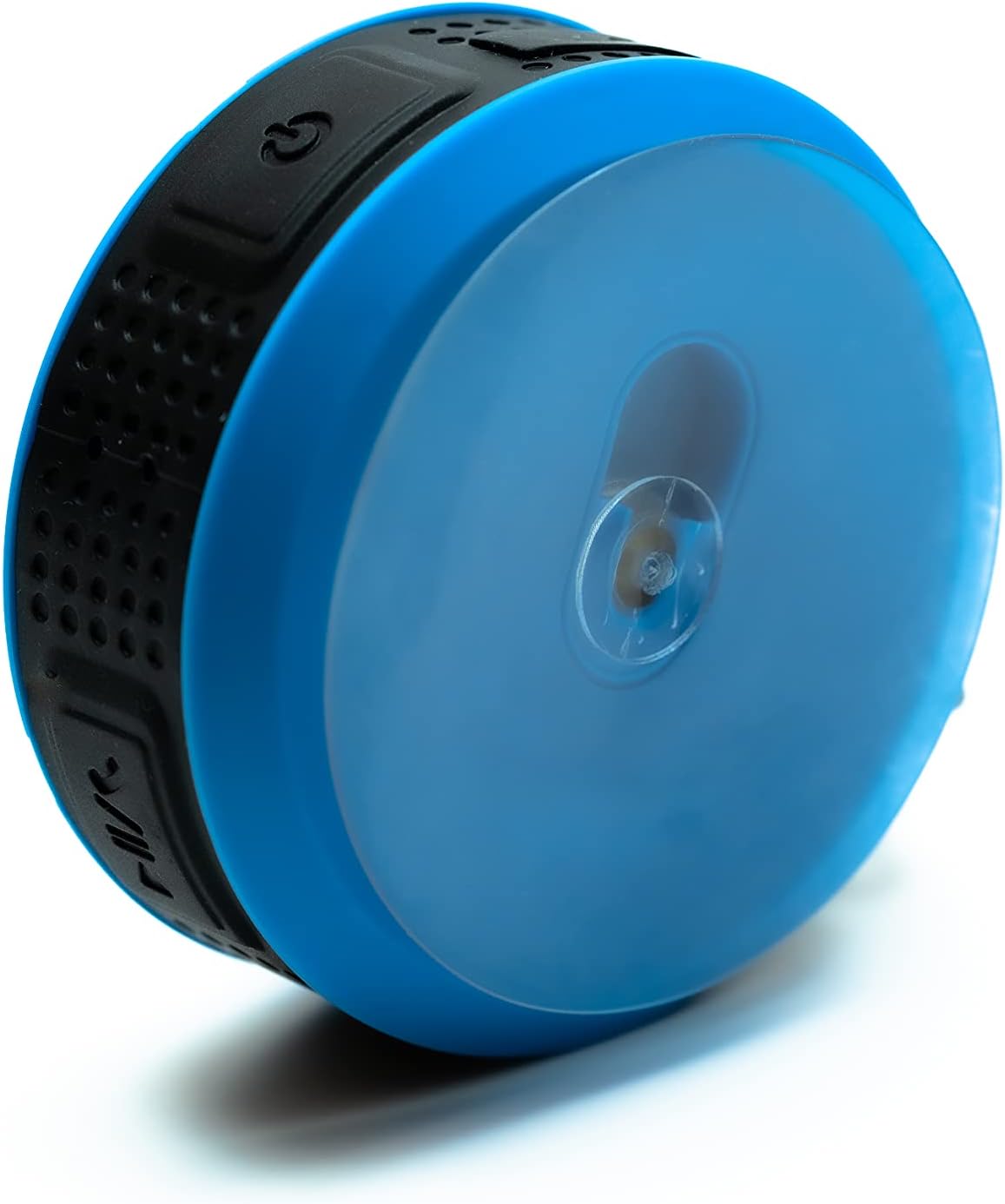
Image 4: The back of the Daewoo DIBT2122 speaker, clearly showing the large, transparent suction cup for mounting on smooth surfaces.
5. Betjeningsvejledning
5.1 Knapfunktioner
The speaker features several control buttons, typically located on its side:
- Tænd/sluk-knap (tænd/sluk): Tryk og hold for at tænde/slukke.
- Afspil/pause knap: Tryk én gang for at afspille eller sætte musik på pause.
- Knap til lydstyrke op / Næste nummer: Press once to increase volume. Press and hold to skip to the next track.
- Knap til lydstyrke ned / forrige nummer: Tryk én gang for at sænke lydstyrken. Tryk og hold nede for at gå til forrige nummer.
- Call Button (Answer/End/Reject): Press once to answer or end a call. Press and hold to reject a call.

Billede 5: En side view of the Daewoo DIBT2122 speaker, highlighting the embossed control buttons for power, play/pause, volume, and track navigation.
5.2 Bluetooth Music Playback
After successfully pairing your device, open your music application and start playback. You can control volume, play/pause, and skip tracks using the speaker's buttons or your connected device.
5.3 Håndfri opkald
When a call comes in while connected via Bluetooth, the music will pause. Press the Call button once to answer. Press it again to end the call. Press and hold to reject an incoming call.
5.4 Afspilning fra SD-kort
Insert a microSD card (not included) with MP3 audio files into the designated SD card slot. The speaker should automatically switch to SD card mode and begin playing music. Use the track control buttons to navigate your music.
6. Vedligeholdelse
- Rensning: Tør højttaleren af med en blød, tør klud. Brug ikke slibende rengøringsmidler eller opløsningsmidler.
- Opbevaring: Når højttaleren ikke er i brug i længere perioder, skal den opbevares et køligt, tørt sted, væk fra direkte sollys.
- Batteripleje: For at forlænge batteriets levetid bør du undgå at aflade batteriet helt ofte. Oplad højttaleren regelmæssigt, selvom den ikke er i brug.
7. Fejlfinding
| Problem | Mulig årsag | Løsning |
|---|---|---|
| Højttaleren tænder ikke. | Lavt batteri. | Oplad højttaleren i mindst 30 minutter. |
| Kan ikke parres via Bluetooth. | Bluetooth er slået fra på din enhed; højttaleren er for langt væk; højttaleren er allerede parret med en anden enhed. | Ensure Bluetooth is enabled on your device. Move speaker closer. Disconnect from other devices or restart speaker. |
| Ingen lyd. | Volume is too low; device is not playing; speaker is not connected. | Increase volume on both speaker and connected device. Ensure music is playing. Re-pair Bluetooth. |
| Dårlig lydkvalitet. | Speaker is too far from the device; interference. | Move speaker closer to the connected device. Avoid obstacles between devices. |
8. Specifikationer
- Model: DIBT2122
- Bluetooth version: 5.0
- Udgangseffekt: 3W
- Batteri: 300 mAh Li-ion
- Opladningstid: Cirka 2.5 timer
- Afspilningstid: Cirka 1.5 timer
- Transmissionsafstand: Op til 10 meter (33 fod)
- Forbindelse: Bluetooth, USB (for charging), SD Card Slot
- Dimensioner: 9 x 9 x 3.5 cm
- Vægt: 140 gram
- Særlige funktioner: Hands-free calling, SD card playback, suction cup mount, metal hanging hook, LED light.
9. Garanti og support
Daewoo Electronics products are designed and manufactured to the highest quality standards. For warranty information, technical support, or customer service inquiries, please refer to the warranty card included with your purchase or visit the official Daewoo Electronics website. Please have your model number (DIBT2122) and proof of purchase ready when contacting support.